
Overview
Keithley KPCI-PIO32IOA Maintenance-Proven Spare Part for Factory Uptime
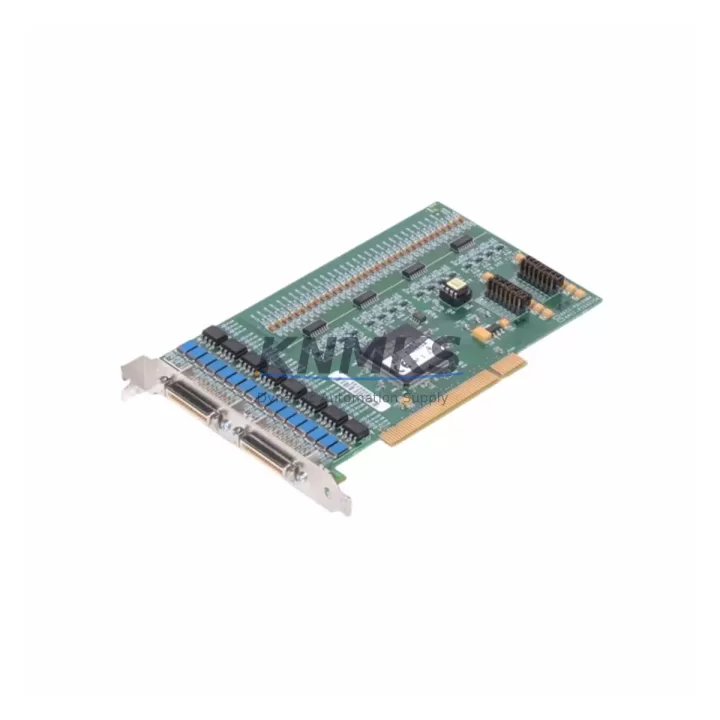
The Keithley KPCI-PIO32IOA is a 32-channel TTL-compatible digital I/O PCI card engineered for high-reliability data acquisition and industrial control environments. As a maintenance-proven spare part, it is stocked and dispatched to support unplanned downtime recovery, scheduled annual overhauls, and long-term system continuity for KPCI Series-based automation platforms. Every unit supplied by KNMKS is original, pre-shipment tested, and backed by a support terms confirmed by quotation — ensuring your control infrastructure stays operational without compromise.
Maintenance engineers and procurement teams managing legacy KPCI Series systems rely on this card as a direct drop-in replacement. Its 32 bidirectional TTL digital I/O lines, PCI bus interface, and compatibility with standard Windows-based driver stacks make it a dependable choice for both emergency replacements and planned spare inventory builds. Whether you are recovering a failed test bench, restoring a production line controller, or pre-positioning stock ahead of a scheduled outage window, the KPCI-PIO32IOA delivers the compatibility and reliability your operation demands.
Spare Maintenance Table
| Parameter | Specification |
|---|---|
| SKU / Part Number | KPCI-PIO32IOA |
| Brand | Keithley Instruments |
| Series | KPCI Series |
| Product Type | PCI Digital I/O Card |
| Digital I/O Channels | 32 bidirectional TTL-compatible lines |
| Bus Interface | PCI (32-bit, 33 MHz) |
| Logic Level | TTL / CMOS compatible (0–5 V) |
| Max Input Voltage | 5.5 V |
| Operating Temperature | 0°C to +55°C |
| Storage Temperature | -40°C to +85°C |
| Compatibility | KPCI Series PCI DAQ systems; Windows driver stack |
| Installation | Standard PCI slot; driver-based configuration |
| Application Environment | Industrial test benches, process control, automated inspection |
| Origin | United States |
| Condition | Original, pre-shipment tested |
| Support terms | 12 months from date of dispatch |
Maintenance Planning for Continuous Operation
When replacing the KPCI-PIO32IOA in a KPCI Series control cabinet or test rack, a thorough site inspection of the surrounding electrical environment is essential to prevent repeat failures and ensure a clean restoration. Maintenance engineers should begin by verifying the integrity of the PCI backplane and chassis power rails — a degraded backplane slot or unstable +5 V / +12 V supply is a common root cause of digital I/O card failures and must be ruled out before installing the replacement unit.
Inspect all field wiring and I/O terminal connections at the card’s 50-pin connector or breakout board interface. Loose, corroded, or over-torqued terminals introduce signal integrity issues that can damage the replacement card within hours of commissioning. If the system uses a signal conditioning or isolation module between the KPCI-PIO32IOA and field devices, verify that the isolator’s input voltage range and logic thresholds remain within specification — degraded isolation barriers are a frequent but overlooked failure point.
For systems where the KPCI-PIO32IOA interfaces with relay output modules or solid-state relay (SSR) arrays, inspect each relay for contact wear, coil resistance drift, and proper snubber protection. Inductive load switching without adequate suppression generates voltage transients that propagate back through the I/O lines and can damage the card’s output drivers. Similarly, review the fuse and circuit protection on the I/O supply lines — blown or degraded fuses on the field-side power distribution indicate an upstream fault that must be resolved before the spare is energized.
If the KPCI Series system communicates with a host PC or industrial workstation via the PCI bus, confirm that the host system’s BIOS PCI resource allocation has not changed and that the driver version is compatible with the replacement card. In multi-card configurations, also inspect adjacent KPCI-3108 or KPCI-3116 analog I/O cards sharing the same chassis — a failing analog card can introduce ground loops or supply noise that affects digital I/O performance. Where the system includes a KPCI-DAS1602/16 or similar multifunction DAQ card, verify that shared interrupt lines and DMA channels are correctly assigned to avoid resource conflicts after the swap.
Procurement engineers building spare parts inventory for KPCI Series installations should consider stocking the KPCI-PIO32IOA alongside compatible breakout boards, shielded 50-pin I/O cables, and terminal block assemblies to enable a complete, rapid restoration without secondary sourcing delays during an outage window.
Site Replacement Workflow
Step 1 — Isolation and lockout: Follow site LOTO procedures. Power down the host system and discharge any residual energy on the I/O field lines before opening the chassis.
Step 2 — Document existing configuration: Record the current driver version, PCI slot assignment, I/O channel mapping, and any software-defined direction settings (input vs. output per port) from the existing system configuration or SCADA/HMI records. This data is required to restore the replacement card to the same functional state.
Step 3 — Physical removal: Carefully extract the failed KPCI-PIO32IOA from its PCI slot. Inspect the slot contacts and the card’s gold fingers for oxidation or mechanical damage. Clean the slot with compressed air if contamination is present.
Step 4 — Install replacement unit: Seat the new KPCI-PIO32IOA firmly in the PCI slot. Reconnect the 50-pin field I/O cable or breakout board. Verify that all terminal connections are secure and correctly mapped to the original wiring diagram.
Step 5 — Driver and software verification: Power up the host system. Confirm that the OS detects the card and that the Keithley driver stack initializes without errors. Re-apply the saved channel direction and configuration settings.
Step 6 — Functional test: Execute a channel-by-channel I/O verification using the system’s diagnostic software or a handheld logic probe. Confirm that all 32 channels respond correctly before returning the system to production.
Step 7 — Return to service: Update the maintenance log with the replacement date, new card serial number, and test results. Flag the failed card for root-cause analysis before disposal or return.
This workflow supports a direct replacement of legacy KPCI-PIO32IOA units without requiring hardware redesign or software re-engineering, preserving system compatibility and minimizing mean time to recovery (MTTR).
Spare Parts Support FAQ
Q1: Is the KPCI-PIO32IOA supplied by KNMKS an original Keithley part?
Yes. All KPCI-PIO32IOA units are sourced as original Keithley Instruments components. Each unit undergoes pre-shipment functional testing to verify digital I/O channel integrity, PCI bus communication, and TTL logic levels before dispatch. A test report is available upon request.
Q2: What support terms coverage applies to this spare part?
KNMKS provides a support terms confirmed by quotation from the date of dispatch covering manufacturing defects and functional failures under normal operating conditions. Support requests are supported with direct technical assistance and expedited replacement dispatch to minimize your downtime exposure.
Q3: Can KNMKS support long-term or blanket purchase orders for KPCI-PIO32IOA inventory?
Yes. KNMKS maintains multi-region stock and supports long-term supply agreements, blanket POs, and scheduled delivery programs for critical spare parts. Contact our sales team to discuss volume pricing, lead time commitments, and consignment stocking options tailored to your maintenance cycle.
Q4: How do I confirm compatibility before ordering if my system uses a customized KPCI Series configuration?
Share your system’s PCI slot inventory, driver version, and I/O channel mapping with our technical team at admin@knmks.com. We will verify compatibility against the KPCI-PIO32IOA specification and your existing configuration before order confirmation, eliminating procurement risk for non-standard or legacy system variants.
© 2026 KNMKS. All rights reserved.
Original Source: https://knmks.com
Contact: admin@knmks.com | +86 18359268345
Product Identification
- Brand / Ecosystem
-
Other Brands
Assorted Brands - Model / Series
-
KPCI-PIO32IOA
Assorted Series - Product Family
- I/O Modules
- Availability Status
- Available on request after model and quantity confirmation
- Inquiry Type
- B2B RFQ, replacement inquiry and project spare-part request
- Pre-Quote Check
- Exact SKU, brand, series, quantity, nameplate photos and destination country are checked before quotation
System Path
Where this product fits in the KNMKS automation structure.
Specification & Inquiry Focus
- I/O range
- Digital, analog and remote I/O modules
- Common needs
- Channel count, signal and bus type
- Project support
- PLC expansion and distributed control
Buyer Confirmation
Information KNMKS checks before replying.
- Exact model
- KPCI-PIO32IOA
- Brand / ecosystem
- Other Brands
- Product family
- I/O Modules
- Application note
- Replacement, maintenance, project build or spare-part list
- Useful photos
- Nameplate, installed unit, cabinet layout or connector side
- Delivery details
- Quantity, destination country and target schedule
Document Support
Files and notes can be confirmed during quotation.
- Product photos or nameplate confirmation when available
- Packing and delivery notes before quotation confirmation
- Support scope and delivery terms confirmed per inquiry
- Export document coordination for qualified B2B requests
Inquiry Support
- Digital and analog signal matching
- Remote station and rack expansion support
- Spare module inquiry for downtime recovery
What to Send Us
- Brand and exact model number: Other Brands KPCI-PIO32IOA
- Quantity and required delivery time
- Application, replacement requirement or nameplate photo
- Destination country and shipping preference
RFQ Preparation
This is a product inquiry page built for RFQ communication.
Fast Model Check
Send this model to KNMKS for confirmation.
Include quantity, destination country and photos if this is a maintenance replacement. The inquiry will be saved with a reference number after submission.
Brand & Compatibility Note
KNMKS displays automation product information for well-known industrial brand ecosystems and compatible replacement references. Brand names are used for product identification and compatibility reference only; final availability and commercial terms are confirmed per quotation.
 Manufacturing
 Machine Tools
 Packaging
 Energy & Power
 PLCs & Controllers
 HMI & Displays
 Servo Systems
 Variable Frequency Drives