
Overview
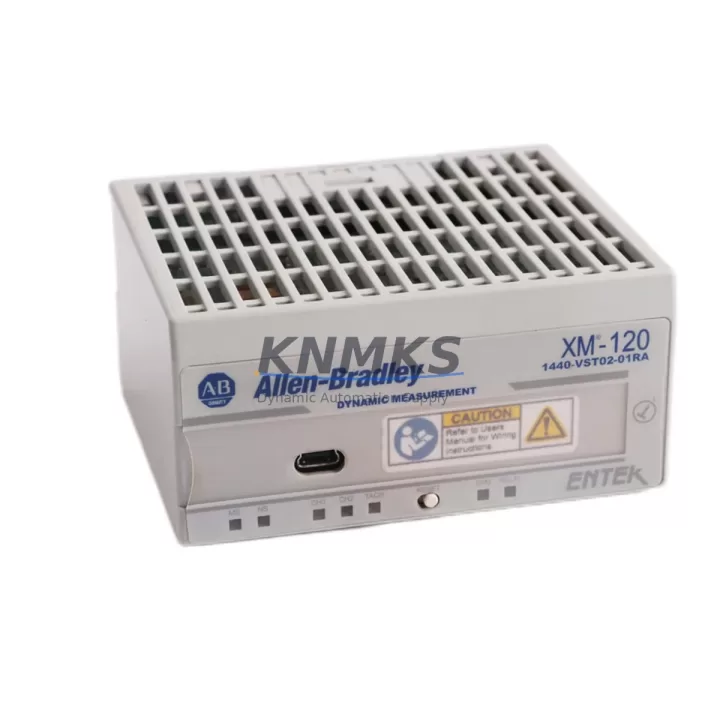
Allen-Bradley 1440-VST02-01RA Maintenance-Proven Spare Part for Factory Uptime
The Allen-Bradley 1440-VST02-01RA is a Speed & Tachometer Input Module designed for the XM-120 Dynamic Measurement Module platform — a precision condition monitoring solution widely deployed in rotating machinery protection systems across power generation, oil & gas, petrochemical, and heavy manufacturing environments. As a critical signal acquisition component, the 1440-VST02-01RA captures speed and tachometer pulse inputs, enabling the XM-120 system to perform real-time vibration analysis, overspeed detection, and phase reference measurement. When this module fails or degrades, the entire condition monitoring loop is compromised, leaving rotating assets unprotected and exposing the facility to unplanned downtime.
Sourced as an original Allen-Bradley spare, the 1440-VST02-01RA stocked at KNMKS is verified for compatibility with the XM-120 series, function-tested prior to shipment, and backed by a support terms confirmed by quotation. Whether you are responding to an emergency shutdown, executing a planned annual overhaul, or building a resilient spare parts inventory for your control cabinet, this module is ready for immediate dispatch.
Spare Maintenance Table
| Part Number | 1440-VST02-01RA |
| Brand | Allen-Bradley (Rockwell Automation) |
| Series | XM-120 Dynamic Measurement Module |
| Module Type | Speed & Tachometer Input Module |
| Product Category | Condition Monitoring / Industrial Automation Spare Parts |
| Input Channels | 2 tachometer/speed inputs |
| Signal Type | Pulse / proximity probe / magnetic pickup compatible |
| Compatibility | Allen-Bradley XM-120, XM-121, XM-122 series; ControlLogix backplane integration |
| Communication | EtherNet/IP via XM-120 host module |
| Mounting | DIN rail / XM expansion slot |
| Operating Temperature | 0°C to 60°C (32°F to 140°F) |
| Origin | United States |
| Condition | Original spare, function-tested before shipment |
| Support terms | 12 Months |
| Lead Time | availability confirmed by RFQ — ships within 1–3 business days |
| Application | Rotating machinery protection, turbine monitoring, compressor condition monitoring, pump speed measurement |
Maintenance Planning for Continuous Operation
Replacing the 1440-VST02-01RA in the field is rarely an isolated task. Maintenance engineers working on XM-120-based condition monitoring systems should treat this module replacement as an opportunity to inspect the entire signal chain and associated control cabinet components to prevent repeat failures and ensure measurement integrity.
Begin with the proximity probe and signal cable assembly connected to the tachometer input. Probe tip wear, cable insulation breakdown, or connector corrosion are common root causes of erratic speed readings that are often misdiagnosed as module failure. Verify the probe gap setting and cable continuity before commissioning the replacement 1440-VST02-01RA. Alongside the probe, inspect the XM-120 host module (1440-DYN02-01RA) itself — the host module manages EtherNet/IP communication and houses the primary processing logic; a degraded host can cause the replacement speed input module to report false faults even when the module is healthy.
Check the 24 VDC power supply feeding the XM expansion rack. Voltage ripple or transient spikes on the DC bus are a leading cause of premature module failure in condition monitoring systems. If the power supply is more than five years old or shows signs of capacitor aging, schedule its replacement during the same maintenance window. Inspect the terminal blocks and field wiring at the tachometer input terminals — loose connections introduce signal noise that corrupts speed measurement and can trigger nuisance trips on the XM-120 platform.
For systems integrated into a ControlLogix chassis, verify the EtherNet/IP communication module (1756-EN2T or equivalent) is operating without packet loss, as communication faults between the XM-120 and the PLC can mask genuine speed measurement alarms. If the installation includes signal isolators or signal conditioners between the proximity probe and the 1440-VST02-01RA input, test their output accuracy — a drifting isolator will produce incorrect speed data regardless of module condition. Finally, review the XM-120 configuration parameters stored in the ControlLogix controller: overspeed trip setpoints, alarm thresholds, and channel scaling must be re-verified after any module swap to ensure the replacement module is configured identically to the original.
Facilities operating multiple XM-120 nodes across a turbine train or compressor string should also maintain a minimum of one spare 1440-DYN02-01RA host module and one 1440-VST02-01RA speed input module per critical asset group. This two-module spare strategy covers the most common failure modes and enables same-shift restoration without waiting for emergency procurement.
Site Replacement Workflow
Step 1 — Pre-replacement verification: Confirm the failed module part number matches 1440-VST02-01RA. Download and archive the current XM-120 configuration from the ControlLogix controller using RSLogix 5000 or Studio 5000 before any hardware change. This configuration backup is essential for restoring alarm setpoints and channel scaling after the swap.
Step 2 — Safe isolation: Follow site LOTO (Lockout/Tagout) procedures. De-energize the XM expansion rack power supply. Disconnect the tachometer probe cables from the module terminals, labeling each cable to ensure correct reconnection. Remove the 1440-VST02-01RA from the expansion slot.
Step 3 — Module installation: Insert the replacement 1440-VST02-01RA into the correct expansion slot. Reconnect the tachometer probe cables per the labeled sequence. Restore power to the XM rack and verify the module status LED indicates normal operation.
Step 4 — Configuration restore and commissioning: Download the archived XM-120 configuration to the controller. Verify channel scaling, overspeed setpoints, and alarm thresholds match the pre-replacement values. Perform a live speed measurement check using a reference tachometer or by observing the machine at a known speed to confirm the module is reading accurately.
Step 5 — Documentation: Record the replacement date, module serial number, and commissioning test results in the site maintenance management system (CMMS). Update the spare parts inventory to reflect the consumed module and initiate a replenishment order to maintain buffer stock.
This workflow minimizes downtime exposure and ensures the XM-120 system is returned to full protective function without configuration drift — a common source of post-maintenance incidents in rotating machinery protection systems.
Spare Parts Support FAQ
Q1: Is the 1440-VST02-01RA supplied by KNMKS an original Allen-Bradley component?
Yes. All 1440-VST02-01RA units stocked by KNMKS are sourced as original Allen-Bradley spare parts. Each unit undergoes functional testing prior to shipment to verify signal input performance and communication integrity. A support terms confirmed by quotation is provided from the date of delivery.
Q2: How do I confirm compatibility with my existing XM-120 installation?
The 1440-VST02-01RA is designed for use with the Allen-Bradley XM-120 Dynamic Measurement Module platform and is compatible with XM-121 and XM-122 variants. Compatibility with your specific installation depends on the firmware revision of the XM-120 host module and the ControlLogix controller. Share your existing module catalog number and firmware version with our technical team at admin@knmks.com and we will confirm compatibility before shipment.
Q3: What is the lead time and how is the module tested before shipment?
Units availability confirmed by RFQ ship within 1–3 business days. Each 1440-VST02-01RA is bench-tested for input channel functionality, signal conditioning performance, and physical connector integrity before packaging. A test report is available upon request for critical applications.
Q4: Can KNMKS support long-term supply for annual maintenance programs?
Yes. KNMKS maintains ongoing stock of XM-120 series spare parts to support annual overhaul programs, blanket purchase orders, and emergency procurement. For facilities managing multiple XM-120 nodes, we recommend establishing a standing supply agreement to ensure priority allocation during peak maintenance seasons. Contact admin@knmks.com or call +86 18359268345 to discuss long-term supply arrangements.
© 2026 KNMKS. All rights reserved.
Original Source: https://knmks.com
Contact: admin@knmks.com | +86 18359268345
Product Identification
- Brand / Ecosystem
-
Allen-Bradley
Allen-Bradley - Model / Series
-
1440-VST02-01RA
Assorted Series - Product Family
- I/O Modules
- Availability Status
- Available on request after model and quantity confirmation
- Inquiry Type
- B2B RFQ, replacement inquiry and project spare-part request
- Pre-Quote Check
- Exact SKU, brand, series, quantity, nameplate photos and destination country are checked before quotation
System Path
Where this product fits in the KNMKS automation structure.
Specification & Inquiry Focus
- I/O range
- Digital, analog and remote I/O modules
- Common needs
- Channel count, signal and bus type
- Project support
- PLC expansion and distributed control
Buyer Confirmation
Information KNMKS checks before replying.
- Exact model
- 1440-VST02-01RA
- Brand / ecosystem
- Allen-Bradley
- Product family
- I/O Modules
- Application note
- Replacement, maintenance, project build or spare-part list
- Useful photos
- Nameplate, installed unit, cabinet layout or connector side
- Delivery details
- Quantity, destination country and target schedule
Document Support
Files and notes can be confirmed during quotation.
- Product photos or nameplate confirmation when available
- Packing and delivery notes before quotation confirmation
- Support scope and delivery terms confirmed per inquiry
- Export document coordination for qualified B2B requests
Inquiry Support
- Digital and analog signal matching
- Remote station and rack expansion support
- Spare module inquiry for downtime recovery
What to Send Us
- Brand and exact model number: Allen-Bradley 1440-VST02-01RA
- Quantity and required delivery time
- Application, replacement requirement or nameplate photo
- Destination country and shipping preference
RFQ Preparation
This is a product inquiry page built for RFQ communication.
Fast Model Check
Send this model to KNMKS for confirmation.
Include quantity, destination country and photos if this is a maintenance replacement. The inquiry will be saved with a reference number after submission.
Brand & Compatibility Note
KNMKS displays automation product information for well-known industrial brand ecosystems and compatible replacement references. Brand names are used for product identification and compatibility reference only; final availability and commercial terms are confirmed per quotation.
 Manufacturing
 Machine Tools
 Packaging
 Energy & Power
 PLCs & Controllers
 HMI & Displays
 Servo Systems
 Variable Frequency Drives