
Overview
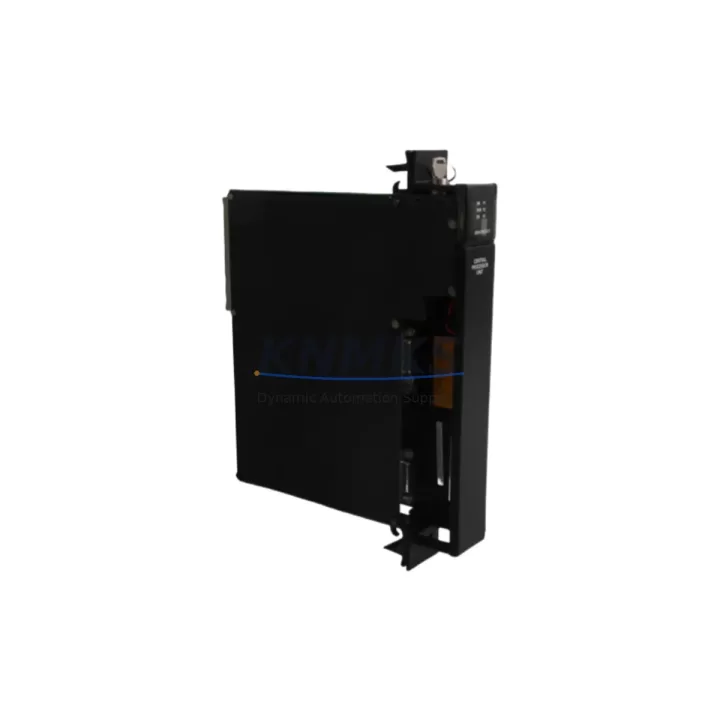
GE IC697CPX782 Migration-Ready CPU for Legacy Control Systems
The GE IC697CPX782 is a high-performance CPU module engineered for the Series 90-70 programmable logic controller platform — one of the most widely deployed industrial control architectures in process manufacturing, power generation, and discrete automation. As original equipment manufacturers phase out support for legacy Series 90-70 hardware, facilities running IC697CPX782-based control systems face increasing pressure to source verified replacement units, execute controlled retrofits, or plan phased migrations to modern control platforms. This listing addresses all three scenarios with in-stock availability, pre-shipment functional testing, and a support terms confirmed by quotation on every unit dispatched.
The IC697CPX782 installs directly into the IC697CHS750 or IC697CHS782 rack backplane without mechanical modification. Its dual-port memory architecture supports ladder logic, function block, and structured text programs developed in Logicmaster 90-70 or Proficy Machine Edition, preserving existing program logic during hardware replacement. Engineers replacing a failed or end-of-life CPU can retain the original .prj or .cld program files, reload via the IC690USB901 programming cable or RS-422 serial port, and resume production with minimal reconfiguration. Compatibility with IC697MDL340, IC697MDL341, and IC697MDL753 discrete I/O modules — as well as IC697ALG320 and IC697ALG321 analog input modules — means the surrounding I/O infrastructure remains fully operational after the CPU swap.
For facilities executing a broader control cabinet upgrade, the IC697CPX782 serves as a stable interim platform while peripheral systems are modernized. Power supply modules such as the IC697PWR711 and IC697PWR724 are fully compatible and should be verified for adequate current capacity before commissioning — the IC697CPX782 draws up to 2.8 A from the 5 VDC backplane rail, and total rack current budget must account for all installed I/O and communication modules. Terminal block wiring on existing I/O modules does not require modification during a CPU-only replacement, which significantly reduces downtime exposure during the changeover window.
Communication continuity is a critical consideration in any Series 90-70 migration. The IC697CPX782 supports the SNP and SNPx protocols natively, maintaining compatibility with existing HMI configurations built on iFIX, CIMPLICITY, or third-party SCADA platforms connected via IC697CMM711 or IC697CMM742 communication modules. If the migration path includes transitioning to Ethernet-based supervisory communication, the IC697BEM711 Ethernet interface module can be added to the existing rack without disrupting the CPU replacement sequence. Verifying HMI tag addresses and driver configurations before the cutover prevents screen-level errors that can delay restart.
Migration Compatibility Table
| Parameter | IC697CPX782 Specification | Migration / Retrofit Note |
|---|---|---|
| Rack Compatibility | IC697CHS750 (5-slot), IC697CHS782 (9-slot) | Direct drop-in; no backplane modification required |
| Power Requirement | 5 VDC @ 2.8 A (backplane) | Verify IC697PWR711 / IC697PWR724 current budget before install |
| Programming Interface | RS-422 serial / IC690USB901 USB adapter | Retain existing .prj / .cld files; reload via Proficy ME or LM90 |
| Communication Protocols | SNP, SNPx | Compatible with IC697CMM711, IC697CMM742; add IC697BEM711 for Ethernet |
| I/O Module Compatibility | Series 90-70 discrete & analog I/O | IC697MDL340/341/753, IC697ALG320/321 — no rewiring needed |
| HMI / SCADA Compatibility | iFIX, CIMPLICITY, third-party SNP drivers | Verify tag addresses and COM port settings before cutover |
| Firmware | Resident in CPU flash | Confirm firmware revision matches program requirements; update if needed |
| Installation Space | Single rack slot (Series 90-70 form factor) | No additional panel space required for CPU-only replacement |
| Pre-Shipment Testing | Full functional test performed | Unit verified for power-on, memory integrity, and communication |
| Support terms | 12 Months | Covers manufacturing defects; RMA support included |
Retrofit Planning for Existing Automation Systems
A successful IC697CPX782 retrofit begins with a thorough audit of the existing control cabinet. Start by documenting the current rack configuration: record the slot positions of all installed modules, including the IC697PWR711 power supply, any IC697CMM711 communication modules, and the full complement of discrete and analog I/O cards. Photograph terminal block wiring before any module is disturbed. This documentation becomes the reference baseline for post-retrofit verification and significantly reduces the risk of wiring errors during reassembly.
Program backup is the next critical step. Using the IC690USB901 programming cable connected to a laptop running Proficy Machine Edition, upload the complete program — including all rungs, function blocks, data tables, and hardware configuration — to a local project file. Store a second copy on removable media kept at the control panel. If the existing CPU is non-functional and program upload is not possible, the program may be recoverable from a previous backup or from a paired HMI project file, which often contains tag definitions and logic cross-references useful for program reconstruction.
During the physical replacement, power down the rack using the established lockout/tagout procedure. Remove the failed CPU from its slot, insert the IC697CPX782, and reseat firmly until the module latch engages. Restore power and observe the CPU status LEDs: a solid RUN indicator confirms successful power-on and memory self-test. If the FAULT LED illuminates, connect the programming cable and review the fault table in Proficy Machine Edition before proceeding. Download the backed-up program, verify the hardware configuration matches the physical rack layout — paying particular attention to I/O module addresses and any IC697ALG320 analog scaling parameters — and place the CPU in RUN mode.
For systems that include signal isolators between field devices and I/O modules, verify that isolator output ranges remain within the configured analog input spans after the CPU replacement. Communication links to upstream SCADA or DCS systems should be tested by confirming live data flow on all monitored tags before declaring the retrofit complete. Where the migration plan includes adding an IC697BEM711 Ethernet module for future connectivity, install and configure it during the same maintenance window to avoid a second planned outage.
Downtime Control During System Migration
Minimizing production downtime during a Series 90-70 CPU replacement requires preparation that begins well before the maintenance window opens. The single most effective measure is pre-staging the replacement IC697CPX782 with the production program already loaded and the hardware configuration pre-verified against the target rack layout. When the replacement unit arrives pre-tested and pre-programmed, the on-site swap is reduced to a physical module exchange and a communication link verification — a sequence that experienced engineers complete in under 30 minutes on a well-documented system.
Protecting original program logic is equally important. The IC697CPX782 stores the user program in battery-backed RAM; however, the replacement unit ships without the site-specific program. Ensuring that a verified program backup exists — and that the backup was taken from the running system, not from an earlier revision — eliminates the risk of loading an outdated program that does not reflect recent logic changes. Where the system includes interlocks tied to external safety relays or emergency stop circuits, verify that these circuits remain in their safe state throughout the CPU replacement sequence and are re-tested before returning the machine to automatic operation.
Field control continuity during the migration window can be maintained by placing downstream equipment in local manual control mode where process safety permits. Coordinating the CPU replacement with the operations team to select a low-production period — shift change, scheduled cleaning cycle, or planned maintenance interval — further reduces the business impact of the outage. Post-replacement, a structured commissioning checklist covering power-on sequence, program download confirmation, I/O force-test, communication link verification, and HMI screen validation ensures that no step is omitted before the system is returned to automatic control.
Retrofit Support FAQ
Q: Is the IC697CPX782 a direct replacement for the IC697CPX782E or IC697CPX782D?
A: The IC697CPX782, IC697CPX782D, and IC697CPX782E are hardware revisions of the same base module and are functionally interchangeable in most Series 90-70 rack configurations. Confirm the firmware revision level is compatible with your program before installation; if a firmware update is required, this can be performed via the programming port using Proficy Machine Edition.
Q: What commissioning steps are required after installing the replacement CPU?
A: After physical installation, restore power and confirm the CPU enters STOP/FAULT-FREE mode. Connect via IC690USB901, download the verified program, confirm hardware configuration matches the physical rack, clear any fault table entries, and place the CPU in RUN mode. Test all I/O points and verify communication links to HMI and SCADA systems before releasing to production.
Q: Does the unit ship with a support terms, and what does it cover?
A: Every IC697CPX782 unit dispatched from our inventory carries a support terms confirmed by quotation covering manufacturing defects and functional failures under normal operating conditions. Pre-shipment functional testing is performed on each unit. RMA support is available for support requests; contact our technical team with the order reference and fault description to initiate the process.
Q: What is the typical lead time and stock availability?
A: The IC697CPX782 is maintained in forward stock to support urgent replacement requirements. Standard dispatch is within 1–3 business days of order confirmation. For bulk orders or long-term supply agreements covering multiple units across a planned maintenance schedule, contact our sales team to discuss reserved stock arrangements and volume pricing.
© 2026 KNMKS. All rights reserved.
Original Source: https://knmks.com
Contact: admin@knmks.com | +86 18359268345
Product Identification
- Brand / Ecosystem
-
GE Automation & Controls
Assorted Brands - Model / Series
-
IC697CPX782
Assorted Series - Product Family
- PLCs & Controllers
- Availability Status
- Available on request after model and quantity confirmation
- Inquiry Type
- B2B RFQ, replacement inquiry and project spare-part request
- Pre-Quote Check
- Exact SKU, brand, series, quantity, nameplate photos and destination country are checked before quotation
System Path
Where this product fits in the KNMKS automation structure.
Specification & Inquiry Focus
- Control platform
- PLC, PAC and modular controllers
- Common needs
- CPU, rack, power and I/O expansion
- Project support
- Replacement, cabinet build and maintenance
Buyer Confirmation
Information KNMKS checks before replying.
- Exact model
- IC697CPX782
- Brand / ecosystem
- GE Automation & Controls
- Product family
- PLCs & Controllers
- Application note
- Replacement, maintenance, project build or spare-part list
- Useful photos
- Nameplate, installed unit, cabinet layout or connector side
- Delivery details
- Quantity, destination country and target schedule
Document Support
Files and notes can be confirmed during quotation.
- Product photos or nameplate confirmation when available
- Packing and delivery notes before quotation confirmation
- Support scope and delivery terms confirmed per inquiry
- Export document coordination for qualified B2B requests
Inquiry Support
- Model cross-checking before quotation
- CPU, power, rack and expansion module matching
- Support for replacement and project inquiry
What to Send Us
- Brand and exact model number: GE Automation & Controls IC697CPX782
- Quantity and required delivery time
- Application, replacement requirement or nameplate photo
- Destination country and shipping preference
RFQ Preparation
This is a product inquiry page built for RFQ communication.
Fast Model Check
Send this model to KNMKS for confirmation.
Include quantity, destination country and photos if this is a maintenance replacement. The inquiry will be saved with a reference number after submission.
Brand & Compatibility Note
KNMKS displays automation product information for well-known industrial brand ecosystems and compatible replacement references. Brand names are used for product identification and compatibility reference only; final availability and commercial terms are confirmed per quotation.
 Manufacturing
 Machine Tools
 Packaging
 Energy & Power



 HMI & Displays
 Servo Systems
 Variable Frequency Drives
 Sensors