
Overview
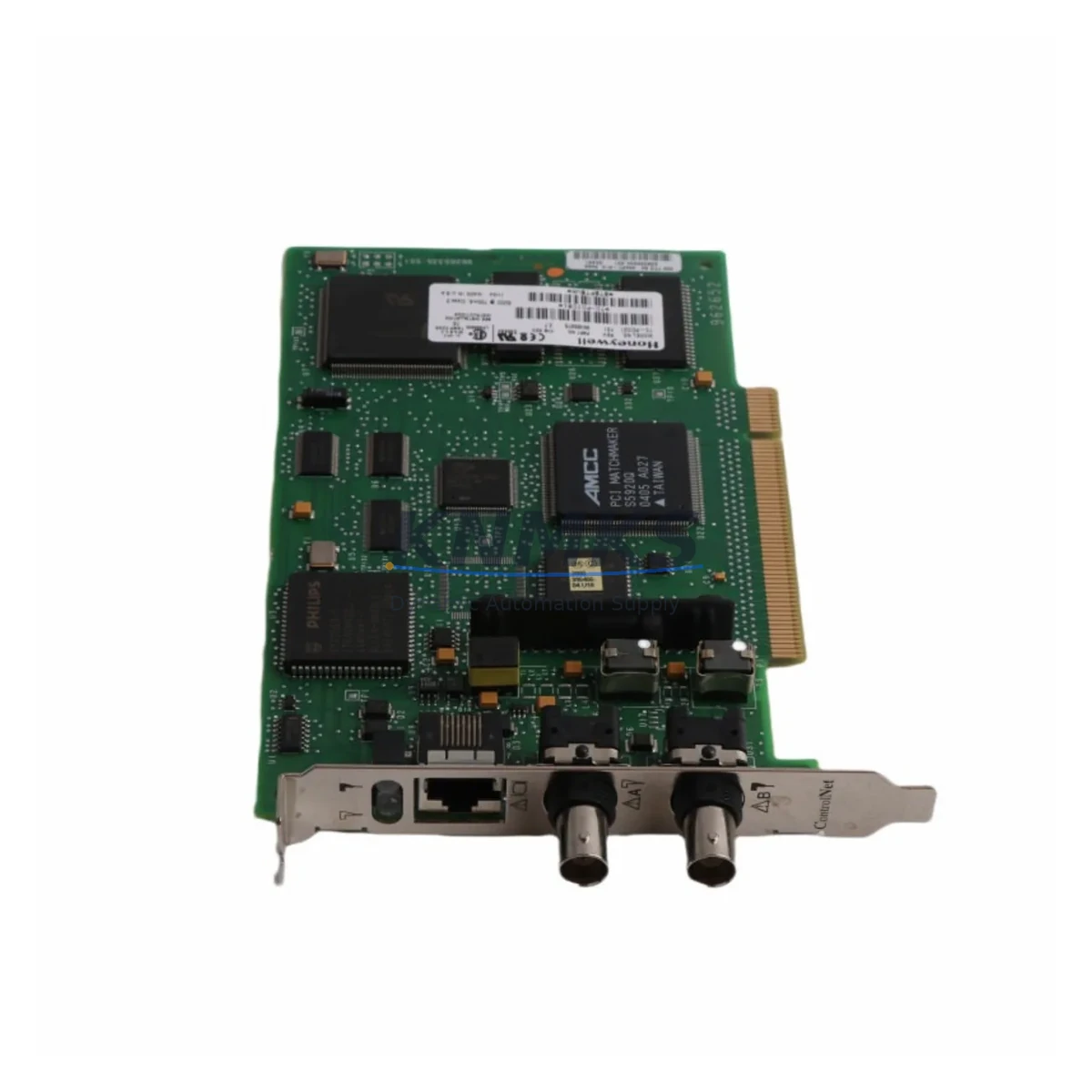
Honeywell TC-PCIC01 Migration-Ready ControlNet Interface Card: Legacy System Retrofit & Compatibility Upgrade
The Honeywell TC-PCIC01 is a PCI-bus ControlNet Interface Card engineered for seamless integration within Honeywell Experion PKS distributed control system environments. As legacy automation infrastructure ages and original equipment manufacturers discontinue support for older ControlNet-based platforms, the TC-PCIC01 has become a critical component in retrofit projects, spare-parts lifecycle extension programs, and full-scale DCS modernization initiatives. Whether you are replacing a failed card in an active production line or planning a phased migration from an older TDC 3000 or PlantScape system to a current Experion PKS C300 architecture, the TC-PCIC01 provides the communication backbone that keeps your control network operational without forcing a complete system overhaul.
Before deploying the TC-PCIC01 in a retrofit scenario, engineers must verify several critical parameters. Power supply capacity within the host workstation or server chassis must be confirmed, as the PCI card draws from the system’s internal 5V and 3.3V rails. Terminal wiring and coaxial trunk connections on the ControlNet segment should be inspected for impedance compliance and proper termination resistors at both ends of the network. The card occupies a standard PCI slot, so available backplane space in the engineering workstation or operator station must be assessed before installation. Module addressing on the ControlNet network must be configured to avoid conflicts with existing nodes, including C300 controllers, I/O link interface modules, and remote I/O chassis. Program compatibility between the existing RSNetWorx for ControlNet configuration and the replacement card’s firmware version should be validated prior to cutover. HMI screen bindings in Experion Station or any third-party SCADA interface must be tested to confirm that tag references remain intact after the card swap. Communication link integrity across the ControlNet coaxial or fiber segment should be verified using the network diagnostic tools available in Experion Configuration Studio. Physical installation space, including PCI slot clearance and cable routing for the BNC or fiber connectors, must be confirmed in the control room cabinet or workstation enclosure. Firmware version alignment between the TC-PCIC01 and the Experion PKS server software release is essential to avoid driver incompatibilities. Finally, a structured field commissioning procedure—including a cold-start test, network health scan, and I/O point verification—should be completed before returning the system to automatic control.
Migration Compatibility Table
| Parameter | TC-PCIC01 Specification | Retrofit Notes |
|---|---|---|
| Interface Type | PCI Bus (32-bit, 33 MHz) | Verify PCI slot availability in host workstation; not compatible with PCIe-only systems without adapter |
| Network Protocol | ControlNet (IEEE 802.4 / ODVA) | Compatible with existing ControlNet coaxial and fiber segments; confirm network topology and node count |
| Compatible Platforms | Experion PKS C300, PlantScape, TDC 3000 migration paths | Validate Experion server software version; RSNetWorx for ControlNet configuration required |
| Installation Space | Standard full-height PCI card | Confirm physical clearance in workstation chassis; check cable routing for BNC connectors |
| Communication Links | Dual-port ControlNet (redundant media support) | Maintain both coaxial trunks for redundant operation; inspect BNC termination and cable condition |
| Firmware Compatibility | Aligned with Experion PKS R400–R500 series | Confirm firmware version matches installed Experion server release before deployment |
| Replacement Recommendation | Direct drop-in for failed or end-of-life TC-PCIC01 units | No hardware modification required for like-for-like replacement; reconfigure node address if needed |
| Commissioning Focus | Network health scan, I/O point verification, HMI tag validation | Use Experion Configuration Studio diagnostics; complete cold-start test before returning to auto control |
| Support terms | support terms confirmed by quotation — All units tested prior to shipment; functional verification included | |
Retrofit Planning for Existing Automation Systems
Successful integration of the TC-PCIC01 into an existing Honeywell Experion PKS environment requires a structured approach that accounts for the interdependencies between the ControlNet communication layer and the broader control system architecture. In most retrofit scenarios, the TC-PCIC01 is installed in an engineering workstation or operator station that also hosts Experion Configuration Studio and RSNetWorx for ControlNet, making the card a central node in the network management infrastructure.
When planning a retrofit, the power module supplying the workstation chassis must be evaluated to ensure it can support the additional PCI card load alongside existing peripherals. In control cabinet upgrades where the workstation is rack-mounted, the C300 controller modules and their associated I/O link interface modules draw from the same cabinet power distribution, so a full power budget review is recommended. The ControlNet segment connected to the TC-PCIC01 typically includes C300 process controllers, remote I/O chassis with analog and digital I/O modules, and in some installations, safety system interfaces. Each of these nodes must be accounted for in the RSNetWorx scheduled connection table to avoid communication conflicts after the card replacement.
In systems where the TC-PCIC01 connects to a fiber ControlNet segment rather than coaxial, the fiber media adapters and repeaters in the network path must be inspected for compatibility with the replacement card’s driver stack. HMI workstations running Experion Station display server connections that reference ControlNet node addresses; any address change during the retrofit must be reflected in the HMI configuration to prevent alarm and display failures. In larger installations, the ControlNet segment may also carry communications to Honeywell HC900 hybrid controllers or legacy UDC series single-loop controllers that have been integrated into the Experion supervisory layer, and these connections must be preserved during the card swap. Programming cables and configuration laptops running RSNetWorx should be available on-site during commissioning to allow real-time network diagnostics and node verification. Signal isolators on analog I/O loops connected to C300 modules should be checked for loop integrity before and after the retrofit to confirm that the communication change has not introduced ground loops or signal offsets.
Downtime Control During System Migration
Minimizing production downtime during a TC-PCIC01 replacement requires careful pre-staging and a disciplined cutover procedure. The most effective approach is to prepare the replacement card in advance by installing it in a test workstation, loading the correct driver version, and verifying basic ControlNet communication with a network analyzer before bringing it to the plant floor. This pre-commissioning step eliminates the most common source of extended downtime: driver incompatibility or firmware mismatch discovered only after the original card has been removed.
Before removing the failed or end-of-life TC-PCIC01, a full backup of the Experion server database, RSNetWorx configuration file, and HMI display project should be completed and stored on an isolated backup medium. The existing ControlNet node address assignment for the card should be documented, along with the scheduled connection parameters for all devices on the segment. During the physical swap, the ControlNet coaxial or fiber connections should be labeled and photographed to ensure correct reconnection. After installing the replacement card, the RSNetWorx configuration should be reloaded and the network rescanned to confirm that all previously scheduled connections are re-established. The Experion server should then be restarted in a controlled sequence, with operators monitoring the HMI for alarm floods or missing point indications that could signal a configuration mismatch. I/O point verification should be performed loop-by-loop before releasing the system to automatic control, with particular attention to any interlock or safety-critical loops that depend on ControlNet-connected I/O modules. By following this structured procedure, most TC-PCIC01 replacements can be completed within a planned maintenance window of two to four hours, preserving control continuity and protecting the integrity of the original program logic.
Retrofit Support FAQ
Q: Is the TC-PCIC01 a direct replacement for an existing failed ControlNet interface card in my Experion PKS workstation?
A: Yes. The TC-PCIC01 is designed as a like-for-like replacement for failed or end-of-life ControlNet interface cards in Honeywell Experion PKS engineering and operator workstations. No hardware modification is required for a standard replacement. You will need to reinstall the ControlNet driver and reload your RSNetWorx configuration after installation. All units supplied by KNMKS are tested prior to shipment and covered by a support terms confirmed by quotation.
Q: What firmware version should I confirm before deploying the TC-PCIC01 in my system?
A: The TC-PCIC01 driver and firmware must be aligned with your installed Experion PKS server software release. Honeywell Experion PKS R400 through R500 series releases are the most common deployment environments. Before installation, confirm the Experion server version and download the corresponding ControlNet driver package from your Honeywell support portal. KNMKS can provide pre-shipment firmware verification upon request.
Q: Can I use the TC-PCIC01 in a system that is migrating from TDC 3000 or PlantScape to Experion PKS?
A: Yes. The TC-PCIC01 is commonly used in phased migration projects where the ControlNet communication infrastructure is retained while the control layer is upgraded to Experion PKS C300 controllers. During the migration, the card provides continuity of ControlNet communications, allowing existing I/O modules and remote chassis to remain online while the controller migration is completed in stages. Detailed compatibility verification with your specific migration path is recommended before deployment.
Q: What does the support terms confirmed by quotation cover, and how does KNMKS handle stock availability?
A: All TC-PCIC01 units supplied by KNMKS are covered by a support terms confirmed by quotation against manufacturing defects and functional failures. Each unit undergoes functional testing and communication verification before shipment. KNMKS maintains inventory of the TC-PCIC01 and related Honeywell Experion PKS components to support urgent replacement requirements. For stock confirmation, lead time, and shipping options, contact our team directly.
© 2026 KNMKS. All rights reserved.
Original Source: https://knmks.com
Contact: admin@knmks.com | +86 18359268345
Product Identification
- Brand / Ecosystem
-
Honeywell
Honeywell - Model / Series
-
TC-PCIC01
Experion PKS Series - Product Family
- PLCs & Controllers
- Availability Status
- Available on request after model and quantity confirmation
- Inquiry Type
- B2B RFQ, replacement inquiry and project spare-part request
- Pre-Quote Check
- Exact SKU, brand, series, quantity, nameplate photos and destination country are checked before quotation
System Path
Where this product fits in the KNMKS automation structure.
Specification & Inquiry Focus
- Control platform
- PLC, PAC and modular controllers
- Common needs
- CPU, rack, power and I/O expansion
- Project support
- Replacement, cabinet build and maintenance
Buyer Confirmation
Information KNMKS checks before replying.
- Exact model
- TC-PCIC01
- Brand / ecosystem
- Honeywell
- Product family
- PLCs & Controllers
- Application note
- Replacement, maintenance, project build or spare-part list
- Useful photos
- Nameplate, installed unit, cabinet layout or connector side
- Delivery details
- Quantity, destination country and target schedule
Document Support
Files and notes can be confirmed during quotation.
- Product photos or nameplate confirmation when available
- Packing and delivery notes before quotation confirmation
- Support scope and delivery terms confirmed per inquiry
- Export document coordination for qualified B2B requests
Inquiry Support
- Model cross-checking before quotation
- CPU, power, rack and expansion module matching
- Support for replacement and project inquiry
What to Send Us
- Brand and exact model number: Honeywell TC-PCIC01
- Quantity and required delivery time
- Application, replacement requirement or nameplate photo
- Destination country and shipping preference
RFQ Preparation
This is a product inquiry page built for RFQ communication.
Fast Model Check
Send this model to KNMKS for confirmation.
Include quantity, destination country and photos if this is a maintenance replacement. The inquiry will be saved with a reference number after submission.
Brand & Compatibility Note
KNMKS displays automation product information for well-known industrial brand ecosystems and compatible replacement references. Brand names are used for product identification and compatibility reference only; final availability and commercial terms are confirmed per quotation.
 Manufacturing
 Machine Tools
 Packaging
 Energy & Power



 HMI & Displays
 Servo Systems
 Variable Frequency Drives
 Sensors