
Overview
Honeywell TC-IDD321 Migration-Ready DC Input Module: Legacy System Retrofit and C300 Compatibility Upgrade
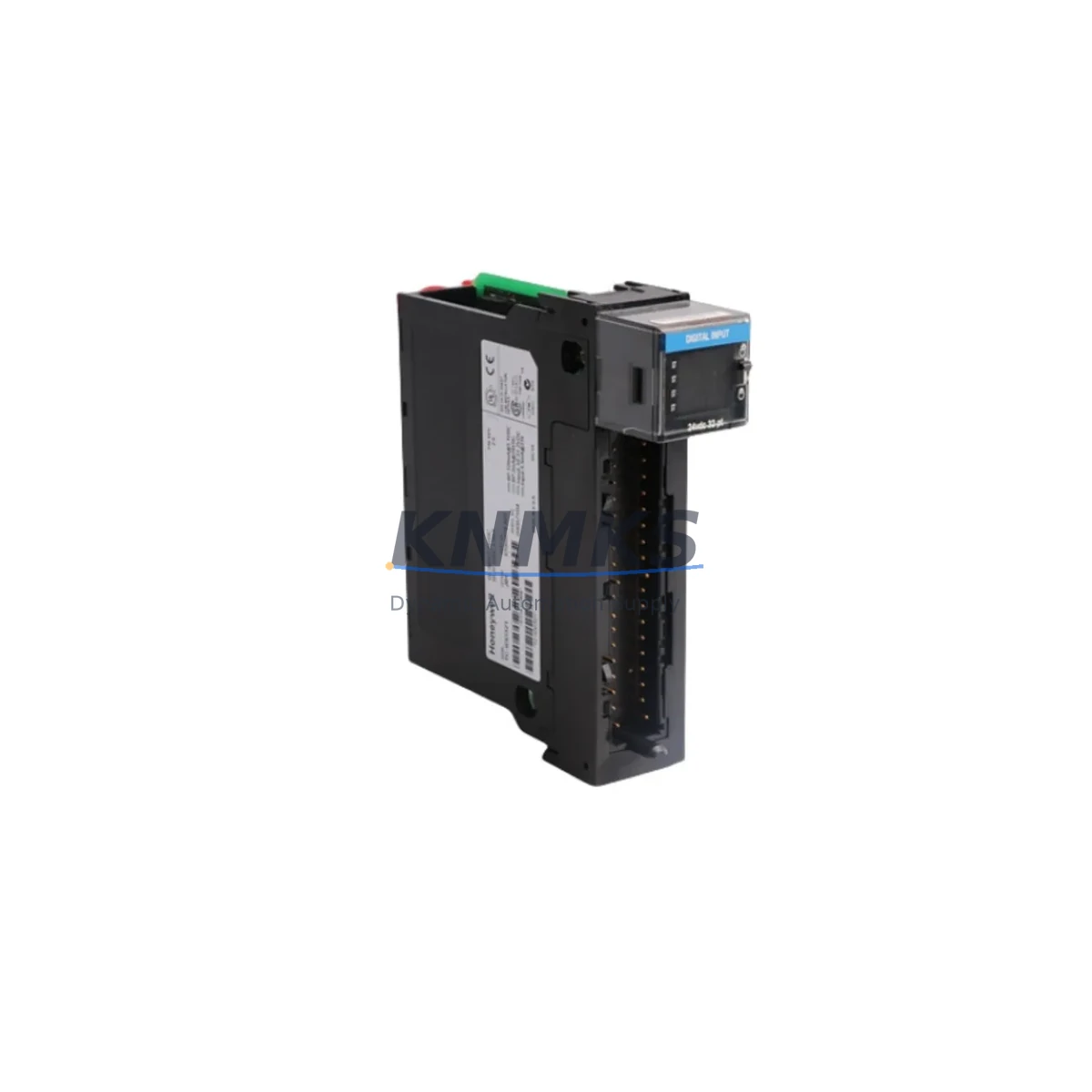
The Honeywell TC-IDD321 is a 32-channel, 24VDC DC input module designed for the Experion PKS C300 Series C control platform. As legacy DCS installations approach end-of-life and spare parts availability tightens, the TC-IDD321 serves as a direct migration-ready replacement for aging I/O infrastructure within existing C300 controller cabinets. Whether you are managing a planned shutdown retrofit, an emergency spare replacement, or a phased I/O modernization program, the TC-IDD321 delivers the electrical compatibility, backplane interface alignment, and firmware-level recognition required to minimize engineering rework and reduce total downtime.
Each unit is sourced from verified supply channels, subjected to pre-shipment functional testing, and backed by a support terms confirmed by quotation — giving maintenance engineers and procurement teams the confidence to plan long-lead spare inventories without compromising system reliability.
Migration Compatibility Table
| Parameter | TC-IDD321 Specification | Retrofit / Migration Notes |
|---|---|---|
| Input Channels | 32 channels, 24VDC | Direct channel-for-channel replacement in C300 I/O cabinets; no rewiring required when replacing same-type modules |
| Backplane Interface | C300 Series C I/O Link | Compatible with standard C300 I/O FIM (Field Interface Module) backplane slots; verify slot addressing before insertion |
| Communication Protocol | FTE (Fault Tolerant Ethernet) via C300 controller | No additional protocol configuration required; module address inherited from backplane slot assignment |
| Power Consumption | Supplied via backplane (no external 24VDC module power) | Confirm backplane power budget when replacing multiple I/O modules simultaneously; reference TC-CCR014 or TC-CCR016 power supply capacity |
| Terminal Wiring | Compatible with standard C300 I/O terminal assembly | Existing field wiring and marshalling panels remain unchanged; confirm terminal block model (e.g., TC-TBCH or equivalent) before hot-swap |
| Firmware Compatibility | Recognized by Experion PKS R400 and above | Verify controller firmware revision in Experion Configuration Studio before insertion; R300 sites may require a firmware update |
| Installation Space | Standard C300 I/O module form factor | Fits existing cabinet rail and backplane without mechanical modification |
| Replacement Scope | Drop-in for TC-IDD321 (same SKU); functional equivalent for discontinued DC input variants | Cross-reference against original BOM; confirm channel count and voltage range match before ordering |
| Pre-Shipment Testing | Yes — functional I/O verification performed before dispatch | Reduces on-site commissioning risk; test report available on request |
| Support terms | 12 months from date of shipment | Covers manufacturing defects and functional failure under normal operating conditions |
Retrofit Planning for Existing Automation Systems
Integrating the TC-IDD321 into an existing Experion PKS installation requires a structured pre-retrofit assessment. Begin by auditing the current I/O cabinet layout to confirm available backplane slots, existing module addresses, and the revision level of the C300 controller firmware. In many brownfield sites, the C300 controller communicates with a mix of I/O modules including the TC-IDJ161 (16-channel DC input) and TC-ODD161 (16-channel DC output), which may share the same backplane and power budget. When replacing or expanding DC input capacity, the total backplane current draw must be recalculated against the installed TC-CCR014 or TC-CCR016 power supply module to avoid undervoltage conditions during peak scan cycles.
Field wiring termination is handled through the marshalling cabinet using compatible terminal assemblies. Confirm that the existing terminal block — typically a TC-TBCH or equivalent C300 I/O terminal assembly — is correctly seated and that all field signal cables are labeled before module removal. This step is critical in multi-loop control applications where signal interruption during replacement can trigger process alarms or safety interlocks.
For sites running Experion PKS with redundant C300 controllers, the TC-IDD321 supports bumpless transfer during controller failover. However, if the retrofit involves migrating from an older TDC 3000 or PlantScape platform, additional engineering is required to remap I/O addresses, update the Control Builder database, and verify HMI display bindings in the Experion Station. Communication links between the C300 and upstream SCADA or historian systems — typically via OPC DA or OPC UA through the Experion Application Server — should be validated post-replacement to confirm data continuity.
Where the retrofit scope includes I/O expansion rather than direct replacement, the TC-FIM8 Field Interface Module provides additional backplane capacity for new TC-IDD321 modules without requiring a new controller cabinet. This approach is commonly used in capacity upgrade projects where the existing C300 controller has available I/O link bandwidth but the physical cabinet is fully populated.
Downtime Control During System Migration
Minimizing unplanned downtime is the primary engineering constraint in any live-system I/O replacement. For the TC-IDD321, the recommended approach is a hot-standby swap procedure executed during a scheduled maintenance window. Before initiating the swap, export the current controller configuration from Control Builder and archive the tag database to a secure backup location. This preserves all loop tuning parameters, alarm setpoints, and interlock logic without requiring manual re-entry after the replacement module is recognized by the system.
In redundant C300 configurations, force a manual controller switchover to the secondary controller before removing the primary-side I/O module. This maintains continuous process control while the TC-IDD321 is physically replaced. After insertion, the new module is automatically recognized by the C300 I/O Link scan and begins reporting channel states within one scan cycle — typically under 500 milliseconds for standard DC input configurations.
For non-redundant installations, coordinate the replacement with the process operations team to identify a low-risk window — ideally during a planned production pause or shift changeover. Prepare a rollback plan that includes the original module (if still functional) and a documented procedure for restoring the previous configuration if the replacement module fails to initialize correctly. Post-replacement, verify all 32 input channels against the field device list, confirm alarm states in the Experion Station, and document the as-built configuration change in the site’s MOC (Management of Change) system.
Each TC-IDD321 shipped by KNMKS undergoes pre-shipment functional testing to verify channel integrity, backplane communication, and power consumption within specification. This reduces the risk of DOA (dead-on-arrival) failures during critical maintenance windows and supports the support terms confirmed by quotation coverage from the date of shipment.
Retrofit Support FAQ
Q1: Is the TC-IDD321 a direct drop-in replacement for the same SKU installed in my C300 cabinet?
Yes. The TC-IDD321 is a same-SKU replacement and is electrically and mechanically compatible with the C300 Series C backplane. No hardware modification or reconfiguration is required when replacing a failed or end-of-life TC-IDD321 with a new unit. Confirm the firmware revision of your C300 controller is R400 or above for full compatibility.
Q2: What wiring changes are needed when installing the TC-IDD321 in an existing marshalling cabinet?
No field wiring changes are required for a same-SKU replacement. The TC-IDD321 uses the same terminal assembly interface as the original module. If you are migrating from a different DC input module with a different channel count or terminal layout, a terminal block adapter or rewiring of the marshalling panel may be necessary. Always verify the terminal block model and field cable labeling before removal.
Q3: How do I verify the TC-IDD321 is recognized correctly after installation?
After physical installation, open Experion Configuration Studio and navigate to the C300 I/O tree. The module should appear automatically in the assigned backplane slot within one controller scan cycle. Verify that all 32 channels report the correct input states against known field device conditions. If the module does not appear, check the backplane slot address assignment and confirm the I/O Link cable is fully seated.
Q4: What does the support terms confirmed by quotation cover, and what is the stock availability?
The support terms confirmed by quotation cover manufacturing defects and functional failure under normal operating conditions from the date of shipment. KNMKS maintains inventory of the TC-IDD321 to support both emergency replacement and planned spare parts programs. For long-term supply agreements (12–36 months), contact our sales team to discuss reserved stock arrangements. Pre-shipment test reports are available on request for quality documentation purposes.
© 2026 KNMKS. All rights reserved.
Original Source: https://knmks.com
Contact: admin@knmks.com | +86 18359268345
Product Identification
- Brand / Ecosystem
-
Honeywell
Honeywell - Model / Series
-
TC-IDD321
Experion PKS Series - Product Family
- PLCs & Controllers
- Availability Status
- Available on request after model and quantity confirmation
- Inquiry Type
- B2B RFQ, replacement inquiry and project spare-part request
- Pre-Quote Check
- Exact SKU, brand, series, quantity, nameplate photos and destination country are checked before quotation
System Path
Where this product fits in the KNMKS automation structure.
Specification & Inquiry Focus
- Control platform
- PLC, PAC and modular controllers
- Common needs
- CPU, rack, power and I/O expansion
- Project support
- Replacement, cabinet build and maintenance
Buyer Confirmation
Information KNMKS checks before replying.
- Exact model
- TC-IDD321
- Brand / ecosystem
- Honeywell
- Product family
- PLCs & Controllers
- Application note
- Replacement, maintenance, project build or spare-part list
- Useful photos
- Nameplate, installed unit, cabinet layout or connector side
- Delivery details
- Quantity, destination country and target schedule
Document Support
Files and notes can be confirmed during quotation.
- Product photos or nameplate confirmation when available
- Packing and delivery notes before quotation confirmation
- Support scope and delivery terms confirmed per inquiry
- Export document coordination for qualified B2B requests
Inquiry Support
- Model cross-checking before quotation
- CPU, power, rack and expansion module matching
- Support for replacement and project inquiry
What to Send Us
- Brand and exact model number: Honeywell TC-IDD321
- Quantity and required delivery time
- Application, replacement requirement or nameplate photo
- Destination country and shipping preference
RFQ Preparation
This is a product inquiry page built for RFQ communication.
Fast Model Check
Send this model to KNMKS for confirmation.
Include quantity, destination country and photos if this is a maintenance replacement. The inquiry will be saved with a reference number after submission.
Brand & Compatibility Note
KNMKS displays automation product information for well-known industrial brand ecosystems and compatible replacement references. Brand names are used for product identification and compatibility reference only; final availability and commercial terms are confirmed per quotation.
 Manufacturing
 Machine Tools
 Packaging
 Energy & Power



 HMI & Displays
 Servo Systems
 Variable Frequency Drives
 Sensors