
Overview
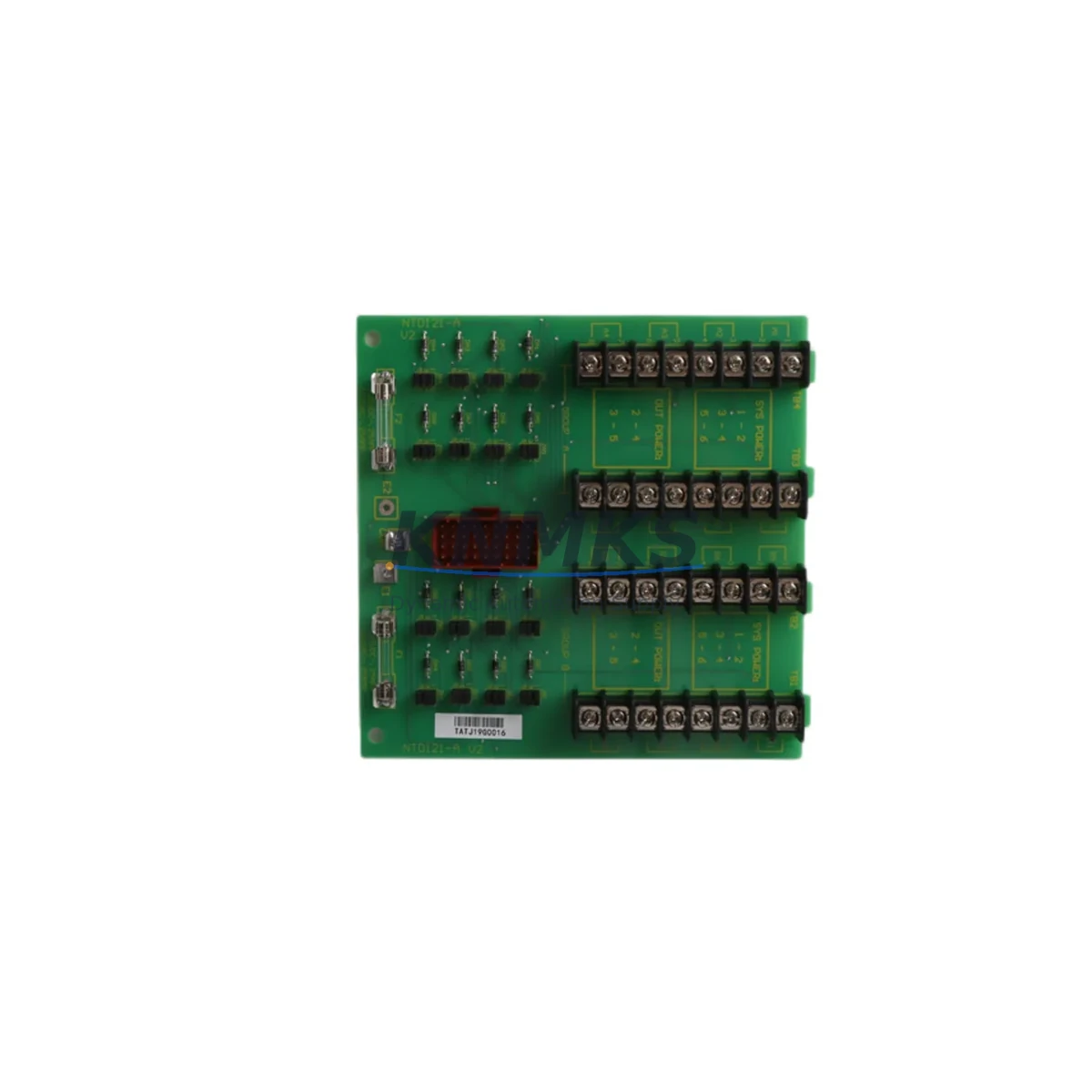
Honeywell NTDI21-A Maintenance-Proven Spare Part for Factory Uptime
The Honeywell NTDI21-A is a digital input termination unit engineered for continuous-duty service within Honeywell TDC 3000 and Experion PKS distributed control systems. As a critical interface component between field wiring and the DCS I/O subsystem, the NTDI21-A plays a central role in maintaining signal integrity across digital input channels — making it one of the highest-priority spare parts for any facility running Honeywell-based process automation.
For maintenance engineers managing aging TDC 3000 infrastructure or transitioning toward Experion PKS, keeping a verified NTDI21-A in the spare parts cabinet is not optional — it is a fundamental element of a defensible uptime strategy. Field failures of termination units are rarely predictable; they often surface during peak production cycles, annual turnarounds, or following electrical disturbances. Having a tested, ready-to-install replacement on hand eliminates the procurement lead time that turns a two-hour repair into a two-week shutdown.
Every NTDI21-A unit shipped from KNMKS is individually inspected, function-tested against original Honeywell specifications, and dispatched with full traceability documentation. Our support terms confirmed by quotation cover both component integrity and operational performance under normal industrial service conditions.
Spare Maintenance Table
| Part Number | NTDI21-A |
| Manufacturer | Honeywell |
| Series / Platform | TDC 3000 / Experion PKS |
| Product Type | Digital Input Termination Unit |
| Function | Field wiring termination for digital input channels in DCS I/O subsystem |
| Compatible Systems | Honeywell TDC 3000, Experion PKS (HPM, LCN, UCN architectures) |
| Signal Type | Digital Input (DI) — discrete on/off field signals |
| Installation | DIN rail or cabinet-mount; plug-in field wiring termination |
| Operating Environment | Industrial control cabinet; temperature and humidity per Honeywell DCS enclosure spec |
| Country of Origin | United States |
| Weight | 360 g |
| Condition | Original spare — inspected and function-tested |
| Support terms | 12 months from date of shipment |
| Lead Time | In-stock units ship within 1–3 business days |
| Documentation | Full traceability and test records included |
Maintenance Planning for Continuous Operation
When a digital input termination unit such as the NTDI21-A is flagged during a control cabinet inspection or fails during a fault isolation sequence, experienced maintenance engineers know that the root cause is rarely isolated to a single component. A disciplined site assessment should extend to the surrounding electrical and signal environment before the replacement unit is commissioned.
Begin by verifying the 24 VDC field power supply feeding the digital input loop — voltage sag or ripple at the termination rail is a common contributor to intermittent DI faults that are misdiagnosed as termination unit failures. If the cabinet houses a Honeywell HPM High-Performance Process Manager or associated I/O link modules, inspect the backplane connectors and I/O card seating before assuming the termination unit is the sole fault point.
Check the field wiring terminal blocks adjacent to the NTDI21-A for corrosion, loose ferrules, or insulation breakdown — particularly in high-humidity or chemically aggressive environments. In systems where the digital inputs are sourced from proximity sensors, limit switches, or solenoid feedback circuits, inspect the signal isolators or barriers upstream of the termination unit; a degraded isolator can inject noise that accelerates termination unit wear.
For cabinets that also house Honeywell NIDI or NIDO series I/O modules, verify that the module-to-termination unit cable assemblies — typically 50-pin or 37-pin shielded cables — are undamaged and properly seated. A bent pin or cracked connector housing on the interconnect cable can produce symptoms identical to a failed NTDI21-A. Similarly, if the cabinet includes relay output modules or interposing relay panels sharing the same power distribution bus, inspect the fuse holders and miniature circuit breakers on the 24 VDC rail for signs of thermal stress.
Annual maintenance schedules for TDC 3000 and Experion PKS systems should include a visual and functional check of all termination units, with particular attention to units installed in high-cycle or high-vibration zones. Procurement engineers should maintain a minimum stock of one NTDI21-A per control cabinet as part of a tiered critical-spare strategy, with replenishment triggered automatically upon consumption.
Site Replacement Workflow
Step 1 — Isolation and Documentation: Before removing the NTDI21-A, capture the current DCS alarm state and document all field wiring connections using the as-built termination drawing. Photograph the wiring layout if drawings are not current. Place the affected DI channels in manual or bypass mode per your site MOC procedure.
Step 2 — Safe Removal: De-energize the field power circuit feeding the termination unit. Disconnect field wiring from the terminal block in labeled sequence. Unplug the I/O interconnect cable from the termination unit. Remove the unit from the DIN rail or mounting bracket.
Step 3 — Replacement Unit Verification: Confirm the replacement NTDI21-A part number matches the removed unit exactly. Inspect the connector pins and terminal block for physical damage. Review the test documentation supplied with the unit.
Step 4 — Installation and Re-termination: Mount the replacement unit and reconnect the I/O interconnect cable. Re-terminate field wiring in the documented sequence, torquing terminal screws to specification. Restore field power and verify supply voltage at the termination rail.
Step 5 — Functional Verification: From the DCS operator station or engineering workstation, verify that all digital input channels associated with the NTDI21-A return to healthy status. Perform a point-by-point field signal test where site safety procedures permit. Clear bypass or manual overrides and return the loop to automatic control.
This workflow is compatible with both like-for-like replacement on TDC 3000 and migration scenarios where the NTDI21-A is being reused within an Experion PKS cabinet upgrade. In either case, no firmware or software configuration changes are required at the termination unit level — compatibility is maintained at the hardware interface.
Spare Parts Support FAQ
Q1: Is the NTDI21-A compatible with both TDC 3000 and Experion PKS systems?
Yes. The NTDI21-A is designed for use across Honeywell TDC 3000 and Experion PKS platforms, including HPM-based I/O subsystems. Always verify the specific I/O module and interconnect cable revision against your system’s as-built documentation before installation.
Q2: How is each unit tested before shipment?
Every NTDI21-A is individually function-tested against original Honeywell electrical specifications prior to dispatch. Test records and traceability documentation are included with each shipment. Units that do not pass functional verification are not offered for sale.
Q3: What does the support terms confirmed by quotation cover?
The support terms covers component integrity and operational performance under normal industrial service conditions for 12 months from the date of shipment. It does not cover damage resulting from incorrect installation, overvoltage events, or use outside the specified operating environment.
Q4: Can KNMKS support long-term or recurring supply of the NTDI21-A?
Yes. KNMKS maintains ongoing sourcing relationships for Honeywell TDC 3000 and Experion PKS spare parts. Procurement engineers managing multi-year maintenance contracts or plant-wide spare parts standardization programs are encouraged to contact our team to discuss volume pricing, reserved stock arrangements, and scheduled replenishment.
© 2026 KNMKS. All rights reserved.
Original Source: https://knmks.com
Contact: admin@knmks.com | +86 18359268345
Product Identification
- Brand / Ecosystem
-
Honeywell
Honeywell - Model / Series
-
NTDI21-A
Experion PKS Series - Product Family
- PLCs & Controllers
- Availability Status
- Available on request after model and quantity confirmation
- Inquiry Type
- B2B RFQ, replacement inquiry and project spare-part request
- Pre-Quote Check
- Exact SKU, brand, series, quantity, nameplate photos and destination country are checked before quotation
System Path
Where this product fits in the KNMKS automation structure.
Specification & Inquiry Focus
- Control platform
- PLC, PAC and modular controllers
- Common needs
- CPU, rack, power and I/O expansion
- Project support
- Replacement, cabinet build and maintenance
Buyer Confirmation
Information KNMKS checks before replying.
- Exact model
- NTDI21-A
- Brand / ecosystem
- Honeywell
- Product family
- PLCs & Controllers
- Application note
- Replacement, maintenance, project build or spare-part list
- Useful photos
- Nameplate, installed unit, cabinet layout or connector side
- Delivery details
- Quantity, destination country and target schedule
Document Support
Files and notes can be confirmed during quotation.
- Product photos or nameplate confirmation when available
- Packing and delivery notes before quotation confirmation
- Support scope and delivery terms confirmed per inquiry
- Export document coordination for qualified B2B requests
Inquiry Support
- Model cross-checking before quotation
- CPU, power, rack and expansion module matching
- Support for replacement and project inquiry
What to Send Us
- Brand and exact model number: Honeywell NTDI21-A
- Quantity and required delivery time
- Application, replacement requirement or nameplate photo
- Destination country and shipping preference
RFQ Preparation
This is a product inquiry page built for RFQ communication.
Fast Model Check
Send this model to KNMKS for confirmation.
Include quantity, destination country and photos if this is a maintenance replacement. The inquiry will be saved with a reference number after submission.
Brand & Compatibility Note
KNMKS displays automation product information for well-known industrial brand ecosystems and compatible replacement references. Brand names are used for product identification and compatibility reference only; final availability and commercial terms are confirmed per quotation.
 Manufacturing
 Machine Tools
 Packaging
 Energy & Power



 HMI & Displays
 Servo Systems
 Variable Frequency Drives
 Sensors