
Overview
Honeywell MC-TSTX03 51309140-175 Maintenance-Proven Spare Part for Factory Uptime
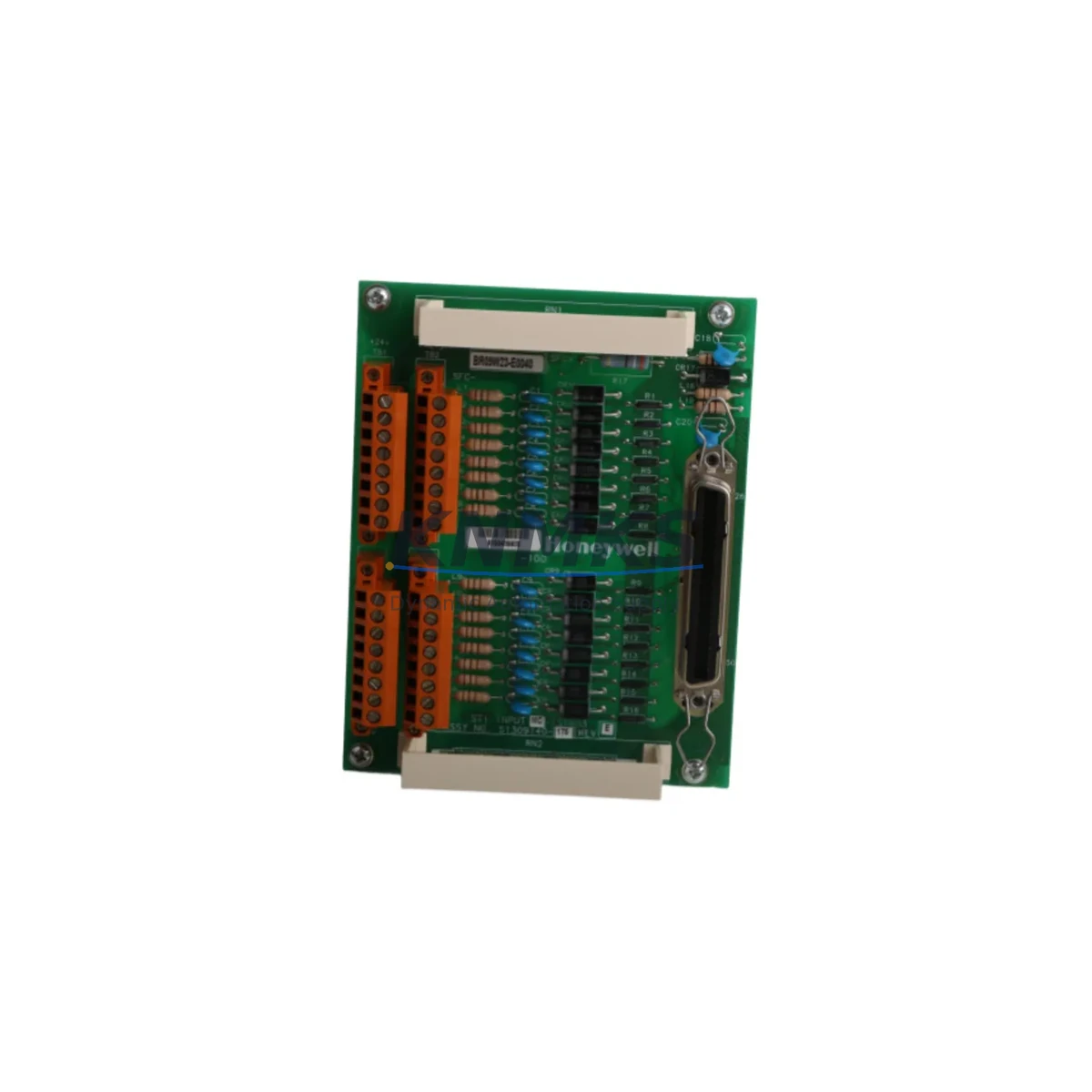
The Honeywell MC-TSTX03 (P/N 51309140-175) is an original safety termination module designed for the Honeywell Experion PKS Safety Manager platform. As a field-termination assembly within the Safety Manager I/O subsystem, this module provides the critical interface between field wiring and the safety logic solver — making it an essential spare for any facility running SIL-rated process safety applications in oil & gas, petrochemical, power generation, or advanced manufacturing environments.
Maintenance engineers and reliability teams managing aging Experion PKS Safety Manager cabinets understand the risk of a single unavailable termination module causing extended unplanned downtime. The MC-TSTX03 is a direct OEM replacement that preserves full compatibility with the Safety Manager chassis, backplane wiring, and associated I/O modules — eliminating the need for re-engineering or re-certification during emergency replacement.
Every unit shipped by KNMKS undergoes pre-shipment functional verification and is backed by a support terms confirmed by quotation, giving procurement engineers confidence in both quality and long-term supply continuity.
Spare Maintenance Table
| Part Number | MC-TSTX03 |
| Reference P/N | 51309140-175 |
| Brand | Honeywell |
| Series / Platform | Experion PKS Safety Manager |
| Module Type | Safety Termination Module (Field Termination Assembly) |
| Product Category | Industrial Automation / Safety Systems / DCS Spare Parts |
| Compatibility | Honeywell Safety Manager SM, SMX; Experion PKS SIL-rated I/O subsystems |
| Installation | Direct chassis/backplane mount; field wiring via screw terminals |
| Application Environment | Oil & Gas, Petrochemical, Power Generation, Advanced Manufacturing |
| Safety Rating | Designed for SIL 1 / SIL 2 / SIL 3 safety loop applications |
| Origin | USA (OEM) |
| Condition | Original / New / Refurbished-Tested (specify on inquiry) |
| Maintenance Recommendation | Inspect terminal integrity and wiring insulation annually; replace on first sign of terminal oxidation or intermittent signal faults |
| Weight | 700 g (approx.) |
| Support terms | 12 Months — Pre-shipment tested, documented QC pass |
Maintenance Planning for Continuous Operation
When scheduling a planned replacement or responding to an unplanned fault involving the MC-TSTX03, a thorough maintenance review of the surrounding cabinet and safety loop is essential to prevent repeat failures and ensure the restored system meets its original SIL performance target.
Begin with the Safety Manager I/O module seated in the same chassis slot — verify that the corresponding MC-PAOX02 or MC-PDOX02 digital output module shows no fault LEDs and that its backplane connector pins are clean and undamaged. A degraded termination module is frequently accompanied by oxidized backplane contacts that can cause intermittent faults even after the termination assembly is replaced.
Inspect the 24 VDC field power supply feeding the termination rail. Honeywell Safety Manager field circuits are sensitive to supply ripple and voltage sag; a failing Honeywell MC-PSIM01 power supply input module or an undersized DIN-rail PSU can cause nuisance trips that are misdiagnosed as termination module failures. Confirm supply voltage is within the specified ±5% tolerance under full load.
Check all field wiring terminal blocks on the termination module for torque compliance and insulation integrity. In high-vibration environments, terminal screws can back off over 12–18 months of operation, introducing resistance that corrupts 4–20 mA analog signals or causes digital input chattering. Re-torque to the manufacturer’s specification and apply thread-locking compound where permitted.
Review the Safety Manager communication module (e.g., MC-TAMR03 or equivalent HART/Modbus interface) for any logged communication errors that coincide with the termination fault window. A communication module nearing end-of-life can generate false I/O faults that mask the true root cause. If the communication module has not been replaced within its recommended service interval, include it in the current maintenance cycle.
For cabinets with signal isolators or safety barriers protecting intrinsically safe field devices, verify that each isolator’s output voltage and current limits remain within specification. Zener barriers and galvanic isolators degrade over time in high-temperature enclosures; a marginal isolator can cause the Safety Manager to log spurious faults on the channel served by the MC-TSTX03.
Finally, confirm that the Experion PKS Safety Manager chassis backplane itself shows no physical damage, corrosion, or bent connector pins. Backplane integrity is a prerequisite for reliable termination module operation; a damaged backplane slot will cause recurring faults regardless of how many termination modules are replaced.
Site Replacement Workflow
Step 1 — Permit and Isolation: Obtain a valid work permit and confirm the safety loop is in a safe state (bypassed or inhibited in the Safety Manager configuration) before touching any field wiring. Never remove a termination module from a live, un-bypassed safety loop.
Step 2 — Document Existing Wiring: Photograph or sketch the existing field wiring layout on the MC-TSTX03 terminal block before disconnection. Label each wire with its channel number and signal type. This step eliminates re-wiring errors that can cause dangerous mis-connections after replacement.
Step 3 — Module Removal: Release the module retention latch, disconnect field wiring in reverse order, and carefully extract the MC-TSTX03 from the chassis. Inspect the backplane connector on the removed module for bent pins or burn marks — this information is valuable for root-cause analysis.
Step 4 — Install Replacement: Insert the new MC-TSTX03 51309140-175 firmly until the retention latch clicks. Reconnect field wiring per the documented layout, torquing each terminal to specification. Verify wire insulation is not pinched under terminal screws.
Step 5 — Functional Verification: Remove the bypass/inhibit in the Safety Manager, confirm the channel returns to a healthy state in the Experion PKS operator station, and perform a loop check on each field device connected to the replaced module. Log the replacement in the site maintenance management system (CMMS) with the new module’s serial number and installation date.
Step 6 — Spare Stock Update: Replenish the replaced unit in your spare parts inventory immediately. For facilities with multiple Safety Manager cabinets, maintaining a minimum of one MC-TSTX03 per cabinet is a widely adopted best practice to support a 30-minute mean-time-to-repair (MTTR) target for safety system faults.
Spare Parts Support FAQ
Q1: Is the MC-TSTX03 51309140-175 compatible with both Safety Manager SM and SMX chassis?
Based on Honeywell’s Experion PKS Safety Manager product family architecture, the MC-TSTX03 termination module is designed for use within the Safety Manager I/O subsystem. Compatibility with specific SM or SMX chassis revisions should be confirmed against your site’s Safety Manager hardware revision and the applicable Honeywell product compatibility matrix. KNMKS can assist with compatibility verification prior to order confirmation — contact admin@knmks.com with your chassis revision and existing module part numbers.
Q2: What pre-shipment testing does KNMKS perform on the MC-TSTX03?
Every MC-TSTX03 unit undergoes a documented functional verification check before dispatch, including visual inspection of the backplane connector, terminal block integrity, and module housing. Units that do not pass QC are not shipped. A support terms confirmed by quotation is provided from the date of shipment, covering defects in materials and workmanship under normal operating conditions.
Q3: Can KNMKS support long-term supply agreements for the MC-TSTX03 and related Safety Manager spare parts?
Yes. KNMKS specializes in long-term spare parts supply for legacy and current-generation Honeywell Experion PKS systems. We support 12–36 month blanket purchase agreements with reserved stock allocation, giving maintenance and procurement teams predictable availability and pricing for critical safety system spares. Contact us to discuss your annual consumption forecast and preferred delivery schedule.
Q4: What is the recommended spare parts holding strategy for the MC-TSTX03 in a multi-cabinet Safety Manager installation?
For facilities operating two or more Safety Manager cabinets, the recommended minimum holding is one MC-TSTX03 per cabinet, plus one additional unit as a central emergency spare. For sites with high process criticality (continuous operation, no planned shutdown windows), a holding of two units per cabinet is advisable. Spare parts should be stored in anti-static packaging in a climate-controlled environment and inspected annually for terminal oxidation or physical damage.
© 2026 KNMKS. All rights reserved.
Original Source: https://knmks.com
Contact: admin@knmks.com | +86 18359268345
Product Identification
- Brand / Ecosystem
-
Honeywell
Honeywell - Model / Series
-
MC-TSTX03 51309140-175
Experion PKS Series - Product Family
- PLCs & Controllers
- Availability Status
- Available on request after model and quantity confirmation
- Inquiry Type
- B2B RFQ, replacement inquiry and project spare-part request
- Pre-Quote Check
- Exact SKU, brand, series, quantity, nameplate photos and destination country are checked before quotation
System Path
Where this product fits in the KNMKS automation structure.
Specification & Inquiry Focus
- Control platform
- PLC, PAC and modular controllers
- Common needs
- CPU, rack, power and I/O expansion
- Project support
- Replacement, cabinet build and maintenance
Buyer Confirmation
Information KNMKS checks before replying.
- Exact model
- MC-TSTX03 51309140-175
- Brand / ecosystem
- Honeywell
- Product family
- PLCs & Controllers
- Application note
- Replacement, maintenance, project build or spare-part list
- Useful photos
- Nameplate, installed unit, cabinet layout or connector side
- Delivery details
- Quantity, destination country and target schedule
Document Support
Files and notes can be confirmed during quotation.
- Product photos or nameplate confirmation when available
- Packing and delivery notes before quotation confirmation
- Support scope and delivery terms confirmed per inquiry
- Export document coordination for qualified B2B requests
Inquiry Support
- Model cross-checking before quotation
- CPU, power, rack and expansion module matching
- Support for replacement and project inquiry
What to Send Us
- Brand and exact model number: Honeywell MC-TSTX03 51309140-175
- Quantity and required delivery time
- Application, replacement requirement or nameplate photo
- Destination country and shipping preference
RFQ Preparation
This is a product inquiry page built for RFQ communication.
Fast Model Check
Send this model to KNMKS for confirmation.
Include quantity, destination country and photos if this is a maintenance replacement. The inquiry will be saved with a reference number after submission.
Brand & Compatibility Note
KNMKS displays automation product information for well-known industrial brand ecosystems and compatible replacement references. Brand names are used for product identification and compatibility reference only; final availability and commercial terms are confirmed per quotation.
 Manufacturing
 Machine Tools
 Packaging
 Energy & Power



 HMI & Displays
 Servo Systems
 Variable Frequency Drives
 Sensors