
Overview
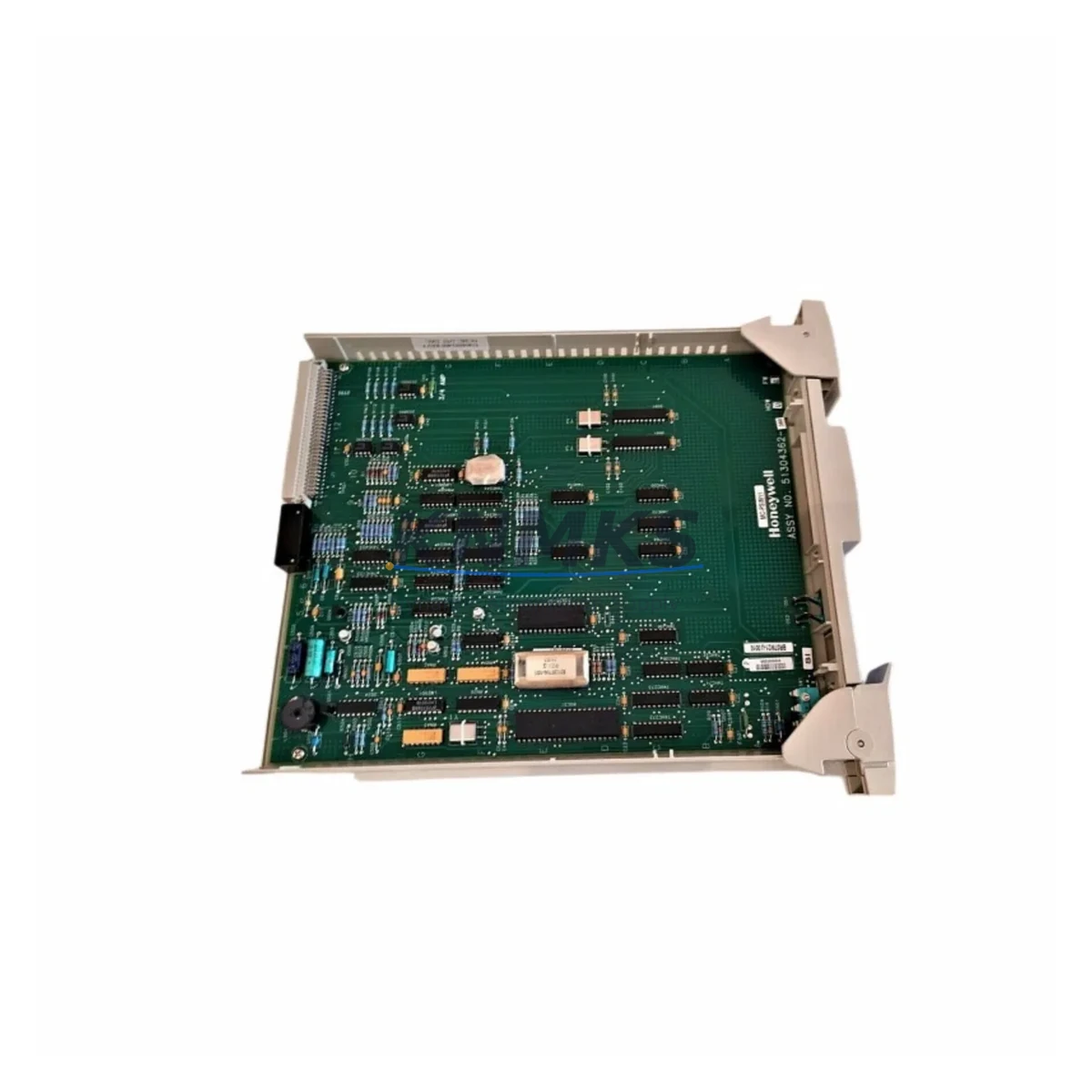
Honeywell MC-PSIM11 51304362-350 Maintenance Spare Part: Experion PKS Process Simulation Interface for Factory Uptime
The Honeywell MC-PSIM11 (P/N 51304362-350) is an original process simulation interface module engineered for the Experion PKS distributed control system. Designed to support process simulation, loop checkout, and controller validation workflows, this module is a critical spare for maintenance engineers managing continuous operations in refining, petrochemical, power generation, and advanced manufacturing environments. Stocking a verified MC-PSIM11 51304362-350 eliminates unplanned downtime during simulation-related faults and accelerates commissioning recovery when primary modules fail.
At KNMKS, every MC-PSIM11 51304362-350 unit is sourced from original Honeywell supply chains, individually powered-on tested, and shipped with a support terms confirmed by quotation. Our inventory supports urgent replacement orders, planned annual shutdown procurement, and long-term spare parts programs for facilities running Experion PKS R400 through R501 and beyond.
Spare Maintenance Table
| Part Number | MC-PSIM11 / 51304362-350 |
| Brand | Honeywell |
| Series | Experion PKS |
| Module Type | Process Simulation Interface Module (PSIM) |
| Compatible Controllers | C300 Process Controller, ACE Node |
| Backplane Compatibility | Experion PKS IOLINK / FIM backplane assemblies |
| Communication Interface | FTE (Fault Tolerant Ethernet) / IOLINK |
| Operating Voltage | 24 VDC (supplied via backplane) |
| Operating Temperature | 0°C to 60°C |
| Mounting | Experion PKS I/O carrier / chassis slot |
| Origin | United States |
| Condition | Original, tested before shipment |
| Support terms | 12 months from date of shipment |
| Typical Lead Time | availability confirmed by RFQ — ships within 2 business days |
| Applications | Refining, Petrochemical, Power Generation, Specialty Chemical, Advanced Manufacturing |
| Maintenance Recommendation | Inspect module seating, FTE link status, and simulation tag mapping during annual shutdown; replace if LED fault indicators are persistent |
Maintenance Planning for Continuous Operation
When a process simulation interface module such as the MC-PSIM11 51304362-350 is flagged for replacement, a disciplined site assessment prevents secondary failures and shortens total restoration time. Maintenance engineers should treat this module replacement as a trigger for a broader control cabinet inspection covering the following associated components:
C300 Process Controller (MC-CONT02 / MC-CONT03): The PSIM module operates in close coordination with the C300 controller. Verify firmware revision compatibility and check for any pending diagnostic alarms on the C300 before inserting the replacement PSIM. A controller with degraded memory or communication faults will mask successful PSIM restoration.
FIM (Field Interface Module) and IOLINK Cables: The MC-PSIM11 relies on IOLINK connectivity for simulation data exchange. Inspect IOLINK cables, connectors, and the associated FIM module (e.g., MC-FIM01) for wear, corrosion, or intermittent contact. Damaged IOLINK infrastructure is a common root cause of recurring PSIM faults.
Power Supply Modules (MC-PDPM11 / MC-PDPM12): Confirm that the 24 VDC backplane power supply is within specification. Voltage sag or ripple from an aging power supply module can cause PSIM initialization failures that mimic hardware faults. Replace power supply modules showing output deviation beyond ±2%.
Backplane and I/O Carrier Assembly: Inspect the Experion PKS I/O carrier for bent pins, oxidized contacts, or mechanical damage at the PSIM slot. A compromised backplane connector will prevent the replacement module from achieving proper communication handshake with the C300.
FTE Network Switch and Ethernet Patch Cables: The Fault Tolerant Ethernet infrastructure supporting Experion PKS should be validated during any PSIM replacement event. Check FTE switch port status, cable integrity, and redundancy path health to ensure the restored simulation environment has full network visibility.
Fuses and Circuit Protection: Review the control cabinet fuse block serving the PSIM carrier. Blown or weakened fuses in the 24 VDC distribution circuit are frequently overlooked during module-level troubleshooting. Replace any fuse showing discoloration or resistance drift.
Procurement engineers building annual spare parts budgets should consider stocking the MC-PSIM11 51304362-350 alongside C300 controller spares, FIM modules, and IOLINK cable assemblies as a coordinated Experion PKS maintenance kit. This approach reduces emergency sourcing lead times and supports predictable shutdown planning.
Site Replacement Workflow
Step 1 — Pre-Replacement Verification: Confirm the replacement MC-PSIM11 51304362-350 part number and revision match the installed module. Cross-reference the Experion PKS hardware compatibility matrix for your software release. Document the current simulation tag configuration and export a backup from Experion Configuration Studio before removing the faulty module.
Step 2 — Safe Removal: Place the affected C300 controller in a safe maintenance state per site procedures. De-energize the PSIM carrier slot if required by local LOTO policy. Remove the faulty MC-PSIM11 by releasing the module latch and sliding it clear of the backplane connector. Inspect the vacated slot for debris or pin damage before insertion.
Step 3 — Module Installation: Insert the replacement MC-PSIM11 51304362-350 firmly into the carrier slot until the latch engages. Restore power and observe the module status LEDs. A solid green RUN indicator confirms successful backplane communication. Allow 60–90 seconds for the module to complete its self-test and establish IOLINK synchronization with the C300.
Step 4 — Simulation Validation: Re-load the simulation configuration from the Experion Configuration Studio backup. Execute a loop checkout sequence on the affected process tags to confirm simulation fidelity. Verify that all simulation-linked control loops respond correctly before returning the system to automatic operation.
Step 5 — Documentation and Spare Replenishment: Record the replacement event in the site CMMS with module serial numbers, date, and technician ID. Immediately initiate a procurement request to replenish the consumed spare, maintaining a minimum one-unit buffer for the MC-PSIM11 51304362-350 in the site spare parts inventory.
This workflow is applicable to facilities migrating from legacy Honeywell TDC 3000 or PlantScape systems to Experion PKS, where PSIM modules play a key role in simulation-assisted migration validation. The MC-PSIM11 51304362-350 supports a direct slot-compatible replacement path within the Experion PKS chassis architecture, eliminating the need for wiring modifications during emergency substitution.
Spare Parts Support FAQ
Q1: Is the MC-PSIM11 51304362-350 compatible with all Experion PKS software releases?
The MC-PSIM11 51304362-350 is designed for the Experion PKS platform and is compatible with R400 through R501 releases. For sites running earlier or later revisions, KNMKS recommends confirming the hardware compatibility matrix with your Honeywell system documentation or contacting our technical team before ordering. We supply original Honeywell modules that meet factory hardware revision specifications.
Q2: How is the MC-PSIM11 51304362-350 tested before shipment?
Every unit shipped by KNMKS undergoes a powered-on functional test to verify backplane communication, LED status response, and module self-test completion. Units that fail any test stage are quarantined and not offered for sale. A test record is available upon request for quality-critical procurement programs.
Q3: What does the support terms confirmed by quotation cover for this module?
The support terms confirmed by quotation cover hardware defects and functional failures under normal operating conditions from the date of shipment. If the MC-PSIM11 51304362-350 fails within the confirmed support period due to a manufacturing or component defect, KNMKS will provide a replacement unit or documented resolution support. Support requests are processed within 5 business days of receiving the returned module.
Q4: Can KNMKS support long-term supply agreements for the MC-PSIM11 51304362-350?
Yes. KNMKS maintains standing inventory of Honeywell Experion PKS spare modules and can support annual blanket purchase orders, scheduled delivery programs, and emergency same-week shipments. For facilities with multi-site Experion PKS installations or planned multi-year maintenance contracts, contact our sales team to discuss volume pricing and guaranteed stock reservation.
© 2026 KNMKS. All rights reserved.
Original Source: https://knmks.com
Contact: admin@knmks.com | +86 18359268345
Product Identification
- Brand / Ecosystem
-
HONEYWELL
Honeywell - Model / Series
-
MC-PSIM11 51304362-350
Experion PKS Series - Product Family
- PLCs & Controllers
- Availability Status
- Available on request after model and quantity confirmation
- Inquiry Type
- B2B RFQ, replacement inquiry and project spare-part request
- Pre-Quote Check
- Exact SKU, brand, series, quantity, nameplate photos and destination country are checked before quotation
System Path
Where this product fits in the KNMKS automation structure.
Specification & Inquiry Focus
- Control platform
- PLC, PAC and modular controllers
- Common needs
- CPU, rack, power and I/O expansion
- Project support
- Replacement, cabinet build and maintenance
Buyer Confirmation
Information KNMKS checks before replying.
- Exact model
- MC-PSIM11 51304362-350
- Brand / ecosystem
- HONEYWELL
- Product family
- PLCs & Controllers
- Application note
- Replacement, maintenance, project build or spare-part list
- Useful photos
- Nameplate, installed unit, cabinet layout or connector side
- Delivery details
- Quantity, destination country and target schedule
Document Support
Files and notes can be confirmed during quotation.
- Product photos or nameplate confirmation when available
- Packing and delivery notes before quotation confirmation
- Support scope and delivery terms confirmed per inquiry
- Export document coordination for qualified B2B requests
Inquiry Support
- Model cross-checking before quotation
- CPU, power, rack and expansion module matching
- Support for replacement and project inquiry
What to Send Us
- Brand and exact model number: HONEYWELL MC-PSIM11 51304362-350
- Quantity and required delivery time
- Application, replacement requirement or nameplate photo
- Destination country and shipping preference
RFQ Preparation
This is a product inquiry page built for RFQ communication.
Fast Model Check
Send this model to KNMKS for confirmation.
Include quantity, destination country and photos if this is a maintenance replacement. The inquiry will be saved with a reference number after submission.
Brand & Compatibility Note
KNMKS displays automation product information for well-known industrial brand ecosystems and compatible replacement references. Brand names are used for product identification and compatibility reference only; final availability and commercial terms are confirmed per quotation.
 Manufacturing
 Machine Tools
 Packaging
 Energy & Power



 HMI & Displays
 Servo Systems
 Variable Frequency Drives
 Sensors