
Overview
Honeywell MC-PHAO01 Migration-Ready Analog Mux for Legacy DCS: Retrofit and Compatibility Upgrade
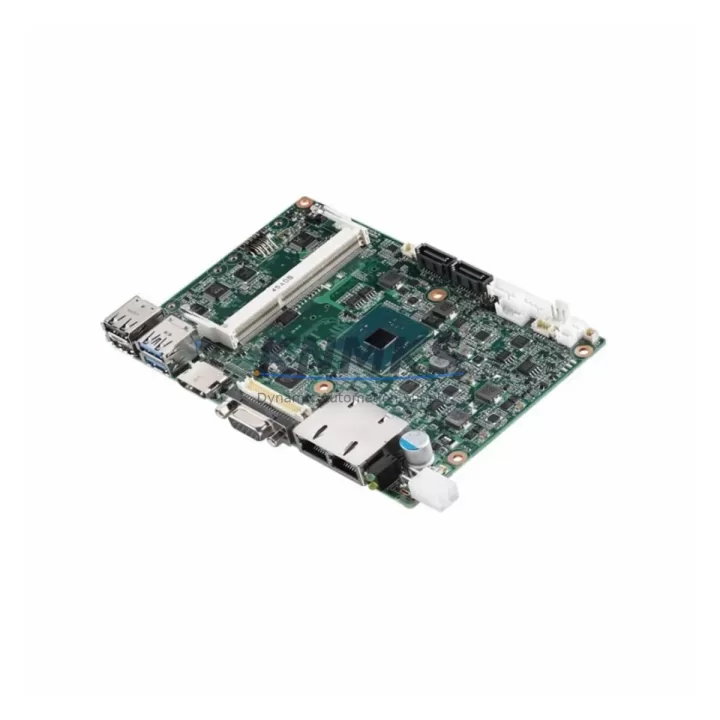
The Honeywell MC-PHAO01 is a high-density analog output multiplexer module engineered for the Experion PKS and TDC 3000 distributed control system platforms. As legacy DCS installations approach end-of-support milestones, the MC-PHAO01 has become a critical component in plant-wide migration strategies — enabling facilities to extend operational life, replace discontinued analog I/O assemblies, and maintain process continuity without committing to a full platform overhaul. Whether you are executing a phased retrofit of an aging TDC 3000 cabinet or consolidating I/O density in an Experion PKS expansion chassis, the MC-PHAO01 delivers the signal integrity and backplane compatibility required for reliable analog output control in demanding process environments.
This module is a direct functional replacement for the MC-PLAM02 analog output assembly and the MC-PSIM11 signal interface module, both of which have been discontinued by Honeywell. Facilities that have been sourcing these legacy parts through spot markets or cannibalizing decommissioned panels can now standardize on the MC-PHAO01 as a verified, in-stock alternative with a documented replacement path. Each unit is pre-shipment tested against Honeywell’s original output accuracy and channel isolation specifications before dispatch.
Migration Compatibility Table
| Parameter | MC-PHAO01 | MC-PLAM02 (Legacy) | MC-PSIM11 (Legacy) |
|---|---|---|---|
| Platform | Experion PKS / TDC 3000 | TDC 3000 | TDC 3000 / HPM |
| Backplane Interface | LLMUX / FTA compatible | LLMUX | HPM backplane |
| Output Channels | Up to 40 analog outputs (mux) | 16 analog outputs | Signal interface only |
| Signal Range | 4–20 mA / 1–5 VDC | 4–20 mA | 4–20 mA |
| Communication | LLMUX serial link | LLMUX serial link | HPM serial |
| Installation Form Factor | Standard Honeywell card cage | Standard card cage | HPM card cage |
| Firmware Compatibility | Experion R310+ / TDC 3000 R680+ | TDC 3000 R640+ | TDC 3000 R620+ |
| Replacement Recommendation | Direct drop-in for MC-PLAM02; adapter wiring required for MC-PSIM11 | — | — |
| Commissioning Note | Verify LLMUX address assignment and FTA terminal mapping before power-up | — | — |
| Support terms | 12 Months | N/A (discontinued) | N/A (discontinued) |
Retrofit Planning for Existing Automation Systems
A successful MC-PHAO01 retrofit begins well before the module arrives on site. Engineers should audit the existing LLMUX Field Termination Assembly (FTA) wiring to confirm that terminal block assignments match the new module’s channel map. In most TDC 3000 installations, the MC-PHAO01 slots into the same card cage position as the MC-PLAM02, but the FTA connector pinout must be cross-referenced against the current loop drawing set to avoid signal inversion or channel offset errors on 4–20 mA loops feeding control valves or variable-speed drives.
Power budget verification is equally important. The MC-PHAO01 draws its supply from the Honeywell HPM or Experion controller backplane power rail. Before installation, confirm that the existing MC-HPPM01 or MC-HPPM02 power module has sufficient headroom to support the additional analog output load, particularly in high-density cabinets where multiple I/O modules share a single power rail. If the cabinet is already near capacity, a supplemental MC-HPPM02 power module may be required before the MC-PHAO01 can be safely commissioned.
For facilities migrating from TDC 3000 to Experion PKS, the MC-PHAO01 is frequently deployed alongside the MC-PAIH02 analog input module and the MC-TDID12 digital I/O module to rebuild a complete I/O complement in the new Experion chassis. The LLMUX communication link between the MC-PHAO01 and the Experion C300 controller must be configured with the correct node address and baud rate settings in Control Builder before the module will respond to output commands. Technicians should also verify that the Experion server’s I/O assignment database reflects the new module address to prevent alarm floods during the cutover window.
Where the legacy installation includes an Experion Station HMI or a legacy GUS operator station, the analog output tag assignments associated with the MC-PHAO01 channels must be validated in the HMI faceplate configuration. Tag name mismatches between the old MC-PLAM02 channel map and the new MC-PHAO01 assignment will cause display errors on operator graphics, which can delay cutover acceptance. A pre-cutover simulation using the Experion Control Builder emulator is strongly recommended to validate all tag bindings before live commissioning.
Downtime Control During System Migration
Minimizing unplanned downtime during an MC-PHAO01 swap requires a structured pre-outage checklist and a clearly defined rollback procedure. The recommended approach is to complete all wiring verification, address configuration, and HMI tag validation during a planned maintenance window, with the replacement module pre-configured and bench-tested before the production system is taken offline.
Where process conditions permit, a parallel commissioning strategy can be used: the MC-PHAO01 is installed in a spare card cage slot and its outputs are verified against a test load before the legacy MC-PLAM02 is removed from service. This approach allows the control program logic — including PID loop tuning parameters, output scaling, and alarm limits — to be validated without interrupting live process control. Once the MC-PHAO01 outputs are confirmed stable, the LLMUX address is reassigned and the legacy module is removed, completing the cutover with minimal process disturbance.
For sites where a parallel slot is not available, the cutover must be executed as a hot-swap within the maintenance window. In this case, the Experion C300 controller should be placed in manual output mode for all affected loops before the MC-PLAM02 is removed. After the MC-PHAO01 is seated and the LLMUX link is confirmed active, outputs should be restored to automatic control one loop at a time, with field confirmation from the instrument technician at each control valve or actuator before proceeding to the next channel. This sequential restoration approach protects process stability and reduces the risk of simultaneous loop upsets during the cutover.
All units are pre-shipment tested for output accuracy, channel isolation, and LLMUX communication integrity before dispatch. Stock is maintained for immediate shipment, supporting both planned retrofit schedules and emergency replacement requirements.
Retrofit Support FAQ
Q1: Is the MC-PHAO01 a direct replacement for the MC-PLAM02 without any wiring changes?
In most TDC 3000 installations, the MC-PHAO01 is a direct card cage replacement for the MC-PLAM02 with no FTA wiring changes required, provided the existing FTA terminal assignments match the MC-PHAO01 channel map. A loop drawing review is recommended before installation to confirm terminal compatibility and avoid channel offset errors on live 4–20 mA loops.
Q2: What commissioning steps are required after installing the MC-PHAO01 in an Experion PKS system?
After physical installation, the LLMUX node address must be set to match the address previously assigned to the legacy module in the Experion Control Builder I/O configuration. The Experion server I/O database should be updated to reflect the new module, and all analog output tags should be validated in the HMI faceplate before restoring loops to automatic control. A pre-cutover simulation in Control Builder is recommended for complex installations.
Q3: Does the MC-PHAO01 require a firmware update before use in a TDC 3000 R680 system?
The MC-PHAO01 is compatible with TDC 3000 R680 and later releases without a firmware update in most configurations. For Experion PKS installations running R310 or later, no additional firmware is required. If the host system is running an earlier release, a system software update should be completed before the MC-PHAO01 is commissioned to ensure full LLMUX communication compatibility.
Q4: What support terms and stock availability does KNMKS provide for the MC-PHAO01?
All MC-PHAO01 units supplied by KNMKS carry a support terms confirmed by quotation covering manufacturing defects and functional performance against Honeywell’s original specifications. Stock is maintained for immediate dispatch to support both planned retrofit projects and emergency replacement requirements. Each unit undergoes pre-shipment functional testing including output accuracy verification, channel isolation measurement, and LLMUX communication confirmation before shipment.
© 2026 KNMKS. All rights reserved.
Original Source: https://knmks.com
Contact: admin@knmks.com | +86 18359268345
Product Identification
- Brand / Ecosystem
-
Honeywell
Honeywell - Model / Series
-
MC-PHAO01/MC-PLAM02/MC-PSIM11
Experion PKS Series - Product Family
- I/O Modules
- Availability Status
- Available on request after model and quantity confirmation
- Inquiry Type
- B2B RFQ, replacement inquiry and project spare-part request
- Pre-Quote Check
- Exact SKU, brand, series, quantity, nameplate photos and destination country are checked before quotation
System Path
Where this product fits in the KNMKS automation structure.
Specification & Inquiry Focus
- I/O range
- Digital, analog and remote I/O modules
- Common needs
- Channel count, signal and bus type
- Project support
- PLC expansion and distributed control
Buyer Confirmation
Information KNMKS checks before replying.
- Exact model
- MC-PHAO01/MC-PLAM02/MC-PSIM11
- Brand / ecosystem
- Honeywell
- Product family
- I/O Modules
- Application note
- Replacement, maintenance, project build or spare-part list
- Useful photos
- Nameplate, installed unit, cabinet layout or connector side
- Delivery details
- Quantity, destination country and target schedule
Document Support
Files and notes can be confirmed during quotation.
- Product photos or nameplate confirmation when available
- Packing and delivery notes before quotation confirmation
- Support scope and delivery terms confirmed per inquiry
- Export document coordination for qualified B2B requests
Inquiry Support
- Digital and analog signal matching
- Remote station and rack expansion support
- Spare module inquiry for downtime recovery
What to Send Us
- Brand and exact model number: Honeywell MC-PHAO01/MC-PLAM02/MC-PSIM11
- Quantity and required delivery time
- Application, replacement requirement or nameplate photo
- Destination country and shipping preference
RFQ Preparation
This is a product inquiry page built for RFQ communication.
Fast Model Check
Send this model to KNMKS for confirmation.
Include quantity, destination country and photos if this is a maintenance replacement. The inquiry will be saved with a reference number after submission.
Brand & Compatibility Note
KNMKS displays automation product information for well-known industrial brand ecosystems and compatible replacement references. Brand names are used for product identification and compatibility reference only; final availability and commercial terms are confirmed per quotation.
 Manufacturing
 Machine Tools
 Packaging
 Energy & Power
 PLCs & Controllers
 HMI & Displays
 Servo Systems
 Variable Frequency Drives