
Overview
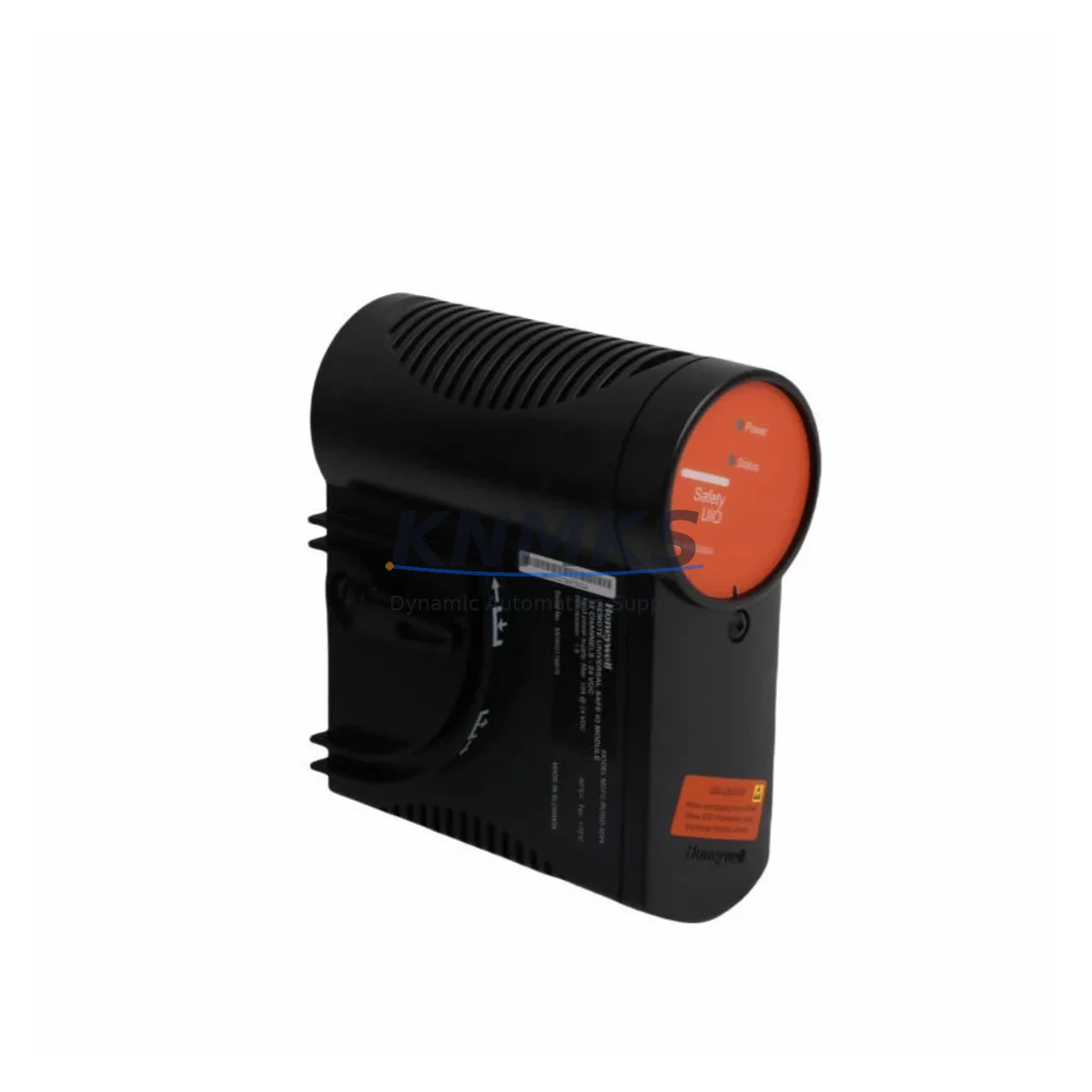
Honeywell FC-PUIO01 51454294-176 Migration-Ready USIO for Legacy Control Systems
The Honeywell FC-PUIO01 (part number 51454294-176) is a Universal I/O (USIO) module designed for the Experion PKS distributed control system platform. As legacy Honeywell TDC 3000 and PlantScape systems reach end-of-life, the FC-PUIO01 has become a critical component in brownfield migration projects, enabling engineers to consolidate mixed analog and digital I/O channels onto a single, flexible module without redesigning the entire control cabinet. Whether you are replacing a failed FC-PUIO01 on a running line or executing a planned upgrade from an older Series C I/O architecture, this module provides the compatibility and reliability your retrofit demands.
Each unit shipped by KNMKS is sourced from verified industrial supply channels, function-tested prior to dispatch, and covered by a support terms confirmed by quotation. We maintain buffer stock specifically to support emergency replacement scenarios where production downtime must be minimized.
Migration Compatibility Table
| Parameter | FC-PUIO01 51454294-176 | Retrofit Notes |
|---|---|---|
| Platform Compatibility | Honeywell Experion PKS (C200, C300 controllers) | Verify controller firmware version supports USIO module revision |
| I/O Channel Type | Universal (AI/AO/DI/DO configurable per channel) | Confirm channel assignments match legacy wiring schedule before power-up |
| Backplane Interface | Experion PKS IOLINK / FIM backplane | Slot position and module address must match original configuration in Control Builder |
| Power Supply Requirement | 24 VDC via backplane (chassis-powered) | Verify IOLIM or FIM power budget before adding modules to existing rack |
| Terminal Wiring | Removable terminal block (field-side) | Retain original terminal block or re-terminate using existing wiring schedule |
| Communication Protocol | Proprietary Experion IOLINK (FTE-compatible) | No protocol conversion required within Experion PKS; verify FTE switch port assignment |
| Legacy Replacement Path | Replaces TDC 3000 HLAI, LLAI, and DI/DO modules via I/O migration strategy | Use Honeywell I/O Migration Toolkit; update CM/SCM blocks in Control Builder |
| HMI Screen Impact | Tag names preserved if module address unchanged | Verify Experion Station faceplate bindings after module swap |
| Firmware Compatibility | Requires Experion PKS R310 or later (recommended R400+) | Check module firmware label; upgrade via Experion Server if required |
| Installation Space | Standard Experion PKS I/O chassis slot (1-slot wide) | Confirm available slot count in existing IOLIM chassis before ordering |
| Support terms | support terms confirmed by quotation — All units function-tested before shipment | |
Retrofit Planning for Existing Automation Systems
A successful FC-PUIO01 retrofit begins well before the module arrives on site. Engineers should pull the existing I/O schedule and cross-reference each channel’s signal type — thermocouple, RTD, 4–20 mA, HART, or discrete — against the USIO channel configuration stored in Honeywell Control Builder. Because the FC-PUIO01 supports mixed signal types on a single module, it frequently replaces two or three older dedicated modules such as the HC-TSIM51 thermocouple input module or the HC-RAIL51 relay output module, reducing the total slot count required in the IOLIM chassis.
Before removing the legacy module, export the current Control Module (CM) and Sequential Control Module (SCM) logic from Control Builder and archive it to a secure location. This step protects the original program logic and provides a rollback point if commissioning reveals unexpected behavior. If the existing rack also houses an FC-PSDV01 power supply module or an FC-TSDI01 discrete input module, inspect their terminal connections simultaneously — a planned outage window is the right time to address any adjacent wiring concerns and replace aging components before they cause unplanned downtime.
Communication continuity is another key consideration. The FC-PUIO01 communicates over the Experion IOLINK network managed by the FIM (Field Interface Module). If the FIM itself is running on an older firmware revision, a module swap may trigger a mismatch alarm. Coordinate with your Experion Server administrator to verify that the FIM firmware and the Experion PKS server release are aligned before the maintenance window. In systems where a C300 controller manages redundant IOLINK segments, confirm that the redundant FIM pair will maintain control during the hot-swap procedure.
For sites migrating from TDC 3000 infrastructure, the FC-PUIO01 is typically deployed alongside an MC-TAIH72 analog input termination assembly or an MC-TDID12 discrete I/O termination panel, which provide the field-side wiring interface between existing cable trays and the new Experion I/O chassis. Verify that the termination assembly part number matches the USIO module variant — mismatched termination assemblies are a common source of commissioning delays. If the project also involves upgrading the operator interface, confirm that the Experion Station HMI displays are bound to the correct tag names before signing off on the migration.
Downtime Control During System Migration
Minimizing production downtime during an FC-PUIO01 replacement requires a structured pre-outage checklist and a clear go/no-go decision point. Begin by placing the affected control loops in manual mode at the Experion Station and confirming with field operators that all associated actuators are in a safe state. Document the current process values for each channel on the module — this baseline allows rapid verification that the replacement module is reading correctly after power-up.
The physical swap itself typically takes under 15 minutes for a trained technician: remove the terminal block, extract the module from the chassis slot, insert the replacement FC-PUIO01, reconnect the terminal block, and restore power to the chassis. The Experion PKS system will automatically detect the new module and load the stored configuration from the FIM, provided the module address has not changed. If the system prompts for a firmware download, allow it to complete before returning loops to automatic mode.
To further reduce risk, schedule the swap during a low-production period and have a spare FC-PUIO01 on the shelf before beginning. KNMKS maintains ready stock of the 51454294-176 variant specifically to support same-day or next-day dispatch for emergency replacement scenarios. Once the module is online, perform a channel-by-channel verification against the original I/O schedule, check HART communication on any smart field devices, and confirm that all Experion Station alarm states have cleared before releasing the loops to automatic control.
Retrofit Support FAQ
Q: Is the FC-PUIO01 51454294-176 a direct drop-in replacement for older Honeywell USIO variants?
A: The 51454294-176 is a specific revision of the FC-PUIO01 USIO module. It is compatible with Experion PKS systems running R310 and later. If your system is running an earlier release, a firmware upgrade on the Experion Server is recommended before installation. Always verify the module revision against your system’s compatibility matrix in the Experion PKS I/O Installation and Wiring Guide.
Q: Can I reuse the existing terminal block and field wiring?
A: Yes. The FC-PUIO01 uses a removable field-side terminal block. In most cases the original terminal block can be transferred directly to the replacement module, preserving all field wiring and eliminating the need to re-terminate individual conductors. Inspect the terminal block for corrosion or damaged contacts before reuse.
Q: How do I verify the replacement module is communicating correctly before returning to automatic control?
A: After installation, open Control Builder and navigate to the module’s hardware tree. The FC-PUIO01 should appear online with a green status indicator. Check each channel’s live value against a known field reference — a calibrated signal generator or a stable process reading. Confirm HART pass-through is active on any HART-enabled channels by polling the field device from the Experion HART Server or a handheld communicator.
Q: What support terms and pre-shipment testing does KNMKS provide?
A: Every FC-PUIO01 51454294-176 unit shipped by KNMKS is function-tested prior to dispatch to confirm basic I/O channel operation and backplane communication. All units are covered by a support terms confirmed by quotation from the date of shipment. In the event of a support terms claim, KNMKS will arrange a replacement unit and provide return shipping instructions. Contact our team at admin@knmks.com or +86 18359268345 for support terms support.
© 2026 KNMKS. All rights reserved.
Original Source: https://knmks.com
Contact: admin@knmks.com | +86 18359268345
Product Identification
- Brand / Ecosystem
-
Honeywell
Honeywell - Model / Series
-
FC-PUIO01 51454294-176
Experion PKS Series - Product Family
- PLCs & Controllers
- Availability Status
- Available on request after model and quantity confirmation
- Inquiry Type
- B2B RFQ, replacement inquiry and project spare-part request
- Pre-Quote Check
- Exact SKU, brand, series, quantity, nameplate photos and destination country are checked before quotation
System Path
Where this product fits in the KNMKS automation structure.
Specification & Inquiry Focus
- Control platform
- PLC, PAC and modular controllers
- Common needs
- CPU, rack, power and I/O expansion
- Project support
- Replacement, cabinet build and maintenance
Buyer Confirmation
Information KNMKS checks before replying.
- Exact model
- FC-PUIO01 51454294-176
- Brand / ecosystem
- Honeywell
- Product family
- PLCs & Controllers
- Application note
- Replacement, maintenance, project build or spare-part list
- Useful photos
- Nameplate, installed unit, cabinet layout or connector side
- Delivery details
- Quantity, destination country and target schedule
Document Support
Files and notes can be confirmed during quotation.
- Product photos or nameplate confirmation when available
- Packing and delivery notes before quotation confirmation
- Support scope and delivery terms confirmed per inquiry
- Export document coordination for qualified B2B requests
Inquiry Support
- Model cross-checking before quotation
- CPU, power, rack and expansion module matching
- Support for replacement and project inquiry
What to Send Us
- Brand and exact model number: Honeywell FC-PUIO01 51454294-176
- Quantity and required delivery time
- Application, replacement requirement or nameplate photo
- Destination country and shipping preference
RFQ Preparation
This is a product inquiry page built for RFQ communication.
Fast Model Check
Send this model to KNMKS for confirmation.
Include quantity, destination country and photos if this is a maintenance replacement. The inquiry will be saved with a reference number after submission.
Brand & Compatibility Note
KNMKS displays automation product information for well-known industrial brand ecosystems and compatible replacement references. Brand names are used for product identification and compatibility reference only; final availability and commercial terms are confirmed per quotation.
 Manufacturing
 Machine Tools
 Packaging
 Energy & Power



 HMI & Displays
 Servo Systems
 Variable Frequency Drives
 Sensors