
Overview
Honeywell FC-DCOM-485 Maintenance-Proven Spare for Factory Uptime
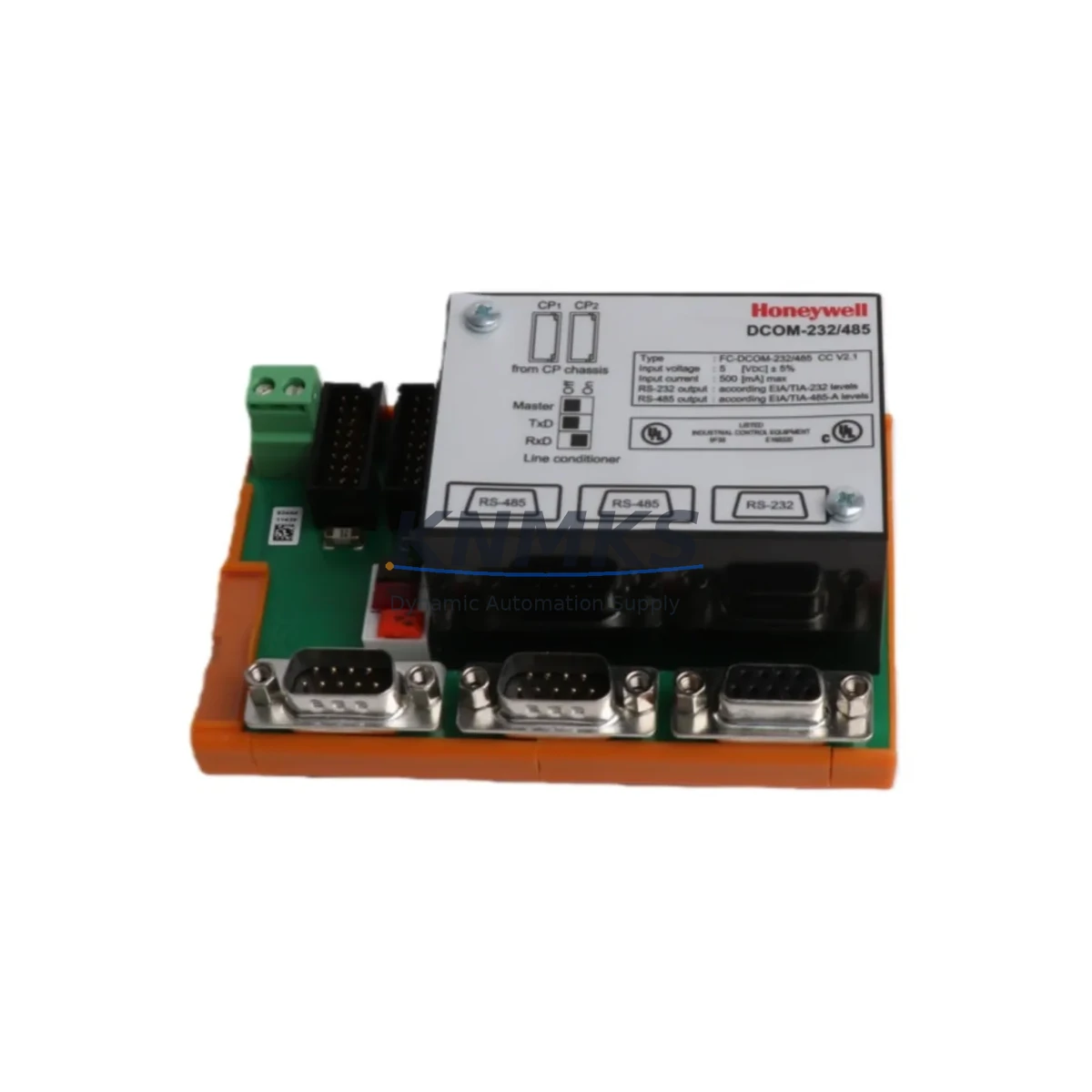
The Honeywell FC-DCOM-485 is an original RS-485 serial communication module engineered for the Experion PKS and TDC 3000 distributed control systems. As a field-proven spare part, the FC-DCOM-485 plays a critical role in maintaining uninterrupted serial data exchange between controllers, I/O subsystems, and third-party field devices across energy, petrochemical, refining, and continuous manufacturing plants. When this module fails or degrades, the consequences extend beyond a single communication link — they can cascade into process alarms, loss of field visibility, and unplanned production shutdowns.
Sourced directly from authorized supply channels, each FC-DCOM-485 unit we ship is inspected, function-tested, and backed by a support terms confirmed by quotation. Our inventory is maintained to support both emergency replacement orders and planned annual maintenance cycles, with fast dispatch and full traceability documentation available upon request.
Spare Maintenance Table
| Parameter | Specification |
|---|---|
| Part Number / SKU | FC-DCOM-485 |
| Brand | Honeywell |
| Series | Experion PKS / TDC 3000 |
| Module Type | RS-485 Serial Communication Module |
| Communication Protocol | RS-485 (EIA-485), supports MODBUS RTU / proprietary Honeywell serial |
| Baud Rate Support | Up to 115,200 bps (application-dependent) |
| Isolation | Optical isolation on serial interface |
| Power Supply | Supplied via backplane (Experion PKS chassis) |
| Operating Temperature | 0°C to 60°C |
| Humidity | 5% to 95% RH, non-condensing |
| Mounting | Plug-in module, Experion PKS / C300 compatible chassis |
| Compatibility | Experion PKS C300, TDC 3000, HPM, ACE nodes |
| Condition | Original / New Surplus / Refurbished (tested) |
| Support terms | 12 Months |
| Lead Time | availability confirmed by RFQ — ships within 1–3 business days |
| Origin | USA |
Maintenance Planning for Continuous Operation
When a maintenance engineer identifies a fault or degraded performance on the FC-DCOM-485, the replacement workflow should extend beyond the module itself. The RS-485 communication path in an Experion PKS cabinet involves multiple interdependent components, and a thorough inspection during the replacement window significantly reduces the risk of repeat failures and secondary downtime events.
Begin by verifying the Experion PKS C300 Controller or associated HPM High-Performance Process Manager for any co-existing fault codes that may indicate upstream communication errors. Inspect the FTA (Field Termination Assembly) wiring blocks and terminal strips connected to the RS-485 bus — corroded terminals or loose connections are a common root cause of intermittent serial faults that are often misdiagnosed as module failures.
Check the Experion PKS backplane and chassis slot contacts for oxidation or mechanical damage. A faulty backplane connector can cause the replacement FC-DCOM-485 to exhibit the same fault symptoms as the original failed unit. If the cabinet houses a Honeywell CC-PAIX01 or CC-TAIX01 analog/digital I/O module on the same communication segment, verify its status indicators and configuration parameters during the same maintenance window.
For plants running MODBUS RTU devices on the RS-485 segment, inspect the signal isolator or repeater installed at the bus junction — particularly in long-cable runs exceeding 100 meters. Degraded isolation can introduce ground loops that stress the communication module’s transceiver. Additionally, confirm that the 24VDC power supply module feeding the control cabinet maintains stable output within ±1% tolerance; voltage sags during peak load are a known contributor to serial communication module resets.
If the plant uses a Honeywell HMIWeb Display Builder or Station for operator interface, verify that the HMI communication path is restored and alarm acknowledgment is functional after the FC-DCOM-485 replacement. Finally, review the fuse and circuit protection on the 24VDC rail serving the communication module slot — a blown fuse or tripped thermal protector is sometimes the actual fault, not the module itself.
Site Replacement Workflow
Step 1 — Pre-Replacement Verification: Confirm the fault is isolated to the FC-DCOM-485 by reviewing Experion PKS system alarms, module status LEDs, and communication diagnostics in the Experion Configuration Studio. Document the current module configuration parameters, baud rate, parity, and device address assignments before removal.
Step 2 — Safe Removal: Follow your site’s LOTO (Lockout/Tagout) procedure. The FC-DCOM-485 is a hot-swap capable module in most Experion PKS chassis configurations, but confirm with your site’s control system documentation before performing a live swap. Remove the module by releasing the ejector levers and sliding it clear of the backplane.
Step 3 — Replacement Installation: Insert the new FC-DCOM-485 into the same chassis slot. The module will perform a self-test sequence upon power-up. Verify that the STATUS LED transitions from fault (red) to normal (green) within 60 seconds. If the module requires firmware configuration, use Experion Configuration Studio to restore the saved parameter set.
Step 4 — Communication Restoration: Confirm that all downstream MODBUS RTU or proprietary serial devices are communicating correctly. Check the Experion PKS system event log for any residual communication alarms. Perform a loop check on critical I/O points served by the restored communication path before returning the process to automatic control.
Step 5 — Documentation and Spare Replenishment: Record the replacement in your CMMS (Computerized Maintenance Management System) with the module serial number, installation date, and post-replacement test results. Immediately initiate a purchase order to replenish your on-site FC-DCOM-485 spare inventory to maintain your minimum stock level.
Spare Parts Support FAQ
Q1: Is the FC-DCOM-485 compatible with both Experion PKS and TDC 3000 systems?
Yes. The FC-DCOM-485 is designed for use within the Honeywell Experion PKS platform and is also applicable in TDC 3000 migration and hybrid configurations where RS-485 serial communication is retained. Always verify the chassis slot type and firmware revision compatibility with your site’s control system engineer before installation.
Q2: What testing is performed before shipment?
Each FC-DCOM-485 unit undergoes functional power-on testing and communication interface verification prior to dispatch. Units sourced as new surplus are inspected for physical integrity and date code. A test report is available upon request for critical plant applications.
Q3: How should I manage FC-DCOM-485 inventory for a large DCS installation?
Industry best practice for critical communication modules in continuous process plants is to maintain a minimum of one spare per 10 installed units, with a floor of two spares per site regardless of installed quantity. For plants with aging Experion PKS or TDC 3000 systems where OEM support has been reduced, increasing the on-site buffer to three or more units is advisable to protect against extended lead times on future procurement.
Q4: What is covered under the support terms confirmed by quotation?
Our support terms confirmed by quotation cover manufacturing defects and functional failures under normal operating conditions. It does not cover damage resulting from incorrect installation, overvoltage events, or physical mishandling. In the event of a support terms claim, we provide a replacement unit or documented resolution support, with return shipping coordinated by our support team. Long-term supply agreements with guaranteed stock reservation are available for customers with multi-site maintenance programs.
© 2026 KNMKS. All rights reserved.
Original Source: https://knmks.com
Contact: admin@knmks.com | +86 18359268345
Product Identification
- Brand / Ecosystem
-
Honeywell
Honeywell - Model / Series
-
FC-DCOM-485
Experion PKS Series - Product Family
- PLCs & Controllers
- Availability Status
- Available on request after model and quantity confirmation
- Inquiry Type
- B2B RFQ, replacement inquiry and project spare-part request
- Pre-Quote Check
- Exact SKU, brand, series, quantity, nameplate photos and destination country are checked before quotation
System Path
Where this product fits in the KNMKS automation structure.
Specification & Inquiry Focus
- Control platform
- PLC, PAC and modular controllers
- Common needs
- CPU, rack, power and I/O expansion
- Project support
- Replacement, cabinet build and maintenance
Buyer Confirmation
Information KNMKS checks before replying.
- Exact model
- FC-DCOM-485
- Brand / ecosystem
- Honeywell
- Product family
- PLCs & Controllers
- Application note
- Replacement, maintenance, project build or spare-part list
- Useful photos
- Nameplate, installed unit, cabinet layout or connector side
- Delivery details
- Quantity, destination country and target schedule
Document Support
Files and notes can be confirmed during quotation.
- Product photos or nameplate confirmation when available
- Packing and delivery notes before quotation confirmation
- Support scope and delivery terms confirmed per inquiry
- Export document coordination for qualified B2B requests
Inquiry Support
- Model cross-checking before quotation
- CPU, power, rack and expansion module matching
- Support for replacement and project inquiry
What to Send Us
- Brand and exact model number: Honeywell FC-DCOM-485
- Quantity and required delivery time
- Application, replacement requirement or nameplate photo
- Destination country and shipping preference
RFQ Preparation
This is a product inquiry page built for RFQ communication.
Fast Model Check
Send this model to KNMKS for confirmation.
Include quantity, destination country and photos if this is a maintenance replacement. The inquiry will be saved with a reference number after submission.
Brand & Compatibility Note
KNMKS displays automation product information for well-known industrial brand ecosystems and compatible replacement references. Brand names are used for product identification and compatibility reference only; final availability and commercial terms are confirmed per quotation.
 Manufacturing
 Machine Tools
 Packaging
 Energy & Power



 HMI & Displays
 Servo Systems
 Variable Frequency Drives
 Sensors