
Overview
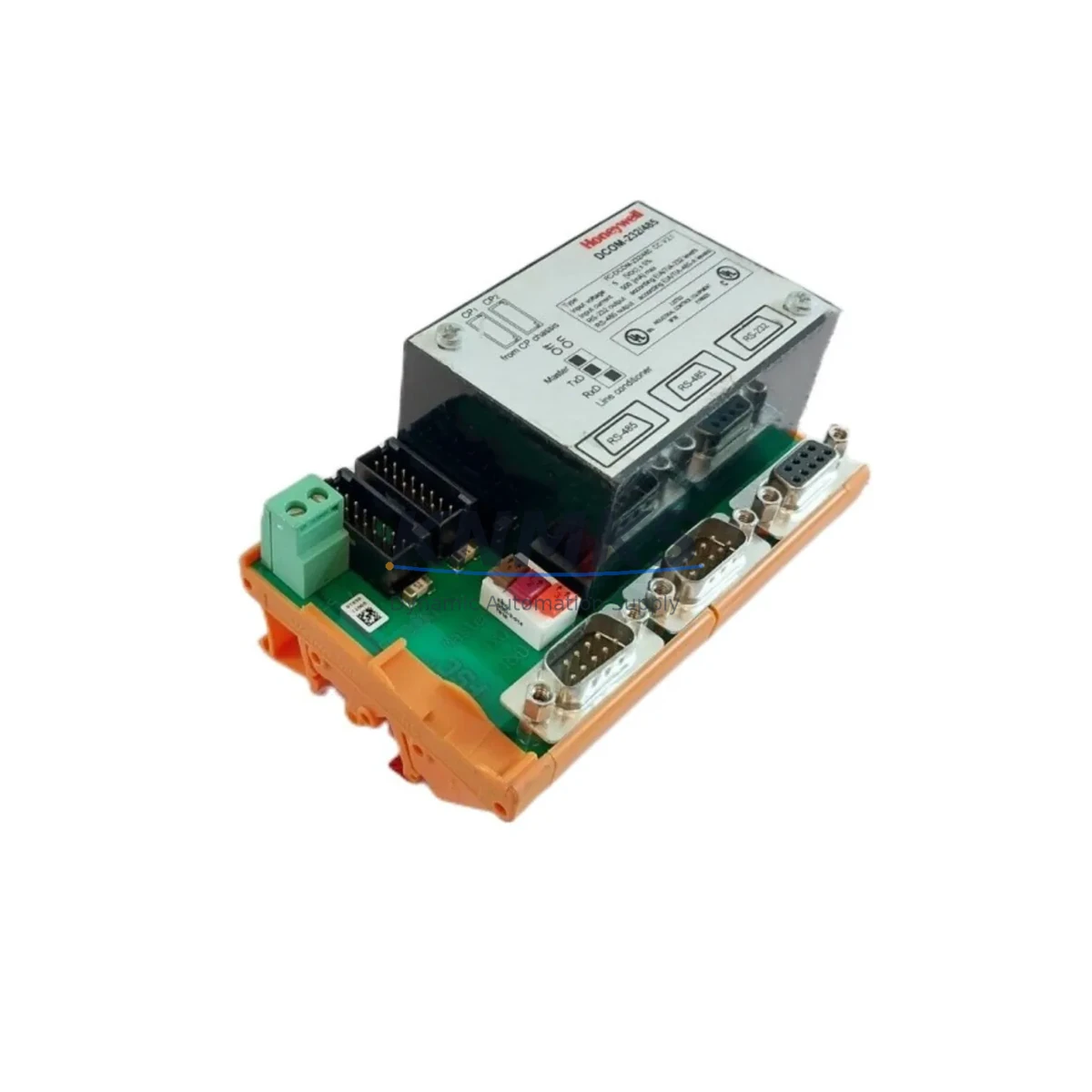
Honeywell FC-DCOM-232/485 Migration-Ready Serial Module for Legacy Control Systems
The Honeywell FC-DCOM-232/485 is a dual-port serial communication module designed for the Experion PKS distributed control system platform. As legacy Honeywell TDC 3000 and PlantScape systems approach end-of-life, the FC-DCOM-232/485 serves as a critical bridge component in RS-232 and RS-485 serial migration projects. Whether you are replacing a failed DCOM module in an active control loop, upgrading a legacy serial gateway, or expanding communication capacity in an existing Experion C300 or C200 controller chassis, this module provides a verified drop-in replacement path with minimal engineering rework.
The FC-DCOM-232/485 supports both RS-232 and RS-485 physical layer standards, enabling integration with third-party field devices, Modbus RTU slaves, serial printers, barcode readers, and legacy HMI terminals that cannot be immediately migrated to Ethernet-based protocols. In brownfield retrofit projects where full protocol migration to OPC-UA or HART IP is not yet feasible, this module allows engineers to maintain existing serial communication links while the broader control architecture is modernized in phases.
Migration Compatibility Table
| Parameter | FC-DCOM-232/485 Specification | Retrofit Notes |
|---|---|---|
| Communication Interfaces | RS-232 (DB9) + RS-485 (terminal block) | Verify existing cable pinout before swap; DB9 wiring may differ from legacy DCOM variants |
| Supported Protocols | Modbus RTU, generic serial, proprietary Honeywell serial | Confirm protocol driver version in Experion Configuration Studio before commissioning |
| Chassis / Backplane Compatibility | Experion PKS C300 / C200 controller chassis | Module slot address must be re-assigned in Control Builder if replacing a different slot position |
| Power Consumption | Supplied via backplane (no external power required) | Verify chassis power supply (FC-PSU series) capacity before adding modules; total chassis load must not exceed rated output |
| Terminal Wiring | RS-485: 2-wire or 4-wire selectable | Confirm termination resistor setting (120 Ω) at both ends of RS-485 bus; incorrect termination causes communication errors |
| Module Address Configuration | Configured via Experion Control Builder software | Export existing module configuration before removal; re-import after installation to minimize re-engineering time |
| Firmware Compatibility | Compatible with Experion PKS R400 and above | Confirm server firmware revision; older R300 environments may require patch before module recognition |
| Physical Dimensions | Standard Experion PKS module form factor | No additional panel space required; direct slot replacement in existing chassis |
| Replacement for Legacy Models | Replaces FC-DCOM-232, FC-DCOM-485 single-port variants | Dual-port design consolidates two legacy single-port modules into one slot; verify slot availability |
| Support terms | support terms confirmed by quotation | Covers manufacturing defects; includes pre-shipment functional test report on request |
Retrofit Planning for Existing Automation Systems
A successful FC-DCOM-232/485 retrofit begins with a thorough audit of the existing control cabinet. Engineers should document the current chassis layout, including the positions of the FC-PSUX power supply module, the C300 controller module, and any existing FC-DCOM or FC-AI/AO I/O modules occupying adjacent slots. The dual-port design of the FC-DCOM-232/485 is particularly valuable when consolidating two aging single-port serial modules into a single slot, freeing chassis space for additional I/O expansion modules such as the FC-SDO-0824 digital output module or FC-SAI-1620M analog input module.
Before physical installation, engineers should export the full module configuration from Experion Control Builder, including all serial port parameters, baud rate settings, parity, stop bits, and device address assignments. This configuration backup is essential for rapid restoration if commissioning issues arise. The RS-485 bus wiring should be inspected for correct 2-wire or 4-wire topology, and termination resistors verified at both the module end and the far-field device end. Devices such as Modbus RTU flow computers, third-party motor drives, or legacy serial HMI panels connected to the existing DCOM module must be individually verified for compatibility with the replacement module’s driver version.
For sites running Honeywell Experion PKS with an FTE (Fault Tolerant Ethernet) network backbone, the FC-DCOM-232/485 integrates without requiring changes to the FTE switch configuration or the ENET communication module. However, if the serial devices being served by this module also communicate status data to an Experion Station HMI display, engineers should verify that the HMI faceplate templates and alarm point references remain valid after the module address is re-assigned in Control Builder. In some R400-era configurations, a module slot change triggers a point rebuild that temporarily suppresses alarms — this should be coordinated with the site safety team before execution.
Sites migrating from TDC 3000 HPM (High-Performance Manager) serial I/O to Experion PKS will find the FC-DCOM-232/485 a practical intermediate step. Rather than immediately replacing all serial field devices with HART or Foundation Fieldbus instruments, the serial module allows the new Experion controller to maintain communication with existing Modbus RTU devices, extending the useful life of field instrumentation while the broader migration is planned and budgeted. This phased approach also reduces the risk of simultaneous multi-system cutover, which is a primary cause of extended unplanned downtime in brownfield DCS migration projects.
Downtime Control During System Migration
Minimizing production downtime during a serial module replacement requires careful pre-staging and a clearly defined cutover sequence. The FC-DCOM-232/485 should be pre-configured offline using a spare Experion chassis or a bench test environment before the scheduled maintenance window. All serial port parameters — baud rate, parity, data bits, stop bits, and flow control — should be verified against the connected field device specifications and confirmed to match the outgoing module’s settings exactly.
During the cutover window, the recommended sequence is: (1) place the affected control loops in manual mode at the Experion Station operator console; (2) export the current module configuration from Control Builder; (3) power down the chassis slot using the chassis keyswitch or software inhibit command if supported; (4) physically swap the module; (5) power up and confirm module LED status; (6) download the pre-staged configuration; (7) verify serial communication link status in the Experion System Display; (8) confirm field device responses; and (9) return control loops to automatic mode. This sequence, when executed by a prepared team, typically completes within a 30–60 minute maintenance window for a single module replacement.
To protect existing program logic, no changes should be made to the Control Builder strategy during the module swap. The control strategy — including PID blocks, serial device drivers, and alarm limits — should remain locked and unchanged throughout the physical replacement. If the replacement module is installed in a different chassis slot than the original, the module address must be updated in Control Builder and a strategy download performed, which requires a brief controller reload. This reload period, typically under 60 seconds for a C300 controller, should be communicated to operations in advance. All pre-shipment units are functionally tested before dispatch, and a test report is available on request to support site acceptance procedures.
Retrofit Support FAQ
Q1: Is the FC-DCOM-232/485 a direct replacement for the older FC-DCOM-232 and FC-DCOM-485 single-port modules?
Yes. The FC-DCOM-232/485 combines both RS-232 and RS-485 ports in a single module. It occupies one chassis slot and can replace two legacy single-port modules, provided a free slot is available in the target position. Verify the chassis slot assignment in Control Builder and update the module address if the physical slot position changes.
Q2: What commissioning steps are required after installation?
After physical installation, download the pre-staged module configuration via Experion Control Builder, verify serial port LED indicators show active communication, confirm Modbus RTU or serial device polling responses in the Experion System Display, and check that all associated HMI alarm points are active and correctly mapped. A full loop check against each connected serial device is recommended before returning to automatic control.
Q3: Can this module be used in an Experion PKS system running firmware older than R400?
The FC-DCOM-232/485 is validated for Experion PKS R400 and above. For systems running R300 or earlier, a firmware patch or server upgrade may be required before the module is recognized by the Experion server. Contact your Honeywell system integrator or our technical team to confirm compatibility with your specific server revision before ordering.
Q4: What does the support terms confirmed by quotation cover, and is in-stock inventory available for urgent replacement?
The support terms confirmed by quotation cover manufacturing defects and functional failures under normal operating conditions. All units are pre-shipment tested and a functional test report is available on request. In-stock inventory is maintained for urgent replacement orders, with global delivery details confirmed by RFQ available. Contact admin@knmks.com or +86 18359268345 for lead time confirmation and expedited dispatch options.
© 2026 KNMKS. All rights reserved.
Original Source: https://knmks.com
Contact: admin@knmks.com | +86 18359268345
Product Identification
- Brand / Ecosystem
-
Honeywell
Honeywell - Model / Series
-
FC-DCOM-232/485
Experion PKS Series - Product Family
- PLCs & Controllers
- Availability Status
- Available on request after model and quantity confirmation
- Inquiry Type
- B2B RFQ, replacement inquiry and project spare-part request
- Pre-Quote Check
- Exact SKU, brand, series, quantity, nameplate photos and destination country are checked before quotation
System Path
Where this product fits in the KNMKS automation structure.
Specification & Inquiry Focus
- Control platform
- PLC, PAC and modular controllers
- Common needs
- CPU, rack, power and I/O expansion
- Project support
- Replacement, cabinet build and maintenance
Buyer Confirmation
Information KNMKS checks before replying.
- Exact model
- FC-DCOM-232/485
- Brand / ecosystem
- Honeywell
- Product family
- PLCs & Controllers
- Application note
- Replacement, maintenance, project build or spare-part list
- Useful photos
- Nameplate, installed unit, cabinet layout or connector side
- Delivery details
- Quantity, destination country and target schedule
Document Support
Files and notes can be confirmed during quotation.
- Product photos or nameplate confirmation when available
- Packing and delivery notes before quotation confirmation
- Support scope and delivery terms confirmed per inquiry
- Export document coordination for qualified B2B requests
Inquiry Support
- Model cross-checking before quotation
- CPU, power, rack and expansion module matching
- Support for replacement and project inquiry
What to Send Us
- Brand and exact model number: Honeywell FC-DCOM-232/485
- Quantity and required delivery time
- Application, replacement requirement or nameplate photo
- Destination country and shipping preference
RFQ Preparation
This is a product inquiry page built for RFQ communication.
Fast Model Check
Send this model to KNMKS for confirmation.
Include quantity, destination country and photos if this is a maintenance replacement. The inquiry will be saved with a reference number after submission.
Brand & Compatibility Note
KNMKS displays automation product information for well-known industrial brand ecosystems and compatible replacement references. Brand names are used for product identification and compatibility reference only; final availability and commercial terms are confirmed per quotation.
 Manufacturing
 Machine Tools
 Packaging
 Energy & Power



 HMI & Displays
 Servo Systems
 Variable Frequency Drives
 Sensors