
Overview
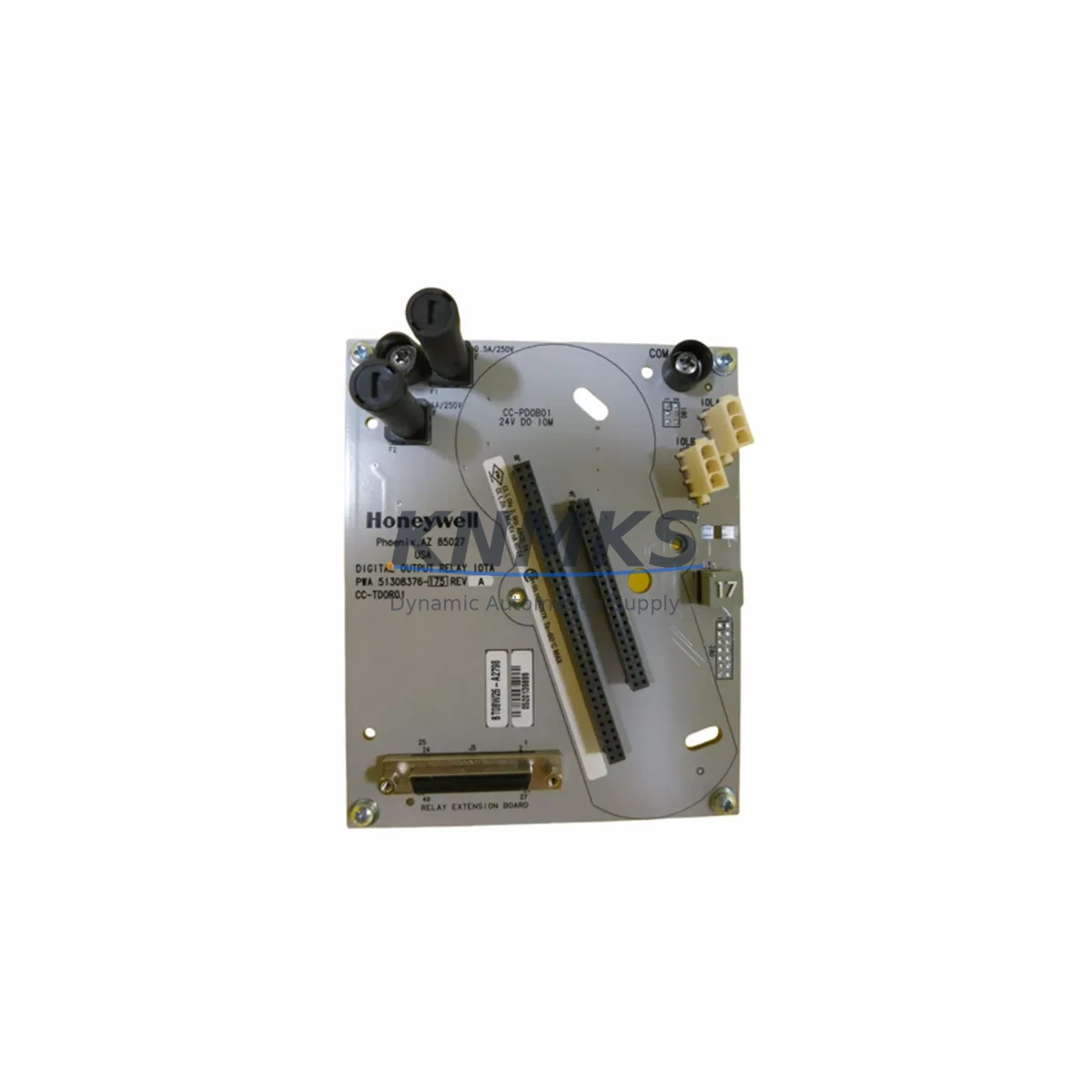
Honeywell CC-TDOR01 Relay Output Module for Legacy DCS Systems
The Honeywell CC-TDOR01 (part number 51308376-175) is a migration-ready relay output module engineered for the Experion PKS C300 Distributed Control System platform. As legacy Honeywell TDC 3000, PlantScape, and early Experion R100–R300 installations reach end-of-support milestones, plant engineers and automation teams face increasing pressure to source verified replacement modules that maintain electrical compatibility, preserve existing wiring infrastructure, and minimize unplanned downtime during scheduled outages or emergency changeovers.
This module provides eight relay output channels with dry-contact switching capability, designed to interface directly with the C300 controller node via the Series C I/O FTA (Field Termination Assembly). The CC-TDOR01 is fully compatible with the CC-PCNT01 pulse counter input module and CC-PAIH01 analog input module commonly installed in the same C300 I/O cabinet, allowing engineers to plan a phased migration without disrupting adjacent I/O channels. Each unit is pre-tested against Honeywell factory specifications, ships with a support terms confirmed by quotation, and is available from multi-region stock for fast global dispatch to support both emergency replacements and planned maintenance windows.
Migration Compatibility Table
| Parameter | CC-TDOR01 (51308376-175) | Retrofit Notes |
|---|---|---|
| Platform Compatibility | Honeywell Experion PKS C300 DCS | Verify Experion R400+ firmware on C300 controller node |
| Output Channels | 8 × Relay (Dry Contact) | Map channel addresses in Control Builder before hot-swap |
| FTA Interface | Series C I/O FTA (CC-TAIX11, CC-TAOX11 compatible) | Confirm FTA revision; older FTA revisions may require adapter |
| Backplane / Rack | C300 I/O Link — IOLIM or IOTA mounting | Check available slot count in existing I/O cabinet |
| Communication Protocol | Experion I/O Link (proprietary) | No protocol conversion required within C300 architecture |
| Wiring Compatibility | Terminal block wiring retained from legacy FTA | Re-use existing field cable terminations; verify wire gauge |
| Power Supply | Powered via I/O Link backplane (24 VDC) | Confirm CC-PWR001 or CC-PWR002 power module capacity |
| Installation Space | Standard C300 I/O module form factor | Single slot; no additional DIN rail or panel space required |
| Firmware | Compatible with Experion R400–R520 | Upgrade controller firmware before replacement if below R400 |
| Support terms | 12 Months | Covers manufacturing defects; pre-shipment tested |
Retrofit Planning for Existing Automation Systems
Successful integration of the CC-TDOR01 into an existing Experion PKS C300 architecture requires a structured pre-migration assessment. Engineers should begin by auditing the current I/O cabinet layout to confirm available backplane slots and verify that the installed CC-PWR001 or CC-PWR002 power module can support the additional load of the replacement relay output module without exceeding rated capacity. In multi-node installations, the C300 controller node’s I/O Link budget must be recalculated if additional modules are being added alongside the CC-TDOR01.
Terminal wiring from the existing FTA should be documented and photographed before removal. The Series C FTA used with the CC-TDOR01 retains the same terminal block layout as earlier Experion relay output assemblies, which means field cable terminations can typically be preserved without re-pulling wire — a significant advantage in retrofit scenarios where cable trays are congested or cable labeling is incomplete. Engineers should cross-reference the existing I/O assignment table in Honeywell Control Builder to confirm that module addresses, channel tags, and alarm setpoints are correctly mapped before the replacement module is inserted.
In systems where the CC-TDOR01 operates alongside a CC-TAIX11 analog input FTA, a CC-PAIH01 analog input module, or a CC-PCNT01 pulse counter input module, the I/O Link scan rate and module polling sequence should be reviewed to ensure that the addition of the relay output module does not introduce latency into time-critical control loops. For installations that include a Honeywell Experion Station or an Experion-connected HMI running on a Windows-based operator workstation, the associated HMI faceplates and alarm graphics should be validated in a simulation environment before the live cutover to confirm that relay status feedback is correctly displayed.
Where the existing control cabinet includes a CC-SCMB01 serial communication module or a CC-LINK01 I/O Link interface module, engineers should verify that the communication link remains stable after the module swap, particularly in installations where the I/O Link is operating near its maximum node count. A pre-tested CC-TDOR01 from verified stock eliminates the risk of introducing a faulty module into a live system, reducing the scope of on-site troubleshooting during the commissioning phase.
Downtime Control During System Migration
Minimizing control system downtime during a relay output module replacement requires careful coordination between the DCS engineering team, the operations group, and the site safety authority. For the CC-TDOR01, the recommended approach is to schedule the replacement during a planned maintenance window rather than performing a hot-swap under live process conditions, unless the C300 platform’s redundancy configuration explicitly supports online module replacement for the installed I/O Link revision.
Before initiating the physical swap, the control strategy associated with the affected relay output channels should be placed in manual mode at the Experion operator station. This preserves the current output state of each relay channel and prevents unintended process actuations during the module removal and insertion sequence. The existing module configuration — including channel enable/disable states, output inversion settings, and watchdog behavior — should be exported from Control Builder and retained as a backup prior to any hardware change.
Once the CC-TDOR01 is seated in the backplane slot, Control Builder will automatically detect the new module and initiate a configuration download if the module address matches the previously defined I/O assignment. Engineers should confirm that the module status LED indicates a healthy I/O Link connection before returning the associated control loops to automatic mode. Field verification of each relay output channel — using a loop tester or by observing the connected actuator response — should be completed before the maintenance window is closed. This structured commissioning sequence, combined with a pre-tested replacement module and documented wiring records, is the most reliable method for achieving a single-shift cutover with no residual process impact.
Retrofit Support FAQ
Q: Is the CC-TDOR01 a direct drop-in replacement for earlier Honeywell relay output modules used in TDC 3000 or PlantScape systems?
A: The CC-TDOR01 is designed specifically for the Experion PKS C300 I/O architecture and is not electrically or mechanically interchangeable with TDC 3000 HPM I/O modules or PlantScape I/O assemblies. Migration from TDC 3000 or PlantScape to Experion PKS C300 requires a full I/O migration plan, including FTA replacement and Control Builder reconfiguration. Contact our technical team for a migration assessment.
Q: What wiring changes are required when installing the CC-TDOR01 to replace a failed relay output module of the same part number?
A: If replacing a CC-TDOR01 with an identical part number in the same FTA slot, no wiring changes are required. Field cable terminations at the Series C FTA terminal block remain unchanged. Verify that the replacement module’s firmware revision is compatible with the installed Experion R-release before insertion.
Q: Has the CC-TDOR01 been tested before shipment, and what does the support terms confirmed by quotation cover?
A: Yes. Every CC-TDOR01 unit is pre-tested against Honeywell factory specifications before dispatch. The support terms confirmed by quotation cover manufacturing defects and functional failures under normal operating conditions. Units are shipped from multi-region stock to support delivery details confirmed by RFQ for both emergency replacements and scheduled maintenance outages.
Q: What is the lead time for CC-TDOR01, and is stock available for immediate dispatch?
A: The CC-TDOR01 (51308376-175) is maintained in multi-region inventory for immediate dispatch. Standard lead time for in-stock units is 1–3 business days depending on destination. For urgent requirements or bulk orders, contact our sales team directly to confirm current stock levels and expedited shipping options.
© 2026 KNMKS. All rights reserved.
Original Source: https://knmks.com
Contact: admin@knmks.com | +86 18359268345
Product Identification
- Brand / Ecosystem
-
Honeywell
Honeywell - Model / Series
-
CC-TDOR01-51308376-175
Experion PKS Series - Product Family
- PLCs & Controllers
- Availability Status
- Available on request after model and quantity confirmation
- Inquiry Type
- B2B RFQ, replacement inquiry and project spare-part request
- Pre-Quote Check
- Exact SKU, brand, series, quantity, nameplate photos and destination country are checked before quotation
System Path
Where this product fits in the KNMKS automation structure.
Specification & Inquiry Focus
- Control platform
- PLC, PAC and modular controllers
- Common needs
- CPU, rack, power and I/O expansion
- Project support
- Replacement, cabinet build and maintenance
Buyer Confirmation
Information KNMKS checks before replying.
- Exact model
- CC-TDOR01-51308376-175
- Brand / ecosystem
- Honeywell
- Product family
- PLCs & Controllers
- Application note
- Replacement, maintenance, project build or spare-part list
- Useful photos
- Nameplate, installed unit, cabinet layout or connector side
- Delivery details
- Quantity, destination country and target schedule
Document Support
Files and notes can be confirmed during quotation.
- Product photos or nameplate confirmation when available
- Packing and delivery notes before quotation confirmation
- Support scope and delivery terms confirmed per inquiry
- Export document coordination for qualified B2B requests
Inquiry Support
- Model cross-checking before quotation
- CPU, power, rack and expansion module matching
- Support for replacement and project inquiry
What to Send Us
- Brand and exact model number: Honeywell CC-TDOR01-51308376-175
- Quantity and required delivery time
- Application, replacement requirement or nameplate photo
- Destination country and shipping preference
RFQ Preparation
This is a product inquiry page built for RFQ communication.
Fast Model Check
Send this model to KNMKS for confirmation.
Include quantity, destination country and photos if this is a maintenance replacement. The inquiry will be saved with a reference number after submission.
Brand & Compatibility Note
KNMKS displays automation product information for well-known industrial brand ecosystems and compatible replacement references. Brand names are used for product identification and compatibility reference only; final availability and commercial terms are confirmed per quotation.
 Manufacturing
 Machine Tools
 Packaging
 Energy & Power



 HMI & Displays
 Servo Systems
 Variable Frequency Drives
 Sensors