
Overview
Honeywell CC-PCNT01CC-TCNT01 Maintenance-Proven Spare Part for Factory Uptime
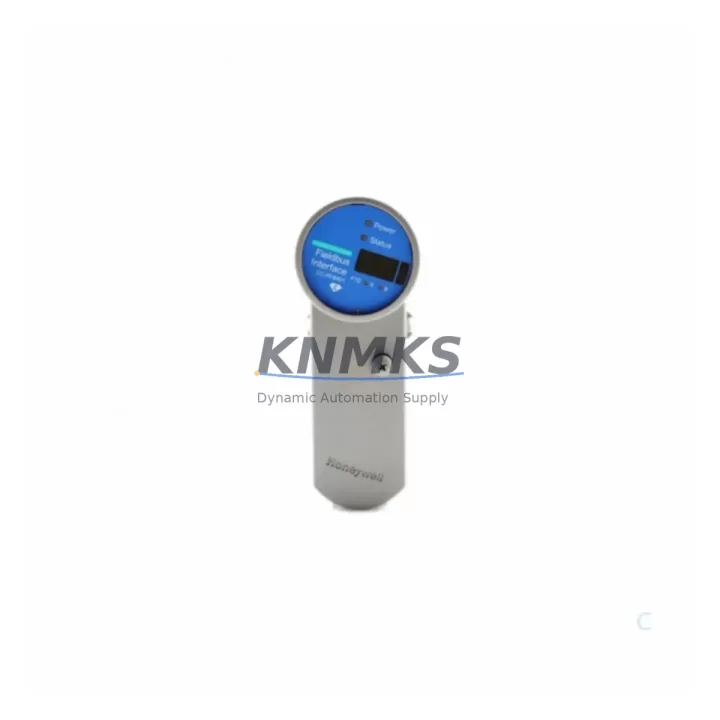
The Honeywell CC-PCNT01CC-TCNT01 is an original Pulse Counter and Timer Module designed for the Experion PKS (Process Knowledge System) distributed control system. As a maintenance-proven spare part, it plays a critical role in sustaining continuous factory operation across process industries including oil & gas, chemical, power generation, and advanced manufacturing. Sourced from authorized supply channels and tested prior to shipment, this module supports rapid field replacement with verified compatibility — minimizing unplanned downtime and protecting production continuity.
For maintenance engineers managing aging Experion PKS installations, the CC-PCNT01CC-TCNT01 represents a high-priority line item in any spare parts inventory strategy. Its pulse counting and timer functions are integral to flow measurement, batch sequencing, and event-driven control logic. When this module fails or degrades, the impact on process visibility and control accuracy can be immediate and severe. Stocking a tested replacement unit ensures that recovery time is measured in minutes, not days.
Procurement engineers sourcing this module should verify the full part number — CC-PCNT01CC-TCNT01 — against the installed revision level in the Experion PKS cabinet. KNMKS supplies this module with a support terms confirmed by quotation, pre-shipment functional testing, and long-term availability commitment, reducing the sourcing risk associated with obsolete or end-of-life DCS components.
Spare Maintenance Table
| Parameter | Specification / Detail |
|---|---|
| Part Number | CC-PCNT01CC-TCNT01 |
| Brand | Honeywell |
| Series | Experion PKS (Process Knowledge System) |
| Module Type | Pulse Counter & Timer Module |
| Product Category | DCS I/O Module / Field Control Module |
| Compatible System | Honeywell Experion PKS C300 / C200 Controller Series |
| Input Type | Pulse / Frequency / Timer Signal Inputs |
| Mounting | DIN Rail / Backplane-mounted in Experion PKS I/O Cabinet |
| Communication | FTE (Fault Tolerant Ethernet) via Experion PKS backplane |
| Operating Temperature | 0°C to 60°C (standard industrial cabinet environment) |
| Origin | USA (Honeywell OEM) |
| Condition | Original, New or Refurbished-Tested |
| Pre-Shipment Test | Yes — functional verification before dispatch |
| Support terms | 12 Months from date of shipment |
| Lead Time | In-stock: 1–3 business days; Ex-stock: subject to availability |
| Application | Flow metering, batch control, event counting, timer-based sequencing |
| Maintenance Interval | Inspect every 12 months or per site PM schedule |
Maintenance Planning for Continuous Operation
When replacing the CC-PCNT01CC-TCNT01 in an Experion PKS cabinet, a thorough site inspection of adjacent components is essential to prevent repeat failures and ensure system stability. Maintenance engineers should treat this replacement as an opportunity for a broader cabinet health check.
Begin by inspecting the Experion PKS C300 or C200 Controller Module — the primary processing unit that communicates with the CC-PCNT01CC-TCNT01 over the backplane. Any firmware mismatch or controller fault can cause the replacement module to report errors even after a successful hardware swap. Verify controller revision compatibility before powering up the new module.
Next, check the CC-PWR001 or CC-PWR002 Power Supply Module in the same I/O cabinet. Pulse counter modules are sensitive to power quality; voltage ripple or supply degradation can cause erratic pulse counts or timer drift. A failing power supply is a common root cause of intermittent module faults that are misdiagnosed as module failure.
Inspect the FTE (Fault Tolerant Ethernet) network switch and cabling connecting the I/O cabinet to the Experion PKS server. Communication interruptions at the network layer can cause the CC-PCNT01CC-TCNT01 to appear offline even when the module hardware is functional. Check switch port status, cable integrity, and FTE redundancy configuration.
Review the CC-SCMB02 or CC-SCMB01 System Cabinet Mounting Base (backplane) for signs of corrosion, bent connector pins, or mechanical damage. A compromised backplane connection is a frequent cause of module communication faults in high-vibration or high-humidity environments.
For field wiring connected to the pulse inputs, inspect the terminal blocks and signal cables running from field instruments (flow transmitters, encoders, proximity switches) to the module’s I/O terminals. Loose terminations, shielding failures, or cable insulation breakdown can introduce noise that corrupts pulse counts. Re-torque all terminal connections and verify cable shield grounding at a single point.
Finally, check any signal isolators or signal conditioners installed between field devices and the CC-PCNT01CC-TCNT01 inputs. These components protect the module from voltage spikes and ground loops; a failed isolator can pass damaging transients to the module’s input circuitry. Replace any isolator showing signs of overheating or output signal drift.
Stocking the CC-PCNT01CC-TCNT01 alongside these associated components — power supply modules, FTE network components, backplane assemblies, and signal isolators — constitutes a complete spare parts strategy for the Experion PKS I/O subsystem, enabling full cabinet recovery within a single maintenance window.
Site Replacement Workflow
Step 1 — Pre-Replacement Verification: Confirm the installed module part number matches CC-PCNT01CC-TCNT01. Check the Experion PKS Station for any active alarms or diagnostic messages related to the module. Document current pulse count values and timer configurations from the Experion PKS engineering station before removal.
Step 2 — Safe Isolation: Follow site lockout/tagout (LOTO) procedures. The CC-PCNT01CC-TCNT01 supports hot-swap in Experion PKS systems with redundant I/O configurations; verify your system’s redundancy status before proceeding. For non-redundant configurations, coordinate with the control room to place affected loops in manual mode.
Step 3 — Module Removal and Inspection: Remove the faulty module and inspect the backplane connector for damage. Clean the connector with approved contact cleaner if contamination is present. Retain the faulty module for failure analysis and support terms claim processing.
Step 4 — Replacement Module Installation: Insert the new CC-PCNT01CC-TCNT01 into the correct slot. The Experion PKS system will automatically detect and configure the module using stored configuration data from the controller. Verify the module status LED indicates normal operation within 60 seconds of insertion.
Step 5 — Functional Verification: From the Experion PKS engineering station, confirm the module is online and all pulse input channels are reading correctly. Compare live pulse count values against field instrument readings to verify signal integrity. Return affected loops to automatic control and document the replacement in the site maintenance log.
Step 6 — Spare Parts Replenishment: Immediately initiate a purchase order for a replacement CC-PCNT01CC-TCNT01 to restore your spare parts buffer. KNMKS maintains long-term stock availability for this module with a support terms confirmed by quotation on all units supplied.
Spare Parts Support FAQ
Q1: Is the CC-PCNT01CC-TCNT01 compatible with both C200 and C300 Experion PKS controllers?
The CC-PCNT01CC-TCNT01 is designed for use within the Honeywell Experion PKS I/O subsystem. Compatibility with specific controller generations (C200, C300) depends on the installed firmware revision and system configuration. KNMKS recommends providing your Experion PKS system revision details at the time of order so compatibility can be confirmed before shipment. All units are tested prior to dispatch to verify module functionality.
Q2: What is the support terms coverage and what does it include?
All CC-PCNT01CC-TCNT01 units supplied by KNMKS carry a support terms confirmed by quotation from the date of shipment. The support terms covers manufacturing defects and functional failures under normal operating conditions. Each unit undergoes pre-shipment functional testing. In the event of a support terms claim, KNMKS provides replacement or repair support with documented failure analysis upon request.
Q3: How quickly can the CC-PCNT01CC-TCNT01 be shipped, and is long-term supply guaranteed?
In-stock units are dispatched within 1–3 business days. KNMKS maintains a dedicated inventory buffer for high-demand Experion PKS spare parts to support emergency replacement scenarios. For sites with planned annual shutdowns or multi-year maintenance contracts, KNMKS offers long-term supply agreements to guarantee availability and price stability over extended periods.
Q4: What documentation is provided with the module to support site acceptance and audit requirements?
Each shipment includes a packing list with the module part number, serial number (where applicable), and test certification. Upon request, KNMKS can provide a certificate of conformance, test report, and material traceability documentation to support site acceptance testing and regulatory audit requirements. Contact admin@knmks.com to specify documentation requirements at the time of order.
© 2026 KNMKS. All rights reserved.
Original Source: https://knmks.com
Contact: admin@knmks.com | +86 18359268345
Product Identification
- Brand / Ecosystem
-
Honeywell
Honeywell - Model / Series
-
CC-PCNT01CC-TCNT01
Experion PKS Series - Product Family
- PLCs & Controllers
- Availability Status
- Available on request after model and quantity confirmation
- Inquiry Type
- B2B RFQ, replacement inquiry and project spare-part request
- Pre-Quote Check
- Exact SKU, brand, series, quantity, nameplate photos and destination country are checked before quotation
System Path
Where this product fits in the KNMKS automation structure.
Specification & Inquiry Focus
- Control platform
- PLC, PAC and modular controllers
- Common needs
- CPU, rack, power and I/O expansion
- Project support
- Replacement, cabinet build and maintenance
Buyer Confirmation
Information KNMKS checks before replying.
- Exact model
- CC-PCNT01CC-TCNT01
- Brand / ecosystem
- Honeywell
- Product family
- PLCs & Controllers
- Application note
- Replacement, maintenance, project build or spare-part list
- Useful photos
- Nameplate, installed unit, cabinet layout or connector side
- Delivery details
- Quantity, destination country and target schedule
Document Support
Files and notes can be confirmed during quotation.
- Product photos or nameplate confirmation when available
- Packing and delivery notes before quotation confirmation
- Support scope and delivery terms confirmed per inquiry
- Export document coordination for qualified B2B requests
Inquiry Support
- Model cross-checking before quotation
- CPU, power, rack and expansion module matching
- Support for replacement and project inquiry
What to Send Us
- Brand and exact model number: Honeywell CC-PCNT01CC-TCNT01
- Quantity and required delivery time
- Application, replacement requirement or nameplate photo
- Destination country and shipping preference
RFQ Preparation
This is a product inquiry page built for RFQ communication.
Fast Model Check
Send this model to KNMKS for confirmation.
Include quantity, destination country and photos if this is a maintenance replacement. The inquiry will be saved with a reference number after submission.
Brand & Compatibility Note
KNMKS displays automation product information for well-known industrial brand ecosystems and compatible replacement references. Brand names are used for product identification and compatibility reference only; final availability and commercial terms are confirmed per quotation.
 Manufacturing
 Machine Tools
 Packaging
 Energy & Power



 HMI & Displays
 Servo Systems
 Variable Frequency Drives
 Sensors