
Overview
Honeywell CC-PCF901 Migration-Ready Control Firewall: Legacy System Migration & Compatible Upgrade for Experion PKS
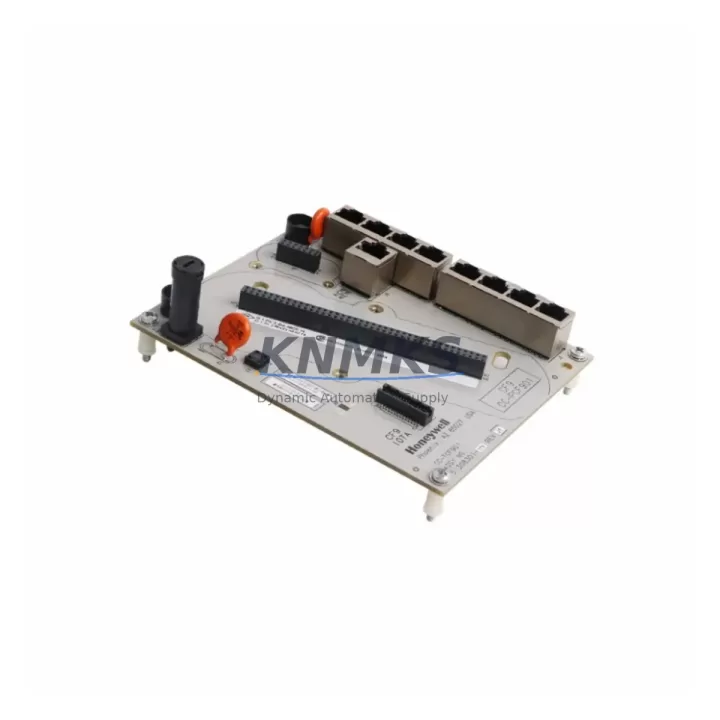
The Honeywell CC-PCF901 (also referenced as CC-TCF901) is a migration-ready Control Firewall Module engineered for Experion PKS distributed control system environments. As legacy Honeywell TDC 3000 and PlantScape systems approach end-of-life, the CC-PCF901 provides a validated, drop-in upgrade path that preserves existing control logic, minimizes downtime, and extends the operational lifespan of installed automation infrastructure. Whether you are replacing a discontinued firewall module, upgrading a control cabinet, or executing a phased DCS migration, the CC-PCF901 is a proven solution backed by support terms confirmed by quotation coverage and verified pre-shipment testing.
Industrial facilities running legacy Honeywell architectures face increasing pressure to modernize without disrupting continuous production. The CC-PCF901 addresses this challenge directly: it is designed to slot into existing C300 Controller backplane configurations, maintain FTE (Fault Tolerant Ethernet) network segmentation, and support Experion PKS R400 through R520 firmware environments. Engineers replacing aging CC-PCF901 units or decommissioning TDC 3000 Global Control Network (GCN) firewall nodes will find this module fully compatible with existing terminal block wiring, DIN rail mounting dimensions, and cabinet depth constraints — eliminating the need for panel re-engineering.
Before committing to a replacement, site engineers should verify the following parameters against the installed base: power supply capacity (the CC-PCF901 draws from the C300 chassis 24 VDC bus — confirm the existing CC-PWR001 or CC-PWR002 power supply module can support the additional load), backplane slot assignment (the firewall module occupies a dedicated slot in the Series C I/O chassis — verify slot addressing in the Experion Configuration Studio before hot-swap), and FTE port mapping (dual RJ-45 FTE ports must be re-patched to the existing FTE switch infrastructure, typically a Cisco IE 2000 or equivalent managed switch configured for Honeywell FTE VLANs).
Terminal wiring on the CC-PCF901 follows the standard Honeywell Series C connector pinout. No re-termination is required when replacing a like-for-like unit; however, if migrating from a TDC 3000 HPM (High-Performance Manager) firewall node, engineers must map legacy UCN (Universal Control Network) addresses to the new FTE node addressing scheme within the Experion Server configuration. This address remapping step is critical to maintaining HMI display continuity — Experion Station screens referencing legacy UCN point addresses must be updated in the Display Builder to reflect the new FTE-based point paths.
Communication protocol migration is a key consideration. The CC-PCF901 supports Honeywell’s proprietary FTE protocol natively and does not require additional protocol converters when operating within a pure Experion PKS environment. However, facilities integrating third-party SCADA systems via OPC DA or OPC UA should confirm that the Experion OPC Server configuration is updated post-replacement to reflect any node address changes. Where Modbus RTU or PROFIBUS DP legacy field devices remain in service, the CC-PDOB01 PROFIBUS DP Output Module and associated CC-SCMB02 Serial Communications Module may be referenced during the broader migration planning process to ensure field device connectivity is maintained across the upgraded control network.
Firmware compatibility must be confirmed prior to installation. The CC-PCF901 requires Experion PKS firmware R400.1 or later. Sites running earlier firmware revisions should schedule a firmware upgrade on the C300 Controller — typically the CC-CONT01 — before installing the replacement firewall module. Firmware upgrade procedures are documented in Honeywell’s Experion PKS Installation and Upgrade Guide and should be executed during a planned maintenance window to avoid unplanned process interruptions.
Physical installation space should be confirmed against the existing cabinet layout. The CC-PCF901 occupies a single Series C I/O chassis slot (standard 19-inch rack or DIN rail enclosure). Cabinet depth must accommodate the module body plus FTE cable bend radius. Where cabinet space is constrained, engineers may consider consolidating I/O using CC-TDIL01 Digital Input Modules or CC-TAOX11 Analog Output Modules with higher channel density to free up adjacent slots for the firewall module installation.
All CC-PCF901 units supplied by KNMKS undergo pre-shipment functional testing, including FTE port link verification, backplane communication handshake confirmation, and firmware version validation. Units are shipped with original Honeywell packaging where available, or equivalent ESD-protective packaging, with full traceability documentation. Stock is maintained across regional distribution hubs to support urgent replacement requirements with short lead times.
Migration Compatibility Table
| Parameter | CC-PCF901 Specification | Legacy Reference / Notes |
|---|---|---|
| Compatible Platform | Honeywell Experion PKS (C300 Architecture) | Replaces TDC 3000 GCN Firewall nodes in phased migrations |
| Firmware Compatibility | Experion PKS R400.1 – R520 | Upgrade C300 firmware before installation on pre-R400 sites |
| Communication Interface | Dual-port FTE (Fault Tolerant Ethernet), RJ-45 | Requires FTE-capable managed switch (e.g., Cisco IE 2000) |
| Backplane Interface | Series C I/O Chassis, single slot | Slot address must be pre-configured in Experion Config Studio |
| Power Requirement | 24 VDC via C300 chassis bus | Verify CC-PWR001 / CC-PWR002 load capacity before installation |
| Terminal Wiring | Standard Honeywell Series C connector pinout | No re-termination required for like-for-like replacement |
| Installation Dimensions | Single Series C slot, standard 19″ rack / DIN rail | Confirm cabinet depth for FTE cable bend radius |
| Replacement Recommendation | Direct drop-in for CC-PCF901 / CC-TCF901 | Address remapping required when migrating from TDC 3000 UCN |
| Commissioning Focus | FTE link verification, backplane handshake, HMI point path update | Update Experion Station Display Builder post-installation |
| Support terms | support terms confirmed by quotation | Includes pre-shipment functional test & traceability documentation |
Retrofit Planning for Existing Automation Systems
A successful CC-PCF901 retrofit begins with a thorough audit of the existing control architecture. In most Experion PKS installations, the firewall module operates in conjunction with the C300 Controller (CC-CONT01), which manages the FTE network segmentation between the Experion Server and the Series C I/O subsystem. Engineers should document the current C300 node address, FTE IP addressing scheme, and any custom firewall rules configured in the Experion Network Manager before removing the legacy unit.
Where the existing installation includes CC-SCMB02 Serial Communications Modules for Modbus RTU or RS-485 field device connectivity, these modules should be inventoried and their serial port configurations exported from the Experion Configuration Studio prior to the firewall replacement. Serial communication parameters — baud rate, parity, stop bits, and device address maps — must be preserved and re-validated after the new CC-PCF901 is commissioned.
I/O expansion planning is equally important. Sites with high I/O density may be running CC-TDIL01 Digital Input Modules or CC-TAOX11 Analog Output Modules in adjacent chassis slots. The physical slot layout should be mapped before the retrofit to ensure the firewall module’s installation does not displace active I/O modules. In constrained cabinets, a secondary Series C I/O chassis may be required to accommodate both the replacement firewall and existing I/O complement.
For facilities also upgrading their HMI infrastructure, the CC-PCF901 retrofit is an appropriate trigger point to review Experion Station display configurations. Legacy TDC 3000 GUS (Global User Station) displays referencing UCN-based point addresses will require migration to Experion Station format. The Experion Display Builder tool supports batch point address remapping, which can significantly reduce the engineering effort associated with HMI migration when executed in parallel with the firewall module replacement.
Power infrastructure should not be overlooked. The CC-PWR001 and CC-PWR002 power supply modules serving the C300 chassis must be load-verified before adding the CC-PCF901. Where power margin is insufficient, a supplementary power supply or chassis expansion may be required. This assessment should be completed during the pre-retrofit engineering phase to avoid last-minute delays during the maintenance window.
Downtime Control During System Migration
Minimizing unplanned downtime is the primary operational constraint in any legacy DCS firewall replacement. The CC-PCF901 supports hot-swap installation within the Series C I/O chassis, provided the replacement procedure follows Honeywell’s documented module exchange sequence: export the current firewall configuration from Experion Configuration Studio, remove the legacy module, insert the replacement CC-PCF901, and allow the C300 Controller to automatically download the stored configuration to the new module via the backplane. This sequence typically completes within 3–5 minutes under normal network conditions, with FTE link re-establishment occurring automatically once the module initializes.
To protect existing control logic during the migration, engineers should perform a full C300 Controller checkpoint backup — saving the current control strategy to the Experion Server — before initiating the module exchange. This backup preserves all function block configurations, PID tuning parameters, and interlock logic, ensuring that a rollback is possible if the replacement module encounters a compatibility issue during initialization.
Field control continuity can be maintained during the firewall module exchange by placing affected control loops in manual mode at the Experion Station operator interface prior to the swap. This prevents process upsets caused by momentary FTE communication interruptions during module hot-swap. Once the CC-PCF901 has initialized and FTE links are confirmed active, control loops can be returned to automatic mode in a controlled sequence, starting with the lowest-criticality loops and progressing to primary process control loops.
Post-installation commissioning should include: FTE port link status verification in the Experion Network Manager, backplane communication health check in the C300 Controller diagnostic display, HMI point path validation for all displays referencing the replaced firewall node, and a 30-minute observation period under normal operating conditions before closing the maintenance work order. All commissioning steps should be documented in the site’s change management system to maintain audit trail compliance.
Retrofit Support FAQ
Q1: Is the CC-PCF901 a direct drop-in replacement for the CC-TCF901?
Yes. The CC-PCF901 and CC-TCF901 share the same Series C chassis form factor, backplane connector pinout, and FTE interface specification. In like-for-like replacement scenarios, no wiring changes or slot reassignment are required. The C300 Controller will recognize the replacement module automatically upon insertion and download the stored configuration from the Experion Server.
Q2: What commissioning steps are required after installing the CC-PCF901?
Post-installation commissioning includes: (1) FTE link verification via Experion Network Manager — both FTE ports should show active link status within 60 seconds of module initialization; (2) backplane communication confirmation in the C300 Controller diagnostic display; (3) HMI point path validation — verify that all Experion Station displays referencing the firewall node are updating correctly; and (4) a functional test of any serial communication channels (CC-SCMB02) connected through the firewall module. Document all steps in the site change management system.
Q3: How is the CC-PCF901 tested before shipment, and what support terms coverage is provided?
All CC-PCF901 units supplied by KNMKS undergo pre-shipment functional testing covering FTE port link verification, backplane communication handshake, and firmware version validation. Units are supplied with traceability documentation and are covered by a support terms confirmed by quotation from the date of shipment. Support requests are supported by KNMKS technical staff, with replacement units dispatched from regional stock to minimize site downtime.
Q4: Is stock available for urgent replacement requirements?
Yes. KNMKS maintains CC-PCF901 inventory across regional distribution hubs to support urgent spare part requirements. Lead times for in-stock units are typically 1–3 business days for standard shipping, with expedited options available for critical plant situations. Contact the KNMKS sales team to confirm current stock availability and lead time for your region.
© 2026 KNMKS. All rights reserved.
Original Source: https://knmks.com
Contact: admin@knmks.com | +86 18359268345
Product Identification
- Brand / Ecosystem
-
Honeywell
Honeywell - Model / Series
-
CC-PCF901 CC-TCF901
Experion PKS Series - Product Family
- PLCs & Controllers
- Availability Status
- Available on request after model and quantity confirmation
- Inquiry Type
- B2B RFQ, replacement inquiry and project spare-part request
- Pre-Quote Check
- Exact SKU, brand, series, quantity, nameplate photos and destination country are checked before quotation
System Path
Where this product fits in the KNMKS automation structure.
Specification & Inquiry Focus
- Control platform
- PLC, PAC and modular controllers
- Common needs
- CPU, rack, power and I/O expansion
- Project support
- Replacement, cabinet build and maintenance
Buyer Confirmation
Information KNMKS checks before replying.
- Exact model
- CC-PCF901 CC-TCF901
- Brand / ecosystem
- Honeywell
- Product family
- PLCs & Controllers
- Application note
- Replacement, maintenance, project build or spare-part list
- Useful photos
- Nameplate, installed unit, cabinet layout or connector side
- Delivery details
- Quantity, destination country and target schedule
Document Support
Files and notes can be confirmed during quotation.
- Product photos or nameplate confirmation when available
- Packing and delivery notes before quotation confirmation
- Support scope and delivery terms confirmed per inquiry
- Export document coordination for qualified B2B requests
Inquiry Support
- Model cross-checking before quotation
- CPU, power, rack and expansion module matching
- Support for replacement and project inquiry
What to Send Us
- Brand and exact model number: Honeywell CC-PCF901 CC-TCF901
- Quantity and required delivery time
- Application, replacement requirement or nameplate photo
- Destination country and shipping preference
RFQ Preparation
This is a product inquiry page built for RFQ communication.
Fast Model Check
Send this model to KNMKS for confirmation.
Include quantity, destination country and photos if this is a maintenance replacement. The inquiry will be saved with a reference number after submission.
Brand & Compatibility Note
KNMKS displays automation product information for well-known industrial brand ecosystems and compatible replacement references. Brand names are used for product identification and compatibility reference only; final availability and commercial terms are confirmed per quotation.
 Manufacturing
 Machine Tools
 Packaging
 Energy & Power



 HMI & Displays
 Servo Systems
 Variable Frequency Drives
 Sensors