
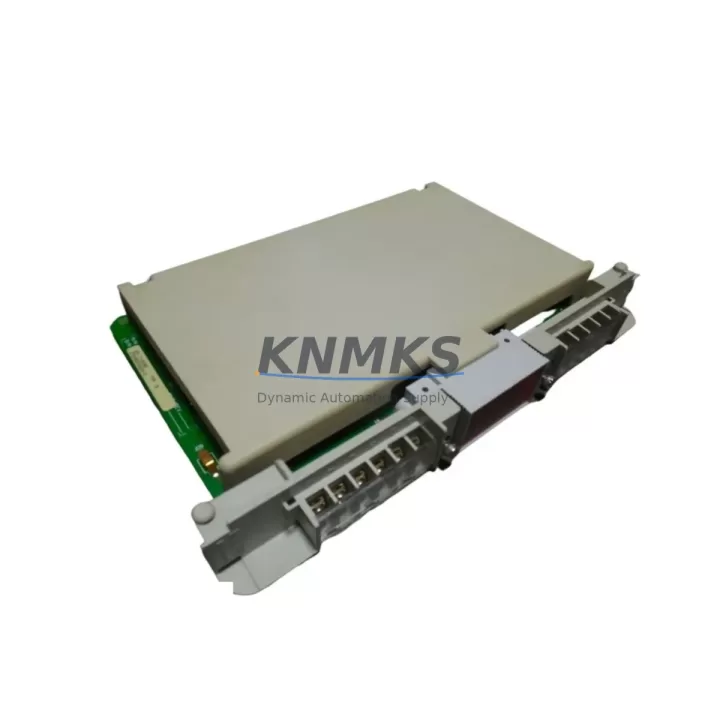
Overview
Honeywell 621-1100RC Maintenance-Ready Spare for 621 Series
The Honeywell 621-1100RC is an original discrete input module designed for the Honeywell 621 Series programmable logic controller platform — a proven workhorse in process manufacturing, utilities, and continuous production environments. For maintenance engineers managing aging control infrastructure, sourcing a verified, tested replacement for the 621-1100RC is a critical step in reducing unplanned downtime and sustaining factory uptime. KNMKS supplies this module as a genuine spare, fully inspected and backed by a support terms confirmed by quotation, with global delivery details confirmed by RFQ to support emergency and planned maintenance alike.
The 621-1100RC handles discrete (digital) input signals from field devices such as limit switches, pushbuttons, proximity sensors, and relay contacts. Its role in the I/O subsystem makes it a high-priority spare: a failed input module can blind the controller to field status, triggering process shutdowns or unsafe conditions. Keeping at least one 621-1100RC in your critical spare parts inventory is standard practice for any facility running 621 Series PLCs.
Spare Maintenance Table
| Parameter | Specification |
|---|---|
| Part Number / SKU | 621-1100RC |
| Brand | Honeywell |
| Series | 621 Series PLC |
| Module Type | Discrete Input Module |
| Signal Type | Digital / Discrete Input |
| Compatible Platform | Honeywell 621 Series PLC Rack Systems |
| Installation | Rack-mount, backplane bus interface |
| Application Environment | Industrial process control, utilities, manufacturing |
| Origin | United States |
| Condition | Original / Surplus New / Tested |
| Support terms | 12 Months |
| Shipping | Global, tested before dispatch |
| Maintenance Recommendation | Inspect annually; replace on first sign of input fault or communication error |
Maintenance Planning for Continuous Operation
When a 621-1100RC discrete input module is flagged for replacement during a scheduled outage or emergency callout, experienced maintenance engineers know that the module itself is rarely the only component that needs attention. A thorough site inspection should accompany every module swap to prevent repeat failures and ensure the control system returns to full operational integrity.
Begin by verifying the 621 Series rack and backplane for signs of corrosion, bent connector pins, or loose card guides — a damaged backplane slot can destroy a new module within hours of installation. Check the 621 power supply module (such as the 621-0020 or equivalent) for output voltage stability; an under-voltage condition is a common root cause of discrete I/O faults that are misdiagnosed as module failures. Inspect all field wiring terminal blocks connected to the input channels: loose terminations, corroded lugs, or incorrect wire gauges introduce signal noise that can cause intermittent input faults even with a healthy module installed.
Review the 621 Series processor module diagnostic logs before clearing faults — the processor often records input module communication errors that predate the visible failure, helping you identify whether the issue is isolated to the 621-1100RC or indicative of a wider rack problem. If the system includes signal isolators or signal conditioners between field sensors and the input module, verify their output levels and isolation integrity; degraded isolators can inject ground loops that damage input circuits. For facilities using relay output modules in the same control cabinet to drive actuators based on the 621-1100RC’s input status, confirm relay contact condition and coil voltage to rule out feedback interference.
Where the 621 Series PLC communicates upstream via a data highway or serial communications module, confirm that the communications link remains stable after the module swap — some 621 platforms require a rack re-initialization or processor restart to re-enumerate replaced I/O modules. Finally, check cabinet fusing and circuit protection for the input field circuits: blown fuses or tripped breakers protecting the 24VDC or 120VAC input supply are frequently overlooked during emergency replacements and will prevent the new module from reading field signals correctly.
Proactive spare parts planning for 621 Series installations should include the 621-1100RC alongside companion modules such as discrete output modules, analog input modules, and the processor module itself — all of which share the same end-of-production lifecycle risk and are increasingly difficult to source through standard distribution channels.
Site Replacement Workflow
Replacing the Honeywell 621-1100RC on a live or recently shut-down system follows a structured sequence to minimize downtime and avoid configuration loss:
1. Pre-replacement verification: Confirm the replacement module’s SKU matches the installed unit exactly — 621-1100RC. Verify the module revision level if your system documentation specifies a minimum firmware or hardware revision. Cross-check the rack slot address against the PLC configuration file to ensure the replacement is installed in the correct position.
2. Safe isolation: Follow your site’s lockout/tagout (LOTO) procedure for the affected I/O circuit. De-energize field wiring connected to the module’s input terminals before extraction. Do not hot-swap discrete input modules unless your 621 Series configuration explicitly supports it — consult the system manual.
3. Module extraction and inspection: Remove the 621-1100RC by releasing the card latch and sliding it from the backplane. Inspect the backplane connector for damage. Note any visible burn marks, corrosion, or component damage on the removed module for root cause documentation.
4. Installation and re-energization: Seat the replacement 621-1100RC firmly into the rack slot until the latch engages. Reconnect field wiring terminals, verifying polarity and termination torque. Re-energize the field circuit and monitor the processor’s I/O status display for module recognition and input channel health.
5. Functional verification: Actuate each field device connected to the module’s input channels and confirm correct status indication at the HMI or operator workstation. Log the replacement in your maintenance management system with the date, module serial number, and technician ID.
This workflow applies equally to planned annual maintenance replacements and emergency fault-response scenarios. Having a tested 621-1100RC on the shelf — rather than waiting for expedited freight — is the single most effective way to reduce mean time to repair (MTTR) for this module type.
Spare Parts Support FAQ
Q1: Is the 621-1100RC still in production, and how long can I expect supply availability?
The Honeywell 621 Series PLC platform has reached end-of-production status. KNMKS sources 621-1100RC modules from verified surplus and new-old-stock channels, with ongoing procurement to maintain inventory depth. We recommend customers with active 621 Series installations conduct a lifecycle audit and establish a multi-year spare parts buffer. Contact our team for long-term supply agreements.
Q2: How is the 621-1100RC tested before shipment?
Every 621-1100RC dispatched by KNMKS undergoes functional verification including backplane interface continuity, input channel response testing, and visual inspection for component condition. A test report is available on request. All modules are shipped with ESD-protective packaging to prevent transit damage.
Q3: Can the 621-1100RC be used as a direct replacement for other 621 Series discrete input modules?
Compatibility depends on the specific input voltage range, channel count, and rack slot addressing of the installed module. The 621-1100RC has defined electrical characteristics that must match your field wiring and PLC configuration. Always verify the part number against your system’s I/O configuration documentation before installation. Our technical team can assist with compatibility confirmation if you provide your rack layout and processor model.
Q4: What does the support terms confirmed by quotation cover, and what is the claims process?
The support terms confirmed by quotation cover manufacturing defects and functional failures under normal operating conditions. It does not cover damage resulting from incorrect installation, overvoltage, or environmental conditions outside the module’s rated specifications. To initiate a support terms claim, contact admin@knmks.com with your order number, a description of the fault, and any available diagnostic data. Replacement or repair will be arranged promptly to minimize your downtime.
© 2026 KNMKS. All rights reserved.
Original Source: https://knmks.com
Contact: admin@knmks.com | +86 18359268345
Product Identification
- Brand / Ecosystem
-
HONEYWELL
Honeywell - Model / Series
-
621-1100RC
Assorted Series - Product Family
- PLCs & Controllers
- Availability Status
- Available on request after model and quantity confirmation
- Inquiry Type
- B2B RFQ, replacement inquiry and project spare-part request
- Pre-Quote Check
- Exact SKU, brand, series, quantity, nameplate photos and destination country are checked before quotation
System Path
Where this product fits in the KNMKS automation structure.
Specification & Inquiry Focus
- Control platform
- PLC, PAC and modular controllers
- Common needs
- CPU, rack, power and I/O expansion
- Project support
- Replacement, cabinet build and maintenance
Buyer Confirmation
Information KNMKS checks before replying.
- Exact model
- 621-1100RC
- Brand / ecosystem
- HONEYWELL
- Product family
- PLCs & Controllers
- Application note
- Replacement, maintenance, project build or spare-part list
- Useful photos
- Nameplate, installed unit, cabinet layout or connector side
- Delivery details
- Quantity, destination country and target schedule
Document Support
Files and notes can be confirmed during quotation.
- Product photos or nameplate confirmation when available
- Packing and delivery notes before quotation confirmation
- Support scope and delivery terms confirmed per inquiry
- Export document coordination for qualified B2B requests
Inquiry Support
- Model cross-checking before quotation
- CPU, power, rack and expansion module matching
- Support for replacement and project inquiry
What to Send Us
- Brand and exact model number: HONEYWELL 621-1100RC
- Quantity and required delivery time
- Application, replacement requirement or nameplate photo
- Destination country and shipping preference
RFQ Preparation
This is a product inquiry page built for RFQ communication.
Fast Model Check
Send this model to KNMKS for confirmation.
Include quantity, destination country and photos if this is a maintenance replacement. The inquiry will be saved with a reference number after submission.
Brand & Compatibility Note
KNMKS displays automation product information for well-known industrial brand ecosystems and compatible replacement references. Brand names are used for product identification and compatibility reference only; final availability and commercial terms are confirmed per quotation.
 Manufacturing
 Machine Tools
 Packaging
 Energy & Power



 HMI & Displays
 Servo Systems
 Variable Frequency Drives
 Sensors