
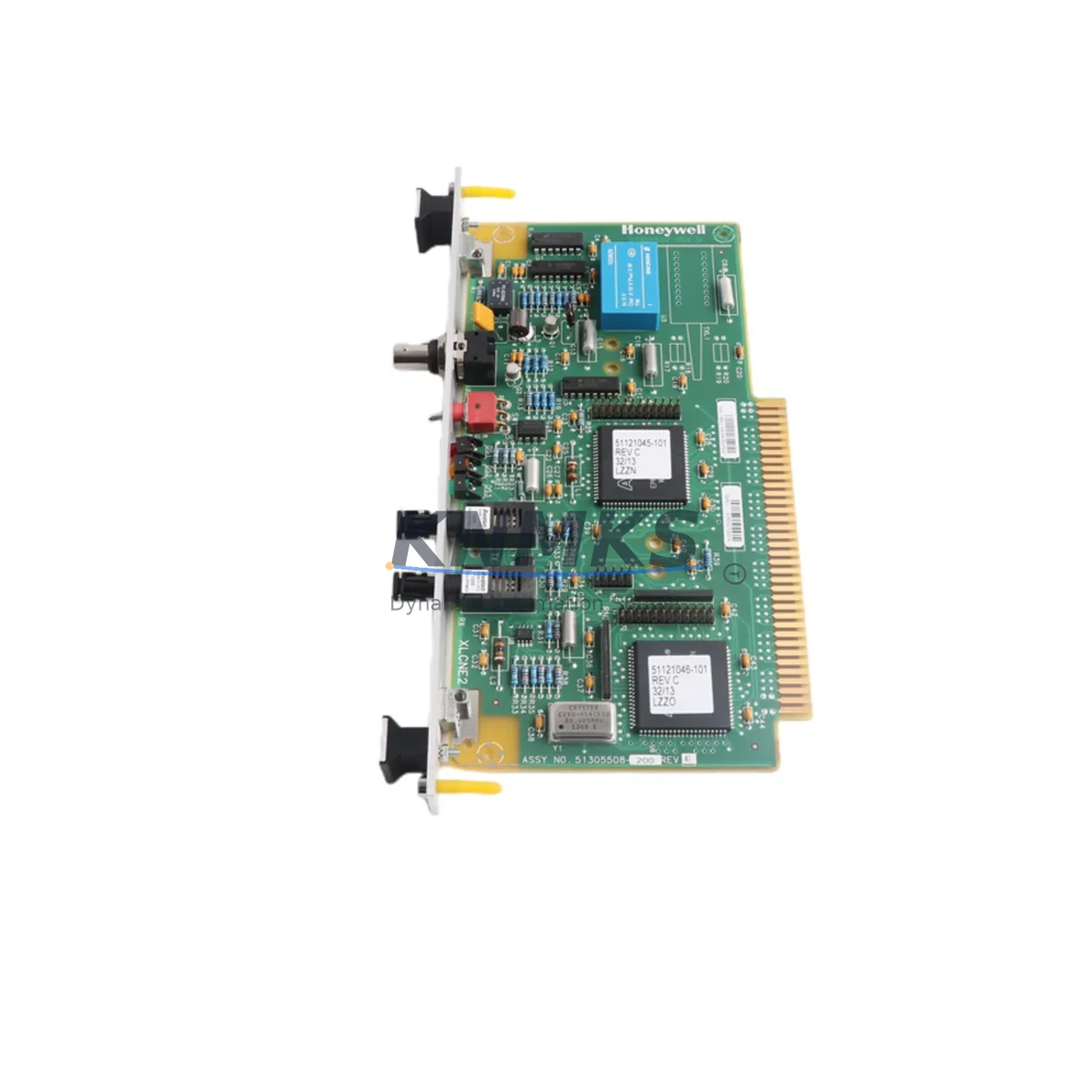
Overview
Honeywell 51305508-200 XLCNE2 Fiber Network Module: Legacy System Migration & Compatible Upgrade
The Honeywell 51305508-200 XLCNE2 is a fiber optic network communication module designed for the Honeywell Experion PKS (Process Knowledge System) distributed control platform. As legacy TDC 3000 and PlantScape systems approach end-of-support milestones, the XLCNE2 serves as a critical migration bridge — enabling engineers to preserve existing control logic, I/O wiring infrastructure, and HMI display configurations while transitioning to a modern, supportable network backbone.
For facilities operating aging C200, C300, or ACE controller nodes on shared FTE (Fault Tolerant Ethernet) or fiber ring topologies, the 51305508-200 provides a verified drop-in replacement path. Its dual-fiber interface maintains the optical link budget required by existing cabinet runs, eliminating the need for re-cabling during a phased retrofit. Engineers planning a control cabinet upgrade should confirm available backplane slot positions, module address assignments, and chassis power rail capacity before installation — particularly in high-density cabinets where the XLCNE2 shares a rack with redundant power supplies such as the Honeywell 51305556-175 or 51204172-175.
During migration planning, it is essential to document the existing network node address, fiber port assignments, and FTE switch configuration before removing the legacy module. The XLCNE2 supports standard Experion R500+ firmware environments; sites running earlier firmware revisions should schedule a firmware upgrade on the C300 controller or ACE node prior to module swap to avoid communication faults on restart. Compatibility with the Honeywell ESVT (Experion Server Virtual Terminal) and Station displays should be validated in a staging environment where possible.
Field teams executing the replacement should prepare a pre-outage checklist covering: terminal block labeling on associated I/O modules (such as the Honeywell 51304485-100 or 51309512-175 series), confirmation of fiber connector type (ST or LC), verification of SFP transceiver wavelength if applicable, and a backup of the current controller database via Experion Configuration Studio. Post-installation, the module address must be re-entered in the Experion hardware tree and a full communication diagnostic run before returning the loop to automatic control.
In broader system modernization projects, the XLCNE2 is frequently deployed alongside the Honeywell 51401642-150 IOTA base, Honeywell CC-PAIX01 analog input modules, and Honeywell 51309276-175 power conditioner modules to form a complete upgraded node assembly. Sites migrating from older Series C or TDC 3000 hardware may also require the Honeywell 51190493-100 termination panel to adapt legacy field wiring to current I/O channel formats.
Migration Compatibility Table
| Parameter | Detail |
|---|---|
| Part Number | 51305508-200 |
| Module Designation | XLCNE2 |
| Compatible Platform | Honeywell Experion PKS (R400 / R500 / R510+) |
| Legacy Systems Replaced | TDC 3000, PlantScape, Experion R300 nodes |
| Interface Type | Dual Fiber Optic (FTE / Control Firewall Network) |
| Backplane Compatibility | Experion standard chassis; confirm slot availability |
| Communication Protocol | FTE (Fault Tolerant Ethernet over fiber) |
| Firmware Requirement | Experion R500 or later recommended |
| Installation Requirement | Confirm module address, fiber connector type, power rail load |
| Commissioning Steps | Hardware tree update, communication diagnostic, loop-to-auto verification |
| Replacement Recommendation | Direct drop-in for same-series XLCNE modules; address re-entry required |
| Support terms | support terms confirmed by quotation — all units tested prior to shipment |
Retrofit Planning for Existing Automation Systems
A successful retrofit using the 51305508-200 XLCNE2 requires coordinated planning across multiple system layers. Network topology must be reviewed to confirm the fiber ring segment count and switch port assignments on the FTE infrastructure. In cabinets where the XLCNE2 shares a chassis with C300 process controllers, engineers should verify that the chassis backplane can support the additional module without exceeding the rated power budget — a common oversight when adding modules to a previously fully-loaded rack.
I/O expansion during the same outage window is a frequent requirement. Facilities often pair the XLCNE2 installation with the addition of Honeywell 51304485-100 analog output IOTA bases or 51309512-175 digital I/O modules to expand channel capacity while the cabinet is already offline. This combined approach minimizes total downtime across multiple improvement objectives.
For sites with legacy HMI stations running Honeywell Station or GUS (Global User Station) displays, the network module replacement must be followed by a display rebuild or point re-association in Experion Configuration Studio to ensure all process variables remain correctly mapped. Communication links to third-party systems via OPC DA or OPC UA should also be re-validated after the module swap, as node address changes can disrupt server subscriptions.
Where signal isolation is required between field devices and the new module assembly, Honeywell or equivalent signal isolators and barriers should be confirmed for compatibility with the updated I/O channel assignments. Programming cable access to the C300 or ACE controller via the Experion engineering workstation should be verified before the outage begins to avoid delays during the commissioning phase.
Downtime Control During System Migration
Minimizing production impact during a fiber network module replacement requires a structured outage management approach. Prior to the maintenance window, all active control loops associated with the affected node should be placed in manual mode and field operators briefed on manual override procedures. A full controller database backup — including all strategy files, tuning parameters, and alarm configurations — must be completed and verified before any hardware is removed.
The XLCNE2 module swap itself is a hot-standby-compatible operation in redundant node configurations, meaning that in systems with a redundant C300 pair, the primary can be failed over to the secondary before the module is removed, preserving continuous control during the hardware exchange. In non-redundant configurations, the outage window must be sized to include: module removal, installation, address configuration, firmware verification, communication diagnostic, and a controlled return-to-auto sequence for all affected loops.
Post-installation, the Experion system event log should be reviewed for any communication fault or module health alarms before the node is returned to service. A 30-minute observation period under automatic control is recommended before the maintenance team stands down, ensuring that all fiber links, FTE switch connections, and I/O channel communications are stable under live process conditions.
Retrofit Support FAQ
Q: Is the 51305508-200 XLCNE2 a direct replacement for older XLCNE modules?
A: Yes, the XLCNE2 is designed as a functional replacement for earlier XLCNE-series fiber network modules within the Experion PKS platform. Module address re-entry in the Experion hardware tree is required after installation. Confirm firmware compatibility with your site’s current Experion revision before proceeding.
Q: What pre-shipment testing is performed on this module?
A: All 51305508-200 units are functionally tested prior to dispatch. Each module is verified for power-on self-test completion, fiber port integrity, and communication handshake capability. A support terms confirmed by quotation is included with every unit.
Q: What wiring or termination changes are needed during installation?
A: The XLCNE2 uses standard fiber optic connectors consistent with the Experion FTE network. No field wiring changes are required for a like-for-like module replacement. If the installation is part of a broader I/O expansion, associated IOTA base terminal wiring should be reviewed against the updated I/O channel map.
Q: What is the lead time and stock availability?
A: Units are available from stock for immediate dispatch. Contact our team to confirm current inventory levels and estimated delivery to your site. Emergency orders for critical system recovery can be prioritized upon request.
© 2026 KNMKS. All rights reserved. Original Source: https://knmks.com | Contact: admin@knmks.com | +86 18359268345
Product Identification
- Brand / Ecosystem
-
Honeywell
Honeywell - Model / Series
-
51305508-200
Experion PKS Series - Product Family
- PLCs & Controllers
- Availability Status
- Available on request after model and quantity confirmation
- Inquiry Type
- B2B RFQ, replacement inquiry and project spare-part request
- Pre-Quote Check
- Exact SKU, brand, series, quantity, nameplate photos and destination country are checked before quotation
System Path
Where this product fits in the KNMKS automation structure.
Specification & Inquiry Focus
- Control platform
- PLC, PAC and modular controllers
- Common needs
- CPU, rack, power and I/O expansion
- Project support
- Replacement, cabinet build and maintenance
Buyer Confirmation
Information KNMKS checks before replying.
- Exact model
- 51305508-200
- Brand / ecosystem
- Honeywell
- Product family
- PLCs & Controllers
- Application note
- Replacement, maintenance, project build or spare-part list
- Useful photos
- Nameplate, installed unit, cabinet layout or connector side
- Delivery details
- Quantity, destination country and target schedule
Document Support
Files and notes can be confirmed during quotation.
- Product photos or nameplate confirmation when available
- Packing and delivery notes before quotation confirmation
- Support scope and delivery terms confirmed per inquiry
- Export document coordination for qualified B2B requests
Inquiry Support
- Model cross-checking before quotation
- CPU, power, rack and expansion module matching
- Support for replacement and project inquiry
What to Send Us
- Brand and exact model number: Honeywell 51305508-200
- Quantity and required delivery time
- Application, replacement requirement or nameplate photo
- Destination country and shipping preference
RFQ Preparation
This is a product inquiry page built for RFQ communication.
Fast Model Check
Send this model to KNMKS for confirmation.
Include quantity, destination country and photos if this is a maintenance replacement. The inquiry will be saved with a reference number after submission.
Brand & Compatibility Note
KNMKS displays automation product information for well-known industrial brand ecosystems and compatible replacement references. Brand names are used for product identification and compatibility reference only; final availability and commercial terms are confirmed per quotation.
 Manufacturing
 Machine Tools
 Packaging
 Energy & Power



 HMI & Displays
 Servo Systems
 Variable Frequency Drives
 Sensors