
Overview
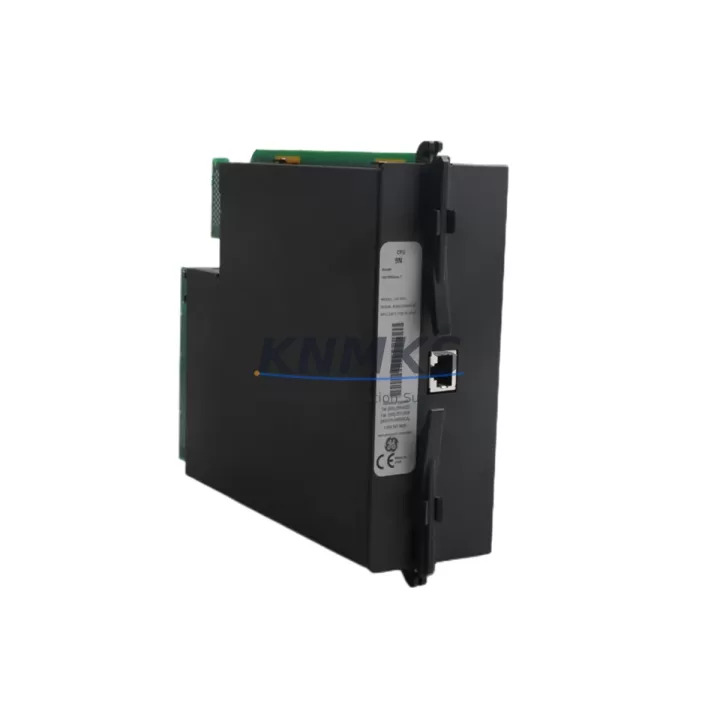
GE UR9NH Migration-Ready CPU Module for UR Series: Legacy System Retrofit & Compatibility Upgrade
The GE UR9NH is a high-performance CPU module designed for the GE UR Series (Universal Relay) protection relay platform — one of the most widely deployed digital protection systems in transmission substations, industrial power distribution, and utility-grade switchgear worldwide. As aging UR Series installations approach end-of-support milestones, the UR9NH serves as the primary migration-ready replacement for earlier CPU generations including the UR6NH, UR7NH, and UR8NH, enabling engineers to extend system service life, restore full relay functionality, and defer costly full-panel replacements.
Whether you are managing a planned protection system upgrade, responding to an unplanned CPU failure, or executing a substation modernization program, the UR9NH provides a validated, drop-in compatible path that preserves your existing UR Series chassis, wiring infrastructure, and relay settings files — dramatically reducing engineering hours, commissioning risk, and total downtime exposure.
Migration Compatibility Table
| Parameter | Detail |
|---|---|
| Compatible Platform | GE UR Series (Universal Relay) — all chassis form factors |
| Replaces / Upgrades From | UR6NH, UR7NH, UR8NH, and equivalent legacy UR CPU modules |
| Backplane Interface | UR Series standard backplane connector — no adapter required |
| Communication Protocols | IEC 61850 (GOOSE/MMS), DNP3, Modbus RTU/TCP, IEC 60870-5-103/104 |
| Installation Requirement | Direct slot replacement; confirm chassis slot assignment and module address before installation |
| Firmware Compatibility | Supports UR Series firmware upgrade path; verify target firmware version against relay order code |
| Settings File Migration | Compatible with EnerVista UR Setup software; existing .urs settings files can be imported after firmware alignment |
| HMI / SCADA Integration | Retains existing IEC 61850 SCL/CID configuration; DNP3 point maps preserved with minor re-mapping review recommended |
| Retrofit Commissioning Focus | Module address verification, protection element re-enable, CT/VT ratio confirmation, trip output wiring continuity test |
| Pre-Shipment Testing | Each unit powered-on and functionally verified before dispatch |
| Support terms | support terms confirmed by quotation — covers manufacturing defects and functional failure under normal operating conditions |
| Origin | USA (General Electric / GE Grid Solutions) |
Retrofit Planning for Existing Automation Systems
A successful UR9NH retrofit begins well before the module arrives on site. Engineers should start by auditing the existing UR Series chassis configuration — confirming which slots are occupied by I/O modules such as the UR 9A series analog input modules and UR 9D series digital I/O modules, and verifying that the chassis backplane is free of damage or corrosion at the CPU slot connector. The UR 9PS power supply module should also be inspected: an aging or undersized power supply is a common root cause of CPU instability in legacy UR installations, and replacing it concurrently with the CPU module eliminates a frequent callback failure mode.
Communication infrastructure requires particular attention during migration planning. If the existing installation uses a UR 9E Ethernet communication module for IEC 61850 GOOSE messaging or DNP3 over TCP, confirm that the module firmware is compatible with the UR9NH CPU firmware target version. Mismatched firmware between the CPU and communication modules is the leading cause of post-retrofit communication link failures. Where the legacy system relied on RS-485 serial DNP3 via a UR 9C serial communication module, the migration is an appropriate moment to evaluate whether upgrading to Ethernet-based IEC 61850 is feasible within the existing control cabinet space and SCADA architecture.
For installations where the UR Series relay interfaces with a GE Multilin 750/760 feeder protection relay or similar legacy feeder relay on the same protection bus, verify that inter-relay GOOSE subscriptions and hardwired trip/close interlock circuits remain intact after the CPU swap. Document all terminal block wiring assignments — particularly trip output contacts, alarm contacts, and binary input wiring — before removing the legacy CPU module. Photograph the existing wiring and retain the original relay order code label for reference during EnerVista settings file reconstruction.
Installation space confirmation is straightforward for the UR9NH given its standard UR Series form factor, but engineers working in densely populated control cabinets should verify that adjacent modules have not been retrofitted with non-standard spacers or cable management clips that could obstruct module extraction and re-insertion. Allow a minimum of 30 minutes for physical module exchange, settings file upload, and initial power-on verification under controlled conditions.
Downtime Control During System Migration
Minimizing protection system downtime during a CPU module replacement requires a structured pre-outage preparation protocol. Before scheduling the maintenance window, use EnerVista UR Setup to export a complete backup of the existing relay settings, including all protection element parameters, logic equations, FlexLogic configurations, and communication settings. Store this backup in at least two independent locations — a local engineering workstation and a network-accessible archive — to ensure recovery capability if the settings upload encounters an error.
Coordinate with the SCADA/EMS operations team to place the affected relay in test mode and suppress alarms at the control center before beginning physical work. This prevents nuisance alarms from propagating to the operations center during the CPU swap interval. If the UR Series chassis hosts multiple protection functions (e.g., combined line differential and distance protection on a single chassis), confirm with the protection engineer which elements must be re-enabled in sequence after the new CPU is installed, to avoid inadvertent protection gaps during commissioning.
After installing the UR9NH and uploading the settings file, perform a systematic commissioning check: verify all binary inputs are reading correctly against known field states, confirm trip output relay continuity with a secondary injection test if possible, and validate communication link re-establishment with the SCADA master station before returning the relay to service. A well-prepared team can typically complete a UR Series CPU module replacement — from outage commencement to relay return-to-service — within a two-to-four hour maintenance window, preserving protection system availability and minimizing operational risk.
Retrofit Support FAQ
Q1: Is the GE UR9NH a direct drop-in replacement for the UR8NH or UR7NH?
Yes. The UR9NH uses the same UR Series backplane connector and chassis form factor as earlier UR CPU generations. No mechanical adapters or chassis modifications are required. However, a firmware upgrade of the UR9NH to match your relay order code’s target firmware version is recommended before uploading legacy settings files, to ensure full protection element and communication feature compatibility.
Q2: Can I reuse my existing EnerVista settings file after installing the UR9NH?
In most cases, yes. Settings files created in EnerVista UR Setup are forward-compatible across UR CPU generations, though minor parameter mapping differences may exist between firmware versions. We recommend opening the existing .urs file in the latest EnerVista version, reviewing any flagged parameter changes, and performing a settings comparison report before uploading to the new CPU. Our technical team can assist with settings file review upon request.
Q3: What pre-shipment testing is performed on the UR9NH before dispatch?
Every UR9NH unit is powered on and subjected to a functional verification test prior to shipment, confirming CPU boot integrity, communication port activity, and absence of hardware fault indicators. Units are shipped in anti-static packaging with individual serial number documentation. A support terms confirmed by quotation cover manufacturing defects and functional failure under normal operating conditions from the date of receipt.
Q4: What is the typical lead time and stock availability?
The UR9NH is maintained availability confirmed by RFQ for immediate dispatch. Standard orders ship within 1–3 business days. For urgent protection system restoration requirements, expedited shipping options are available. Contact our sales team at admin@knmks.com or +86 18359268345 to confirm current inventory and arrange priority fulfillment.
© 2026 KNMKS. All rights reserved.
Original Source: https://knmks.com
Contact: admin@knmks.com | +86 18359268345
Product Identification
- Brand / Ecosystem
-
General Electric
Assorted Brands - Model / Series
-
UR 9NH UR9NH
Assorted Series - Product Family
- PLCs & Controllers
- Availability Status
- Available on request after model and quantity confirmation
- Inquiry Type
- B2B RFQ, replacement inquiry and project spare-part request
- Pre-Quote Check
- Exact SKU, brand, series, quantity, nameplate photos and destination country are checked before quotation
System Path
Where this product fits in the KNMKS automation structure.
Specification & Inquiry Focus
- Control platform
- PLC, PAC and modular controllers
- Common needs
- CPU, rack, power and I/O expansion
- Project support
- Replacement, cabinet build and maintenance
Buyer Confirmation
Information KNMKS checks before replying.
- Exact model
- UR 9NH UR9NH
- Brand / ecosystem
- General Electric
- Product family
- PLCs & Controllers
- Application note
- Replacement, maintenance, project build or spare-part list
- Useful photos
- Nameplate, installed unit, cabinet layout or connector side
- Delivery details
- Quantity, destination country and target schedule
Document Support
Files and notes can be confirmed during quotation.
- Product photos or nameplate confirmation when available
- Packing and delivery notes before quotation confirmation
- Support scope and delivery terms confirmed per inquiry
- Export document coordination for qualified B2B requests
Inquiry Support
- Model cross-checking before quotation
- CPU, power, rack and expansion module matching
- Support for replacement and project inquiry
What to Send Us
- Brand and exact model number: General Electric UR 9NH UR9NH
- Quantity and required delivery time
- Application, replacement requirement or nameplate photo
- Destination country and shipping preference
RFQ Preparation
This is a product inquiry page built for RFQ communication.
Fast Model Check
Send this model to KNMKS for confirmation.
Include quantity, destination country and photos if this is a maintenance replacement. The inquiry will be saved with a reference number after submission.
Brand & Compatibility Note
KNMKS displays automation product information for well-known industrial brand ecosystems and compatible replacement references. Brand names are used for product identification and compatibility reference only; final availability and commercial terms are confirmed per quotation.
 Manufacturing
 Machine Tools
 Packaging
 Energy & Power



 HMI & Displays
 Servo Systems
 Variable Frequency Drives
 Sensors