
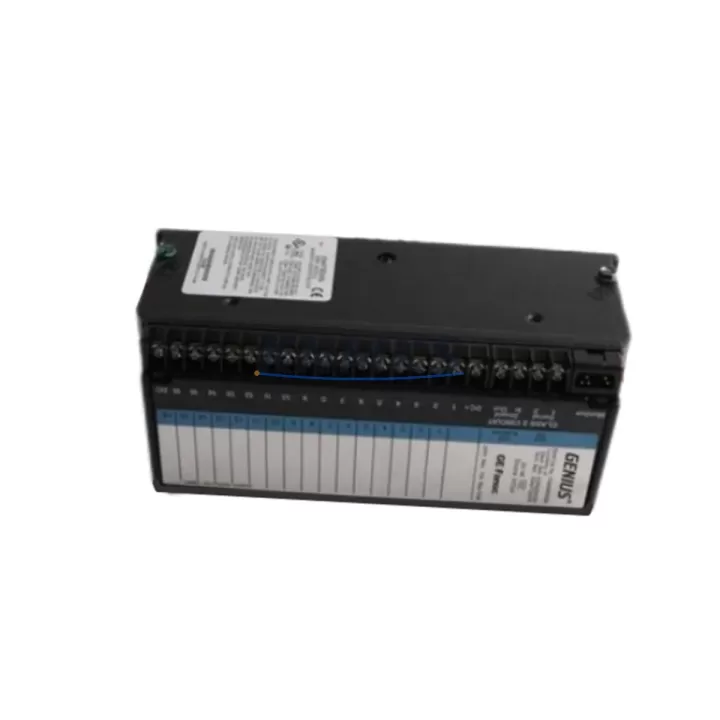
Overview
GE UR7HH Migration-Ready Inter-Relay Comms for UR Series: Legacy System Migration and Compatible Upgrade
The GE UR7HH is a factory-specification inter-relay communications module designed for the General Electric UR Series protection relay platform. As aging control systems approach end-of-support cycles and original spare parts become increasingly difficult to source, the UR7HH has become a critical component in substation modernization projects, protection relay panel upgrades, and legacy system migration programs across power utilities, industrial facilities, and transmission operators worldwide.
Engineered to support high-speed, deterministic inter-relay communication over fiber optic links, the UR7HH enables direct relay-to-relay data exchange without dependence on external communication infrastructure. This architecture is essential in applications where protection coordination, differential schemes, and direct transfer trip (DTT) functions must remain intact during a phased system upgrade. Engineers replacing discontinued relay models or migrating from older protection platforms frequently specify the UR7HH as the communications backbone of their retrofit design.
When planning a migration involving the UR7HH, the first step is confirming slot compatibility within the existing UR Series chassis. The UR platform uses a modular backplane architecture, and the UR7HH occupies a dedicated communications slot. Before installation, verify that the target relay — whether a GE D60 Line Distance Relay, GE L90 Line Differential Relay, GE T60 Transformer Management Relay, or GE B90 Bus Differential Relay — supports the UR7HH module in the intended slot position. Slot addressing and module recognition are handled automatically by the relay firmware, but the firmware version must be confirmed to be compatible with the UR7HH hardware revision being installed.
Power supply capacity is another critical verification point. The UR Series backplane distributes power to all installed modules, and adding or replacing a communications module changes the total power draw. Confirm that the installed UR Series power supply module (such as the 3A or 5A variants) has sufficient headroom to support the UR7HH alongside existing I/O modules, DSP cards, and CPU modules. Insufficient power budget is a common cause of intermittent module faults during commissioning after a retrofit.
Fiber optic port configuration is central to the UR7HH’s function. The module supports 820 nm multimode or 1300 nm single-mode fiber depending on the variant, and the fiber type must match the existing inter-relay link infrastructure. When replacing a failed or discontinued communications module in an operating protection scheme, the fiber patch cables, connectors, and optical power budget must all be verified before the replacement module is brought online. Mismatched fiber types or excessive optical loss will prevent the inter-relay link from establishing, which can disable differential protection functions and trigger relay alarms.
Terminal wiring on the UR7HH is minimal compared to I/O-intensive modules, but the backplane connector seating must be confirmed during installation. In older UR Series chassis that have been in service for many years, backplane connectors may show signs of oxidation or mechanical wear. Cleaning the backplane contacts and confirming firm module seating before powering up is a standard step in any UR Series retrofit procedure.
Program logic compatibility is a key concern when the UR7HH is being installed as part of a broader relay replacement. If the protection scheme relies on inter-relay GOOSE messaging or direct I/O channels routed through the communications module, the relay settings files must be reviewed and updated to reflect the new module’s channel assignments. Use GE EnerVista UR Setup software to upload, verify, and re-commission the relay settings after module replacement. Confirm that all protection elements, communication channel assignments, and event recorder settings are correctly restored before returning the relay to service.
HMI and SCADA integration should also be reviewed during the migration. If the relay communicates upstream via IEC 61850, DNP3, or Modbus over a separate communications module such as the GE UR 7SR or 7SS series communications card, confirm that the inter-relay link handled by the UR7HH does not share addressing or protocol resources with the SCADA-facing port. Maintaining clear separation between protection-critical inter-relay links and supervisory communication channels reduces the risk of communication conflicts during and after the retrofit.
Installation space in the relay panel or control cabinet should be confirmed before ordering. The UR7HH is a standard UR Series module form factor, but in densely populated panels where multiple relay chassis are installed side by side, access to the module slot and fiber routing space must be assessed. Adequate bend radius for fiber patch cables is particularly important — tight bends in multimode fiber can introduce optical loss that degrades link performance over time.
For projects involving multiple relay replacements across a substation or industrial facility, the UR7HH is commonly deployed alongside other UR Series components including GE C60 Circuit Breaker Relay and GE F60 Feeder Management Relay installations. Coordinating the inter-relay communication scheme across multiple bays or feeders requires careful planning of channel assignments, fiber routing, and protection coordination settings to ensure that the upgraded system maintains the same protection performance as the original design.
Every UR7HH unit supplied by KNMKS is sourced from verified supply channels and undergoes pre-shipment functional inspection. Each module is covered by a support terms confirmed by quotation against manufacturing defects and operational failure. global delivery details confirmed by RFQ is available, with export documentation and customs support provided for international orders.
Migration Compatibility Table
| Parameter | Details |
|---|---|
| Module Type | Inter-Relay Communications Module |
| Compatible Platform | GE UR Series (D60, L90, T60, B90, C60, F60 and compatible variants) |
| Slot Requirement | UR Series dedicated communications slot (verify chassis slot map before installation) |
| Fiber Interface | 820 nm multimode / 1300 nm single-mode (confirm variant before ordering) |
| Communication Function | High-speed inter-relay link for differential protection, DTT, and protection coordination |
| Firmware Compatibility | Verify UR relay firmware version supports UR7HH hardware revision |
| Power Supply Check | Confirm UR Series power supply module has sufficient capacity for full module complement |
| Commissioning Tool | GE EnerVista UR Setup software required for settings upload and verification |
| Installation Space | Standard UR Series module form factor; confirm fiber routing and bend radius clearance |
| Replacement Recommendation | Direct replacement for failed or discontinued UR Series inter-relay comms modules |
| Support terms | support terms confirmed by quotation — covers manufacturing defects and operational failure |
| Pre-Shipment Testing | Functional inspection completed before dispatch |
Retrofit Planning for Existing Automation Systems
A successful UR7HH retrofit begins with a complete audit of the existing protection scheme. In most substation and industrial power system applications, the inter-relay communications module is part of a wider protection architecture that includes multiple relay types, each handling a specific protection function. The GE D60 Line Distance Relay and GE L90 Line Differential Relay are the most common relay types that rely on inter-relay communications for their primary protection functions, and the UR7HH is the standard module used to establish these links within the UR Series platform.
When the existing inter-relay link is carried over legacy hardware that is no longer supported or has reached end of life, the UR7HH provides a direct replacement path without requiring changes to the relay chassis, backplane, or fiber infrastructure. This is a significant advantage in retrofit projects where minimizing scope and downtime is a priority. The module slots into the existing chassis position, and after settings verification and firmware confirmation, the inter-relay link can be re-established with minimal disruption to the protection scheme.
In projects where the relay chassis itself is being replaced — for example, migrating from an older UR Series generation to a current-production chassis — the UR7HH can be transferred to the new chassis if the hardware revision is compatible. Alternatively, a new UR7HH can be specified for the replacement chassis while the original module is retained as a tested spare. Maintaining a verified spare UR7HH on-site is a common practice in critical infrastructure applications where rapid restoration of protection functions is required.
The retrofit plan should also account for the UR Series CPU module and any installed UR Series analog or digital I/O modules. In some aging installations, the CPU module firmware may need to be updated before the UR7HH can be recognized correctly. Coordinate firmware updates with the relay manufacturer’s recommendations and test the updated firmware in a non-critical relay before applying it to protection-critical equipment. If the installation includes a UR Series HMI panel or local operator interface, verify that the HMI display correctly reflects the inter-relay link status after the UR7HH replacement.
For facilities managing multiple relay panels across a substation, the UR7HH retrofit can be staged bay by bay to minimize the scope of any single outage window. Each bay’s inter-relay link can be replaced independently, with protection coordination verified at each stage before proceeding to the next. This phased approach is particularly effective in live substations where extended outages are not operationally acceptable.
Downtime Control During System Migration
Minimizing downtime during a UR7HH replacement requires careful pre-work and a clear commissioning sequence. Before the outage window begins, all relay settings files should be backed up using GE EnerVista UR Setup, and the replacement UR7HH should be on-site and confirmed as the correct variant. Fiber patch cables should be pre-tested for optical continuity and loss, and all personnel involved in the replacement should be briefed on the commissioning sequence and hold points.
During the outage, the failed or replaced module is removed and the new UR7HH is installed in the same chassis slot. The relay is powered up and the firmware version is confirmed. Settings are uploaded from the backup file and verified against the as-found configuration. The inter-relay link is established and tested by confirming that both ends of the fiber link show active status in the relay’s communication diagnostics. Protection elements that depend on the inter-relay link — such as differential protection or direct transfer trip — are tested to confirm correct operation before the relay is returned to service.
Maintaining field control continuity during the migration is critical in applications where the relay is part of an active protection scheme. Where possible, coordinate the UR7HH replacement with the system operator to ensure that backup protection is in service during the outage window. Document all steps taken during the replacement, including firmware versions, settings file checksums, and fiber optical power readings, to support post-commissioning review and future maintenance planning.
Controlling the risk of extended downtime also means having a verified replacement module available before the outage begins. KNMKS maintains inventory of the UR7HH and can support urgent requirements with expedited shipping. Each unit is inspected before dispatch, reducing the risk of receiving a non-functional module and extending the outage beyond the planned window.
Retrofit Support FAQ
Q: Is the GE UR7HH a direct drop-in replacement for the existing inter-relay communications module in my UR Series relay?
A: In most cases, yes. The UR7HH is designed for the UR Series modular chassis and occupies the standard communications slot. However, you should confirm the chassis slot map, firmware version, and fiber type (multimode vs. single-mode) before installation to ensure full compatibility with your specific relay model and hardware revision.
Q: What commissioning steps are required after installing the UR7HH?
A: After physical installation, use GE EnerVista UR Setup to upload the relay settings file and verify all protection element configurations, communication channel assignments, and event recorder settings. Confirm that the inter-relay fiber link is active and that all protection functions dependent on the inter-relay link are operating correctly before returning the relay to service.
Q: Can the UR7HH be used in a relay chassis that has been in service for many years?
A: Yes, provided the chassis backplane and slot are in good condition. Inspect the backplane connector for oxidation or mechanical wear before installing the new module. Confirm that the chassis power supply has sufficient capacity to support the full module complement including the UR7HH. Clean backplane contacts if necessary before seating the module.
Q: What support terms and pre-shipment testing does KNMKS provide for the UR7HH?
A: Every UR7HH supplied by KNMKS undergoes a pre-shipment functional inspection and is covered by a support terms confirmed by quotation against manufacturing defects and operational failure. Inventory is maintained for fast dispatch, and export documentation is provided for international orders. Contact our team for lead time confirmation and urgent requirements.
© 2026 KNMKS. All rights reserved.
Original Source: https://knmks.com
Contact: admin@knmks.com | +86 18359268345
Product Identification
- Brand / Ecosystem
-
General Electric
Assorted Brands - Model / Series
-
UR7HH
Assorted Series - Product Family
- PLCs & Controllers
- Availability Status
- Available on request after model and quantity confirmation
- Inquiry Type
- B2B RFQ, replacement inquiry and project spare-part request
- Pre-Quote Check
- Exact SKU, brand, series, quantity, nameplate photos and destination country are checked before quotation
System Path
Where this product fits in the KNMKS automation structure.
Specification & Inquiry Focus
- Control platform
- PLC, PAC and modular controllers
- Common needs
- CPU, rack, power and I/O expansion
- Project support
- Replacement, cabinet build and maintenance
Buyer Confirmation
Information KNMKS checks before replying.
- Exact model
- UR7HH
- Brand / ecosystem
- General Electric
- Product family
- PLCs & Controllers
- Application note
- Replacement, maintenance, project build or spare-part list
- Useful photos
- Nameplate, installed unit, cabinet layout or connector side
- Delivery details
- Quantity, destination country and target schedule
Document Support
Files and notes can be confirmed during quotation.
- Product photos or nameplate confirmation when available
- Packing and delivery notes before quotation confirmation
- Support scope and delivery terms confirmed per inquiry
- Export document coordination for qualified B2B requests
Inquiry Support
- Model cross-checking before quotation
- CPU, power, rack and expansion module matching
- Support for replacement and project inquiry
What to Send Us
- Brand and exact model number: General Electric UR7HH
- Quantity and required delivery time
- Application, replacement requirement or nameplate photo
- Destination country and shipping preference
RFQ Preparation
This is a product inquiry page built for RFQ communication.
Fast Model Check
Send this model to KNMKS for confirmation.
Include quantity, destination country and photos if this is a maintenance replacement. The inquiry will be saved with a reference number after submission.
Brand & Compatibility Note
KNMKS displays automation product information for well-known industrial brand ecosystems and compatible replacement references. Brand names are used for product identification and compatibility reference only; final availability and commercial terms are confirmed per quotation.
 Manufacturing
 Machine Tools
 Packaging
 Energy & Power



 HMI & Displays
 Servo Systems
 Variable Frequency Drives
 Sensors