
Overview
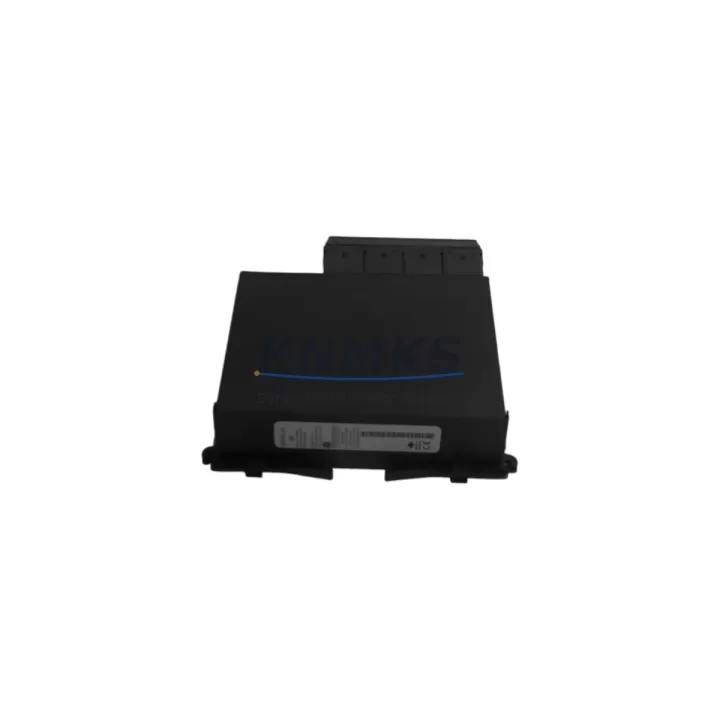
GE UR6PH Migration-Ready Digital I/O Module for Legacy Relay Systems
The GE UR6PH is a Digital I/O Module engineered for the GE UR (Universal Relay) Series platform — one of the most widely deployed protective relay architectures in transmission substations, industrial switchgear, and utility-grade control systems worldwide. As legacy UR-series installations approach end-of-life or require capacity expansion, the UR6PH serves as a verified drop-in replacement and retrofit-ready I/O expansion module, enabling engineers to extend system life without full panel replacement.
For facilities operating aging GE UR-series relays such as the T60, L90, D60, C60, or F60, the UR6PH provides a direct migration path that preserves existing wiring harnesses, backplane slot assignments, and COMTRADE/IEC 61850 communication links. Its terminal block layout is compatible with standard UR chassis backplanes, reducing rewiring time during scheduled outages and minimizing the risk of field wiring errors during cutover.
When planning a retrofit or spare-part replacement using the UR6PH, engineers should verify the following before installation: available backplane slot position, chassis power budget (the UR6PH draws from the shared UR power supply module — confirm headroom against the installed GE UR-series power supply card), terminal block torque specifications, module address assignment in the relay settings file, and firmware revision compatibility between the UR6PH and the host relay CPU module. Mismatched firmware versions between the I/O module and the main processor can cause initialization faults that delay commissioning.
In systems where the original UR6PH has been discontinued or is no longer available through OEM channels, this stocked unit provides a tested, pre-shipment verified alternative. Each unit undergoes functional output contact testing and input signal verification prior to dispatch, with results traceable to the shipment record.
Migration Compatibility Table
| Parameter | UR6PH Specification | Retrofit / Migration Notes |
|---|---|---|
| Module Type | Digital I/O Module | Replaces legacy UR-series I/O cards in same slot position |
| Platform Compatibility | GE UR Universal Relay Series | Compatible with T60, L90, D60, C60, F60, B90, C30 chassis |
| Backplane Interface | UR Standard Backplane Connector | Confirm slot assignment matches relay settings file |
| Terminal Block | Standard UR screw-terminal block | Existing field wiring reusable; verify torque spec (1.2 Nm) |
| Communication Protocol | Internal UR backplane bus | IEC 61850, DNP3, Modbus via host relay CPU — no protocol change required |
| Power Consumption | Supplied via UR backplane | Verify chassis power budget before adding I/O modules |
| Firmware Compatibility | UR firmware-dependent | Match firmware version with host relay CPU; update via EnerVista UR Setup |
| Installation Space | Standard UR module slot (single-wide) | No panel modification required for like-for-like replacement |
| Pre-Shipment Testing | Functional I/O contact and signal test | Test report available upon request |
| Support terms | 12 Months | Covers manufacturing defects; DOA replacement within 30 days |
Retrofit Planning for Existing Automation Systems
A successful UR6PH retrofit begins with a thorough audit of the existing UR chassis configuration. Engineers should document all occupied slot positions, the installed GE UR CPU module firmware version, and the current I/O map as reflected in the relay settings file exported from EnerVista UR Setup. This settings file governs how the relay addresses each I/O module by slot — any mismatch between the physical slot and the settings file will result in a module fault alarm on the relay front panel.
For systems that also include a GE UR communications module (such as a fiber-optic or Ethernet card occupying an adjacent slot), confirm that the addition of the UR6PH does not exceed the chassis backplane power allocation. The UR-series power supply module has a defined maximum load; adding I/O modules without verifying headroom is a common cause of intermittent resets in retrofitted panels.
Where the control cabinet also houses a GE UR analog I/O module or a UR transducer input card, the UR6PH digital I/O module can be installed in a parallel slot to expand the relay’s contact output and digital input capacity without displacing existing analog measurement channels. This is particularly relevant in transformer protection panels where both analog metering and digital trip/alarm outputs must coexist.
In multi-relay substation architectures, the UR6PH is frequently deployed alongside GE UR inter-relay communications modules that carry direct transfer trip signals over fiber. Confirm that the MIRRORED BITS channel assignments in the relay settings are not disrupted when the I/O module is replaced, as these assignments are slot-position-sensitive in some UR firmware versions.
For panels undergoing a broader control system migration — for example, transitioning from a legacy SCADA RTU to an IEC 61850 GOOSE-based architecture — the UR6PH’s digital outputs can be mapped to GOOSE control blocks within the relay’s IED configuration, reducing the need for hardwired interposing relays and simplifying the control cabinet layout. This approach is increasingly used in brownfield substation upgrades where panel space is constrained and new wiring runs are cost-prohibitive.
Downtime Control During System Migration
Minimizing outage duration during a UR6PH replacement requires pre-staging all materials and completing the settings file review before the maintenance window opens. The relay settings file should be backed up from the live relay using EnerVista UR Setup immediately before the outage begins — this backup serves as both the restoration baseline and the commissioning reference for the replacement module.
During the physical swap, the UR chassis does not require full de-energization if the replacement is performed in a non-critical slot with the relay in test mode; however, site safety procedures and utility operating rules must govern this decision. Once the UR6PH is seated in the backplane, the relay will perform an automatic module recognition sequence — monitor the relay front panel for any slot fault or module mismatch indication before restoring the relay to service mode.
After the module is recognized, verify all digital input states against the known field wiring conditions before enabling output contacts. This step prevents spurious trip or alarm outputs caused by wiring polarity errors or open-circuit field contacts that were masked during the outage. Commissioning should include a point-to-point check of each input and output channel against the relay’s I/O map, followed by a functional test of any protection elements that depend on the UR6PH’s contact outputs for trip or close commands.
For sites where the relay is part of a redundant protection scheme, coordinate the UR6PH replacement with the protection engineer to ensure the backup relay remains in service throughout the outage. Document the as-left configuration, firmware version, and slot assignment in the site maintenance record before closing the maintenance window. Stock availability of the UR6PH from this listing supports rapid dispatch for emergency replacements where planned outage scheduling is not possible.
Retrofit Support FAQ
Q1: Is the UR6PH a direct drop-in replacement for the original GE UR-series digital I/O module?
Yes. The UR6PH is designed for the GE UR Universal Relay platform and occupies a standard UR chassis slot. For like-for-like replacement, no panel modification is required. Confirm the slot position matches the relay settings file before installation to avoid module address conflicts.
Q2: What firmware version is required for UR6PH compatibility?
The UR6PH is compatible with the UR relay firmware versions that support the UR6x I/O module family. Use EnerVista UR Setup to verify the host relay’s current firmware revision and cross-reference against GE’s UR firmware release notes. If a firmware update is required, it can be performed via the relay’s Ethernet port without removing the module.
Q3: Can the UR6PH be used to expand I/O capacity in an existing UR chassis, rather than as a replacement?
Yes, provided an unoccupied slot is available in the UR chassis and the chassis power budget supports the additional load. Update the relay settings file in EnerVista UR Setup to assign the new slot position before installing the module, then perform a full I/O map verification after installation.
Q4: What does the support terms confirmed by quotation cover, and what is the pre-shipment testing process?
Each UR6PH unit is functionally tested for digital input signal recognition and output contact operation before dispatch. The support terms confirmed by quotation cover manufacturing defects and functional failures under normal operating conditions. Dead-on-arrival (DOA) units are eligible for priority replacement within 30 days of receipt. Contact admin@knmks.com with the order reference and fault description to initiate a support terms claim.
© 2026 KNMKS. All rights reserved.
Original Source: https://knmks.com
Contact: admin@knmks.com | +86 18359268345
Product Identification
- Brand / Ecosystem
-
GE Grid Solutions
Assorted Brands - Model / Series
-
UR 6PH UR6PH
Assorted Series - Product Family
- PLCs & Controllers
- Availability Status
- Available on request after model and quantity confirmation
- Inquiry Type
- B2B RFQ, replacement inquiry and project spare-part request
- Pre-Quote Check
- Exact SKU, brand, series, quantity, nameplate photos and destination country are checked before quotation
System Path
Where this product fits in the KNMKS automation structure.
Specification & Inquiry Focus
- Control platform
- PLC, PAC and modular controllers
- Common needs
- CPU, rack, power and I/O expansion
- Project support
- Replacement, cabinet build and maintenance
Buyer Confirmation
Information KNMKS checks before replying.
- Exact model
- UR 6PH UR6PH
- Brand / ecosystem
- GE Grid Solutions
- Product family
- PLCs & Controllers
- Application note
- Replacement, maintenance, project build or spare-part list
- Useful photos
- Nameplate, installed unit, cabinet layout or connector side
- Delivery details
- Quantity, destination country and target schedule
Document Support
Files and notes can be confirmed during quotation.
- Product photos or nameplate confirmation when available
- Packing and delivery notes before quotation confirmation
- Support scope and delivery terms confirmed per inquiry
- Export document coordination for qualified B2B requests
Inquiry Support
- Model cross-checking before quotation
- CPU, power, rack and expansion module matching
- Support for replacement and project inquiry
What to Send Us
- Brand and exact model number: GE Grid Solutions UR 6PH UR6PH
- Quantity and required delivery time
- Application, replacement requirement or nameplate photo
- Destination country and shipping preference
RFQ Preparation
This is a product inquiry page built for RFQ communication.
Fast Model Check
Send this model to KNMKS for confirmation.
Include quantity, destination country and photos if this is a maintenance replacement. The inquiry will be saved with a reference number after submission.
Brand & Compatibility Note
KNMKS displays automation product information for well-known industrial brand ecosystems and compatible replacement references. Brand names are used for product identification and compatibility reference only; final availability and commercial terms are confirmed per quotation.
 Manufacturing
 Machine Tools
 Packaging
 Energy & Power



 HMI & Displays
 Servo Systems
 Variable Frequency Drives
 Sensors