
Overview
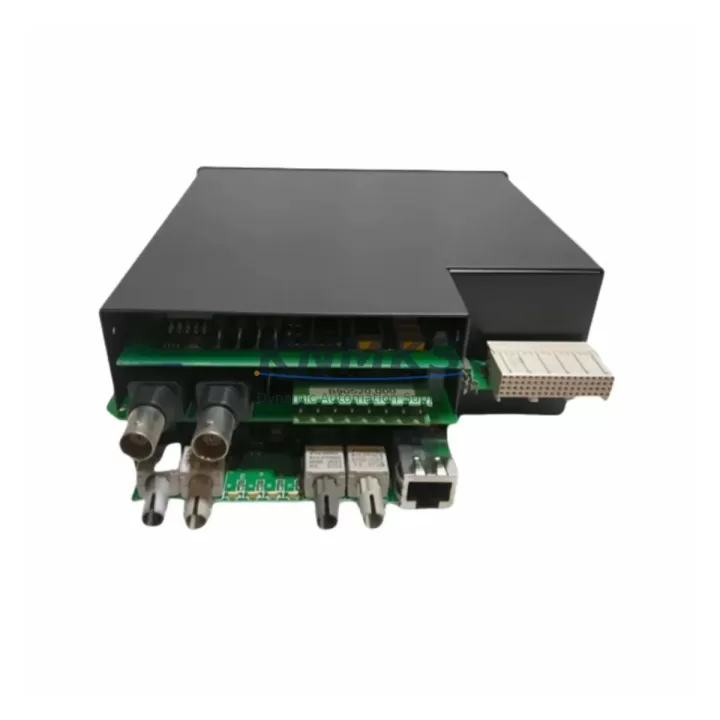
GE UR5EH Migration-Ready Processor Card for UR Series: Legacy System Retrofit & Compatibility Upgrade
The GE UR5EH is a migration-ready processor card engineered for the GE UR Series protection relay platform. As aging substation automation systems approach end-of-life, the UR5EH provides a verified, drop-in upgrade path that preserves existing wiring, rack infrastructure, and relay logic — dramatically reducing the risk and downtime associated with legacy control system modernization. Whether you are replacing a failed processor in an active protection scheme or executing a planned retrofit across multiple relay bays, the UR5EH is designed to integrate into your existing UR Series chassis without requiring panel redesign or communication reconfiguration.
For engineers managing aging grid protection infrastructure, the UR5EH addresses the most critical pain points in legacy relay replacement: firmware compatibility, terminal wiring continuity, backplane interface alignment, and module addressing. The card is fully compatible with the UR Series backplane, meaning existing I/O modules — including analog input cards, digital output modules, and CT/VT interface boards — remain in service. This eliminates the need to re-terminate field wiring, a process that typically accounts for the majority of retrofit labor hours and introduces the highest risk of commissioning errors.
Migration Compatibility Table
| Parameter | Details |
|---|---|
| Compatible Platform | GE UR Series Protection Relays (UR, URplus chassis) |
| Backplane Interface | Standard UR Series backplane — no adapter required |
| Installation Format | Direct slot replacement; no panel modification needed |
| Communication Compatibility | IEC 61850, DNP3, Modbus RTU/TCP, IEC 60870-5-103 |
| Firmware Compatibility | Compatible with UR Series firmware versions; field-upgradeable via EnerVista UR Setup |
| Module Addressing | Retains existing module address configuration from legacy processor |
| Replacement Recommendation | Direct replacement for failed or obsolete UR Series processor cards |
| Commissioning Focus | Firmware version verification, settings file restore, communication link test, I/O functional check |
| Support terms | support terms confirmed by quotation — covers hardware defects and DOA units |
Retrofit Planning for Existing Automation Systems
Successful UR5EH integration begins well before the replacement card arrives on site. During the planning phase, engineers should retrieve the existing relay’s settings file using EnerVista UR Setup software and archive the complete configuration — including protection elements, logic equations, FlexLogic settings, and communication parameters. This settings file becomes the baseline for post-replacement commissioning and eliminates the risk of losing relay logic that may have been customized over years of operation.
Power supply capacity is a critical verification step. The UR Series chassis accommodates multiple modules, and the total draw from the processor card, I/O modules, and any installed UR Series communications card (such as the 9E or 9F Ethernet module) must remain within the rated output of the installed UR Series power supply module. If the existing power supply is already operating near capacity, the retrofit plan should include a power budget review before the UR5EH is installed.
For sites running IEC 61850 GOOSE messaging or peer-to-peer protection schemes, the communications configuration stored in the processor must be carefully documented. The UR5EH supports IEC 61850 Edition 1 and Edition 2, but the IED name, IP address, and GOOSE dataset configuration must be restored exactly to avoid disrupting inter-relay communication with adjacent GE UR Series relays or third-party IEDs on the same substation LAN. Where DNP3 or Modbus is in use, the existing data map and point list should be exported and re-imported after the processor swap to maintain SCADA integration without requiring changes at the master station.
Physical installation space should be confirmed against the UR Series chassis slot assignment. The UR5EH occupies a standard processor slot and does not require adjacent slots to be vacated. However, if the chassis also houses a UR Series human-machine interface (HMI) module or a front-panel display card, the slot layout should be reviewed to confirm no mechanical interference. Rack-mounted installations in existing control cabinets should also verify that cable management and door clearance are maintained after the new card is seated.
For sites with installed UR Series analog output modules or transducer output cards used for metering integration, the scaling and channel assignment configuration stored in the legacy processor must be transferred to the UR5EH during commissioning. These parameters are not automatically retained in the I/O module hardware and must be restored from the archived settings file or re-entered manually.
Downtime Control During System Migration
Minimizing protection outage duration is the primary operational constraint in any live substation retrofit. For UR5EH replacements, the recommended approach is to complete all pre-work — settings file backup, firmware version confirmation, communication parameter documentation, and spare parts staging — before the protection relay is taken out of service. With preparation complete, the physical processor swap can typically be completed in under 30 minutes, with the remaining outage time consumed by settings restore, firmware upgrade (if required), and functional testing.
Where the relay being replaced is part of a redundant protection scheme — for example, a dual-main or main-backup arrangement — the outage can be further compressed by confirming that the backup protection system is in service and healthy before the primary relay is isolated. This approach eliminates the risk of an unprotected interval during the processor replacement and allows the commissioning team to take additional time on functional verification without time pressure.
Settings file restoration using EnerVista UR Setup is the fastest path to restoring relay logic after a processor swap. The software allows the complete settings file — including all protection elements, FlexLogic equations, and communication parameters — to be loaded in a single operation, avoiding the need to re-enter individual settings manually. After the settings file is loaded, a firmware version check should be performed to confirm that the UR5EH firmware is compatible with the settings file version. If a firmware upgrade is required, it should be performed before the relay is returned to service, as firmware upgrades require a relay restart.
Final commissioning steps include a full I/O functional check — verifying that all digital inputs, output contacts, and analog channels respond correctly — followed by a communication link test to confirm that SCADA, engineering workstation, and peer relay connections are restored. Where possible, a secondary injection test using a relay test set should be performed to verify that protection elements operate correctly before the relay is returned to service.
Retrofit Support FAQ
Q: Is the GE UR5EH a direct replacement for all UR Series processor cards?
A: The UR5EH is designed as a processor card for the GE UR Series platform. Compatibility depends on the specific chassis generation and firmware version in use. We recommend providing your existing relay model number and firmware version so our technical team can confirm direct replaceability before shipment.
Q: Can the existing relay settings be transferred to the UR5EH without re-entering them manually?
A: Yes. Settings files created with EnerVista UR Setup can be saved from the existing relay and loaded directly into the UR5EH after installation. Settings file compatibility is firmware-version dependent; our team will advise on any required firmware alignment before dispatch.
Q: What pre-shipment testing is performed on the UR5EH?
A: Each UR5EH unit undergoes functional verification prior to shipment, including power-on self-test, communication port verification, and firmware integrity check. Units are shipped with a test report confirming pre-shipment status. All units are covered by a support terms confirmed by quotation against hardware defects.
Q: What is the typical lead time and do you maintain stock?
A: We maintain inventory of the GE UR5EH to support urgent replacement requirements. Standard orders ship within 1–3 business days. For large-quantity or project-based requirements, contact our sales team to confirm availability and reserve stock against your project schedule.
© 2026 KNMKS. All rights reserved.
Original Source: https://knmks.com
Contact: admin@knmks.com | +86 18359268345
Product Identification
- Brand / Ecosystem
-
GE Grid Solutions
Assorted Brands - Model / Series
-
UR5EH
Assorted Series - Product Family
- PLCs & Controllers
- Availability Status
- Available on request after model and quantity confirmation
- Inquiry Type
- B2B RFQ, replacement inquiry and project spare-part request
- Pre-Quote Check
- Exact SKU, brand, series, quantity, nameplate photos and destination country are checked before quotation
System Path
Where this product fits in the KNMKS automation structure.
Specification & Inquiry Focus
- Control platform
- PLC, PAC and modular controllers
- Common needs
- CPU, rack, power and I/O expansion
- Project support
- Replacement, cabinet build and maintenance
Buyer Confirmation
Information KNMKS checks before replying.
- Exact model
- UR5EH
- Brand / ecosystem
- GE Grid Solutions
- Product family
- PLCs & Controllers
- Application note
- Replacement, maintenance, project build or spare-part list
- Useful photos
- Nameplate, installed unit, cabinet layout or connector side
- Delivery details
- Quantity, destination country and target schedule
Document Support
Files and notes can be confirmed during quotation.
- Product photos or nameplate confirmation when available
- Packing and delivery notes before quotation confirmation
- Support scope and delivery terms confirmed per inquiry
- Export document coordination for qualified B2B requests
Inquiry Support
- Model cross-checking before quotation
- CPU, power, rack and expansion module matching
- Support for replacement and project inquiry
What to Send Us
- Brand and exact model number: GE Grid Solutions UR5EH
- Quantity and required delivery time
- Application, replacement requirement or nameplate photo
- Destination country and shipping preference
RFQ Preparation
This is a product inquiry page built for RFQ communication.
Fast Model Check
Send this model to KNMKS for confirmation.
Include quantity, destination country and photos if this is a maintenance replacement. The inquiry will be saved with a reference number after submission.
Brand & Compatibility Note
KNMKS displays automation product information for well-known industrial brand ecosystems and compatible replacement references. Brand names are used for product identification and compatibility reference only; final availability and commercial terms are confirmed per quotation.
 Manufacturing
 Machine Tools
 Packaging
 Energy & Power



 HMI & Displays
 Servo Systems
 Variable Frequency Drives
 Sensors