
Overview
GE IC695PBM300CA Migration-Ready PROFIBUS DP Master for Legacy Control Systems
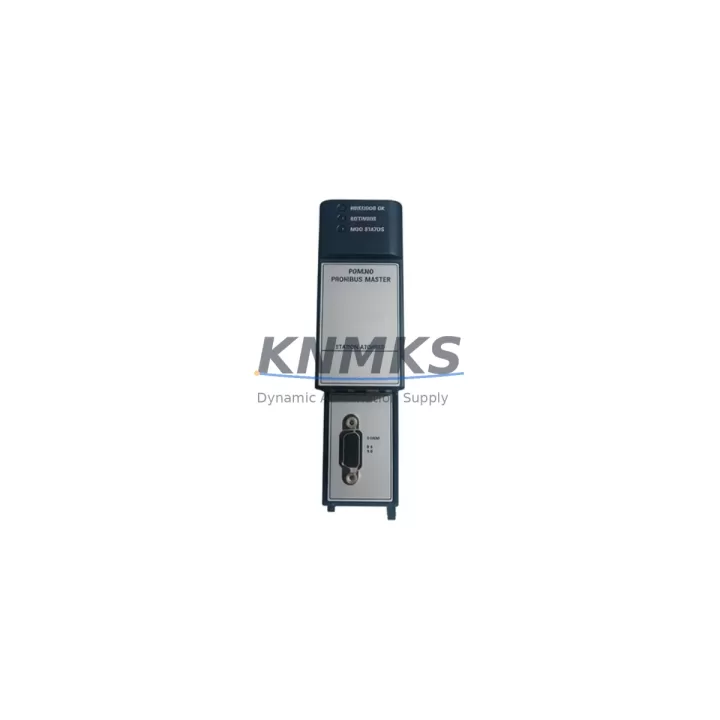
The GE IC695PBM300CA is a PROFIBUS DP Master communication module designed for the GE PACSystems RX3i platform. As industrial facilities worldwide accelerate the retirement of aging Series 90-30 and Series 90-70 control architectures, the IC695PBM300CA has become a critical component in brownfield retrofit projects, legacy panel upgrades, and multi-site PROFIBUS network consolidations. Whether you are replacing a discontinued IC695PBM300 or migrating an entire control cabinet from an older GE Series 90 rack to a modern RX3i backplane, this module provides the communication backbone required to maintain PROFIBUS DP master functionality without rewriting the underlying field device configuration.
Engineers undertaking a retrofit must carefully verify several parameters before commissioning the IC695PBM300CA. Power budget on the RX3i backplane — typically supplied by an IC695PSA040 or IC695PSD040 power supply — must accommodate the module’s current draw alongside co-resident I/O and specialty modules. Terminal wiring on the PROFIBUS DB9 connector must be confirmed against the existing cable shield and bus termination scheme, particularly when the legacy system used a different connector pinout or active terminator. The module occupies a single universal backplane slot on the IC695CHS012 or IC695CHS016 chassis, and its slot address must be assigned consistently with the existing GSD file and hardware configuration stored in the PACSystems Machine Edition project.
Program compatibility is a frequent concern during migration. Logic developed for an IC693PBM200 on a Series 90-30 rack cannot be directly imported into a PACSystems RX3i project without conversion, but the PROFIBUS DP slave device list, GSD parameters, and I/O mapping can be preserved with careful re-engineering in Machine Edition. HMI screens connected via SRTP or OPC to the original controller must be updated to reflect the new register addresses if the data model changes during migration. Communication links to upstream SCADA systems, historians, or DCS gateways should be validated in a staging environment before live cutover to avoid unplanned process interruptions.
Installation space confirmation is essential when retrofitting into an existing control cabinet. The IC695PBM300CA follows the standard RX3i module form factor, but the overall cabinet layout must account for the IC695CHS012 chassis depth, DIN rail or panel-mount clearance, and cable management for the PROFIBUS trunk cable. Firmware version compatibility between the IC695PBM300CA and the IC695CPE305 or IC695CPE400 CPU must be verified; Emerson’s release notes specify minimum CPU firmware levels required for full PROFIBUS DP master feature support. Field commissioning typically involves setting the module’s master address, scanning the PROFIBUS network for all slave devices, and confirming cyclic data exchange before releasing the system to production.
Migration Compatibility Table
| Parameter | IC695PBM300CA (This Module) | Legacy Reference (IC693PBM200 / IC695PBM300) |
|---|---|---|
| Platform | PACSystems RX3i | Series 90-30 / Early RX3i |
| Backplane Interface | RX3i Universal Backplane (IC695CHS012 / IC695CHS016) | Series 90-30 5-slot / 10-slot rack |
| PROFIBUS Role | DP Master (Class 1) | DP Master (Class 1) |
| Max Slave Devices | Up to 125 DP slaves | Up to 125 DP slaves |
| Communication Speed | 9.6 kbps – 12 Mbps | 9.6 kbps – 12 Mbps |
| Connector | DB9 Female (PROFIBUS standard) | DB9 Female |
| Power Requirement | Supplied via RX3i backplane (IC695PSA040 / IC695PSD040) | Supplied via Series 90-30 rack power supply |
| Configuration Tool | PACSystems Machine Edition (GSD import) | Logicmaster 90 / Machine Edition |
| Firmware Compatibility | Verify CPU firmware ≥ minimum specified in Emerson release notes | N/A (legacy) |
| Installation Space | Single universal slot, standard RX3i module depth | Single Series 90-30 slot |
| Replacement Recommendation | Direct replacement for IC695PBM300; migration path from IC693PBM200 | Discontinued / End-of-Life |
| Support terms | support terms confirmed by quotation | N/A |
| Outgoing Test | Function-tested before shipment | N/A |
Retrofit Planning for Existing Automation Systems
A successful retrofit begins well before the first module is removed from the cabinet. When planning the migration of a PROFIBUS DP network to a PACSystems RX3i platform centered on the IC695PBM300CA, engineers should audit the full bill of materials for the existing control system. The IC695CHS012 backplane must be sized to accommodate not only the PROFIBUS master but also any analog or discrete I/O modules — such as the IC695ALG600 analog input module or IC695MDL654 discrete output module — that will be co-located in the same chassis. If the legacy system relied on a Series 90-30 IC693PWR321 power supply, the replacement IC695PSA040 power supply must be evaluated for total backplane current capacity before the new chassis is populated.
Communication architecture planning is equally important. If the existing plant network uses Ethernet alongside PROFIBUS, an IC695ETM001 Ethernet module may need to be added to the RX3i chassis to maintain SRTP or Modbus TCP connectivity to SCADA or historian systems. For sites where the legacy controller communicated with an operator panel via SNP serial protocol, the migration plan must address whether the HMI will be updated to Ethernet-based communication or whether a serial communication module such as the IC695CMM002 will bridge the gap during the transition period. PROFIBUS slave devices — including variable frequency drives, remote I/O stations, and field instruments — retain their existing GSD files and wiring, which significantly reduces the scope of field work during cutover.
Signal isolation requirements should be reviewed for any analog loops that pass through the control cabinet. Where legacy wiring used unshielded twisted pair or shared cable trays with power conductors, signal isolators may be required to maintain measurement integrity after the new RX3i chassis is energized. Programming cable access for the IC695CPE305 or IC695CPE400 CPU — typically via USB or Ethernet — should be confirmed before the cutover window begins, ensuring that the Machine Edition workstation can reach the controller for online monitoring and program download during commissioning.
Downtime Control During System Migration
Minimizing unplanned downtime is the primary operational constraint in any brownfield PLC migration. For projects involving the IC695PBM300CA, the recommended approach is to pre-configure and bench-test the complete RX3i chassis — including the PROFIBUS master, CPU, power supply, and I/O modules — before the scheduled maintenance window. The Machine Edition project should be compiled, downloaded to the CPU, and verified offline using simulated I/O forcing to confirm that all PROFIBUS slave addresses, cyclic data lengths, and diagnostic messaging behave as expected before the system is connected to live field devices.
During the cutover window, the sequence should follow a structured handover: de-energize the legacy rack, document all terminal wiring connections, transfer the PROFIBUS trunk cable to the new DB9 connector on the IC695PBM300CA, and energize the RX3i chassis. The CPU should be placed in RUN mode only after the PROFIBUS network scan confirms that all expected slave devices are online and exchanging cyclic data correctly. Original program logic — particularly PID loops, interlock sequences, and safety-related rungs — should be protected from inadvertent modification during the migration by using Machine Edition’s program protection and version control features. If the legacy system used a GE IC693MDL940 relay output module for critical outputs, the equivalent RX3i output module wiring should be verified against the original terminal strip drawings before the system is released to production operators. Maintaining a parallel backup of the original Logicmaster or Machine Edition project ensures that a rollback path exists if unexpected compatibility issues arise during the first production run after cutover.
Retrofit Support FAQ
Q: Is the IC695PBM300CA a direct drop-in replacement for the IC695PBM300?
A: Yes. The IC695PBM300CA is the current catalog revision of the IC695PBM300 and is fully compatible with the same RX3i backplane slots, GSD-based configuration, and Machine Edition hardware configuration. No firmware changes to the CPU are required in most cases, though verifying the minimum CPU firmware level against Emerson’s current release notes is always recommended before installation.
Q: Can the IC695PBM300CA replace an IC693PBM200 from a Series 90-30 system?
A: The IC695PBM300CA is not a plug-in replacement for the IC693PBM200 because the two modules use different backplane architectures (RX3i universal backplane vs. Series 90-30 rack). However, it is the correct migration target when upgrading from a Series 90-30 PROFIBUS master to a PACSystems RX3i platform. The PROFIBUS slave device configuration, GSD files, and field wiring can be reused, which significantly reduces migration effort.
Q: What pre-shipment testing is performed on the IC695PBM300CA?
A: Each IC695PBM300CA unit is function-tested before shipment to verify PROFIBUS DP master communication, backplane interface integrity, and module self-diagnostics. Units are shipped with a support terms confirmed by quotation covering defects in materials and workmanship. Expedited shipping options are available to support urgent maintenance and unplanned downtime recovery scenarios.
Q: How long does a typical IC695PBM300CA retrofit commissioning take?
A: For a pre-configured and bench-tested RX3i chassis, field commissioning of the PROFIBUS master typically requires two to four hours, including network scan, slave device verification, cyclic data confirmation, and initial production run monitoring. Sites with large PROFIBUS networks (50+ slaves) or complex HMI integration may require additional time for full validation. Having a Machine Edition-trained engineer on-site and a pre-tested spare IC695PBM300CA module available significantly reduces risk during the cutover window.
© 2026 KNMKS. All rights reserved.
Original Source: https://knmks.com
Contact: admin@knmks.com | +86 18359268345
Product Identification
- Brand / Ecosystem
-
GE
Assorted Brands - Model / Series
-
IC695PBM300CA
Assorted Series - Product Family
- PLCs & Controllers
- Availability Status
- Available on request after model and quantity confirmation
- Inquiry Type
- B2B RFQ, replacement inquiry and project spare-part request
- Pre-Quote Check
- Exact SKU, brand, series, quantity, nameplate photos and destination country are checked before quotation
System Path
Where this product fits in the KNMKS automation structure.
Specification & Inquiry Focus
- Control platform
- PLC, PAC and modular controllers
- Common needs
- CPU, rack, power and I/O expansion
- Project support
- Replacement, cabinet build and maintenance
Buyer Confirmation
Information KNMKS checks before replying.
- Exact model
- IC695PBM300CA
- Brand / ecosystem
- GE
- Product family
- PLCs & Controllers
- Application note
- Replacement, maintenance, project build or spare-part list
- Useful photos
- Nameplate, installed unit, cabinet layout or connector side
- Delivery details
- Quantity, destination country and target schedule
Document Support
Files and notes can be confirmed during quotation.
- Product photos or nameplate confirmation when available
- Packing and delivery notes before quotation confirmation
- Support scope and delivery terms confirmed per inquiry
- Export document coordination for qualified B2B requests
Inquiry Support
- Model cross-checking before quotation
- CPU, power, rack and expansion module matching
- Support for replacement and project inquiry
What to Send Us
- Brand and exact model number: GE IC695PBM300CA
- Quantity and required delivery time
- Application, replacement requirement or nameplate photo
- Destination country and shipping preference
RFQ Preparation
This is a product inquiry page built for RFQ communication.
Fast Model Check
Send this model to KNMKS for confirmation.
Include quantity, destination country and photos if this is a maintenance replacement. The inquiry will be saved with a reference number after submission.
Brand & Compatibility Note
KNMKS displays automation product information for well-known industrial brand ecosystems and compatible replacement references. Brand names are used for product identification and compatibility reference only; final availability and commercial terms are confirmed per quotation.
 Manufacturing
 Machine Tools
 Packaging
 Energy & Power



 HMI & Displays
 Servo Systems
 Variable Frequency Drives
 Sensors