
Overview
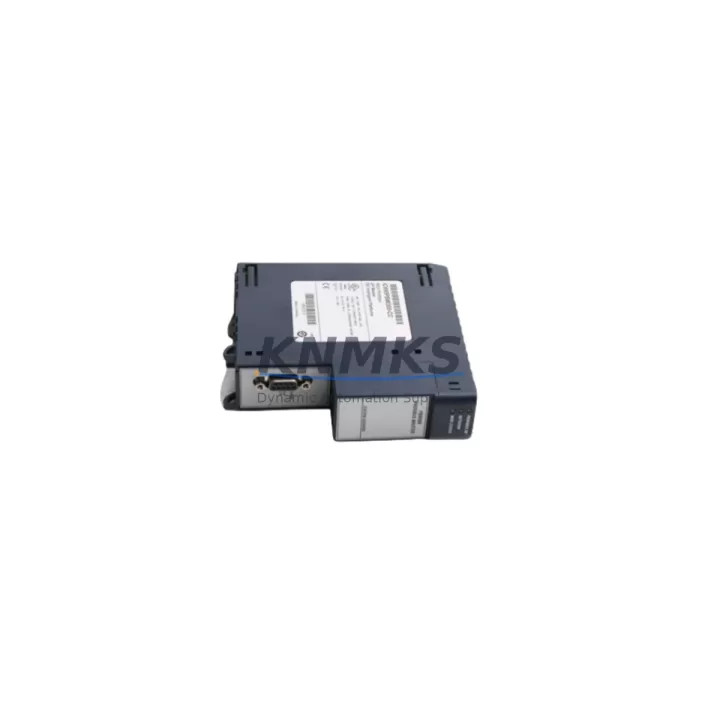
GE IC695PBM300-CC Migration-Ready PROFIBUS Master RX3i: Legacy System Migration and Compatible Upgrade
The GE IC695PBM300-CC is a PROFIBUS DP Master module designed for the PACSystems RX3i platform, engineered to serve as a direct migration path from discontinued GE Series 90-30 and earlier RX3i PROFIBUS configurations. As legacy control architectures reach end-of-life, the IC695PBM300-CC provides a reliable, tested, and immediately deployable replacement that preserves existing PROFIBUS DP network topologies while enabling integration into modern RX3i backplane environments.
For facilities operating aging IC693PBM200 or first-generation IC695PBM300 modules, the transition to the IC695PBM300-CC requires careful pre-migration planning. Engineers must verify backplane slot compatibility within the IC695CHS012 or IC695CHS016 universal backplane, confirm available 5 VDC backplane power budget from the IC695PSA040 or IC695PSD040 power supply, and review the PROFIBUS DP segment configuration including baud rate, station addressing, and GSD file assignments. The IC695PBM300-CC supports PROFIBUS DP-V0 and DP-V1 protocols at baud rates up to 12 Mbps, maintaining backward compatibility with the majority of installed PROFIBUS slave devices on the plant floor.
Before cutover, project teams should export and archive the existing PACSystems Machine Edition (PME) project, validate that all DP slave GSD files are correctly imported into the new hardware configuration, and confirm that the module’s slot address assignment matches the original program logic. Any changes to the module’s rack position will require corresponding updates to the hardware configuration tree in PME and a full program download to the IC695CPE305 or IC695CPE400 controller. Where the original system used an IC693CMM321 communications module for serial PROFIBUS bridging, the migration to a native RX3i PROFIBUS master eliminates that intermediate layer and simplifies the network architecture.
Migration Compatibility Table
| Parameter | IC695PBM300-CC | IC695PBM300 (Legacy) | IC693PBM200 (Discontinued) |
|---|---|---|---|
| Platform | PACSystems RX3i | PACSystems RX3i | Series 90-30 |
| Backplane Interface | RX3i Universal Backplane | RX3i Universal Backplane | Series 90-30 5-slot / 10-slot |
| PROFIBUS Protocol | DP-V0, DP-V1 | DP-V0, DP-V1 | DP-V0 only |
| Max Baud Rate | 12 Mbps | 12 Mbps | 1.5 Mbps |
| Max DP Slaves | 125 | 125 | 64 |
| Installation Slot | Any universal slot | Any universal slot | Dedicated Series 90-30 slot |
| Programming Tool | PME 9.0+ | PME 8.x+ | Logicmaster / VersaPro |
| Firmware Compatibility | RX3i CPU firmware 8.x+ | RX3i CPU firmware 7.x+ | Series 90-30 CPU firmware |
| Replacement Recommendation | Direct drop-in for IC695PBM300 | — | Requires backplane and CPU migration |
| Commissioning Focus | GSD re-import, slot address, baud rate | GSD import, slot address | Full hardware and program migration |
| Support terms | support terms confirmed by quotation | OEM support terms (EOL) | Discontinued — no OEM support |
Retrofit Planning for Existing Automation Systems
A successful retrofit centered on the IC695PBM300-CC begins with a thorough audit of the existing control cabinet. Engineers should document the current backplane layout, identifying occupied slots in the IC695CHS012 chassis and confirming that sufficient space exists for the PROFIBUS master alongside the IC695CPE400 controller, IC695ETM001 Ethernet module, and any installed IC695ALG600 analog I/O modules. Power budget calculations must account for the IC695PBM300-CC’s backplane current draw in addition to all co-resident modules, ensuring the IC695PSA040 power supply is not operating near its rated capacity.
For sites where the PROFIBUS network also carries communication to IC694MDL655 discrete input modules or IC694MDL754 discrete output modules operating as DP slaves, the GSD file library must be fully updated before the new master is brought online. Where signal isolation is required between the PROFIBUS segment and field instrumentation, inline signal isolators should be verified for compatibility with the updated baud rate settings. Programming cable access via the IC690USB901 USB-to-serial adapter or direct Ethernet connection to the CPE400 should be confirmed prior to the maintenance window to avoid delays during the live cutover.
Sites migrating from Series 90-30 architectures will also need to address the HMI layer. Existing CIMPLICITY or iFIX screens referencing Series 90-30 register addresses must be remapped to the RX3i memory model, and any OPC server configurations pointing to the legacy CPU must be updated to reflect the new IC695CPE400 IP address and communication driver. This HMI remapping is frequently the longest task in the migration schedule and should be allocated dedicated commissioning time separate from the hardware swap.
Downtime Control During System Migration
Minimizing production downtime during a PROFIBUS master migration requires a structured pre-cutover checklist. The recommended approach is to complete all hardware configuration changes, GSD file imports, and program modifications in a PME offline project before the maintenance window begins. The new IC695PBM300-CC should be bench-tested in a staging rack with representative DP slave devices to verify communication at the target baud rate and confirm that all I/O data maps correctly to the program’s variable table.
During the live cutover, the sequence should follow: power down the control cabinet, remove the legacy PROFIBUS master, install the IC695PBM300-CC in the designated slot, reconnect the PROFIBUS DB9 connector, restore power, and perform a forced program download from the pre-validated PME project. The controller’s RUN/STOP switch should remain in STOP until all DP slave communications are confirmed healthy in the PME hardware diagnostics view. Only after all slave status indicators show active communication should the controller be transitioned to RUN mode and the process returned to automatic control.
For critical continuous processes where even a brief interruption is unacceptable, a parallel migration strategy using a temporary IC695CHS007 expansion chassis can allow the new PROFIBUS master to be pre-configured and tested on a secondary backplane before the final swap. This approach keeps the original system operational until the last possible moment and reduces the live cutover window to the minimum time required for the physical module exchange and a single program download. All pre-shipment testing on the IC695PBM300-CC is completed at our facility before dispatch, and each unit ships with a support terms confirmed by quotation covering both hardware and communication functionality.
Retrofit Support FAQ
Q1: Is the IC695PBM300-CC a direct replacement for the IC695PBM300?
Yes. The IC695PBM300-CC installs in the same RX3i universal backplane slot and uses the same PME hardware configuration profile as the IC695PBM300. No changes to the program logic or PROFIBUS network wiring are required for a like-for-like swap. The “-CC” suffix denotes a conformal-coated variant for enhanced environmental protection in humid or corrosive industrial environments.
Q2: What commissioning steps are required after installation?
After physical installation, connect the programming laptop via Ethernet to the IC695CPE400 or IC695CPE305 controller. Open the existing PME project, verify the hardware configuration reflects the IC695PBM300-CC in the correct slot, and perform a hardware configuration download. Confirm that all PROFIBUS DP slaves appear in the diagnostics view with active status before switching the controller to RUN mode. Baud rate and station address settings are retained from the original configuration and do not require re-entry.
Q3: Can the IC695PBM300-CC communicate with legacy Series 90-30 PROFIBUS slaves?
Yes, provided the slave devices support PROFIBUS DP-V0 at the configured baud rate. The IC695PBM300-CC is backward compatible with DP-V0 slaves, which covers the majority of field devices installed in Series 90-30 era systems. DP-V1 acyclic services are additionally available for devices that support extended diagnostics and parameter assignment.
Q4: What support terms and testing does this unit include?
Every IC695PBM300-CC unit is pre-tested for PROFIBUS DP communication functionality, backplane interface integrity, and firmware version verification before shipment. Units are supplied with a support terms confirmed by quotation covering hardware defects and communication failures under normal operating conditions. In-stock units are available for same-week dispatch to minimize system downtime for urgent replacement requirements.
© 2026 KNMKS. All rights reserved.
Original Source: https://knmks.com
Contact: admin@knmks.com | +86 18359268345
Product Identification
- Brand / Ecosystem
-
GE
Assorted Brands - Model / Series
-
IC695PBM300-CC
Assorted Series - Product Family
- PLCs & Controllers
- Availability Status
- Available on request after model and quantity confirmation
- Inquiry Type
- B2B RFQ, replacement inquiry and project spare-part request
- Pre-Quote Check
- Exact SKU, brand, series, quantity, nameplate photos and destination country are checked before quotation
System Path
Where this product fits in the KNMKS automation structure.
Specification & Inquiry Focus
- Control platform
- PLC, PAC and modular controllers
- Common needs
- CPU, rack, power and I/O expansion
- Project support
- Replacement, cabinet build and maintenance
Buyer Confirmation
Information KNMKS checks before replying.
- Exact model
- IC695PBM300-CC
- Brand / ecosystem
- GE
- Product family
- PLCs & Controllers
- Application note
- Replacement, maintenance, project build or spare-part list
- Useful photos
- Nameplate, installed unit, cabinet layout or connector side
- Delivery details
- Quantity, destination country and target schedule
Document Support
Files and notes can be confirmed during quotation.
- Product photos or nameplate confirmation when available
- Packing and delivery notes before quotation confirmation
- Support scope and delivery terms confirmed per inquiry
- Export document coordination for qualified B2B requests
Inquiry Support
- Model cross-checking before quotation
- CPU, power, rack and expansion module matching
- Support for replacement and project inquiry
What to Send Us
- Brand and exact model number: GE IC695PBM300-CC
- Quantity and required delivery time
- Application, replacement requirement or nameplate photo
- Destination country and shipping preference
RFQ Preparation
This is a product inquiry page built for RFQ communication.
Fast Model Check
Send this model to KNMKS for confirmation.
Include quantity, destination country and photos if this is a maintenance replacement. The inquiry will be saved with a reference number after submission.
Brand & Compatibility Note
KNMKS displays automation product information for well-known industrial brand ecosystems and compatible replacement references. Brand names are used for product identification and compatibility reference only; final availability and commercial terms are confirmed per quotation.
 Manufacturing
 Machine Tools
 Packaging
 Energy & Power



 HMI & Displays
 Servo Systems
 Variable Frequency Drives
 Sensors