
Overview
GE IC695CPE310-ABAH Maintenance-Proven Spare Part for Factory Uptime
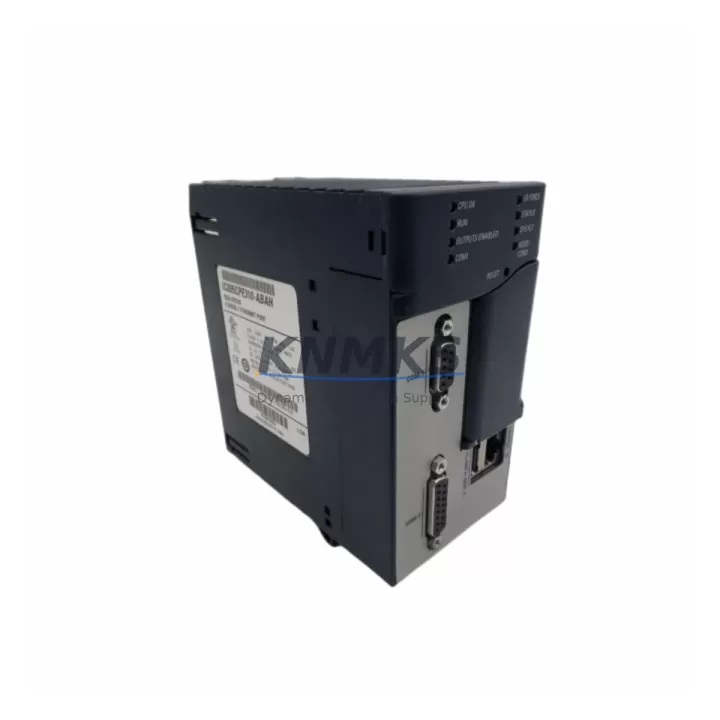
The GE IC695CPE310-ABAH is a high-performance CPU module within the GE PACSystems RX3i platform — one of the most widely deployed programmable logic controller families in continuous process, discrete manufacturing, and hybrid industrial environments. Sourced as an original OEM spare, this unit is maintained in inventory specifically to support maintenance engineers and procurement teams managing aging control systems, scheduled overhauls, and emergency downtime recovery scenarios.
For facilities running PACSystems RX3i-based control cabinets, the IC695CPE310-ABAH represents a critical line-replaceable unit (LRU). Its role spans routine point inspections, fault isolation during unplanned stops, annual maintenance windows, and long-term system life extension programs. Keeping a verified spare on the shelf eliminates the lead-time risk that turns a two-hour fault into a multi-day production loss.
Each unit is tested prior to shipment and backed by a support terms confirmed by quotation, giving procurement engineers a documented quality baseline for spare parts budget justification and supplier qualification records.
Spare Maintenance Table
| SKU / Part Number | IC695CPE310-ABAH |
| Brand / Manufacturer | GE (Emerson Automation Solutions) |
| Series | PACSystems RX3i |
| Product Type | PLC CPU Module |
| Processor | Intel Celeron-based, 1.0 GHz (typical for CPE310 class) |
| Memory | 64 MB user program / 256 MB data storage (standard CPE310 spec) |
| Backplane Compatibility | IC695CHS007, IC695CHS012, IC695CHS016 (7-, 12-, 16-slot RX3i backplanes) |
| Communication Ports | Ethernet (RJ-45), RS-232 serial; supports SRTP, Modbus TCP, EGD |
| Power Supply Compatibility | IC695PSA040 / IC695PSD040 (40W AC/DC RX3i power supplies) |
| Operating Voltage | 3.3 V / 5 V via backplane (supplied by RX3i PSU) |
| Operating Temperature | 0 °C to 60 °C (32 °F to 140 °F) |
| Humidity | 5% to 95% non-condensing |
| Mounting | Backplane slot 0 (CPU slot), DIN-rail or panel-mount chassis |
| Origin | United States |
| Condition | Original OEM spare; tested before shipment |
| Support terms | 12 months from date of shipment |
| Shipping | Worldwide; ESD-safe packaging; export documentation available |
Maintenance Planning for Continuous Operation
When a PACSystems RX3i CPU such as the IC695CPE310-ABAH is flagged during a control cabinet inspection or fault log review, experienced maintenance engineers know that the CPU is rarely the only component under stress. A structured replacement workflow should include verification of the adjacent power supply — typically an IC695PSA040 or IC695PSD040 — since an under-performing PSU can cause intermittent CPU faults that mimic firmware or memory errors.
I/O module health should be confirmed across all occupied backplane slots. Mixed-generation I/O cards such as the IC694MDL754 (discrete output) or IC695ALG600 (analog input) may develop communication errors after a CPU swap if their firmware revisions are not aligned with the replacement CPU’s PACSystems firmware version. Confirm compatibility in the GE PACSystems RX3i System Manual (GFK-2314) before energizing the replacement unit.
Communication continuity is equally important. If the control system relies on Ethernet Global Data (EGD) or Modbus TCP for SCADA integration, verify that the IC695ETM001 Ethernet module (if installed as a dedicated comms card) retains its IP configuration after the CPU replacement. In systems where the CPU’s onboard Ethernet port handles SCADA traffic directly, re-validate the network adapter settings in Machine Edition Logic Developer before going live.
For cabinets with relay output modules or interposing relay panels, inspect the IC694MDL940 relay output module and associated terminal blocks for contact wear — a CPU replacement is an ideal opportunity to perform this check without an additional planned outage. Similarly, review any installed IC695RMX128 or redundancy modules if the system is configured for hot-standby operation, as redundancy synchronization must be re-established after a primary CPU change.
Fuse and surge protection components at the cabinet entry point should be inspected as part of any CPU replacement event. A blown or degraded fuse on the 24 VDC field power rail can cause I/O modules to report faults that are incorrectly attributed to the CPU. Documenting these checks in the maintenance log supports both root-cause analysis and future spare parts procurement planning.
Procurement engineers managing multi-site RX3i deployments should consider maintaining a minimum of one IC695CPE310-ABAH per site alongside a matched power supply spare. This two-component buffer covers the majority of unplanned CPU-related downtime scenarios and aligns with IEC 62443 spare parts management recommendations for industrial control systems.
Site Replacement Workflow
Step 1 — Pre-replacement backup: Using GE Proficy Machine Edition, perform a full program backup from the existing CPU via the online upload function. Store the .project file with version date and technician ID in the site’s document management system.
Step 2 — Power down sequence: Follow the site’s lockout/tagout (LOTO) procedure. De-energize the RX3i chassis via the main disconnect. Confirm zero-energy state on all field power rails before opening the cabinet.
Step 3 — Module extraction: Release the IC695CPE310-ABAH from backplane slot 0 using the module locking tabs. Handle with ESD precautions. Record the firmware version label from the removed unit for documentation.
Step 4 — Replacement installation: Seat the replacement IC695CPE310-ABAH into slot 0. Confirm the module locks positively into the backplane connector. Re-connect any front-panel Ethernet or serial cables.
Step 5 — Program restore and validation: Power up the chassis. Download the backed-up program from Machine Edition. Verify I/O module status in the hardware configuration. Confirm all EGD and Modbus TCP connections re-establish within expected timeout windows.
Step 6 — Functional test: Run a controlled I/O test cycle before returning the system to automatic mode. Document the replacement in the site maintenance log with part number, serial number, and test results.
This workflow supports legacy system life extension without requiring a full platform migration, preserving the existing IC695 backplane, I/O infrastructure, and field wiring investment.
Spare Parts Support FAQ
Q1: Is the IC695CPE310-ABAH compatible with all PACSystems RX3i backplanes?
The IC695CPE310-ABAH is designed for the RX3i universal backplane family, including the IC695CHS007 (7-slot), IC695CHS012 (12-slot), and IC695CHS016 (16-slot) configurations. It is not compatible with the older Series 90-30 (IC693) or Series 90-70 (IC697) backplanes. Always verify the chassis model before ordering.
Q2: What testing is performed before shipment?
Each IC695CPE310-ABAH unit undergoes power-on functional verification and communication port testing prior to dispatch. Units are shipped in ESD-safe anti-static packaging with a test record. The support terms confirmed by quotation cover manufacturing defects and functional failures under normal operating conditions from the date of shipment.
Q3: How do you manage long-term supply for discontinued or end-of-life GE RX3i components?
We maintain a managed inventory of original OEM RX3i spare parts specifically to support facilities that cannot migrate to newer platforms on short notice. Long-term supply agreements and volume reservation options are available for multi-site procurement programs. Contact our sales team to discuss scheduled delivery and inventory reservation terms.
Q4: Can the IC695CPE310-ABAH replace earlier CPE310 revisions without reprogramming?
In most cases, yes — the ABAH hardware revision is backward-compatible with programs developed for earlier IC695CPE310 revisions, provided the PACSystems firmware version is matched or updated accordingly in Machine Edition. A program re-download is always recommended after any CPU replacement to ensure configuration integrity. Compatibility should be confirmed against the specific firmware revision in use at your site before installation.
© 2026 KNMKS. All rights reserved.
Original Source: https://knmks.com
Contact: admin@knmks.com | +86 18359268345
Product Identification
- Brand / Ecosystem
-
GE
Assorted Brands - Model / Series
-
IC695CPE310-ABAH
Assorted Series - Product Family
- PLCs & Controllers
- Availability Status
- Available on request after model and quantity confirmation
- Inquiry Type
- B2B RFQ, replacement inquiry and project spare-part request
- Pre-Quote Check
- Exact SKU, brand, series, quantity, nameplate photos and destination country are checked before quotation
System Path
Where this product fits in the KNMKS automation structure.
Specification & Inquiry Focus
- Control platform
- PLC, PAC and modular controllers
- Common needs
- CPU, rack, power and I/O expansion
- Project support
- Replacement, cabinet build and maintenance
Buyer Confirmation
Information KNMKS checks before replying.
- Exact model
- IC695CPE310-ABAH
- Brand / ecosystem
- GE
- Product family
- PLCs & Controllers
- Application note
- Replacement, maintenance, project build or spare-part list
- Useful photos
- Nameplate, installed unit, cabinet layout or connector side
- Delivery details
- Quantity, destination country and target schedule
Document Support
Files and notes can be confirmed during quotation.
- Product photos or nameplate confirmation when available
- Packing and delivery notes before quotation confirmation
- Support scope and delivery terms confirmed per inquiry
- Export document coordination for qualified B2B requests
Inquiry Support
- Model cross-checking before quotation
- CPU, power, rack and expansion module matching
- Support for replacement and project inquiry
What to Send Us
- Brand and exact model number: GE IC695CPE310-ABAH
- Quantity and required delivery time
- Application, replacement requirement or nameplate photo
- Destination country and shipping preference
RFQ Preparation
This is a product inquiry page built for RFQ communication.
Fast Model Check
Send this model to KNMKS for confirmation.
Include quantity, destination country and photos if this is a maintenance replacement. The inquiry will be saved with a reference number after submission.
Brand & Compatibility Note
KNMKS displays automation product information for well-known industrial brand ecosystems and compatible replacement references. Brand names are used for product identification and compatibility reference only; final availability and commercial terms are confirmed per quotation.
 Manufacturing
 Machine Tools
 Packaging
 Energy & Power



 HMI & Displays
 Servo Systems
 Variable Frequency Drives
 Sensors