
Overview
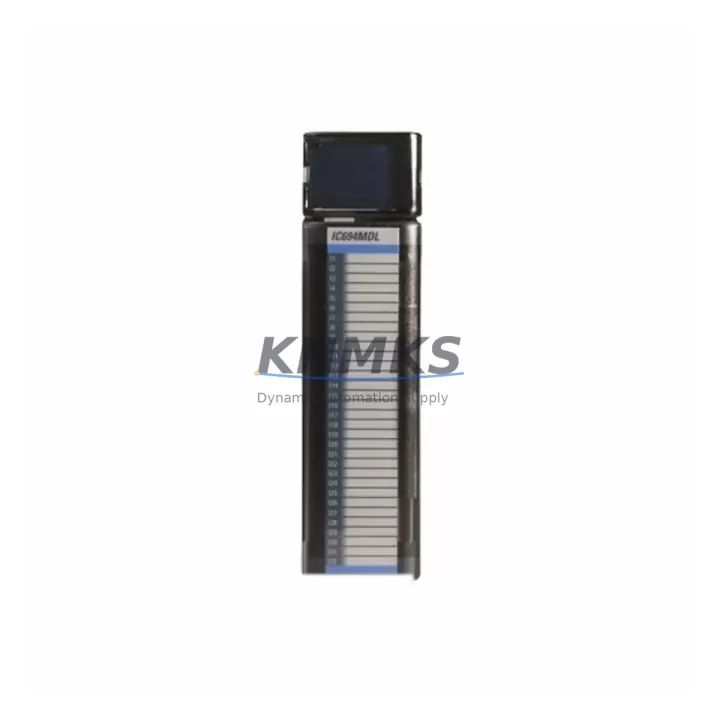
GE IC694MDL740 Migration-Ready Analog Output Module for Legacy Series 90-30 Control Systems
The GE IC694MDL740 is a 16-channel analog output module designed for the GE Series 90-30 PLC platform. As legacy automation systems approach end-of-support milestones, engineering teams managing Series 90-30 control cabinets face increasing pressure to source verified replacement modules that maintain signal integrity, rack compatibility, and program continuity without triggering full system redesigns. The IC694MDL740 addresses this need directly — it is a migration-ready, pre-tested analog output module with confirmed compatibility across the Series 90-30 backplane architecture, available from multi-region stock for emergency replacements and scheduled outage windows.
Whether your facility is executing a phased migration from a Series 90-30 to a PACSystems RX3i platform, or simply extending the operational life of an existing control cabinet, the IC694MDL740 provides a reliable, cost-effective path. Each unit is pre-shipment tested, carries a support terms confirmed by quotation, and ships with full documentation to support field installation and commissioning teams.
Migration Compatibility Table
| Parameter | IC694MDL740 Specification | Migration / Retrofit Notes |
|---|---|---|
| Output Channels | 16 analog output channels | Verify channel-to-terminal mapping against existing I/O schedule before wiring |
| Output Signal Range | 0–10 VDC / 4–20 mA (configurable per channel) | Confirm field device signal type; reconfigure via Proficy Machine Edition if switching from voltage to current output |
| Backplane Interface | Series 90-30 5-slot / 10-slot rack (IC693CHS391, IC693CHS397) | Slot assignment must match original module address; update I/O configuration table in PLC program if slot is changed |
| Power Consumption | Draws from Series 90-30 backplane power bus | Verify IC693PWR321 or IC693PWR330 power supply capacity before adding module; total rack load must not exceed rated output |
| Communication Protocol | Backplane parallel I/O bus (Series 90-30 native) | No additional communication module required; compatible with IC693CPU374 and IC693CPU364 CPUs |
| Module Address | Configured via Proficy Machine Edition hardware configuration | Re-reference all %AQ addresses in ladder logic after slot reassignment |
| HMI Compatibility | Compatible with CIMPLICITY and iFIX SCADA via existing CPU data tables | Verify analog output tag addresses in HMI screens after module replacement; no driver change required |
| Firmware Dependency | No module-level firmware; CPU firmware v9.x or later recommended | Upgrade IC693CPU374 firmware if running versions below v9.0 to ensure stable analog I/O scan |
| Installation Space | Single-slot Series 90-30 module form factor | Confirm physical slot availability in existing rack; no panel cutout modification required |
| Support terms | support terms confirmed by quotation | Covers manufacturing defects; pre-shipment functional test report available on request |
Retrofit Planning for Existing Automation Systems
Replacing the IC694MDL740 in an active Series 90-30 control cabinet requires a structured pre-outage checklist to protect program integrity and minimize commissioning time. Before the scheduled maintenance window, engineering teams should export the full hardware configuration from Proficy Machine Edition and document all %AQ analog output reference addresses mapped to the module. If the replacement module occupies the same rack slot, the hardware configuration typically requires no modification — however, if the slot position changes due to rack reconfiguration, all downstream %AQ references in the ladder logic must be updated and the program re-downloaded to the CPU.
Terminal block wiring is a critical step. The IC694MDL740 uses a removable terminal block, which simplifies field replacement — the wiring harness can be transferred directly to the new module without re-terminating individual conductors, provided the terminal block is in good condition. Teams should inspect terminal block contacts for oxidation or mechanical wear before reuse. Field devices connected to the analog outputs — including control valves, variable frequency drives such as the GE AF-300 series, and positioners — should be verified for signal range compatibility before the system is returned to automatic control.
For facilities running mixed-generation control architectures, the IC694MDL740 retrofit often occurs alongside upgrades to adjacent modules. Common co-replacement items include the IC693MDL940 discrete output module for relay-driven actuators sharing the same control cabinet, the IC693ALG442 analog input module when both input and output channels are being refreshed, and the IC693CMM321 communications module if the CPU is being upgraded to support Ethernet I/P connectivity as part of a broader network modernization. Power supply capacity should be re-evaluated whenever multiple modules are replaced in a single outage — the IC693PWR321 supports up to 40W of backplane load, and adding high-channel-count analog modules can approach this limit in fully populated racks.
For facilities planning a longer-horizon migration from Series 90-30 to PACSystems RX3i, the IC694MDL740 serves as a bridge module during the transition period. The RX3i platform’s IC695ALG728 16-channel analog output module is the functional successor, but the Series 90-30 rack infrastructure can remain in service during phased migration using the IC694 module family, deferring full rack replacement until the next major capital project cycle.
Downtime Control During System Migration
Minimizing unplanned downtime during analog output module replacement requires preparation at three levels: program backup, signal continuity, and commissioning verification. Before any module is removed from the rack, the current PLC program — including all force tables, data block values, and hardware configuration — must be uploaded and archived. This backup serves as the recovery baseline if commissioning reveals unexpected behavior after the replacement module is installed.
During the physical swap, analog output signals to field devices will be interrupted. For process-critical outputs driving control valves or drives, the field devices should be placed in manual or local control mode before the module is removed. This prevents uncontrolled actuator movement during the outage window. Once the IC694MDL740 replacement is seated in the rack and the terminal block is reconnected, the CPU should be placed in STOP mode before downloading any program changes, then transitioned to RUN mode with outputs disabled for an initial scan verification before enabling field outputs.
Post-installation commissioning should include a channel-by-channel analog output verification using a calibrated loop calibrator or multimeter to confirm that each channel produces the correct output value at 0%, 50%, and 100% of the configured range. Any offset or scaling errors should be corrected in the Proficy Machine Edition analog scaling configuration before the system is returned to automatic operation. Full commissioning of a 16-channel analog output module typically requires 2–4 hours for an experienced controls technician, making the IC694MDL740’s pre-tested condition a significant time-saver during tight maintenance windows.
Retrofit Support FAQ
Q: Is the IC694MDL740 a direct drop-in replacement for the IC693MDL740?
A: Yes. The IC694MDL740 is the direct Series 90-30 compatible successor to the IC693MDL740 and occupies the same rack slot with identical terminal block wiring. No hardware configuration changes are required when replacing IC693MDL740 with IC694MDL740 in the same slot position.
Q: Does the replacement module require firmware updates before installation?
A: The IC694MDL740 has no module-level firmware. However, if the host CPU (IC693CPU374 or IC693CPU364) is running firmware below v9.0, a CPU firmware update is recommended to ensure stable analog I/O scan performance. CPU firmware updates can be performed via Proficy Machine Edition without a full program re-download.
Q: What pre-shipment testing is performed on each unit?
A: Each IC694MDL740 unit undergoes functional output verification across all 16 channels prior to shipment, confirming signal accuracy within manufacturer-specified tolerances for both voltage and current output modes. A test report is available on request. All units ship with a support terms confirmed by quotation covering manufacturing defects.
Q: What is the typical lead time and stock availability?
A: The IC694MDL740 is maintained in multi-region stock to support emergency replacement and scheduled outage requirements. Standard orders ship within 1–3 business days. For urgent requirements, expedited dispatch is available — contact admin@knmks.com or call +86 18359268345 to confirm current stock and shipping options.
© 2026 KNMKS. All rights reserved.
Original Source: https://knmks.com
Contact: admin@knmks.com | +86 18359268345
Product Identification
- Brand / Ecosystem
-
GE
Assorted Brands - Model / Series
-
IC694MDL740
Assorted Series - Product Family
- PLCs & Controllers
- Availability Status
- Available on request after model and quantity confirmation
- Inquiry Type
- B2B RFQ, replacement inquiry and project spare-part request
- Pre-Quote Check
- Exact SKU, brand, series, quantity, nameplate photos and destination country are checked before quotation
System Path
Where this product fits in the KNMKS automation structure.
Specification & Inquiry Focus
- Control platform
- PLC, PAC and modular controllers
- Common needs
- CPU, rack, power and I/O expansion
- Project support
- Replacement, cabinet build and maintenance
Buyer Confirmation
Information KNMKS checks before replying.
- Exact model
- IC694MDL740
- Brand / ecosystem
- GE
- Product family
- PLCs & Controllers
- Application note
- Replacement, maintenance, project build or spare-part list
- Useful photos
- Nameplate, installed unit, cabinet layout or connector side
- Delivery details
- Quantity, destination country and target schedule
Document Support
Files and notes can be confirmed during quotation.
- Product photos or nameplate confirmation when available
- Packing and delivery notes before quotation confirmation
- Support scope and delivery terms confirmed per inquiry
- Export document coordination for qualified B2B requests
Inquiry Support
- Model cross-checking before quotation
- CPU, power, rack and expansion module matching
- Support for replacement and project inquiry
What to Send Us
- Brand and exact model number: GE IC694MDL740
- Quantity and required delivery time
- Application, replacement requirement or nameplate photo
- Destination country and shipping preference
RFQ Preparation
This is a product inquiry page built for RFQ communication.
Fast Model Check
Send this model to KNMKS for confirmation.
Include quantity, destination country and photos if this is a maintenance replacement. The inquiry will be saved with a reference number after submission.
Brand & Compatibility Note
KNMKS displays automation product information for well-known industrial brand ecosystems and compatible replacement references. Brand names are used for product identification and compatibility reference only; final availability and commercial terms are confirmed per quotation.
 Manufacturing
 Machine Tools
 Packaging
 Energy & Power



 HMI & Displays
 Servo Systems
 Variable Frequency Drives
 Sensors