
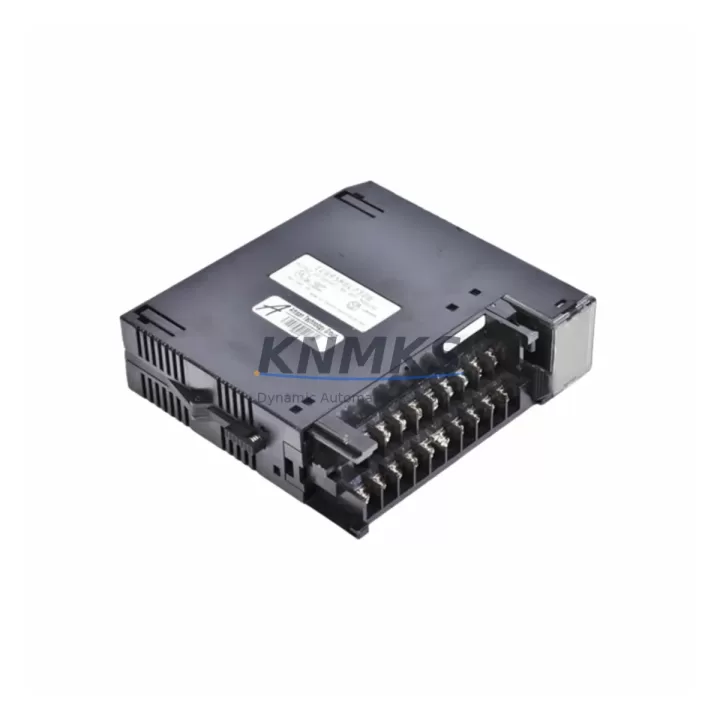
Overview
GE IC693MDL732 Maintenance-Proven Spare Part for Factory Uptime
The GE IC693MDL732 is a 32-point 24VDC sourcing discrete output module designed for the GE Series 90-30 PLC platform — one of the most widely deployed programmable logic controller families in process manufacturing, automotive assembly, water treatment, and discrete production environments. As original equipment reaches end-of-support milestones, maintaining a verified spare of the IC693MDL732 is a frontline strategy for maintenance engineers who cannot afford unplanned downtime during shift changes, seasonal peaks, or critical production runs.
Each IC693MDL732 unit supplied by KNMKS is sourced from authorized channels, subjected to pre-shipment functional testing, and backed by a support terms confirmed by quotation. Multi-region stock is maintained to support emergency same-week dispatch for facilities across Asia-Pacific, Europe, and the Americas. Whether you are managing a scheduled annual outage, responding to an unplanned output module failure, or building a long-term spare parts inventory for aging Series 90-30 racks, the IC693MDL732 is a direct-fit, drop-in replacement that preserves your existing I/O wiring, rack addressing, and ladder logic without reprogramming.
Spare Maintenance Table
| Parameter | Specification |
|---|---|
| SKU / Part Number | IC693MDL732 |
| Brand | GE (Emerson Automation) |
| Series | GE Series 90-30 |
| Module Type | Discrete Output Module (Sourcing) |
| Output Points | 32 Points |
| Output Voltage | 24VDC |
| Output Current per Point | 0.5A (max) |
| Total Module Current | 4A (max) |
| Backplane Compatibility | IC693CHS391, IC693CHS392, IC693CHS393, IC693CHS398 |
| CPU Compatibility | IC693CPU364, IC693CPU374, IC693CPU374, IC693CPU350 and compatible Series 90-30 CPUs |
| Operating Temperature | 0°C to 60°C |
| Isolation | Optical isolation between field and logic side |
| Mounting | Series 90-30 rack slot (any I/O slot) |
| Origin | USA |
| Condition | Original / Refurbished-to-OEM-spec (pre-tested) |
| Support terms | 12 Months |
| Dispatch | Multi-region stock — global delivery details confirmed by RFQ available |
| Maintenance Recommendation | Inspect field wiring, fuse blocks, and output load circuits at each replacement interval |
Maintenance Planning for Continuous Operation
When replacing the IC693MDL732 in a Series 90-30 control cabinet, a disciplined maintenance engineer will treat the module swap as an opportunity to audit the surrounding electrical environment. Output module failures in 24VDC sourcing circuits are rarely isolated events — they are often preceded or accompanied by stress on adjacent components.
Begin by inspecting the IC693PWR321 or IC693PWR330 power supply module that feeds the rack. A degraded power supply delivering marginal voltage under load is a common root cause of premature output module failure. Verify output voltage under full I/O load before reinstalling the replacement IC693MDL732.
Next, check the field-side fuse blocks and terminal strips connected to the 32 output channels. Blown fuses on individual output circuits are a leading indicator of field wiring shorts or overloaded actuators. Replace any suspect fuses and verify load resistance before energizing the new module.
If the rack includes a communications module such as the IC693CMM321 (Ethernet) or IC693CMM311 (serial), confirm that the module is still responding correctly after the rack power cycle. Backplane disturbances during module removal can occasionally cause communication modules to require a soft reset.
For facilities running mixed I/O racks, also inspect any co-installed IC693MDL654 or IC693MDL655 discrete input modules sharing the same backplane. Input modules in the same rack that share a common field power bus with the output module should be verified for correct 24VDC field supply voltage after the replacement.
Where the Series 90-30 system interfaces with an IC693APU300 analog processing unit or IC693ALG220 analog input module, confirm that analog signal integrity has not been affected by the maintenance event — particularly in mixed-signal cabinets where digital switching noise can couple into analog circuits during module hot-swap or power cycling.
Finally, if the facility uses a Hand-Held Monitor (IC693PRG300) or a Proficy Machine Edition programming terminal for on-site diagnostics, use it to perform a full I/O force test on the replacement IC693MDL732 before returning the line to production. Document the replacement in the site maintenance log with the module serial number, slot address, and test results.
Site Replacement Workflow
Step 1 — Isolate and de-energize. Follow site LOTO (Lockout/Tagout) procedures. De-energize the field output circuits connected to the IC693MDL732. Do not remove the module under live field voltage.
Step 2 — Record slot address and wiring. Photograph or document the terminal block wiring before disconnecting. Note the rack number, slot number, and I/O reference addresses assigned to the IC693MDL732 in the CPU configuration.
Step 3 — Remove the failed module. Release the module locking tab, slide the IC693MDL732 out of the backplane slot. Inspect the backplane connector for bent pins or contamination.
Step 4 — Install the replacement IC693MDL732. Seat the replacement module firmly into the same slot. The Series 90-30 backplane is slot-addressed, so no CPU configuration change is required when replacing with an identical module in the same slot.
Step 5 — Reconnect field wiring. Reattach the terminal block. Verify wiring against the documented photograph. Confirm fuse integrity on all 32 output circuits.
Step 6 — Re-energize and test. Restore rack power. Use the programming terminal or HMI to force-test each output point. Confirm actuator response on the plant floor before releasing the line.
Step 7 — Update maintenance records. Log the replacement with date, technician ID, module serial number, and test results. Schedule the next inspection interval per your preventive maintenance plan.
This workflow applies equally to scheduled annual outage replacements and emergency unplanned failures. Maintaining one or two IC693MDL732 units in your on-site spare parts cabinet eliminates the lead-time risk associated with sourcing legacy GE Series 90-30 modules on short notice.
Spare Parts Support FAQ
Q1: Is the IC693MDL732 still available as a new original part, or only as refurbished?
KNMKS maintains stock of both original new-surplus and refurbished-to-OEM-specification units. All refurbished units undergo full functional testing prior to shipment and are covered by the same support terms confirmed by quotation as new-surplus stock. The condition is clearly stated on each order confirmation.
Q2: How do I confirm compatibility with my existing Series 90-30 rack and CPU?
The IC693MDL732 is compatible with all standard Series 90-30 5-slot, 10-slot, and expansion racks (IC693CHS391/392/393/398) and all Series 90-30 CPUs that support discrete I/O modules. No firmware update or CPU configuration change is required when replacing an existing IC693MDL732 in the same slot. If you are adding the module to a new slot, a configuration download via Proficy Machine Edition or Logicmaster 90-30 is required.
Q3: What is included in the pre-shipment testing for the IC693MDL732?
Each unit is tested for backplane communication integrity, all 32 output channel switching function, optical isolation continuity, and output voltage/current compliance at rated load. A test report is available upon request for quality-critical procurement processes.
Q4: Can KNMKS support long-term supply agreements for IC693MDL732 and other Series 90-30 modules?
Yes. KNMKS offers long-term supply agreements for facilities managing extended Series 90-30 system lifecycles. Agreements can cover scheduled annual quantities, emergency call-off stock, and multi-site procurement consolidation. Contact admin@knmks.com to discuss volume pricing and supply continuity terms.
© 2026 KNMKS. All rights reserved.
Original Source: https://knmks.com
Contact: admin@knmks.com | +86 18359268345
Product Identification
- Brand / Ecosystem
-
GE
Assorted Brands - Model / Series
-
IC693MDL732
Assorted Series - Product Family
- PLCs & Controllers
- Availability Status
- Available on request after model and quantity confirmation
- Inquiry Type
- B2B RFQ, replacement inquiry and project spare-part request
- Pre-Quote Check
- Exact SKU, brand, series, quantity, nameplate photos and destination country are checked before quotation
System Path
Where this product fits in the KNMKS automation structure.
Specification & Inquiry Focus
- Control platform
- PLC, PAC and modular controllers
- Common needs
- CPU, rack, power and I/O expansion
- Project support
- Replacement, cabinet build and maintenance
Buyer Confirmation
Information KNMKS checks before replying.
- Exact model
- IC693MDL732
- Brand / ecosystem
- GE
- Product family
- PLCs & Controllers
- Application note
- Replacement, maintenance, project build or spare-part list
- Useful photos
- Nameplate, installed unit, cabinet layout or connector side
- Delivery details
- Quantity, destination country and target schedule
Document Support
Files and notes can be confirmed during quotation.
- Product photos or nameplate confirmation when available
- Packing and delivery notes before quotation confirmation
- Support scope and delivery terms confirmed per inquiry
- Export document coordination for qualified B2B requests
Inquiry Support
- Model cross-checking before quotation
- CPU, power, rack and expansion module matching
- Support for replacement and project inquiry
What to Send Us
- Brand and exact model number: GE IC693MDL732
- Quantity and required delivery time
- Application, replacement requirement or nameplate photo
- Destination country and shipping preference
RFQ Preparation
This is a product inquiry page built for RFQ communication.
Fast Model Check
Send this model to KNMKS for confirmation.
Include quantity, destination country and photos if this is a maintenance replacement. The inquiry will be saved with a reference number after submission.
Brand & Compatibility Note
KNMKS displays automation product information for well-known industrial brand ecosystems and compatible replacement references. Brand names are used for product identification and compatibility reference only; final availability and commercial terms are confirmed per quotation.
 Manufacturing
 Machine Tools
 Packaging
 Energy & Power



 HMI & Displays
 Servo Systems
 Variable Frequency Drives
 Sensors