
Overview
GE IC660BRD024C1 Migration-Ready Redundancy T Output Module: Legacy System Migration and Compatible Upgrade
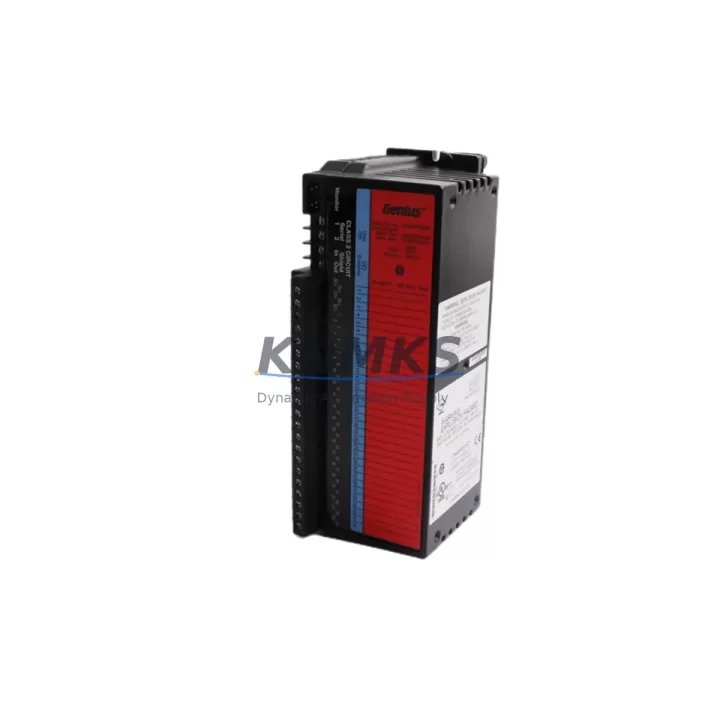
The GE IC660BRD024C1 is a Redundancy T Output Module designed for GE Fanuc Genius I/O distributed I/O systems. As industrial facilities accelerate the retirement of aging control architectures, this module has become a critical component in legacy system migration projects — providing a verified drop-in replacement path for plants still operating on original Genius Bus networks. Whether your facility is executing a phased retrofit, recovering from an unplanned failure, or extending the operational life of an existing control cabinet, the IC660BRD024C1 delivers the output redundancy and bus compatibility required to maintain production continuity without a full platform overhaul.
Engineered for 24 VDC discrete output applications, the IC660BRD024C1 interfaces directly with the Genius Bus Controller — typically the IC660CBB900 or IC660CBB902 — and supports the standard Genius Bus communication protocol at 153.6 Kbaud. When replacing a failed or end-of-life output module in an existing rack, engineers must confirm that the replacement module’s bus address matches the original configuration stored in the PLC program. Address conflicts between the IC660BRD024C1 and adjacent I/O blocks on the same Genius Bus segment will cause communication faults that interrupt output control. This address verification step is non-negotiable before powering the replacement module online.
Terminal wiring compatibility is a frequent concern during field replacement. The IC660BRD024C1 uses a standard removable terminal block, and field wiring from the original module can typically be transferred directly — provided the terminal block pinout of the replacement matches the original. Technicians should photograph and document the existing wiring before removal, and verify output channel assignments against the original I/O map in the PLC program. Where the original module used a different terminal block style, an adapter or rewire may be required. Power supply capacity at the local panel must also be confirmed: the IC660BRD024C1 draws from the backplane power bus, and adding a redundancy module to an existing rack may increase total current draw. Verify that the rack power supply — often a IC660CBB900-series unit — has sufficient headroom before installation.
For facilities migrating from older GE Series Six or Series Five PLC platforms toward a GE 90-30 or PACSystems RX3i architecture, the IC660BRD024C1 can serve as a bridge component during the transition period. In these hybrid migration scenarios, the Genius Bus network is retained while the host controller is upgraded. The IC660BBA020 analog input block and IC660BBD020 discrete input block are commonly retained alongside the IC660BRD024C1 during partial migrations, allowing the new controller to communicate with existing field devices without rewiring. This approach significantly reduces downtime during the cutover window.
Firmware compatibility should be reviewed when the IC660BRD024C1 is installed in a system running a newer Genius Bus Controller revision. GE Fanuc issued multiple firmware revisions for Genius Bus Controllers over the product lifecycle, and some early-revision output modules may exhibit handshake timing differences with later-generation bus controllers. If the replacement module does not respond correctly on the bus after installation, a firmware version check on the IC660CBB900 or IC660CBB902 is the recommended first diagnostic step. In most cases, the IC660BRD024C1 is compatible across all standard Genius Bus Controller revisions without modification.
HMI screen updates are often overlooked during output module replacements. If the original system uses a GE QuickPanel or iFIX SCADA display with hardcoded I/O addresses tied to the replaced module’s bus address, those screen objects must be verified after the replacement is commissioned. Output status indicators, alarm setpoints, and manual override controls linked to the IC660BRD024C1’s output channels should be tested against live field signals before returning the system to automatic control.
Installation space confirmation is straightforward for standard Genius I/O racks: the IC660BRD024C1 occupies a single module slot in the standard Genius I/O rack assembly. Verify that an open slot is available adjacent to the bus controller, as Genius Bus topology requires specific slot sequencing for redundancy modules. If the existing rack is fully populated, a rack expansion or slot reallocation may be required before installation.
Migration Compatibility Table
| Parameter | IC660BRD024C1 Specification | Migration / Retrofit Notes |
|---|---|---|
| Module Type | Redundancy T Output Module | Direct replacement for same-type Genius I/O output modules |
| Output Voltage | 24 VDC Discrete Output | Confirm field device voltage compatibility before wiring |
| Communication Protocol | Genius Bus (153.6 Kbaud) | Compatible with all standard Genius Bus Controllers (IC660CBB900/902) |
| Bus Address | Configurable via rotary switch | Must match original module address in PLC program; verify before power-on |
| Rack Installation | Single slot, standard Genius I/O rack | Confirm available slot; check rack power supply headroom |
| Terminal Block | Removable terminal block | Transfer original field wiring; verify pinout matches original module |
| Firmware Compatibility | Compatible with all standard Genius Bus Controller firmware revisions | If bus handshake fails, check Bus Controller firmware version |
| Host Controller Compatibility | GE Series 90-30, PACSystems RX3i, Series Six (via Genius Bus) | Retain Genius Bus during host controller upgrade for phased migration |
| HMI Integration | Compatible with GE QuickPanel, iFIX SCADA | Verify HMI screen I/O address bindings after replacement |
| Support terms | support terms confirmed by quotation | Covers manufacturing defects; pre-shipment functional test included |
Retrofit Planning for Existing Automation Systems
A successful retrofit begins with a complete audit of the existing Genius Bus segment. Document all bus addresses currently in use across the rack — including the IC660BBD020 discrete input blocks, IC660BBA020 analog input blocks, and any IC660BBD024 discrete output blocks sharing the same bus segment as the IC660BRD024C1. This inventory prevents address conflicts and ensures the replacement module integrates cleanly into the existing I/O map without requiring PLC program modifications.
Power budget verification is the next critical step. The Genius I/O rack power supply must support the combined current draw of all installed modules. When adding the IC660BRD024C1 to a rack that previously operated without a redundancy module, calculate the additional current demand and confirm the rack power supply — typically rated at 4A or 8A depending on the IC660CBB900 variant — has sufficient capacity. If the power budget is marginal, consider replacing the rack power supply before commissioning the new output module.
For systems incorporating a GE IC660CBB902 Bus Controller with an IC693CMM321 communications module for Ethernet connectivity, the migration plan should include a communications link verification step. After installing the IC660BRD024C1, confirm that the Bus Controller correctly enumerates the new module on the Genius Bus and that the host PLC’s I/O configuration table reflects the updated module inventory. In PACSystems RX3i environments, this verification is performed through the Proficy Machine Edition programming software.
Signal isolation requirements should also be assessed during retrofit planning. Where the IC660BRD024C1 drives inductive loads — solenoid valves, motor starters, or relay coils — ensure that appropriate surge suppression is installed at the field device terminals. This protects the module’s output transistors from voltage spikes generated during load switching, extending module service life in high-cycle applications.
Downtime Control During System Migration
Minimizing downtime during an output module replacement requires a structured pre-outage preparation protocol. Before taking the system offline, export the current PLC program from the host controller and archive it to a secure location. For GE 90-30 systems, use Proficy Machine Edition to create a full program backup including I/O configuration, ladder logic, and data table values. For older Series 90 systems, use the Logicmaster 90 programming software to export the program file. This backup ensures that the original program logic can be restored immediately if the replacement module introduces unexpected behavior.
During the physical replacement, maintain field wiring documentation at the work site. Label each wire before removal using the original I/O map as reference. The IC660BRD024C1’s removable terminal block allows the field wiring harness to be transferred as a unit in many installations, reducing rewiring time and the risk of wiring errors. After installing the replacement module and reconnecting the terminal block, perform a point-by-point output test before returning the system to automatic control. Force each output channel individually from the PLC programming terminal and verify the corresponding field device responds correctly.
For critical production lines where even brief interruptions are unacceptable, consider a parallel commissioning approach: install the IC660BRD024C1 in a spare rack slot and configure it with a temporary bus address for bench testing before the scheduled maintenance window. This allows full functional verification of the replacement module — including bus communication, output switching, and terminal wiring — before the production system is taken offline. The actual replacement then becomes a rapid swap operation, reducing the live outage window to the minimum time required for physical module exchange and bus address reconfiguration.
Post-replacement, monitor the Genius Bus Controller’s diagnostic LEDs and the PLC’s I/O fault table for the first 30 minutes of operation. Early detection of bus communication errors, output channel faults, or power supply anomalies allows corrective action before a fault escalates to a production stoppage. Document the replacement in the facility’s maintenance log, including the module serial number, installation date, bus address, and the name of the technician who performed the work.
Retrofit Support FAQ
Q: Is the IC660BRD024C1 a direct drop-in replacement for other Genius I/O output modules?
A: The IC660BRD024C1 is a direct replacement for same-type Genius I/O Redundancy T Output Modules. When replacing a different output module type (e.g., a standard discrete output block with a redundancy module), verify that the host PLC program’s I/O configuration is updated to reflect the new module type. Bus address and terminal wiring must be confirmed before power-on.
Q: What pre-shipment testing is performed on the IC660BRD024C1?
A: Each IC660BRD024C1 unit undergoes functional testing prior to shipment, including bus communication verification, output channel switching tests, and power supply integrity checks. A test report is available upon request. All units are covered by a support terms confirmed by quotation against manufacturing defects from the date of shipment.
Q: How do I confirm wiring compatibility before installation?
A: Compare the IC660BRD024C1 terminal block pinout against the original module’s wiring diagram. GE Fanuc published terminal block pinout diagrams in the Genius I/O System User’s Manual (GFK-0098). If the original wiring documentation is unavailable, photograph the existing terminal block before removal and use the module’s published pinout to verify each connection before powering the replacement module.
Q: What is the typical lead time and stock availability?
A: The IC660BRD024C1 is maintained in inventory for immediate shipment. For urgent replacement requirements, contact our sales team to confirm current stock levels and expedited shipping options. Standard lead time for in-stock units is 1–3 business days. Contact: admin@knmks.com | +86 18359268345
© 2026 KNMKS. All rights reserved. Original Source: https://knmks.com | Contact: admin@knmks.com | +86 18359268345
Product Identification
- Brand / Ecosystem
-
GE
Assorted Brands - Model / Series
-
IC660BRD024C1
Assorted Series - Product Family
- PLCs & Controllers
- Availability Status
- Available on request after model and quantity confirmation
- Inquiry Type
- B2B RFQ, replacement inquiry and project spare-part request
- Pre-Quote Check
- Exact SKU, brand, series, quantity, nameplate photos and destination country are checked before quotation
System Path
Where this product fits in the KNMKS automation structure.
Specification & Inquiry Focus
- Control platform
- PLC, PAC and modular controllers
- Common needs
- CPU, rack, power and I/O expansion
- Project support
- Replacement, cabinet build and maintenance
Buyer Confirmation
Information KNMKS checks before replying.
- Exact model
- IC660BRD024C1
- Brand / ecosystem
- GE
- Product family
- PLCs & Controllers
- Application note
- Replacement, maintenance, project build or spare-part list
- Useful photos
- Nameplate, installed unit, cabinet layout or connector side
- Delivery details
- Quantity, destination country and target schedule
Document Support
Files and notes can be confirmed during quotation.
- Product photos or nameplate confirmation when available
- Packing and delivery notes before quotation confirmation
- Support scope and delivery terms confirmed per inquiry
- Export document coordination for qualified B2B requests
Inquiry Support
- Model cross-checking before quotation
- CPU, power, rack and expansion module matching
- Support for replacement and project inquiry
What to Send Us
- Brand and exact model number: GE IC660BRD024C1
- Quantity and required delivery time
- Application, replacement requirement or nameplate photo
- Destination country and shipping preference
RFQ Preparation
This is a product inquiry page built for RFQ communication.
Fast Model Check
Send this model to KNMKS for confirmation.
Include quantity, destination country and photos if this is a maintenance replacement. The inquiry will be saved with a reference number after submission.
Brand & Compatibility Note
KNMKS displays automation product information for well-known industrial brand ecosystems and compatible replacement references. Brand names are used for product identification and compatibility reference only; final availability and commercial terms are confirmed per quotation.
 Manufacturing
 Machine Tools
 Packaging
 Energy & Power



 HMI & Displays
 Servo Systems
 Variable Frequency Drives
 Sensors