
Overview
GE IC600FP841K Migration-Ready Field Processor for Legacy PLC Systems
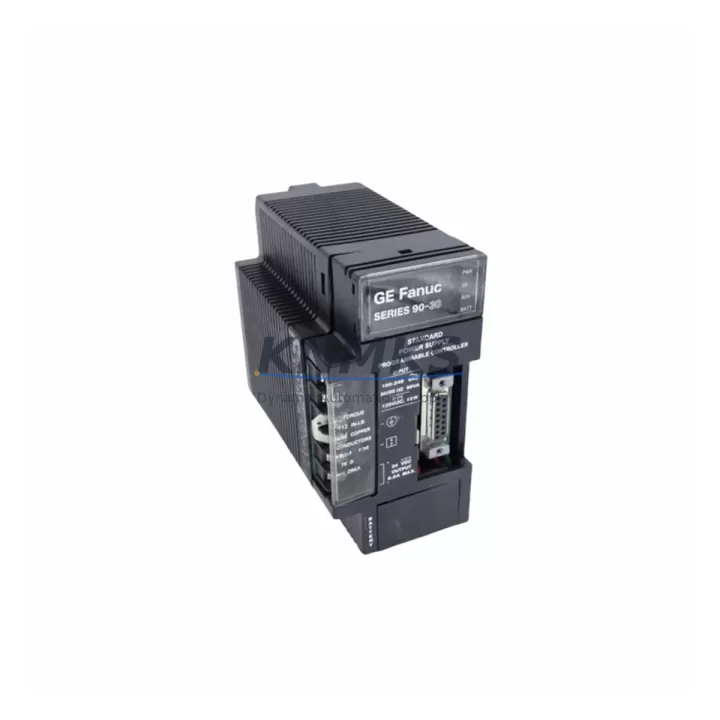
The GE IC600FP841K is a migration-ready field processor module designed for GE Fanuc Series Six programmable logic controller platforms. As legacy Series Six installations approach end-of-support, engineering teams managing scheduled outages, emergency replacements, and phased control system upgrades rely on verified, pre-tested drop-in replacements to maintain production continuity. The IC600FP841K provides a direct hardware path for sites that cannot yet commit to a full platform migration to GE Series 90-30 or Series 90-70 but require immediate restoration of field processor capacity.
Each unit is sourced from controlled inventory, subjected to pre-shipment functional testing, and dispatched with a support terms confirmed by quotation. Multi-region stock ensures fast global dispatch for both emergency callouts and planned maintenance windows. Whether your facility is running a phased decommission of Series Six racks or simply needs a reliable spare to protect uptime, the IC600FP841K is a proven, cost-effective solution.
Migration Compatibility Table
| Parameter | IC600FP841K Detail | Retrofit / Migration Note |
|---|---|---|
| Platform | GE Fanuc Series Six PLC | Direct replacement within Series Six rack; not cross-compatible with Series 90-30/70 without adapter |
| Module Type | Field Processor (FP) | Verify slot assignment matches original FP address in programmer configuration |
| Rack Interface | Series Six backplane bus | Confirm backplane connector condition before insertion; inspect for bent pins or corrosion |
| Power Requirement | Supplied via rack backplane | Verify IC600PM501 or equivalent Series Six power supply capacity before adding module |
| Communication | Internal rack bus; no standalone Ethernet/Modbus port | For Modbus or Ethernet integration, pair with IC600CB900 or IC600CM901 communication module |
| Programming Interface | Compatible with Series Six Logicmaster 6 software | Retain original .prg backup before replacement; verify program re-download after swap |
| Installation Space | Standard Series Six single-slot module | Confirm available slot in IC600CH series chassis; no additional mounting hardware required |
| Firmware | Factory-loaded; no field firmware update required | Confirm firmware revision matches site documentation if multiple FP revisions are in use |
| Support terms | 12 Months | Covers functional failure under normal operating conditions from dispatch date |
| Pre-Shipment Test | Yes — functional verification performed | Test report available on request; reduces on-site commissioning risk |
Retrofit Planning for Existing Automation Systems
Replacing the IC600FP841K in an active Series Six installation requires careful pre-outage planning. Before the maintenance window opens, engineers should pull the current Logicmaster 6 program backup from the IC600CPU772 or IC600CPU774 central processing unit and verify the backup against the as-built documentation. Field processor modules in Series Six architectures handle distributed I/O scanning and local logic execution, so a failed or degraded FP can cause partial I/O loss without triggering a full CPU fault — making proactive replacement critical.
During the retrofit, confirm that the IC600CH series chassis has the correct slot available and that the IC600PM501 power supply is not already running at capacity. Adding or swapping a field processor module changes the rack’s power draw, and an undersized supply will cause intermittent resets. If the site uses IC600BF series I/O modules connected to the field processor, verify terminal wiring assignments against the original I/O map before powering up the replacement unit.
Sites that are simultaneously upgrading their HMI layer — for example, migrating from a legacy Cimplicity or iFIX panel to a modern SCADA — should coordinate the IC600FP841K swap with the HMI tag re-mapping exercise. Field processor address changes, even minor ones, can break HMI data links if the tag database is not updated in parallel. If the site also uses IC600CM901 or IC600CB900 communication modules for Modbus RTU or serial data exchange with upstream DCS or historian systems, verify that the communication module configuration is not dependent on the field processor’s slot address before completing the swap.
For sites running parallel I/O expansion through IC600BF series discrete or analog I/O blocks, document the I/O block addresses and verify continuity after the field processor replacement. Signal isolators installed between field devices and I/O terminals should be checked for correct loop power levels, particularly on 4–20 mA analog channels, as a brief power interruption during module swap can reset isolator calibration on some legacy models.
Downtime Control During System Migration
Minimizing downtime during an IC600FP841K replacement begins with a structured pre-outage checklist. Before taking the rack offline, capture a full program backup from the Series Six CPU, document all I/O module addresses and field wiring terminations, and photograph the existing module slot layout. This documentation protects the original control logic and provides a recovery baseline if the replacement module requires any configuration adjustment.
During the swap, power down the rack at the IC600PM501 power supply rather than pulling the module under power, which can corrupt the CPU memory state in some Series Six firmware revisions. Insert the IC600FP841K replacement, restore rack power, and allow the CPU to complete its self-diagnostic cycle before re-downloading the program. In most Series Six configurations, the CPU will automatically re-scan the rack and recognize the new field processor without requiring a full cold-start, but this should be verified against the site’s specific firmware version and rack configuration.
Once the program is re-downloaded and the field processor is online, perform a structured I/O verification pass — confirm that all discrete inputs and outputs controlled by the IC600FP841K are responding correctly before releasing the system to production. For sites with safety interlocks or process-critical analog loops, a witnessed commissioning check with the process engineer is recommended before returning to automatic mode. Total planned downtime for a prepared IC600FP841K swap in a well-documented Series Six installation is typically 2–4 hours, including program re-download and I/O verification.
Retrofit Support FAQ
Q: Is the IC600FP841K a direct drop-in replacement for all Series Six field processor variants?
A: The IC600FP841K is compatible with standard Series Six racks using the IC600CH series chassis and IC600PM series power supplies. Verify the original module’s part number suffix and firmware revision against your site documentation, as some early Series Six installations used field processor variants with different slot addressing or I/O scanning rates. Our technical team can assist with cross-reference verification before dispatch.
Q: What commissioning steps are required after installing the replacement module?
A: After physical installation, restore rack power and allow the Series Six CPU to complete its diagnostic cycle. Re-download the Logicmaster 6 program from your backup, verify the field processor slot address in the programmer configuration, and perform a full I/O scan verification. If the site uses IC600CM901 communication modules, confirm that serial communication links are re-established after the CPU restart.
Q: Does the IC600FP841K ship with a pre-shipment test report?
A: Yes. Every IC600FP841K unit undergoes functional verification prior to dispatch. A test report is available on request and can be provided with the shipment documentation. This reduces on-site commissioning risk and supports your incoming inspection process.
Q: What is the support terms coverage and what does it include?
A: The IC600FP841K is covered by a support terms confirmed by quotation from the dispatch date. The support terms covers functional failure under normal operating conditions and includes replacement or repair at no additional cost. Support requests are supported by our technical team with a target response time of one business day.
© 2026 KNMKS. All rights reserved.
Original Source: https://knmks.com
Contact: admin@knmks.com | +86 18359268345
Product Identification
- Brand / Ecosystem
-
GE
Assorted Brands - Model / Series
-
IC600FP841K
Assorted Series - Product Family
- PLCs & Controllers
- Availability Status
- Available on request after model and quantity confirmation
- Inquiry Type
- B2B RFQ, replacement inquiry and project spare-part request
- Pre-Quote Check
- Exact SKU, brand, series, quantity, nameplate photos and destination country are checked before quotation
System Path
Where this product fits in the KNMKS automation structure.
Specification & Inquiry Focus
- Control platform
- PLC, PAC and modular controllers
- Common needs
- CPU, rack, power and I/O expansion
- Project support
- Replacement, cabinet build and maintenance
Buyer Confirmation
Information KNMKS checks before replying.
- Exact model
- IC600FP841K
- Brand / ecosystem
- GE
- Product family
- PLCs & Controllers
- Application note
- Replacement, maintenance, project build or spare-part list
- Useful photos
- Nameplate, installed unit, cabinet layout or connector side
- Delivery details
- Quantity, destination country and target schedule
Document Support
Files and notes can be confirmed during quotation.
- Product photos or nameplate confirmation when available
- Packing and delivery notes before quotation confirmation
- Support scope and delivery terms confirmed per inquiry
- Export document coordination for qualified B2B requests
Inquiry Support
- Model cross-checking before quotation
- CPU, power, rack and expansion module matching
- Support for replacement and project inquiry
What to Send Us
- Brand and exact model number: GE IC600FP841K
- Quantity and required delivery time
- Application, replacement requirement or nameplate photo
- Destination country and shipping preference
RFQ Preparation
This is a product inquiry page built for RFQ communication.
Fast Model Check
Send this model to KNMKS for confirmation.
Include quantity, destination country and photos if this is a maintenance replacement. The inquiry will be saved with a reference number after submission.
Brand & Compatibility Note
KNMKS displays automation product information for well-known industrial brand ecosystems and compatible replacement references. Brand names are used for product identification and compatibility reference only; final availability and commercial terms are confirmed per quotation.
 Manufacturing
 Machine Tools
 Packaging
 Energy & Power



 HMI & Displays
 Servo Systems
 Variable Frequency Drives
 Sensors