
Overview
GE IC200MDL750 Migration-Ready Output for Legacy PLC Systems
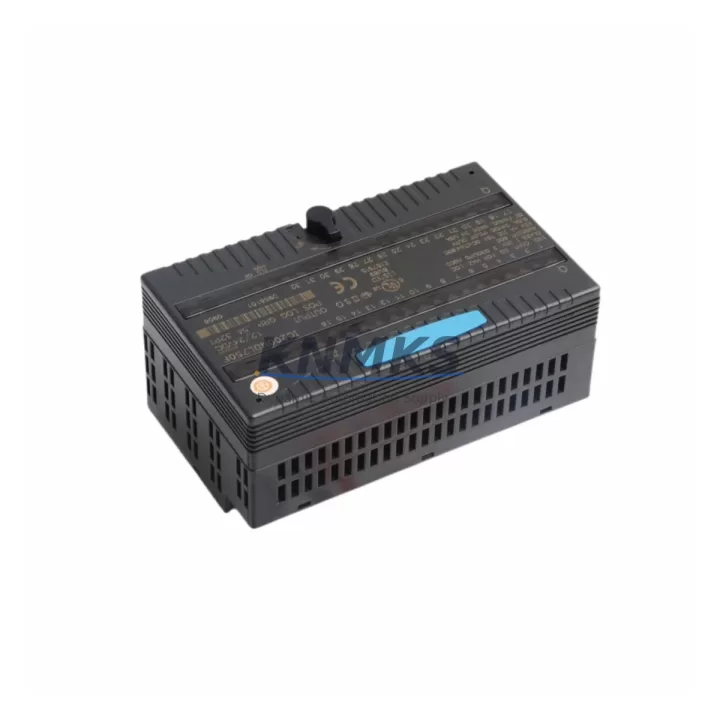
The GE IC200MDL750 is a 16-point, 12/24VDC sourcing discrete output module designed for the GE VersaMax distributed I/O platform — one of the most widely deployed modular control architectures in legacy manufacturing, process automation, and machine control environments. As original GE Fanuc and early Emerson Automation installations approach end-of-life, the IC200MDL750 remains a critical retrofit and replacement component for engineers tasked with extending system uptime without full PLC migration.
This module delivers 0.5A per point (8A total), supports both 12VDC and 24VDC sourcing configurations, and mounts directly onto the VersaMax I/O carrier without backplane rewiring. For facilities running legacy GE Series 90 Micro or VersaMax Nano controllers alongside a VersaMax distributed rack, the IC200MDL750 provides a direct drop-in path that preserves existing terminal wiring, module addressing, and ladder logic references — minimising commissioning time and eliminating the need for program restructuring.
Before installation, engineers should verify the carrier slot assignment and confirm that the CPU — typically an IC200CPUE05 or IC200CPUE05-FE — has sufficient I/O capacity in its configuration table. The module address must match the slot position defined in the Proficy Machine Edition project. If the existing project was built on an older GE Fanuc Logicmaster 90 environment, a logic conversion step may be required before downloading to a VersaMax CPU running the current firmware revision.
Power budget validation is essential during retrofit planning. The VersaMax local rack power supply — commonly the IC200PWR002 or IC200PWR101 — must support the combined load of all installed I/O modules. Adding or replacing output modules without recalculating the rack power draw is a frequent source of intermittent faults in legacy system upgrades. Confirm that the 24VDC field supply feeding the IC200MDL750 output commons is adequately rated for the connected actuator load, particularly when replacing older relay output modules with sourcing solid-state alternatives.
For systems integrating VersaMax I/O with a remote master — such as a Series 90-30 CPU rack communicating over Genius Bus or a PACSystems RX3i controller using Ethernet Global Data (EGD) — the IC200MDL750 operates transparently within the distributed I/O scan. No protocol reconfiguration is required at the module level. However, if the migration path involves transitioning from a Genius Bus master to an EtherNet/IP or PROFIBUS DP network head, the IC200BEM002 bus expansion module or a compatible network interface carrier must be validated for slot compatibility before the IC200MDL750 is re-addressed in the new topology.
HMI screen updates are often overlooked during output module replacements. If the facility runs a CIMPLICITY or iFIX SCADA system with point-mapped I/O tags tied to the original module’s output references, tag address verification should be completed before go-live. This is especially relevant when the replacement module occupies a different slot position than the original, as the I/O reference offset will shift accordingly in the CPU’s memory map.
All IC200MDL750 units supplied by KNMKS are tested prior to shipment, with functional verification of all 16 output channels under load. Each unit ships with a support terms confirmed by quotation covering manufacturing defects and operational failure under normal industrial use conditions. Stock is maintained to support urgent replacement orders, with same-day dispatch available for in-stock units.
Migration Compatibility Table
| Parameter | IC200MDL750 Specification | Retrofit / Migration Note |
|---|---|---|
| Output Type | 16-Pt Discrete Sourcing (PNP) | Verify field device polarity; NPN loads require wiring adaptation |
| Voltage Range | 12/24VDC | Compatible with standard 24VDC control cabinets |
| Current per Point | 0.5A max | Check actuator inrush; replace relay outputs with derating margin |
| Carrier Compatibility | VersaMax I/O Carrier (IC200CHS002 / IC200CHS022) | Direct drop-in; no backplane rewiring required |
| Module Addressing | Slot-based, configured in Proficy ME | Match slot position to original project I/O reference |
| Communication Protocol | VersaMax backplane (local or remote via BEM) | Transparent to Genius Bus, EGD, PROFIBUS DP network heads |
| Power Consumption | Refer to IC200PWR002 / IC200PWR101 budget | Recalculate rack power after module swap |
| Firmware Dependency | None at module level | CPU firmware version may affect I/O scan behaviour |
| Installation Space | Single slot, standard VersaMax carrier | No additional space required vs. original module |
| Support terms | 12 Months | Covers manufacturing defects; pre-shipment functional test included |
Retrofit Planning for Existing Automation Systems
A successful IC200MDL750 retrofit begins with a full audit of the existing VersaMax rack configuration. Document every occupied slot, the module type installed, and its I/O reference range in the Proficy Machine Edition hardware configuration. This baseline prevents address conflicts when the replacement module is inserted and the CPU performs its next I/O scan.
In multi-rack installations — particularly those using an IC200BEM002 remote I/O expansion module to extend the VersaMax network across a large control cabinet or across a production line — confirm that the remote rack’s node address and baud rate settings are unchanged. The IC200MDL750 does not require individual node configuration, but the BEM module’s network parameters must remain consistent with the master CPU’s scanner configuration.
Terminal wiring on the VersaMax I/O carrier is field-removable, which significantly reduces retrofit downtime. The carrier’s terminal block can be unplugged from the backplane, the old module removed, the IC200MDL750 inserted, and the terminal block reconnected — all without disturbing field wiring. This is a key advantage over older fixed-terminal I/O architectures and should be factored into the shutdown window planning.
If the retrofit involves replacing a relay output module (such as the IC200MDL940) with the IC200MDL750 solid-state sourcing module, review the load characteristics of each connected output. Relay outputs tolerate a wider range of load types including AC loads and high-inrush DC devices. Solid-state sourcing outputs require careful matching to resistive or inductive DC loads within the rated current envelope. Signal isolators may be required for outputs driving legacy 12VDC relay coils in older control panels.
For systems that include an IC200ALG320 analog output module or similar mixed I/O configuration in the same rack, the power supply loading calculation must account for both digital and analog module consumption. The IC200PWR002 power supply supports up to 40W of I/O module load; exceeding this threshold with additional modules requires either a second power supply or rack segmentation.
Programming cable access — typically via an IC690ACC901 serial programming cable or a USB-to-serial adapter for Proficy ME — should be confirmed before the maintenance window begins. Having the programming environment connected and the project backed up before the physical swap eliminates the risk of configuration loss if the CPU enters a fault state during the module replacement sequence.
Downtime Control During System Migration
Minimising production downtime during a VersaMax output module replacement requires preparation at three levels: program backup, physical swap procedure, and post-swap verification.
Program Backup: Before any hardware change, upload the current ladder logic from the CPU using Proficy Machine Edition and save a timestamped project archive. If the CPU is running a version of firmware that differs from the development environment, note the firmware revision and confirm that the project file is compatible with both the current and any potential fallback CPU unit.
Physical Swap: With the VersaMax carrier’s removable terminal block, the IC200MDL750 can typically be swapped in under five minutes. Power down the field supply to the output commons before disconnecting the terminal block to prevent arc damage to the carrier contacts. Insert the new module, reconnect the terminal block, and restore field power before commanding the CPU out of Stop mode.
Post-Swap Verification: Force each of the 16 output points individually from the Proficy ME online monitor and confirm field device response. Check the CPU’s I/O fault table for any module status errors. If the module reports a configuration mismatch, verify that the hardware configuration in the project matches the IC200MDL750 module type and slot position. Download the corrected hardware configuration if required, then perform a full I/O scan verification before returning the system to automatic mode.
For critical processes where even a brief Stop-mode transition is unacceptable, coordinate the swap during a scheduled maintenance window and pre-stage the replacement module with all configuration parameters verified offline. KNMKS pre-shipment testing ensures that each IC200MDL750 arrives ready for immediate installation, reducing the risk of DOA delays during time-sensitive maintenance windows.
Retrofit Support FAQ
Q1: Is the IC200MDL750 a direct replacement for the IC200MDL741 or IC200MDL750D?
The IC200MDL750 is the standard 16-point 12/24VDC sourcing output module for the VersaMax platform. The IC200MDL741 is a sinking (NPN) output variant — confirm your field device wiring polarity before substituting. The IC200MDL750D designation typically refers to a factory-refurbished or distributor-graded unit; KNMKS supplies new or equivalent-to-new tested units under the standard IC200MDL750 part number with full support terms confirmed by quotation coverage.
Q2: What pre-shipment testing is performed on each unit?
Every IC200MDL750 supplied by KNMKS undergoes functional output channel verification across all 16 points under a representative DC load before dispatch. Units that fail any channel test are quarantined and not shipped. A test record is available on request for quality-critical applications.
Q3: Can this module be used in a PACSystems RX3i or RX7i rack?
No. The IC200MDL750 is designed exclusively for the VersaMax I/O carrier platform. PACSystems RX3i and RX7i use a different backplane architecture and require IC694 or IC695 series I/O modules respectively. If your migration path involves transitioning from VersaMax to PACSystems, contact KNMKS for guidance on equivalent RX3i output modules and mixed-platform transition strategies.
Q4: What is the support terms coverage and what does it include?
All IC200MDL750 units carry a support terms confirmed by quotation from the date of shipment. The support terms covers manufacturing defects and operational failure under normal industrial operating conditions (within rated voltage, current, and temperature specifications). It does not cover damage resulting from incorrect wiring, overvoltage, or installation outside the module’s rated environment. Support requests are processed via admin@knmks.com with a fault description and return authorisation.
© 2026 KNMKS. All rights reserved.
Original Source: https://knmks.com
Contact: admin@knmks.com | +86 18359268345
Product Identification
- Brand / Ecosystem
-
GE
Assorted Brands - Model / Series
-
IC200MDL750
Assorted Series - Product Family
- PLCs & Controllers
- Availability Status
- Available on request after model and quantity confirmation
- Inquiry Type
- B2B RFQ, replacement inquiry and project spare-part request
- Pre-Quote Check
- Exact SKU, brand, series, quantity, nameplate photos and destination country are checked before quotation
System Path
Where this product fits in the KNMKS automation structure.
Specification & Inquiry Focus
- Control platform
- PLC, PAC and modular controllers
- Common needs
- CPU, rack, power and I/O expansion
- Project support
- Replacement, cabinet build and maintenance
Buyer Confirmation
Information KNMKS checks before replying.
- Exact model
- IC200MDL750
- Brand / ecosystem
- GE
- Product family
- PLCs & Controllers
- Application note
- Replacement, maintenance, project build or spare-part list
- Useful photos
- Nameplate, installed unit, cabinet layout or connector side
- Delivery details
- Quantity, destination country and target schedule
Document Support
Files and notes can be confirmed during quotation.
- Product photos or nameplate confirmation when available
- Packing and delivery notes before quotation confirmation
- Support scope and delivery terms confirmed per inquiry
- Export document coordination for qualified B2B requests
Inquiry Support
- Model cross-checking before quotation
- CPU, power, rack and expansion module matching
- Support for replacement and project inquiry
What to Send Us
- Brand and exact model number: GE IC200MDL750
- Quantity and required delivery time
- Application, replacement requirement or nameplate photo
- Destination country and shipping preference
RFQ Preparation
This is a product inquiry page built for RFQ communication.
Fast Model Check
Send this model to KNMKS for confirmation.
Include quantity, destination country and photos if this is a maintenance replacement. The inquiry will be saved with a reference number after submission.
Brand & Compatibility Note
KNMKS displays automation product information for well-known industrial brand ecosystems and compatible replacement references. Brand names are used for product identification and compatibility reference only; final availability and commercial terms are confirmed per quotation.
 Manufacturing
 Machine Tools
 Packaging
 Energy & Power



 HMI & Displays
 Servo Systems
 Variable Frequency Drives
 Sensors