
Overview
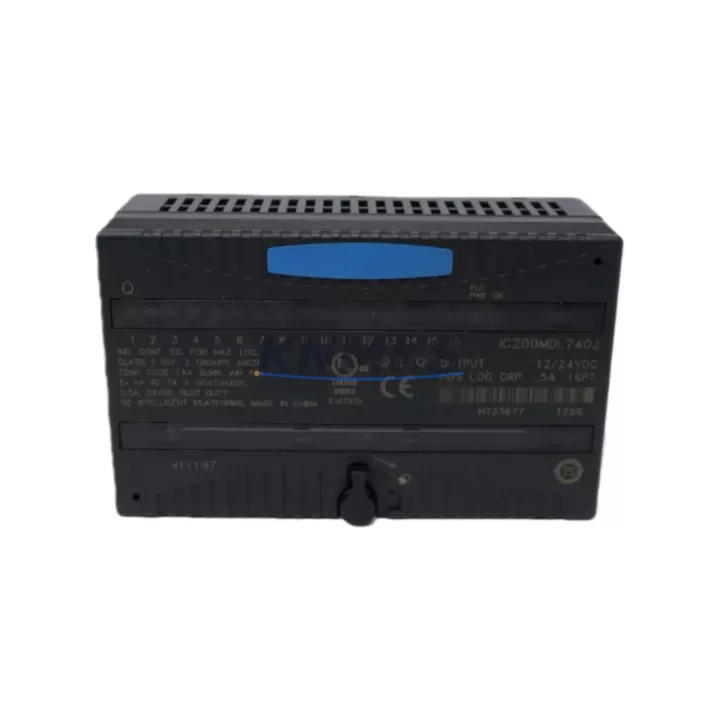
GE IC200MDL740 Maintenance-Proven Spare Part for Factory Uptime
The GE IC200MDL740 is a 16-point, 120VAC discrete output module engineered for the GE VersaMax PLC platform — one of the most widely deployed modular automation architectures in North American and global industrial facilities. Designed for continuous-duty environments including energy generation, water treatment, petrochemical processing, and discrete manufacturing, this module delivers reliable field-side switching performance that maintenance teams depend on during both planned shutdowns and emergency recovery scenarios.
Holding a verified original spare of the IC200MDL740 in your maintenance inventory is a proven strategy for reducing mean time to repair (MTTR). When a discrete output channel fails — whether due to surge damage, contact wear, or firmware-triggered fault isolation — a pre-tested replacement module allows technicians to restore production within minutes rather than waiting days for emergency procurement. For facilities running 24/7 operations, this difference is measured in thousands of dollars per hour of downtime avoided.
Each unit shipped from KNMKS undergoes pre-shipment functional verification, is packaged in anti-static protective materials, and is covered by a support terms confirmed by quotation against manufacturing defects and operational failure under normal industrial conditions.
Spare Maintenance Table
| Parameter | Specification |
|---|---|
| Part Number / SKU | IC200MDL740 |
| Brand / OEM | GE (General Electric / Emerson Automation) |
| Series | VersaMax Modular PLC |
| Module Type | Discrete Output Module |
| Output Points | 16 Points |
| Output Voltage | 120VAC |
| Output Type | Triac (Solid-State AC Output) |
| Load Current per Point | 0.5A (typical), 1A max |
| Isolation | Optical isolation, field-side to backplane |
| Backplane Compatibility | VersaMax Local / Remote I/O Backplanes (IC200CHS series) |
| CPU Compatibility | IC200CPUE05, IC200CPUE05-AA, IC200CPUE05-AB and compatible VersaMax CPUs |
| Operating Temperature | 0°C to 60°C (32°F to 140°F) |
| Relative Humidity | 5% to 95% non-condensing |
| Mounting | Snap-fit onto VersaMax backplane slot |
| Origin | United States (OEM) |
| Condition | Original Spare / New Surplus |
| Support terms | 12 Months from shipment date |
| Pre-Shipment Test | Functional verification performed |
| Certifications | UL Listed, CE Marked (per OEM documentation) |
Maintenance Planning for Continuous Operation
Replacing or inspecting the IC200MDL740 in the field is rarely an isolated task. Experienced maintenance engineers know that a failed output module is often a symptom of broader electrical stress in the control cabinet. Before returning the system to service, a thorough inspection of the surrounding components is strongly recommended.
Start with the VersaMax backplane (IC200CHS series) — check for discoloration, cracked connector pins, or signs of heat stress at the module slot. A damaged backplane can cause intermittent faults even after a module swap. Next, verify the VersaMax power supply module (IC200PWR series): confirm output voltage stability under load, check for ripple, and inspect the DC bus for voltage sag that could cause nuisance tripping on the output module’s internal logic.
Inspect all field-side wiring terminals and terminal blocks connected to the 120VAC output circuits. Loose terminations, corroded lugs, or undersized conductors are common root causes of output module failure. If the facility uses signal isolation relays or interposing relay modules between the IC200MDL740 outputs and field devices, check coil resistance and contact condition — worn relay contacts can reflect back-EMF that stresses the triac outputs over time.
For systems with IC200MDL640 or IC200MDL650 discrete input modules in the same cabinet, verify that input signal levels are within specification; a degraded input module can cause the CPU to issue incorrect output commands, masking the true fault source. If the VersaMax system communicates over Genius Bus or Ethernet (IC200ETM001 communications module), confirm that the network connection is stable and that no communication timeouts are logged — network instability can trigger output module fault states.
Finally, check any panel-mounted fuses or circuit breakers protecting the 120VAC output circuits. A blown fuse on an output channel is often the first indicator of an overloaded or shorted field device, not a failed module. Replacing the IC200MDL740 without addressing the root cause will result in repeat failures.
Site Replacement Workflow
Step 1 — Isolate and document: Before removing the IC200MDL740, place the CPU in STOP mode and de-energize the 120VAC field power supply feeding the output circuits. Document the current I/O configuration and any forced outputs using the programming software (Proficy Machine Edition or equivalent).
Step 2 — Module removal: Release the module locking tab and slide the IC200MDL740 out of its backplane slot. Inspect the backplane connector for bent pins or debris before installing the replacement.
Step 3 — Install replacement: Seat the new IC200MDL740 firmly into the same backplane slot until the locking tab engages. No jumper or DIP switch configuration is required — the module is auto-configured by the VersaMax CPU on power-up.
Step 4 — Power-up and verify: Re-energize the system and place the CPU in RUN mode. Confirm that all 16 output points respond correctly to program logic. Use the I/O diagnostic LEDs on the module face to verify channel status. Check the CPU fault table for any new entries.
Step 5 — Return to service: Re-enable any forced outputs that were cleared during the procedure. Update the maintenance log with the replacement date, module serial number, and technician name. Schedule a follow-up inspection at the next planned maintenance window to verify sustained performance.
This workflow is compatible with hot-standby and redundant VersaMax configurations — consult your system architecture documentation before performing module swaps in redundant topologies.
Spare Parts Support FAQ
Q1: Is the IC200MDL740 still available as a new original spare, or only as refurbished?
KNMKS supplies the IC200MDL740 as original new surplus stock sourced from authorized distribution channels. Each unit is individually tested before shipment. While GE/Emerson has transitioned some VersaMax product lines, we maintain long-term inventory commitments to support facilities that cannot migrate to newer platforms on short notice.
Q2: How do I confirm compatibility with my existing VersaMax backplane and CPU?
The IC200MDL740 is compatible with all standard VersaMax local and remote I/O backplanes in the IC200CHS series. Compatibility with your CPU depends on the firmware revision and I/O configuration file. We recommend providing your CPU part number and firmware version when placing an order so our technical team can confirm compatibility before shipment.
Q3: What is included in the support terms confirmed by quotation, and how is a support terms claim handled?
The support terms confirmed by quotation cover manufacturing defects and operational failure under normal industrial operating conditions. It does not cover damage caused by incorrect installation, overvoltage events, or physical impact. To initiate a support terms claim, contact admin@knmks.com with your order number, a description of the failure, and photos of the module. Replacement units are dispatched within 3 business days of claim approval.
Q4: Can KNMKS support long-term supply agreements for the IC200MDL740 and related VersaMax modules?
Yes. KNMKS offers blanket purchase order arrangements and long-term supply commitments for facilities that require guaranteed stock availability for critical spare parts. This is particularly valuable for aging VersaMax installations where procurement lead times from standard distributors have extended significantly. Contact our sales team to discuss volume pricing and inventory reservation options.
© 2026 KNMKS. All rights reserved.
Original Source: https://knmks.com
Contact: admin@knmks.com | +86 18359268345
Product Identification
- Brand / Ecosystem
-
GE
Assorted Brands - Model / Series
-
IC200MDL740
Assorted Series - Product Family
- PLCs & Controllers
- Availability Status
- Available on request after model and quantity confirmation
- Inquiry Type
- B2B RFQ, replacement inquiry and project spare-part request
- Pre-Quote Check
- Exact SKU, brand, series, quantity, nameplate photos and destination country are checked before quotation
System Path
Where this product fits in the KNMKS automation structure.
Specification & Inquiry Focus
- Control platform
- PLC, PAC and modular controllers
- Common needs
- CPU, rack, power and I/O expansion
- Project support
- Replacement, cabinet build and maintenance
Buyer Confirmation
Information KNMKS checks before replying.
- Exact model
- IC200MDL740
- Brand / ecosystem
- GE
- Product family
- PLCs & Controllers
- Application note
- Replacement, maintenance, project build or spare-part list
- Useful photos
- Nameplate, installed unit, cabinet layout or connector side
- Delivery details
- Quantity, destination country and target schedule
Document Support
Files and notes can be confirmed during quotation.
- Product photos or nameplate confirmation when available
- Packing and delivery notes before quotation confirmation
- Support scope and delivery terms confirmed per inquiry
- Export document coordination for qualified B2B requests
Inquiry Support
- Model cross-checking before quotation
- CPU, power, rack and expansion module matching
- Support for replacement and project inquiry
What to Send Us
- Brand and exact model number: GE IC200MDL740
- Quantity and required delivery time
- Application, replacement requirement or nameplate photo
- Destination country and shipping preference
RFQ Preparation
This is a product inquiry page built for RFQ communication.
Fast Model Check
Send this model to KNMKS for confirmation.
Include quantity, destination country and photos if this is a maintenance replacement. The inquiry will be saved with a reference number after submission.
Brand & Compatibility Note
KNMKS displays automation product information for well-known industrial brand ecosystems and compatible replacement references. Brand names are used for product identification and compatibility reference only; final availability and commercial terms are confirmed per quotation.
 Manufacturing
 Machine Tools
 Packaging
 Energy & Power



 HMI & Displays
 Servo Systems
 Variable Frequency Drives
 Sensors