
Overview
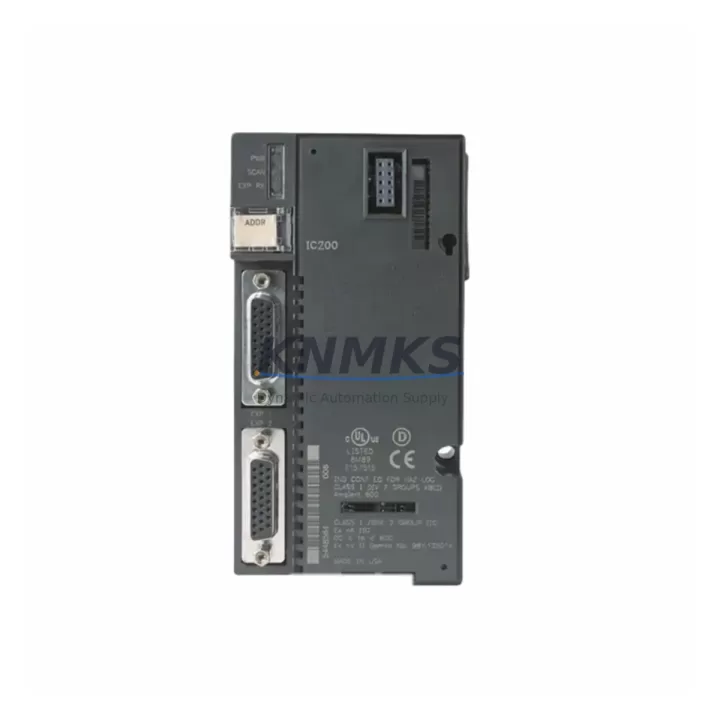
GE IC200ACC201 Maintenance-Proven Spare Part for Factory Uptime
The GE IC200ACC201 is an original analog input expansion module designed for the GE VersaMax Micro PLC platform. In industrial maintenance environments — from discrete manufacturing lines to continuous process plants — this module plays a critical role in acquiring real-time analog signals from field instruments including pressure transmitters, temperature sensors, flow meters, and position transducers. Maintaining a verified spare of the IC200ACC201 in your site inventory is a proven strategy for minimizing unplanned downtime and protecting production continuity.
Maintenance engineers working with GE VersaMax Micro controllers recognize the IC200ACC201 as a high-reliability analog front-end component. Its compact form factor integrates directly with the VersaMax Micro base unit, supporting 4-channel analog input acquisition with configurable signal ranges. When this module fails or degrades — often presenting as erratic PV readings, loss of analog channel data, or controller fault codes — rapid replacement with a pre-tested original spare is the fastest path to restoring loop control and resuming normal operations.
For procurement engineers managing MRO spare parts budgets, the IC200ACC201 represents a low-cost, high-impact line item. A single failed analog input module can halt an entire production cell if no replacement is available on-site. Stocking one or two units per VersaMax Micro installation — particularly in facilities running 24/7 operations or operating in remote locations with long lead times — is a standard risk mitigation practice endorsed by reliability-centered maintenance (RCM) frameworks.
Each IC200ACC201 unit supplied by KNMKS is sourced from verified original GE manufacturing channels, subjected to pre-shipment functional testing, and backed by a support terms confirmed by quotation covering manufacturing defects and operational failures under normal industrial use conditions. Global dispatch is available to support emergency replacement scenarios and scheduled annual maintenance outages alike.
Spare Maintenance Table
| SKU / Part Number | IC200ACC201 |
| Brand | GE (General Electric Automation) |
| Series | VersaMax Micro |
| Module Type | Analog Input Expansion Module |
| Analog Input Channels | 4 channels (configurable per channel) |
| Signal Range | 0–10 VDC / 0–20 mA / 4–20 mA (typical VersaMax Micro analog range) |
| Resolution | 12-bit analog-to-digital conversion |
| Power Supply | Supplied via VersaMax Micro base unit backplane |
| Compatibility | GE VersaMax Micro PLC base units (IC200UDR series, IC200UAL series) |
| Installation | Direct plug-in expansion to VersaMax Micro base; no external wiring adapter required |
| Operating Temperature | 0°C to 55°C (32°F to 131°F) |
| Relative Humidity | 5% to 95% non-condensing |
| Country of Origin | United States |
| Pre-Shipment Testing | Yes — functional analog channel verification |
| Support terms | 12 months from date of shipment |
| Dispatch | Global; emergency and scheduled shipments supported |
Maintenance Planning for Continuous Operation
When replacing the IC200ACC201 in the field, a disciplined maintenance engineer will not stop at swapping the analog input module alone. The surrounding electrical environment must be inspected to confirm the root cause of failure and prevent repeat faults. Begin by verifying the 24 VDC power supply feeding the VersaMax Micro base unit — a degraded or undersized power supply (such as the IC200PWR002 or equivalent) can cause intermittent analog channel errors that mimic module failure. Check supply voltage under load and confirm ripple is within specification.
Next, inspect the analog field wiring terminations. Loose or corroded terminals on the analog input screw connectors are a common source of signal noise and channel dropout. If the installation uses a terminal block expansion or marshalling cabinet, verify that all analog signal cables are properly shielded and that shield grounds are terminated at a single point to avoid ground loops. For 4–20 mA current loop circuits, confirm that loop power is present and that transmitter output impedance is within the module’s input impedance specification.
The VersaMax Micro CPU module — typically an IC200UDR series unit — should also be inspected during the same maintenance window. Check for firmware version compatibility with the IC200ACC201 and confirm that the analog I/O configuration in the application program matches the physical module’s channel settings. If the system uses a GE IC200CBL series communication cable for programming or HMI connectivity, verify cable integrity and connector seating.
For sites running GE QuickPanel HMI displays connected to the VersaMax Micro network, confirm that analog tag mappings in the HMI project are correctly referencing the restored module’s channel addresses. A module replacement without HMI tag verification can result in operators seeing stale or incorrect process values even after the hardware is restored. Additionally, inspect any signal isolators or analog signal conditioners installed between field transmitters and the IC200ACC201 inputs — these components can degrade over time and introduce offset errors that are incorrectly attributed to the PLC module.
Finally, review the control cabinet’s fuse and circuit protection inventory. Blown fuses on analog input circuits are sometimes the primary fault rather than the module itself. Stocking replacement fuses rated for the analog loop circuits, along with a spare IC200ACC201, ensures that your maintenance team can resolve the most common analog input failure modes without waiting for additional parts procurement.
Site Replacement Workflow
Step 1 — Isolate and document: Before removing the IC200ACC201, place the VersaMax Micro controller in STOP mode via the programming software (Proficy Machine Edition or equivalent). Document the current analog channel configuration, engineering unit scaling, and any active alarms associated with the affected channels. Take a photograph of the wiring terminations for reference during reinstallation.
Step 2 — Power down safely: De-energize the 24 VDC supply to the VersaMax Micro base unit. Confirm voltage is absent at the base unit power terminals using a calibrated multimeter before proceeding. Do not rely solely on the power indicator LED.
Step 3 — Remove and inspect: Disconnect the analog input wiring from the IC200ACC201 terminal block. Remove the module from the VersaMax Micro base by releasing the retention latch and sliding the module out. Inspect the base unit connector for bent pins, corrosion, or debris before installing the replacement unit.
Step 4 — Install replacement: Insert the new IC200ACC201 into the correct expansion slot on the VersaMax Micro base. Reconnect analog field wiring per the documented terminal assignments. Restore 24 VDC power and confirm the module’s status LED indicates normal operation.
Step 5 — Verify and return to service: Place the controller back in RUN mode. Verify that all four analog input channels are reading expected engineering unit values. Confirm HMI displays are showing correct process values. Log the replacement in the site maintenance record and update the spare parts inventory accordingly.
This workflow is applicable whether replacing a failed IC200ACC201 with an identical original spare or migrating from an older revision of the module. KNMKS supplies IC200ACC201 units that are compatible with current VersaMax Micro base configurations, reducing the risk of revision-related incompatibilities during emergency replacements.
Spare Parts Support FAQ
Q1: Is the IC200ACC201 still available as a new original spare, or only as a refurbished unit?
KNMKS supplies IC200ACC201 modules sourced from verified original GE manufacturing channels. Each unit undergoes pre-shipment functional testing to confirm analog channel performance before dispatch. Units are supplied with a support terms confirmed by quotation covering manufacturing defects and operational failures under normal industrial use conditions.
Q2: How many IC200ACC201 units should we stock for a facility running multiple VersaMax Micro installations?
Industry best practice for critical analog input modules in continuous-process or 24/7 manufacturing environments is to maintain a minimum of one spare per four installed units, with a floor of two spares per site. For facilities with long procurement lead times or remote locations, increasing the on-hand quantity to cover a 12-month consumption forecast is recommended. KNMKS supports long-term supply agreements to help procurement teams maintain consistent stock levels without repeated spot purchases.
Q3: Can the IC200ACC201 be used as a direct replacement for earlier VersaMax Micro analog input module revisions?
The IC200ACC201 is designed for direct installation into VersaMax Micro base units. Compatibility with specific base unit revisions and firmware versions should be confirmed against the GE VersaMax Micro hardware reference manual for your installed system. KNMKS technical support can assist with compatibility verification prior to shipment to minimize the risk of revision-related issues during emergency replacements.
Q4: What is included with each IC200ACC201 shipment from KNMKS?
Each shipment includes the IC200ACC201 module, pre-shipment test documentation, and a support terms confirmed by quotation certificate. Export documentation and customs declarations are provided for international shipments. Emergency dispatch options are available for critical downtime situations, with global shipping to support both scheduled maintenance outages and unplanned replacement events.
© 2026 KNMKS. All rights reserved.
Original Source: https://knmks.com
Contact: admin@knmks.com | +86 18359268345
Product Identification
- Brand / Ecosystem
-
GE
Assorted Brands - Model / Series
-
IC200ACC201
Assorted Series - Product Family
- PLCs & Controllers
- Availability Status
- Available on request after model and quantity confirmation
- Inquiry Type
- B2B RFQ, replacement inquiry and project spare-part request
- Pre-Quote Check
- Exact SKU, brand, series, quantity, nameplate photos and destination country are checked before quotation
System Path
Where this product fits in the KNMKS automation structure.
Specification & Inquiry Focus
- Control platform
- PLC, PAC and modular controllers
- Common needs
- CPU, rack, power and I/O expansion
- Project support
- Replacement, cabinet build and maintenance
Buyer Confirmation
Information KNMKS checks before replying.
- Exact model
- IC200ACC201
- Brand / ecosystem
- GE
- Product family
- PLCs & Controllers
- Application note
- Replacement, maintenance, project build or spare-part list
- Useful photos
- Nameplate, installed unit, cabinet layout or connector side
- Delivery details
- Quantity, destination country and target schedule
Document Support
Files and notes can be confirmed during quotation.
- Product photos or nameplate confirmation when available
- Packing and delivery notes before quotation confirmation
- Support scope and delivery terms confirmed per inquiry
- Export document coordination for qualified B2B requests
Inquiry Support
- Model cross-checking before quotation
- CPU, power, rack and expansion module matching
- Support for replacement and project inquiry
What to Send Us
- Brand and exact model number: GE IC200ACC201
- Quantity and required delivery time
- Application, replacement requirement or nameplate photo
- Destination country and shipping preference
RFQ Preparation
This is a product inquiry page built for RFQ communication.
Fast Model Check
Send this model to KNMKS for confirmation.
Include quantity, destination country and photos if this is a maintenance replacement. The inquiry will be saved with a reference number after submission.
Brand & Compatibility Note
KNMKS displays automation product information for well-known industrial brand ecosystems and compatible replacement references. Brand names are used for product identification and compatibility reference only; final availability and commercial terms are confirmed per quotation.
 Manufacturing
 Machine Tools
 Packaging
 Energy & Power



 HMI & Displays
 Servo Systems
 Variable Frequency Drives
 Sensors