
Overview
GE EPSCPE100-ABAE Maintenance-Proven Spare Part for Factory Uptime
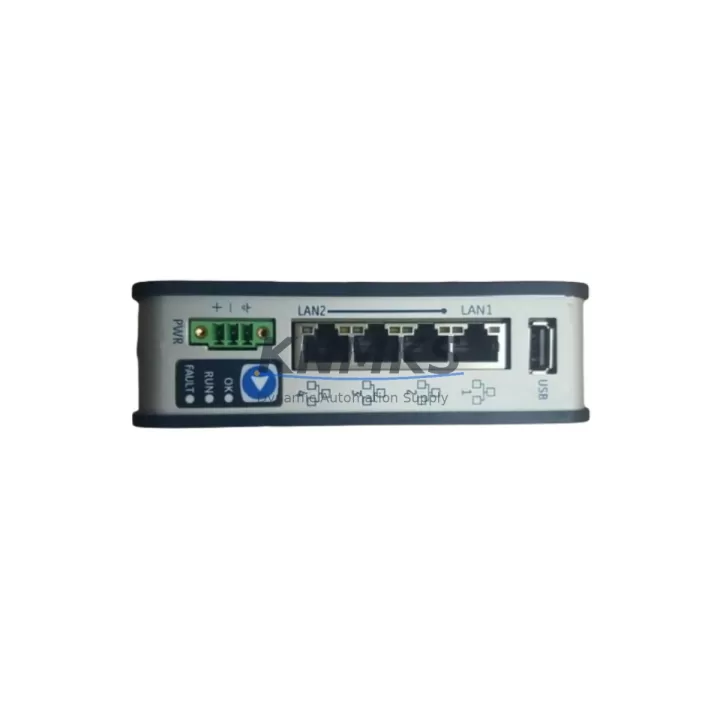
The GE EPSCPE100-ABAE is a high-performance CPU module designed for the GE PACSystems RX3i platform — one of the most widely deployed programmable logic controller architectures in global process and discrete manufacturing. For maintenance engineers managing aging control infrastructure, sourcing a verified, pre-tested EPSCPE100-ABAE spare is a critical step in protecting production continuity. This unit ships fully tested, backed by a support terms confirmed by quotation, and is available for long-term supply agreements to support multi-site maintenance programs.
Whether you are responding to an unplanned CPU fault, executing a scheduled annual overhaul, or building a strategic spare parts inventory for a legacy RX3i rack, the EPSCPE100-ABAE delivers the processing headroom and I/O scan performance required to sustain demanding automation cycles. Its compatibility with the standard RX3i backplane and IC695 series I/O modules makes it a direct drop-in replacement with minimal reconfiguration — reducing mean time to repair (MTTR) and keeping your line running.
Spare Maintenance Table
| Parameter | Specification |
|---|---|
| Part Number | EPSCPE100-ABAE |
| Brand | GE / GE Fanuc / Emerson Automation |
| Series | PACSystems RX3i |
| Module Type | CPU Module (Central Processing Unit) |
| Backplane Compatibility | IC695CHS012, IC695CHS016 (RX3i Universal Backplane) |
| I/O Module Compatibility | IC695 Series (Analog, Digital, Mixed I/O) |
| Communication Ports | Ethernet (RJ-45), Serial RS-232/RS-485 |
| Programming Software | Proficy Machine Edition (PME) |
| Operating Voltage | 3.3 VDC / 5 VDC (backplane supplied) |
| Operating Temperature | 0°C to 60°C (32°F to 140°F) |
| Relative Humidity | 5% to 95% non-condensing |
| Mounting | RX3i Universal Backplane Slot 0 |
| Origin | USA |
| Condition | Original / Genuine OEM |
| Pre-Shipment Testing | Yes — functional power-on and I/O scan verified |
| Support terms | 12 Months |
| Long-Term Supply | Available — 12 to 36-month supply agreements supported |
Maintenance Planning for Continuous Operation
When replacing or inspecting the EPSCPE100-ABAE in an RX3i control cabinet, a disciplined maintenance workflow extends well beyond the CPU module itself. Maintenance engineers should treat a CPU replacement as a full cabinet health check to prevent secondary failures from undermining the repair.
Begin by verifying the IC695PSA040 or IC695PSD040 power supply module — the CPU’s primary power source. A degraded power supply is a leading cause of intermittent CPU faults and should be load-tested before the new EPSCPE100-ABAE is commissioned. Next, inspect all IC695MDL series digital I/O modules seated in the backplane; loose or corroded backplane connectors can cause I/O scan errors that are misdiagnosed as CPU failures.
For systems using Ethernet-based SCADA or HMI connectivity, confirm the integrity of the IC695ETM001 Ethernet interface module and associated Cat5e/Cat6 patch cables. Communication timeouts after a CPU swap are frequently traced to a faulty ETM001 rather than the CPU itself. Similarly, if the RX3i rack includes a IC695CMM002 serial communications module for Modbus RTU or DNP3 field device integration, verify its firmware version is compatible with the replacement CPU’s firmware baseline.
Inspect all terminal blocks and field wiring terminations on analog input modules such as the IC695ALG600 — loose terminations introduce signal noise that can trigger false process alarms during the post-replacement commissioning phase. If the cabinet includes signal isolators or loop-powered transmitters, verify their 24 VDC supply rails are within tolerance before restoring the CPU to RUN mode.
Finally, confirm that the IC695MEM003 or IC695MEM004 memory expansion module, if installed, is firmly seated and that the user program backup stored on the CPU’s internal flash or external CompactFlash card is current. A verified program backup is the single most important safeguard against extended downtime during any unplanned CPU replacement event.
Site Replacement Workflow
Step 1 — Pre-Replacement Backup: Using Proficy Machine Edition, upload and archive the current user program, hardware configuration, and I/O variable table from the existing EPSCPE100-ABAE (or its predecessor) to a secure engineering workstation. Confirm the backup file timestamp and checksum before proceeding.
Step 2 — Cabinet Isolation: Follow site-specific lockout/tagout (LOTO) procedures. De-energize the RX3i rack via the upstream circuit breaker. Allow the power supply capacitors to discharge for a minimum of 30 seconds before opening the cabinet door.
Step 3 — Module Extraction: Release the CPU module locking tabs and slide the EPSCPE100-ABAE out of Slot 0. Inspect the backplane connector pins for corrosion, bent contacts, or debris. Clean with isopropyl alcohol if required.
Step 4 — Replacement Installation: Insert the new EPSCPE100-ABAE into Slot 0, ensuring full backplane engagement. Secure the locking tabs. Restore cabinet power and observe the CPU status LEDs — OK (green), RUN (green), and FAULT (red off) indicate a healthy power-on sequence.
Step 5 — Program Download and Commissioning: Connect via Proficy Machine Edition, download the archived user program and hardware configuration, and perform a full I/O force test before releasing the system to production. Document the replacement in the site maintenance log with the new module’s serial number and support terms start date.
This workflow is compatible with both hot-standby redundancy configurations and simplex RX3i architectures, minimizing planned downtime to under two hours for experienced maintenance teams.
Spare Parts Support FAQ
Q1: Is the EPSCPE100-ABAE compatible with all PACSystems RX3i backplanes?
Yes. The EPSCPE100-ABAE is designed for the RX3i Universal Backplane family, including the IC695CHS012 (12-slot) and IC695CHS016 (16-slot) configurations. It occupies Slot 0 and communicates with all IC695 series I/O and communications modules via the high-speed backplane bus. Verify that your Proficy Machine Edition hardware configuration matches the installed I/O module catalog numbers before downloading the program to the replacement CPU.
Q2: What pre-shipment testing is performed on each EPSCPE100-ABAE unit?
Every EPSCPE100-ABAE unit undergoes a functional power-on test, backplane communication verification, and I/O scan cycle test prior to shipment. Units that fail any stage of testing are quarantined and not shipped. A test report is available upon request. All shipped units are covered by a support terms confirmed by quotation from the date of delivery.
Q3: Can you support long-term or blanket purchase orders for EPSCPE100-ABAE spares?
Yes. We support 12 to 36-month supply agreements for the EPSCPE100-ABAE and related RX3i components, including power supply modules, I/O modules, and communications modules. Long-term agreements include reserved inventory allocation, priority lead times, and fixed pricing to protect your maintenance budget against market volatility. Contact our sales team to discuss your site’s annual consumption requirements.
Q4: What is the recommended spare parts holding strategy for RX3i CPU modules?
For production-critical RX3i installations, we recommend maintaining a minimum of one EPSCPE100-ABAE spare per control system, with a second unit held at the regional warehouse level for multi-site operations. CPU modules have no scheduled replacement interval under normal operating conditions, but units in high-vibration or high-temperature environments should be inspected annually and replaced proactively at the first sign of intermittent faults. Pairing the CPU spare with a backup power supply module and a set of critical I/O modules provides comprehensive coverage for the most common unplanned downtime scenarios.
© 2026 KNMKS. All rights reserved.
Original Source: https://knmks.com
Contact: admin@knmks.com | +86 18359268345
Product Identification
- Brand / Ecosystem
-
GE
Assorted Brands - Model / Series
-
EPSCPE100-ABAE
Assorted Series - Product Family
- PLCs & Controllers
- Availability Status
- Available on request after model and quantity confirmation
- Inquiry Type
- B2B RFQ, replacement inquiry and project spare-part request
- Pre-Quote Check
- Exact SKU, brand, series, quantity, nameplate photos and destination country are checked before quotation
System Path
Where this product fits in the KNMKS automation structure.
Specification & Inquiry Focus
- Control platform
- PLC, PAC and modular controllers
- Common needs
- CPU, rack, power and I/O expansion
- Project support
- Replacement, cabinet build and maintenance
Buyer Confirmation
Information KNMKS checks before replying.
- Exact model
- EPSCPE100-ABAE
- Brand / ecosystem
- GE
- Product family
- PLCs & Controllers
- Application note
- Replacement, maintenance, project build or spare-part list
- Useful photos
- Nameplate, installed unit, cabinet layout or connector side
- Delivery details
- Quantity, destination country and target schedule
Document Support
Files and notes can be confirmed during quotation.
- Product photos or nameplate confirmation when available
- Packing and delivery notes before quotation confirmation
- Support scope and delivery terms confirmed per inquiry
- Export document coordination for qualified B2B requests
Inquiry Support
- Model cross-checking before quotation
- CPU, power, rack and expansion module matching
- Support for replacement and project inquiry
What to Send Us
- Brand and exact model number: GE EPSCPE100-ABAE
- Quantity and required delivery time
- Application, replacement requirement or nameplate photo
- Destination country and shipping preference
RFQ Preparation
This is a product inquiry page built for RFQ communication.
Fast Model Check
Send this model to KNMKS for confirmation.
Include quantity, destination country and photos if this is a maintenance replacement. The inquiry will be saved with a reference number after submission.
Brand & Compatibility Note
KNMKS displays automation product information for well-known industrial brand ecosystems and compatible replacement references. Brand names are used for product identification and compatibility reference only; final availability and commercial terms are confirmed per quotation.
 Manufacturing
 Machine Tools
 Packaging
 Energy & Power



 HMI & Displays
 Servo Systems
 Variable Frequency Drives
 Sensors