
Overview
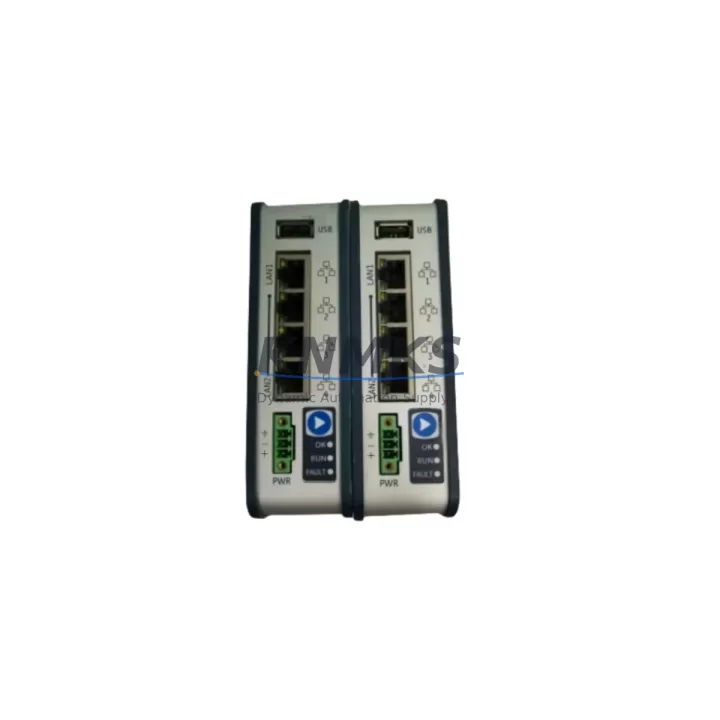
GE EPSCPE100-ABAA Migration-Ready CPU for Legacy Control Systems
The GE EPSCPE100-ABAA is a high-performance CPU module designed for the PACSystems RX3i platform, purpose-built to support legacy system migration, discontinued spare part replacement, and control cabinet modernization. Whether you are retiring an aging Series 90-30 rack or upgrading a multi-drop SRTP network, the EPSCPE100-ABAA provides a verified drop-in migration path with minimal downtime and full backward compatibility within the RX3i backplane ecosystem.
This CPU module supports Ethernet/SRTP and Modbus TCP communications natively, making it a direct candidate for facilities transitioning from serial-based control architectures to Ethernet-based supervisory networks. Before installation, engineers should confirm power supply capacity on the existing IC695PSA040 or IC695PSD040 power supply module, as the EPSCPE100-ABAA draws from the same backplane bus. Verify that total slot current draw across all installed I/O modules — including IC694MDL340 discrete input modules and IC694ALG220 analog output modules — does not exceed the rated output of the installed power supply.
Terminal wiring from the legacy CPU rack should be documented and verified against the new module’s I/O addressing map before cutover. If the existing program was developed on a Series 90-30 CPU, a logic conversion review in Proficy Machine Edition is required to confirm rung-level compatibility and to remap any CPU-resident function blocks. HMI screens connected via CIMPLICITY or iFIX should be audited for tag address changes, particularly if the legacy CPU used a different memory model or register offset convention.
For installations involving the IC695ETM001 Ethernet module or the IC695CMM002 serial communications module, confirm that module slot assignments and rack addressing are preserved in the new configuration file. The EPSCPE100-ABAA supports up to 32 MB of user program memory and includes an integrated Ethernet port, which may allow removal of a dedicated Ethernet module in some retrofit scenarios — freeing a backplane slot for additional I/O expansion.
Migration Compatibility Table
| Parameter | Details |
|---|---|
| Compatible Platform | PACSystems RX3i (IC695 series backplane) |
| Replaces / Upgrades From | IC695CPE010, IC695CPE020, IC695CPE030, Series 90-30 CPU (with logic conversion) |
| Backplane Interface | IC695CHS012 / IC695CHS016 universal backplane |
| Communication Protocols | Ethernet/SRTP, Modbus TCP, SNP (serial via CMM module) |
| Power Supply Compatibility | IC695PSA040, IC695PSD040 — verify total slot current budget |
| Installation Space | Single-slot RX3i module; confirm rack slot availability before ordering |
| Firmware Compatibility | Proficy Machine Edition 8.x and above recommended; verify firmware revision before download |
| Programming Software | GE Proficy Machine Edition (Logic Developer – PLC) |
| Commissioning Notes | Force I/O scan, verify watchdog timer settings, confirm Ethernet IP assignment |
| Support terms | support terms confirmed by quotation — pre-shipment functional test included |
Retrofit Planning for Existing Automation Systems
A successful retrofit using the EPSCPE100-ABAA begins with a full audit of the existing control cabinet. Start by documenting all installed modules in the IC695CHS012 or IC695CHS016 backplane, including the IC695ETM001 Ethernet module, any IC694MDL340 or IC694MDL654 discrete I/O modules, and the IC695ALG600 analog input module if present. Confirm that the IC695PSA040 power supply can sustain the combined load after the CPU swap.
If the legacy system includes an IC695CMM002 serial communications module for Modbus RTU or SNP links to remote I/O drops or third-party drives, verify that the new CPU configuration retains the same COM port assignments and baud rate settings. For sites using a GE QuickPanel+ HMI or a third-party panel connected via Ethernet/SRTP, update the HMI project’s PLC connection string to reflect the new CPU IP address and confirm that all tag bindings resolve correctly before going live.
Where the retrofit involves expanding I/O capacity — for example, adding IC694MDL340 modules to an existing rack or installing a new IC695CHS012 expansion backplane — confirm that the EPSCPE100-ABAA firmware supports the expanded I/O count and that the configuration hardware table in Proficy Machine Edition is updated accordingly. Signal isolators may be required at field terminal strips if the new I/O modules have different input impedance or voltage threshold specifications compared to the legacy hardware being replaced.
Downtime Control During System Migration
Minimizing production downtime during a CPU migration requires a structured pre-cutover checklist. Before removing the legacy CPU, export and archive the current program from the running controller using Proficy Machine Edition’s online backup function. Verify that the backup file includes all data blocks, configuration parameters, and motion profiles if applicable. Store a copy offline and on a separate USB drive kept at the panel.
During the physical swap, label all terminal connections and photograph the existing wiring before disconnection. The EPSCPE100-ABAA uses the same backplane connector as other IC695 series CPUs, so mechanical installation is straightforward — however, confirm that the module firmware version is compatible with the program file before downloading. A firmware mismatch can prevent the CPU from entering RUN mode and will require a firmware update via the USB port before the program download can proceed.
After download, perform a forced I/O scan in STOP mode to verify that all field devices respond correctly before switching to RUN. Monitor the CPU diagnostic log for any I/O fault codes related to module addressing or communication timeouts. For systems with SRTP-connected SCADA, confirm that the supervisory system re-establishes its data connection within the expected timeout window. Each unit shipped has been pre-tested under load conditions, and the support terms confirmed by quotation cover both the module and any verified defects identified during commissioning.
Retrofit Support FAQ
Q: Can the EPSCPE100-ABAA directly replace an IC695CPE010 without program modification?
A: In most cases, yes — if the existing program was developed for the RX3i platform and the hardware configuration table is updated in Proficy Machine Edition to reflect the EPSCPE100-ABAA. Minor differences in memory map or supported function blocks should be reviewed before download.
Q: What commissioning steps are required after installation?
A: Assign the Ethernet IP address via the front-panel USB port or BOOTP, download the updated hardware configuration and program, perform a forced I/O scan in STOP mode, verify all communication links (Ethernet/SRTP, Modbus TCP, serial CMM), and confirm HMI tag connectivity before switching to RUN mode.
Q: Is stock available for immediate shipment?
A: Yes. The EPSCPE100-ABAA is held in inventory for same-week dispatch. Each unit undergoes pre-shipment functional testing. Contact admin@knmks.com or +86 18359268345 to confirm current stock levels and lead time.
Q: What does the support terms confirmed by quotation cover?
A: The support terms covers manufacturing defects, functional failures under normal operating conditions, and any defects identified during initial commissioning. Units are pre-tested before shipment. Support requests are processed directly — contact admin@knmks.com with the order reference and fault description.
© 2026 KNMKS. All rights reserved.
Original Source: https://knmks.com
Contact: admin@knmks.com | +86 18359268345
Product Identification
- Brand / Ecosystem
-
GE
Assorted Brands - Model / Series
-
EPSCPE100-ABAA
Assorted Series - Product Family
- PLCs & Controllers
- Availability Status
- Available on request after model and quantity confirmation
- Inquiry Type
- B2B RFQ, replacement inquiry and project spare-part request
- Pre-Quote Check
- Exact SKU, brand, series, quantity, nameplate photos and destination country are checked before quotation
System Path
Where this product fits in the KNMKS automation structure.
Specification & Inquiry Focus
- Control platform
- PLC, PAC and modular controllers
- Common needs
- CPU, rack, power and I/O expansion
- Project support
- Replacement, cabinet build and maintenance
Buyer Confirmation
Information KNMKS checks before replying.
- Exact model
- EPSCPE100-ABAA
- Brand / ecosystem
- GE
- Product family
- PLCs & Controllers
- Application note
- Replacement, maintenance, project build or spare-part list
- Useful photos
- Nameplate, installed unit, cabinet layout or connector side
- Delivery details
- Quantity, destination country and target schedule
Document Support
Files and notes can be confirmed during quotation.
- Product photos or nameplate confirmation when available
- Packing and delivery notes before quotation confirmation
- Support scope and delivery terms confirmed per inquiry
- Export document coordination for qualified B2B requests
Inquiry Support
- Model cross-checking before quotation
- CPU, power, rack and expansion module matching
- Support for replacement and project inquiry
What to Send Us
- Brand and exact model number: GE EPSCPE100-ABAA
- Quantity and required delivery time
- Application, replacement requirement or nameplate photo
- Destination country and shipping preference
RFQ Preparation
This is a product inquiry page built for RFQ communication.
Fast Model Check
Send this model to KNMKS for confirmation.
Include quantity, destination country and photos if this is a maintenance replacement. The inquiry will be saved with a reference number after submission.
Brand & Compatibility Note
KNMKS displays automation product information for well-known industrial brand ecosystems and compatible replacement references. Brand names are used for product identification and compatibility reference only; final availability and commercial terms are confirmed per quotation.
 Manufacturing
 Machine Tools
 Packaging
 Energy & Power



 HMI & Displays
 Servo Systems
 Variable Frequency Drives
 Sensors