
Overview
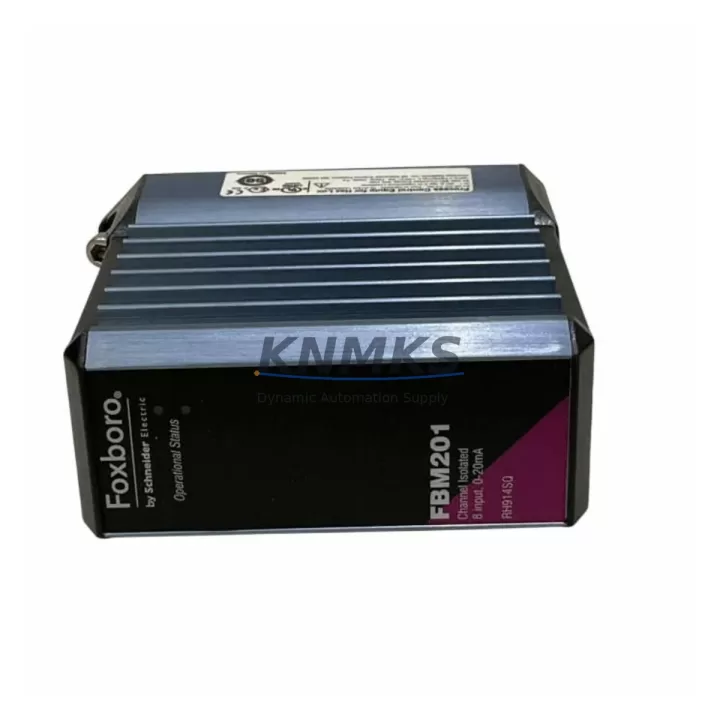
FOXBORO FBM201 RH914SQ Maintenance-Proven Spare Part for Factory Uptime
The FOXBORO FBM201 RH914SQ is a field-proven DCS interface module within the FBM200 Series, engineered for continuous operation in demanding process control environments. For maintenance engineers managing aging I/A Series or Foxboro Evo DCS architectures, maintaining a verified stock of the FBM201 RH914SQ is a critical element of any proactive spare parts strategy. Whether responding to an unplanned fault, executing a scheduled annual overhaul, or building a resilient control cabinet inventory, this module delivers the original electrical performance and backplane compatibility required to restore production with minimal downtime.
Each unit supplied by KNMKS is sourced, inspected, and function-tested prior to dispatch. Our support terms confirmed by quotation cover verified original hardware, giving procurement engineers the confidence to plan long-cycle spare parts budgets without exposure to counterfeit or degraded components. Fast international shipping and long-term supply commitment ensure the FBM201 RH914SQ remains available well beyond OEM end-of-life announcements.
Spare Maintenance Table
| Parameter | Specification |
|---|---|
| Part Number | FBM201 RH914SQ |
| Brand | FOXBORO |
| Series | FBM200 / I/A Series DCS |
| Product Type | DCS Interface Module |
| Backplane Compatibility | FBM200 Series baseplate / I/A Series fieldbus module carrier |
| Signal Type | Analog / Digital I/O interface (per FBM201 specification) |
| Operating Voltage | 24 VDC (field-side power, module-side via backplane) |
| Operating Temperature | 0°C to 60°C (32°F to 140°F) |
| Mounting | DIN rail / baseplate slot insertion |
| Communication | Fieldbus Module (FBM) protocol, I/A Series compatible |
| Country of Origin | United States |
| Support terms | 12 Months — verified original hardware |
| Condition | Original, function-tested before shipment |
| Application | Process control, DCS field I/O, refinery, chemical, power generation |
| Maintenance Recommendation | Inspect baseplate contacts and fieldbus wiring annually; replace on first sign of communication fault or I/O drift |
Maintenance Planning for Continuous Operation
When replacing the FBM201 RH914SQ in the field, a disciplined maintenance engineer will not limit the inspection to the module itself. The surrounding electrical environment must be evaluated to prevent repeat failures and ensure the replacement module operates within its rated parameters from the first power-on.
Begin with the FBM200 Series baseplate — inspect the backplane connector pins for oxidation, mechanical damage, or contamination from condensation. A degraded baseplate will cause intermittent communication faults even with a new FBM201 installed. If the baseplate shows wear, plan a concurrent replacement to avoid a second unplanned outage.
Verify the 24 VDC field power supply feeding the module carrier. Voltage sag or ripple outside specification is a common root cause of FBM module faults in aging control cabinets. A dedicated FOXBORO FPS0200 or equivalent regulated DCS power supply module should be confirmed within tolerance using a calibrated meter before the new FBM201 is inserted.
Inspect all field wiring terminations at the associated terminal blocks. Loose, corroded, or incorrectly torqued connections on analog input or digital output circuits will introduce signal errors that may be misdiagnosed as module failure. Re-torque all terminals to specification and verify continuity on each I/O channel.
For systems using signal isolators or signal conditioners between field instruments and the FBM201 input channels, confirm that isolator output ranges remain within the module’s accepted input window. Degraded isolators are frequently overlooked during module replacement and can cause persistent calibration drift after the new spare is installed.
Review the fieldbus communication segment connected to the FBM201. Check the Nodebus or Fieldbus cable for impedance continuity and confirm termination resistors are correctly installed at both ends of the segment. A faulty fieldbus segment will prevent the replacement module from being recognized by the DCS controller, extending downtime unnecessarily.
Where the control cabinet includes FOXBORO FCP270 or CP60 controllers, confirm that the controller firmware version is compatible with the FBM201 RH914SQ hardware revision. Mismatched firmware can cause configuration download failures. Coordinate with your DCS system administrator to validate compatibility before the maintenance window begins.
Finally, inspect the cabinet fusing and circuit protection for the module power rail. Blown or degraded fuses on the 24 VDC distribution bus are a common secondary fault that must be resolved before energizing the replacement module. Carry rated replacement fuses as part of the standard spare kit alongside the FBM201 RH914SQ.
Site Replacement Workflow
Step 1 — Pre-Replacement Verification: Confirm the failed module part number against the installed baseplate label and DCS configuration database. Verify the FBM201 RH914SQ replacement unit matches the hardware revision documented in the system’s spare parts register.
Step 2 — Safe Isolation: Place the associated DCS control loop in manual mode at the operator workstation. Notify the process team of the planned I/O interruption. De-energize the field power supply to the affected baseplate slot following site LOTO procedures.
Step 3 — Module Extraction: Release the module locking mechanism and extract the FBM201 from the baseplate slot. Inspect the ejected module for visible damage — burn marks, cracked housing, or damaged connector pins — to assist root cause analysis.
Step 4 — Baseplate and Wiring Inspection: Before inserting the replacement, inspect the baseplate slot contacts and all associated field wiring terminations as described in the maintenance planning section above.
Step 5 — Replacement Insertion: Insert the new FBM201 RH914SQ firmly into the baseplate slot until the locking mechanism engages. Restore field power and observe the module status LEDs for normal initialization sequence.
Step 6 — DCS Configuration Download: From the engineering workstation, download the module configuration to the FBM201. Confirm all I/O channels report correctly in the DCS display. Verify analog values against field instrument readings before returning the loop to automatic control.
Step 7 — Return to Service and Documentation: Return the control loop to automatic mode. Document the replacement in the site maintenance management system, including the new module serial number, installation date, and any observations from the inspection. Update the spare parts inventory to trigger replenishment of the consumed FBM201 RH914SQ unit.
Spare Parts Support FAQ
Q1: Is the FOXBORO FBM201 RH914SQ supplied by KNMKS an original unit?
Yes. All FBM201 RH914SQ units are sourced as original FOXBORO hardware. Each unit undergoes function testing prior to shipment. A support terms confirmed by quotation is provided on every unit, covering verified original components against defects in materials and workmanship.
Q2: How do I confirm compatibility with my existing FBM200 Series baseplate and DCS controller?
The FBM201 RH914SQ is designed for the FBM200 Series baseplate within the FOXBORO I/A Series and Foxboro Evo DCS architectures. Compatibility is determined by the baseplate model, controller firmware version, and system configuration. Contact KNMKS with your system model and controller version for a pre-purchase compatibility confirmation.
Q3: What is the lead time and can KNMKS support long-term supply for annual maintenance planning?
Standard in-stock units ship within 3–5 business days internationally. KNMKS maintains a long-term supply commitment for FBM200 Series modules, including the FBM201 RH914SQ, to support annual maintenance budgets and multi-year spare parts agreements. Contact our team to discuss volume pricing and reserved stock arrangements.
Q4: What testing is performed before the FBM201 RH914SQ is shipped?
Each unit is function-tested on compatible test equipment to verify communication, I/O channel integrity, and power consumption within specification. Units that do not pass testing are not dispatched. Test records are available upon request for quality-critical procurement processes.
© 2026 KNMKS. All rights reserved.
Original Source: https://knmks.com
Contact: admin@knmks.com | +86 18359268345
Product Identification
- Brand / Ecosystem
-
FOXBORO
Assorted Brands - Model / Series
-
FBM201 RH914SQ
Assorted Series - Product Family
- PLCs & Controllers
- Availability Status
- Available on request after model and quantity confirmation
- Inquiry Type
- B2B RFQ, replacement inquiry and project spare-part request
- Pre-Quote Check
- Exact SKU, brand, series, quantity, nameplate photos and destination country are checked before quotation
System Path
Where this product fits in the KNMKS automation structure.
Specification & Inquiry Focus
- Control platform
- PLC, PAC and modular controllers
- Common needs
- CPU, rack, power and I/O expansion
- Project support
- Replacement, cabinet build and maintenance
Buyer Confirmation
Information KNMKS checks before replying.
- Exact model
- FBM201 RH914SQ
- Brand / ecosystem
- FOXBORO
- Product family
- PLCs & Controllers
- Application note
- Replacement, maintenance, project build or spare-part list
- Useful photos
- Nameplate, installed unit, cabinet layout or connector side
- Delivery details
- Quantity, destination country and target schedule
Document Support
Files and notes can be confirmed during quotation.
- Product photos or nameplate confirmation when available
- Packing and delivery notes before quotation confirmation
- Support scope and delivery terms confirmed per inquiry
- Export document coordination for qualified B2B requests
Inquiry Support
- Model cross-checking before quotation
- CPU, power, rack and expansion module matching
- Support for replacement and project inquiry
What to Send Us
- Brand and exact model number: FOXBORO FBM201 RH914SQ
- Quantity and required delivery time
- Application, replacement requirement or nameplate photo
- Destination country and shipping preference
RFQ Preparation
This is a product inquiry page built for RFQ communication.
Fast Model Check
Send this model to KNMKS for confirmation.
Include quantity, destination country and photos if this is a maintenance replacement. The inquiry will be saved with a reference number after submission.
Brand & Compatibility Note
KNMKS displays automation product information for well-known industrial brand ecosystems and compatible replacement references. Brand names are used for product identification and compatibility reference only; final availability and commercial terms are confirmed per quotation.
 Manufacturing
 Machine Tools
 Packaging
 Energy & Power



 HMI & Displays
 Servo Systems
 Variable Frequency Drives
 Sensors