
Overview
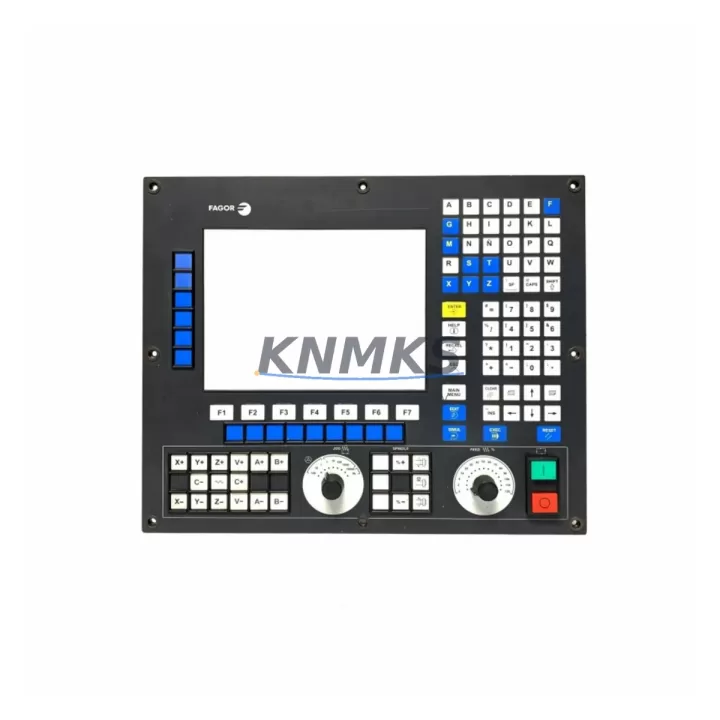
Fagor 8055i/A-M-COL-K Migration-Ready CNC Color Panel for Legacy Control Systems
The Fagor 8055i/A-M-COL-K is a color operator panel designed for the Fagor 8055i CNC series, widely deployed in milling, boring, and multi-axis machining centers across global manufacturing facilities. As Fagor Automation entered insolvency in 2013, thousands of 8055i-equipped machines entered a critical spare parts lifecycle phase. The 8055i/A-M-COL-K panel — the primary human-machine interface for these systems — has become one of the most sought-after replacement components for maintenance engineers managing legacy CNC infrastructure.
This unit is stocked as a migration-ready replacement, pre-shipment tested, and backed by a support terms confirmed by quotation. It is suitable for direct drop-in replacement on existing 8055i milling configurations and for controlled retrofit projects where the operator interface must be preserved while underlying control hardware is upgraded or consolidated.
When planning a replacement or retrofit involving the 8055i/A-M-COL-K, engineers must verify several critical parameters before installation. The panel interfaces with the Fagor 8055i CNC CPU module via a dedicated flat-ribbon or D-sub connector harness; confirming the cable routing and connector pinout against the existing installation is essential before powering the system. The panel’s backlight power supply and contrast settings are configured through the CNC’s internal parameter table — these values should be documented from the original unit before removal to avoid reconfiguration delays during commissioning.
In retrofit scenarios where the 8055i CPU board is being replaced alongside the operator panel, engineers should also account for the axis drive communication links. The 8055i architecture uses Fagor’s proprietary SERCOS or analog ±10V drive interface depending on the machine configuration; the replacement panel must be paired with a CPU module that matches the original drive topology. If the retrofit involves migrating from analog to digital drive communication, the 8055i/A-M-COL-K panel itself remains compatible, but the Fagor 8055i Axes Module and the corresponding drive parameter files must be updated to reflect the new communication protocol.
For machines where the original Fagor 8055i Power Supply Module has degraded, it is strongly recommended to replace it concurrently with the operator panel. A failing PSU can cause intermittent panel resets, corrupted display output, and false axis fault alarms — symptoms that are frequently misdiagnosed as panel failures. Confirming PSU output voltages (typically +5V, +12V, ±15V rails) before installing the replacement 8055i/A-M-COL-K panel eliminates the risk of damaging the new unit during initial power-up.
Machines running Fagor 8055i with DNC or RS-232 program transfer setups should also verify that the communication parameters stored in the CNC’s machine parameter table are backed up prior to panel replacement. The 8055i/A-M-COL-K does not store machine parameters internally, but a full panel swap — particularly if the CNC CPU battery has discharged — can result in parameter loss if the backup procedure is not completed beforehand. A Fagor programming cable or DNC interface adapter is required for parameter backup and restoration on these systems.
In multi-axis machining centers where the 8055i controls a rotary table or a fourth axis via a Fagor Remote Module, the axis address configuration must be confirmed after panel replacement. The 8055i/A-M-COL-K panel displays axis status and alarm codes for all configured axes; if the remote module address is not correctly recognized after replacement, axis fault codes will appear on the panel and the machine will not enter automatic mode. This is resolved through the CNC’s axis configuration parameters, not through hardware changes to the panel itself.
Migration Compatibility Table
| Parameter | Details |
|---|---|
| Compatible CNC Series | Fagor 8055i (Milling / M configuration) |
| Panel Type | Color Operator Panel (COL-K) |
| Interface Connector | D-sub / flat-ribbon harness (verify against original installation) |
| Drive Communication | SERCOS or Analog ±10V (CPU-dependent; confirm before replacement) |
| Power Supply Compatibility | Fagor 8055i PSU module required; verify +5V/+12V/±15V rails before install |
| Parameter Storage | Parameters stored in CNC CPU, not in panel; backup required before swap |
| Axis Address Config | Must be verified post-installation for multi-axis / remote module setups |
| Installation Space | Standard 8055i operator panel cutout; confirm cabinet door dimensions |
| Firmware Compatibility | Compatible with standard 8055i firmware versions; confirm CNC software version |
| Pre-Shipment Testing | Yes — functional and display output verified before dispatch |
| Support terms | 12 Months |
| Origin | Spain (Fagor Automation) |
Retrofit Planning for Existing Automation Systems
A successful 8055i/A-M-COL-K retrofit requires a structured approach that accounts for the full control cabinet ecosystem. In most 8055i installations, the operator panel is mounted on the machine cabinet door and connected to the CNC rack via a cable harness that also carries keypad matrix signals and emergency stop feedback. Before removing the original panel, engineers should photograph the existing cable routing and label all connectors to ensure correct reassembly.
The Fagor 8055i CNC rack typically houses the CPU module, the Axes Module, the I/O Module, and the Power Supply Module in a compact backplane arrangement. When the operator panel is replaced, the CNC rack components remain in place, but the system must be powered down completely and the PSU capacitors allowed to discharge before the panel connector is disturbed. If the retrofit also involves replacing the Fagor 8055i I/O Module — for example, to add additional M-function outputs or to replace a failed digital input card — this work should be sequenced before the panel replacement to minimize the number of power cycles during the maintenance window.
For machines where the HMI screen has failed but the keypad matrix remains functional, it is sometimes possible to replace only the display assembly within the 8055i/A-M-COL-K panel housing. However, given the age of these systems and the difficulty of sourcing individual display components, a full panel replacement is generally the more reliable and time-efficient approach. The replacement panel arrives pre-assembled and tested, eliminating the risk of display calibration issues that can arise from partial repairs.
In facilities where multiple 8055i-equipped machines are in service, it is advisable to maintain at least one 8055i/A-M-COL-K panel as a cold standby spare. The panel is not machine-specific — it does not store machine parameters — and can be transferred between machines of the same configuration with only a parameter restore operation required. This approach significantly reduces mean time to repair (MTTR) in the event of a panel failure during production.
Where the retrofit scope extends beyond the operator panel to include drive system modernization, engineers should note that the Fagor 8055i architecture supports integration with Fagor AXD and SPD digital servo drives via SERCOS ring. If the existing installation uses older Fagor analog drives, the migration to digital drives requires updates to the CNC axis parameters and a SERCOS ring commissioning procedure, but the 8055i/A-M-COL-K panel itself remains the correct operator interface throughout this process.
Downtime Control During System Migration
Minimizing unplanned downtime during a Fagor 8055i/A-M-COL-K panel replacement requires preparation that begins before the maintenance window opens. The most critical pre-work item is a complete backup of the CNC machine parameters, part programs, and tool offset tables. On the 8055i, this backup is performed via the RS-232 DNC port or USB interface (if fitted) using Fagor’s WinDNC software or a compatible DNC terminal. The backup file should be verified on a separate PC before the maintenance window begins.
During the panel swap, the CNC rack remains powered down. The replacement panel is connected using the original cable harness — no wiring modifications are required for a like-for-like replacement. After power-up, the CNC will perform its standard self-test sequence. If the CPU battery was replaced during the same maintenance window, the machine parameters must be restored from the backup file before the machine can enter automatic mode.
To protect original program logic, all part programs stored in the CNC’s internal memory should be transferred to the DNC host or a USB drive before the maintenance window. This is particularly important if the CPU battery condition is unknown, as a discharged battery will result in loss of all stored programs and parameters when power is removed. After the panel replacement and parameter restore, a dry-run cycle on a representative part program should be performed before returning the machine to production to confirm that all axis movements, M-functions, and spindle commands execute correctly.
For facilities with tight production schedules, the panel replacement can typically be completed within a two-to-four hour maintenance window when all preparatory steps are completed in advance. The primary variables that extend this window are unexpected wiring discrepancies, parameter restore complications, and axis re-referencing requirements — all of which can be mitigated through thorough pre-maintenance documentation.
Retrofit Support FAQ
Q: Is the Fagor 8055i/A-M-COL-K a direct replacement for my existing panel?
A: Yes, the 8055i/A-M-COL-K is a direct replacement for the color operator panel in Fagor 8055i milling (M) configurations. No wiring modifications are required for a like-for-like swap. Confirm your existing panel part number and CNC configuration before ordering.
Q: Does the replacement panel require any firmware updates or parameter configuration after installation?
A: The panel itself does not contain firmware that requires updating. However, if the CNC CPU battery has discharged during storage or transit, machine parameters must be restored from a backup after installation. It is strongly recommended to perform a full parameter backup before removing the original panel.
Q: Is the unit pre-tested before shipment?
A: Yes. Every 8055i/A-M-COL-K unit undergoes functional pre-shipment testing, including display output verification and keypad matrix continuity checks, before dispatch. Units are shipped with protective packaging to prevent transit damage.
Q: What support terms and supply terms apply?
A: All units are covered by a support terms confirmed by quotation against manufacturing defects and functional failures. Stock is maintained for immediate dispatch; lead times and availability can be confirmed by contacting our sales team directly.
© 2026 KNMKS. All rights reserved.
Original Source: https://knmks.com
Contact: admin@knmks.com | +86 18359268345
Product Identification
- Brand / Ecosystem
-
Other Brands
Assorted Brands - Model / Series
-
8055i/A-M-COL-K
Assorted Series - Product Family
- HMI & Displays
- Availability Status
- Available on request after model and quantity confirmation
- Inquiry Type
- B2B RFQ, replacement inquiry and project spare-part request
- Pre-Quote Check
- Exact SKU, brand, series, quantity, nameplate photos and destination country are checked before quotation
System Path
Where this product fits in the KNMKS automation structure.
Specification & Inquiry Focus
- Display range
- Operator panels and touch screens
- Common needs
- Screen size, interface and version matching
- Project support
- Retrofit, spare unit and panel replacement
Buyer Confirmation
Information KNMKS checks before replying.
- Exact model
- 8055i/A-M-COL-K
- Brand / ecosystem
- Other Brands
- Product family
- HMI & Displays
- Application note
- Replacement, maintenance, project build or spare-part list
- Useful photos
- Nameplate, installed unit, cabinet layout or connector side
- Delivery details
- Quantity, destination country and target schedule
Document Support
Files and notes can be confirmed during quotation.
- Product photos or nameplate confirmation when available
- Packing and delivery notes before quotation confirmation
- Support scope and delivery terms confirmed per inquiry
- Export document coordination for qualified B2B requests
Inquiry Support
- Panel size and interface confirmation
- Replacement unit inquiry for discontinued HMIs
- Protective packaging for display shipment
What to Send Us
- Brand and exact model number: Other Brands 8055i/A-M-COL-K
- Quantity and required delivery time
- Application, replacement requirement or nameplate photo
- Destination country and shipping preference
RFQ Preparation
This is a product inquiry page built for RFQ communication.
Fast Model Check
Send this model to KNMKS for confirmation.
Include quantity, destination country and photos if this is a maintenance replacement. The inquiry will be saved with a reference number after submission.
Brand & Compatibility Note
KNMKS displays automation product information for well-known industrial brand ecosystems and compatible replacement references. Brand names are used for product identification and compatibility reference only; final availability and commercial terms are confirmed per quotation.
 Manufacturing
 Machine Tools
 Packaging
 Energy & Power
 PLCs & Controllers
 Servo Systems
 Variable Frequency Drives
 Sensors