
Overview
DIGIT 3402087500 Maintenance-Proven Spare Part for Factory Uptime
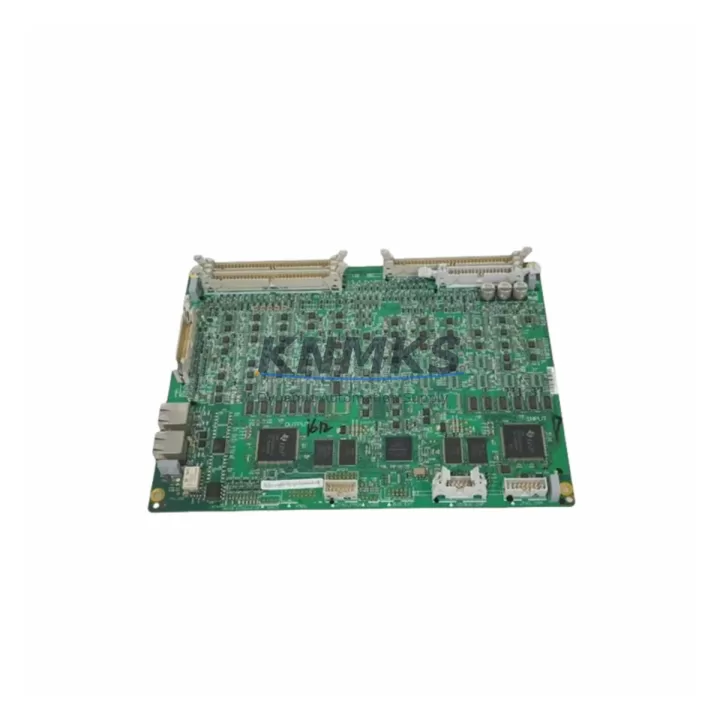
The DIGIT 3402087500 is an original display interface board designed for the 34020874XD series industrial automation platform. As a critical HMI and display communication component, this board manages the signal pathway between the operator interface and the underlying control logic — making it a high-priority spare for any maintenance team responsible for continuous production uptime. Whether you are managing a scheduled annual overhaul, responding to an unplanned fault, or building a proactive spare parts inventory, the 3402087500 is a board that should be stocked and verified before it is needed.
Industrial display interface boards are among the most failure-prone components in aging automation cabinets. Exposure to heat cycling, vibration, capacitor degradation, and connector wear over years of continuous operation means that a board which appears functional during routine inspection may fail without warning during peak production. Maintenance engineers who have experienced a display blackout or HMI communication loss mid-shift understand the urgency: without a verified replacement on the shelf, recovery time stretches from minutes into hours or days.
The DIGIT 3402087500 supplied by KNMKS is sourced as an original spare, pre-tested prior to shipment, and backed by a support terms confirmed by quotation. Multi-region stock is maintained to support fast global dispatch for both emergency replacements and planned outages.
Spare Maintenance Table
| Part Number | 3402087500 |
| Alternate Reference | 34020874XD-1EA / 34020874XD-8EA |
| Brand / Manufacturer | DIGIT |
| Component Type | Industrial Display Interface Board |
| Series | 34020874XD Series |
| Function | Display signal interface and HMI communication for industrial automation panels |
| Compatibility | 34020874XD series automation systems; verify against existing board revision before installation |
| Form Factor | PCB module, panel-mount / backplane-integrated |
| Operating Environment | Industrial cabinet; rated for continuous duty in controlled environments with standard EMC shielding |
| Weight | 940 g (packaged) |
| Country of Origin | China (CN) |
| Supply Condition | Original spare, pre-shipment tested |
| Support terms | 12 months from date of dispatch |
| Dispatch | Multi-region stock; global delivery details confirmed by RFQ available |
| Maintenance Recommendation | Inspect connector pins and ribbon cable seating at each scheduled outage; replace proactively at first sign of display instability or communication fault |
Maintenance Planning for Continuous Operation
When a DIGIT 3402087500 display interface board is flagged for replacement — whether during a fault investigation or a planned cabinet inspection — experienced maintenance engineers know that the board itself is rarely the only component that requires attention. A display communication failure often indicates stress across the broader signal and power chain within the same control cabinet.
Begin by verifying the 24 VDC panel power supply feeding the display circuit. Voltage sag or ripple at the supply rail is a common root cause of intermittent display faults that are misdiagnosed as board failures. If the power supply is original equipment and has been in service for more than five years, treat it as a co-replacement candidate alongside the 3402087500.
Next, inspect the ribbon cable and connector harness linking the display interface board to the operator panel. Connector oxidation, bent pins, and cable fatigue at the fold points are frequent failure contributors in high-vibration environments. A new board installed on a degraded cable will not resolve the underlying fault.
For systems where the 3402087500 interfaces with a PLC CPU or communication backplane, check the backplane bus connectors and any serial or fieldbus communication modules (RS-232, RS-485, or proprietary DIGIT bus) that share the same rack. A faulty communication module can generate display errors that appear to originate from the interface board.
Signal isolation modules and I/O terminal blocks in the same cabinet should be inspected for loose terminations and insulation degradation, particularly if the system operates in environments with high ambient temperature or chemical exposure. Loose I/O wiring can introduce ground loops that corrupt display data.
Finally, check the cabinet fusing and circuit protection for the display circuit branch. A slow-blow fuse that has been operating near its rated current for an extended period may have degraded internally without blowing, causing intermittent supply interruptions. Replace suspect fuses as part of the same maintenance event to avoid a repeat callout.
Procurement engineers building a spare parts list around the 3402087500 should consider stocking the associated panel power supply module, the display cable harness, at least one communication interface module for the same rack, and a set of terminal block inserts for the I/O section of the cabinet. This approach converts a reactive repair into a planned maintenance kit and significantly reduces mean time to repair (MTTR) for future events.
Site Replacement Workflow
Step 1 — Isolate and document. Before removing the DIGIT 3402087500, isolate the control cabinet from its power source following your site LOTO procedure. Photograph the existing board orientation, connector positions, and any jumper or DIP switch settings. These settings must be replicated on the replacement board.
Step 2 — Verify compatibility. Confirm that the replacement 3402087500 matches the hardware revision of the board being removed. Check the board label for revision suffix (e.g., 34020874XD-1EA vs. 34020874XD-8EA). Mismatched revisions may require firmware or parameter adjustments before the system will accept the new board.
Step 3 — Inspect the mounting interface. Before installing the new board, clean the backplane connector and inspect for bent pins or corrosion. Apply a light contact cleaner if oxidation is present. Do not force the board into a damaged connector.
Step 4 — Install and restore power. Seat the replacement board firmly, reconnect all cables and harnesses, and restore power in sequence. Observe the display initialization sequence for any fault codes before returning the system to automatic operation.
Step 5 — Functional verification. Confirm that all display pages, operator inputs, and communication links are functioning correctly. Log the replacement in your maintenance management system with the board serial number, date, and technician ID.
Step 6 — Return the removed board for evaluation. Do not discard the removed 3402087500 without evaluation. In many cases, display interface boards can be refurbished or used as a secondary spare after root cause analysis. If the board is beyond repair, document the failure mode to support future predictive maintenance planning.
Spare Parts Support FAQ
Q1: How do I confirm that the DIGIT 3402087500 is compatible with my existing system before ordering?
Provide your existing board part number, revision suffix (34020874XD-1EA or 34020874XD-8EA), and system model to our technical team at admin@knmks.com. We will cross-reference against our compatibility database and confirm suitability before dispatch. Pre-order compatibility verification is included at no charge for all KNMKS customers.
Q2: What pre-shipment testing is performed on the 3402087500?
Every DIGIT 3402087500 dispatched by KNMKS undergoes functional power-on testing and visual inspection for connector integrity, PCB condition, and component seating. Test records are retained and available on request. The support terms confirmed by quotation cover manufacturing defects and functional failures under normal operating conditions from the date of dispatch.
Q3: Can KNMKS support long-term supply of the 3402087500 for multi-site maintenance programs?
Yes. KNMKS maintains multi-region stock of the DIGIT 3402087500 and can support blanket purchase orders, scheduled release agreements, and emergency call-off arrangements. Contact admin@knmks.com or +86 18359268345 to discuss volume pricing and supply continuity terms for your maintenance program.
Q4: What is the recommended inventory strategy for the 3402087500 in a critical production environment?
For systems where display interface failure would cause an unplanned production stoppage, we recommend maintaining a minimum of one verified spare on-site and one in a regional warehouse or distributor hub. For multi-line facilities running identical or compatible DIGIT platforms, a shared pool of two to three boards is typically sufficient to cover emergency demand while replenishment stock is in transit.
© 2026 KNMKS. All rights reserved.
Original Source: https://knmks.com
Contact: admin@knmks.com | +86 18359268345
Product Identification
- Brand / Ecosystem
-
Other Brands
Assorted Brands - Model / Series
-
3402087500 34020874XD-1EA 34020874XD-8EA
Assorted Series - Product Family
- HMI & Displays
- Availability Status
- Available on request after model and quantity confirmation
- Inquiry Type
- B2B RFQ, replacement inquiry and project spare-part request
- Pre-Quote Check
- Exact SKU, brand, series, quantity, nameplate photos and destination country are checked before quotation
System Path
Where this product fits in the KNMKS automation structure.
Specification & Inquiry Focus
- Display range
- Operator panels and touch screens
- Common needs
- Screen size, interface and version matching
- Project support
- Retrofit, spare unit and panel replacement
Buyer Confirmation
Information KNMKS checks before replying.
- Exact model
- 3402087500 34020874XD-1EA 34020874XD-8EA
- Brand / ecosystem
- Other Brands
- Product family
- HMI & Displays
- Application note
- Replacement, maintenance, project build or spare-part list
- Useful photos
- Nameplate, installed unit, cabinet layout or connector side
- Delivery details
- Quantity, destination country and target schedule
Document Support
Files and notes can be confirmed during quotation.
- Product photos or nameplate confirmation when available
- Packing and delivery notes before quotation confirmation
- Support scope and delivery terms confirmed per inquiry
- Export document coordination for qualified B2B requests
Inquiry Support
- Panel size and interface confirmation
- Replacement unit inquiry for discontinued HMIs
- Protective packaging for display shipment
What to Send Us
- Brand and exact model number: Other Brands 3402087500 34020874XD-1EA 34020874XD-8EA
- Quantity and required delivery time
- Application, replacement requirement or nameplate photo
- Destination country and shipping preference
RFQ Preparation
This is a product inquiry page built for RFQ communication.
Fast Model Check
Send this model to KNMKS for confirmation.
Include quantity, destination country and photos if this is a maintenance replacement. The inquiry will be saved with a reference number after submission.
Brand & Compatibility Note
KNMKS displays automation product information for well-known industrial brand ecosystems and compatible replacement references. Brand names are used for product identification and compatibility reference only; final availability and commercial terms are confirmed per quotation.
 Manufacturing
 Machine Tools
 Packaging
 Energy & Power
 PLCs & Controllers
 Servo Systems
 Variable Frequency Drives
 Sensors