
Overview
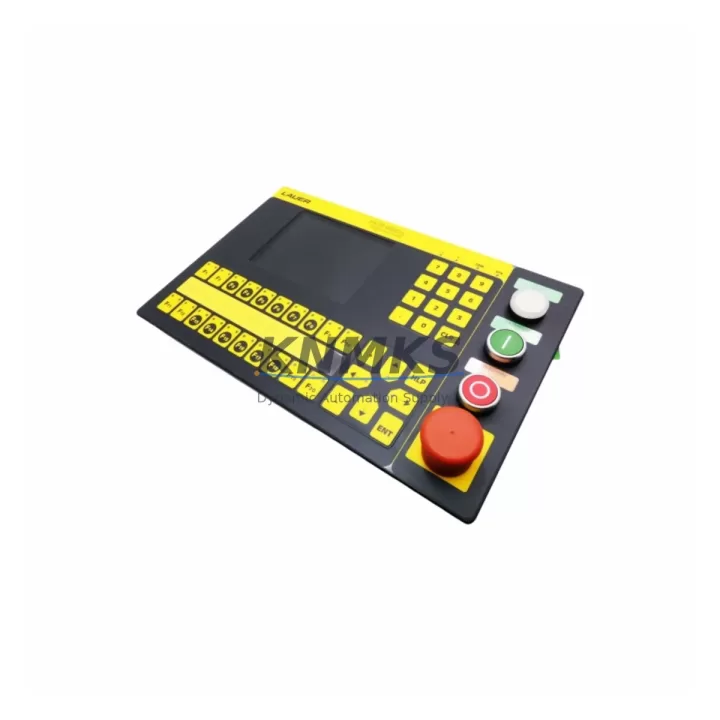
BOSCH 950.000.5 Maintenance-Proven Spare Part for Factory Uptime
The BOSCH 950.000.5 CNC Operator Panel is a critical human-machine interface component used across BOSCH CNC control systems in precision machining, automated production lines, and multi-axis milling environments. When this panel fails or degrades, the entire CNC cell is at risk of unplanned downtime — making rapid access to a verified, original-grade spare part essential for maintenance engineers and procurement teams managing factory continuity.
Our stock of the BOSCH 950.000.5 is sourced from authorized supply channels, subjected to pre-shipment functional testing, and backed by a support terms confirmed by quotation. Whether you are responding to an emergency breakdown, executing a scheduled annual overhaul, or building a strategic spare parts buffer for your CNC fleet, this unit ships with full traceability documentation and is ready for immediate installation.
From a maintenance engineering perspective, the 950.000.5 operator panel sits at the intersection of operator input, system feedback, and machine control logic. Its failure modes — including display degradation, keypad unresponsiveness, backlight failure, and communication dropout — are well-documented in BOSCH CNC service bulletins. Proactive replacement during planned maintenance windows, rather than reactive replacement after failure, is the recommended strategy for high-utilization CNC environments.
Spare Maintenance Table
| Parameter | Specification |
|---|---|
| Part Number / SKU | 950.000.5 |
| Brand | BOSCH |
| Series | BOSCH CNC Control Series |
| Product Type | CNC Operator Panel |
| Country of Origin | Germany (DE) |
| Interface | Operator keypad and display interface for CNC controller |
| Compatibility | BOSCH CNC control cabinets; compatible with legacy and current BOSCH CNC series |
| Installation | Panel-mount; direct replacement for existing 950.000.5 units |
| Application Environment | Industrial CNC machining centers, automated production lines, multi-axis milling |
| Pre-Shipment Testing | Yes — functional verification before dispatch |
| Support terms | 12 Months |
| Weight | 1,400 g (approx.) |
| Dispatch | Global rapid dispatch; stock available for emergency orders |
Maintenance Planning for Continuous Operation
When replacing the BOSCH 950.000.5 operator panel, a thorough site inspection of the surrounding control cabinet is strongly recommended. Maintenance engineers should verify the integrity of the 24 VDC panel power supply feeding the operator station — voltage fluctuations or ripple are a common root cause of premature panel failure and should be measured before the new unit is commissioned. The BOSCH CNC controller main board and its associated I/O modules should be inspected for fault codes, as a failing operator panel may mask underlying controller errors that will resurface after replacement.
Communication cabling between the operator panel and the CNC controller — typically RS-232, RS-422, or proprietary BOSCH serial interfaces — should be inspected for insulation damage, connector corrosion, and secure termination. Faulty cabling is frequently overlooked during panel replacements and can cause intermittent faults in the replacement unit. Similarly, the backplane connectors and ribbon cables linking the panel to the controller chassis should be cleaned and reseated.
For sites running BOSCH CNC systems with integrated PLC functions, the associated BOSCH CNC PLC I/O modules and relay output cards should be checked for contact wear and correct signal levels. If the control cabinet includes a BOSCH operator panel extension unit or a secondary display module, these should be tested in parallel. Fuse protection for the operator panel circuit — typically located on the 24 VDC distribution rail — should be inspected and replaced as part of the maintenance cycle. Signal isolators on analog feedback lines from the machine tool should also be verified to ensure clean signal integrity to the new panel.
Site Replacement Workflow
The BOSCH 950.000.5 is a direct form-fit-function replacement for the original unit. Before beginning replacement, power down the CNC control cabinet following the machine builder’s lockout/tagout procedure. Document the existing panel wiring and connector positions using photographs or a wiring diagram. Disconnect all interface cables and power connectors from the old panel, noting any labeling for reference during reinstallation.
Mount the replacement 950.000.5 into the panel cutout, reconnect all cables in the documented sequence, and restore power. Perform a full CNC controller boot sequence and verify that the operator panel communicates correctly with the controller — check axis display, spindle status, program selection, and alarm acknowledgment functions. If the system uses a BOSCH CNC parameter backup, restore the operator panel configuration from the backup file to ensure correct display language, axis labeling, and machine-specific softkey assignments.
This workflow minimizes downtime to a single maintenance shift and eliminates the risk of configuration errors that can extend recovery time. For sites with multiple CNC machines using the same BOSCH control platform, maintaining one 950.000.5 unit in the on-site spare parts cabinet is the recommended inventory strategy to achieve sub-four-hour recovery from panel failure.
Spare Parts Support FAQ
Q1: Is the BOSCH 950.000.5 compatible with all BOSCH CNC control generations?
The 950.000.5 is designed for the BOSCH CNC control series for which it was originally specified. Compatibility with adjacent BOSCH CNC generations should be verified against the machine builder’s documentation or BOSCH service manuals. Our technical team can assist with compatibility confirmation prior to order.
Q2: What pre-shipment testing is performed on the 950.000.5?
Each unit undergoes functional verification including power-on testing, display and keypad response checks, and communication interface validation before dispatch. A test report is available upon request.
Q3: What is the support terms coverage and what does it include?
All units are covered by a support terms confirmed by quotation from the date of shipment. The support terms covers manufacturing defects and functional failures under normal operating conditions. It does not cover damage resulting from incorrect installation, overvoltage, or physical impact.
Q4: Can you support long-term or repeat supply of the BOSCH 950.000.5?
Yes. We maintain multi-region stock and can support scheduled procurement programs, annual maintenance contracts, and emergency replenishment orders. Contact our sales team to discuss volume pricing and lead time commitments for your maintenance planning cycle.
© 2026 KNMKS. All rights reserved.
Original Source: https://knmks.com
Contact: admin@knmks.com | +86 18359268345
Product Identification
- Brand / Ecosystem
-
Other Brands
Assorted Brands - Model / Series
-
950.000.5
Assorted Series - Product Family
- HMI & Displays
- Availability Status
- Available on request after model and quantity confirmation
- Inquiry Type
- B2B RFQ, replacement inquiry and project spare-part request
- Pre-Quote Check
- Exact SKU, brand, series, quantity, nameplate photos and destination country are checked before quotation
System Path
Where this product fits in the KNMKS automation structure.
Specification & Inquiry Focus
- Display range
- Operator panels and touch screens
- Common needs
- Screen size, interface and version matching
- Project support
- Retrofit, spare unit and panel replacement
Buyer Confirmation
Information KNMKS checks before replying.
- Exact model
- 950.000.5
- Brand / ecosystem
- Other Brands
- Product family
- HMI & Displays
- Application note
- Replacement, maintenance, project build or spare-part list
- Useful photos
- Nameplate, installed unit, cabinet layout or connector side
- Delivery details
- Quantity, destination country and target schedule
Document Support
Files and notes can be confirmed during quotation.
- Product photos or nameplate confirmation when available
- Packing and delivery notes before quotation confirmation
- Support scope and delivery terms confirmed per inquiry
- Export document coordination for qualified B2B requests
Inquiry Support
- Panel size and interface confirmation
- Replacement unit inquiry for discontinued HMIs
- Protective packaging for display shipment
What to Send Us
- Brand and exact model number: Other Brands 950.000.5
- Quantity and required delivery time
- Application, replacement requirement or nameplate photo
- Destination country and shipping preference
RFQ Preparation
This is a product inquiry page built for RFQ communication.
Fast Model Check
Send this model to KNMKS for confirmation.
Include quantity, destination country and photos if this is a maintenance replacement. The inquiry will be saved with a reference number after submission.
Brand & Compatibility Note
KNMKS displays automation product information for well-known industrial brand ecosystems and compatible replacement references. Brand names are used for product identification and compatibility reference only; final availability and commercial terms are confirmed per quotation.
 Manufacturing
 Machine Tools
 Packaging
 Energy & Power
 PLCs & Controllers
 Servo Systems
 Variable Frequency Drives
 Sensors