
Overview
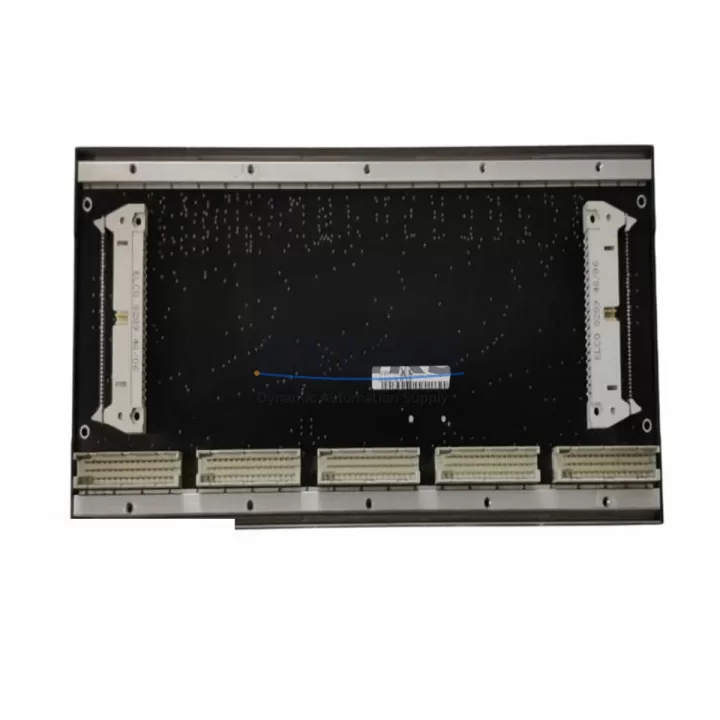
BACHMANN BS205 Migration-Ready Backplane for Legacy M1 Systems
The BACHMANN BS205 backplane module is a proven, migration-ready solution for engineers and maintenance teams managing the transition away from aging M1-series control architectures. As legacy BACHMANN M1 systems approach end-of-life and original spare parts become increasingly scarce, the BS205 provides a structurally compatible, electrically verified replacement that preserves existing rack geometry, backplane bus topology, and inter-module communication integrity. Whether you are executing a phased retrofit, responding to an unplanned outage, or building a long-term spare parts inventory for a critical production line, the BS205 is engineered to reduce migration risk and compress commissioning time.
Industrial facilities running BACHMANN M1 controllers — including those paired with MPC240, MPC265, or MPC270 CPU modules — frequently encounter backplane degradation as the primary failure mode in aging control cabinets. Connector oxidation, bus signal integrity loss, and mechanical fatigue from thermal cycling are common root causes. The BS205 addresses these failure modes directly: its gold-plated backplane connectors, reinforced slot guides, and passive bus architecture make it a direct drop-in candidate for most M1 rack configurations without requiring changes to the CPU module, I/O module addressing, or the existing CODESYS or IEC 61131-3 application program.
Before committing to a BS205 replacement, maintenance engineers should verify the following parameters against the existing installation: rack slot count and physical dimensions, backplane bus voltage rail compatibility (typically 5 VDC and 24 VDC), module address DIP switch settings on all installed I/O cards, and the physical routing of the inter-rack communication cable if a multi-rack topology is in use. In systems where the BS205 is paired with BACHMANN DI212 or DO212 digital I/O modules, terminal wiring assignments are preserved across the swap, eliminating the need to re-terminate field cables — a significant factor in minimizing planned downtime windows.
Migration Compatibility Table
| Parameter | BS205 Specification | Retrofit Note |
|---|---|---|
| Compatible Rack Series | BACHMANN M1 (5-slot backplane) | Verify slot count matches existing rack; BS206 available for 6-slot configurations |
| Backplane Bus | Passive parallel bus, M1 standard | No active bus components; no firmware required on backplane itself |
| Power Rail Compatibility | 5 VDC logic / 24 VDC I/O | Confirm PS201 or PS202 power supply output ratings before swap |
| Communication Protocol | M1 internal bus; PROFIBUS-DP / CANopen via CPU module | Protocol stack resides in CPU module — no reconfiguration required on backplane replacement |
| Module Addressing | DIP switch-based per slot | Document all I/O module address settings before removal; restore identically after BS205 installation |
| Installation Dimensions | Standard DIN rail / panel mount | Confirm cabinet depth and rail spacing; no additional mounting hardware required |
| Firmware Dependency | None (passive module) | CPU module firmware version unchanged; no re-flashing required |
| Pre-Shipment Testing | Full electrical continuity and bus integrity test | Each unit tested before dispatch; test report available on request |
| Support terms | 12 Months | Covers manufacturing defects and bus connector integrity from date of shipment |
Retrofit Planning for Existing Automation Systems
A successful BS205 retrofit begins well before the physical swap. The first step is a full audit of the existing M1 rack population: identify every module installed in the rack, record its slot position, address setting, and wiring terminal assignment. In a typical M1 control cabinet, this audit will surface a mix of components including the MPC240 or MPC265 CPU module, one or more DI212 or DI232 digital input modules, DO212 or DO232 digital output modules, and potentially an AI202 analog input module for process variable acquisition. Each of these modules connects to the backplane via the same edge connector standard, and all will be reinstalled into the BS205 without modification.
Power supply integrity is the second critical checkpoint. The BACHMANN PS201 or PS202 power supply module feeds the backplane rails directly. Before installing the BS205, measure the 5 VDC and 24 VDC output rails under load to confirm they are within specification. A degraded power supply is frequently the co-failure mode alongside a failed backplane, and replacing the backplane without addressing power supply margin will result in premature re-failure. If the PS201 is also approaching end-of-life, sourcing a replacement unit concurrently with the BS205 is strongly recommended.
For systems using PROFIBUS-DP communication, the DP master address and baud rate configuration reside in the CPU module’s non-volatile memory and are unaffected by a backplane replacement. However, the physical PROFIBUS cable termination at the CPU module’s DP port should be inspected during the retrofit window — connector wear and improper termination resistance are common sources of intermittent communication faults that are often misattributed to backplane issues. Similarly, if the M1 system communicates upstream via an MX200 or MX213 communication module installed in the same rack, verify that the inter-module communication link is re-established correctly after the BS205 is seated and powered.
HMI integration should also be validated as part of the retrofit sign-off. If the control system drives a BACHMANN-compatible HMI panel or a third-party SCADA interface via OPC or Modbus TCP, confirm that all data tags and screen objects are reading correctly after the backplane swap. In most cases, because the CPU module and its memory are untouched, HMI screens will resume normal operation immediately on power-up — but a structured walkthrough of critical process screens is a necessary step before returning the line to production.
Downtime Control During System Migration
Minimizing unplanned downtime is the primary operational constraint in any M1 backplane replacement. The BS205 swap procedure, when properly planned, can be completed within a single scheduled maintenance window of two to four hours. The key to achieving this target is pre-staging: have the BS205 physically on-site and verified before the maintenance window opens, with all module address settings documented, all terminal wiring photographed or mapped, and the CPU module’s application program backed up to an external programming device via the BACHMANN SolutionCenter or CODESYS programming environment.
The recommended sequence is: power down the rack in a controlled shutdown (do not hard-cut power while the CPU is in RUN mode), remove all I/O modules in slot order, extract the failed backplane, seat the BS205, reinstall all modules in their original slot positions, restore power, and verify CPU module boot sequence and program execution before reconnecting field I/O. This sequence protects the original program logic entirely — no re-download is required if the CPU module’s battery-backed RAM is intact. If the CPU module has lost its program due to battery failure, the pre-staged backup enables a rapid re-download, keeping the total recovery window within the planned maintenance period.
For facilities that cannot tolerate even a planned shutdown, a parallel migration strategy is available: install a second M1 rack with a new BS205 and pre-configured CPU and I/O modules alongside the existing rack, transfer field wiring in stages during low-production periods, and cut over the control logic at a single coordinated moment. This approach extends the migration timeline but reduces peak downtime to under 30 minutes for the final cutover step.
Retrofit Support FAQ
Q: Is the BS205 a direct replacement for all BACHMANN M1 5-slot backplanes?
A: Yes. The BS205 is the standard 5-slot backplane for the BACHMANN M1 series and is compatible with all M1 CPU modules (MPC240, MPC265, MPC270) and all standard M1 I/O modules. If your existing rack is a 6-slot or 10-slot configuration, please confirm the correct backplane part number before ordering.
Q: Will I need to re-download the PLC program after replacing the backplane?
A: In most cases, no. The application program resides in the CPU module’s battery-backed RAM and is unaffected by a backplane swap. We recommend backing up the program before the maintenance window as a precaution. If the CPU battery has failed, a re-download from the BACHMANN SolutionCenter or CODESYS environment will be required.
Q: What pre-shipment testing is performed on the BS205?
A: Every BS205 unit undergoes full electrical continuity testing across all backplane bus lines and slot connectors before dispatch. A test report is available on request. Units are shipped in anti-static packaging with physical connector protection to prevent transit damage.
Q: What is the support terms coverage and what does it include?
A: The BS205 carries a support terms confirmed by quotation from the date of shipment, covering manufacturing defects, bus connector integrity, and passive component failure under normal operating conditions. Support requests are processed directly — contact admin@knmks.com with your order reference and a description of the fault. Replacement units are dispatched from stock to minimize your system downtime.
© 2026 KNMKS. All rights reserved.
Original Source: https://knmks.com
Contact: admin@knmks.com | +86 18359268345
Product Identification
- Brand / Ecosystem
-
BACHMANN
Assorted Brands - Model / Series
-
BS205
Assorted Series - Product Family
- PLCs & Controllers
- Availability Status
- Available on request after model and quantity confirmation
- Inquiry Type
- B2B RFQ, replacement inquiry and project spare-part request
- Pre-Quote Check
- Exact SKU, brand, series, quantity, nameplate photos and destination country are checked before quotation
System Path
Where this product fits in the KNMKS automation structure.
Specification & Inquiry Focus
- Control platform
- PLC, PAC and modular controllers
- Common needs
- CPU, rack, power and I/O expansion
- Project support
- Replacement, cabinet build and maintenance
Buyer Confirmation
Information KNMKS checks before replying.
- Exact model
- BS205
- Brand / ecosystem
- BACHMANN
- Product family
- PLCs & Controllers
- Application note
- Replacement, maintenance, project build or spare-part list
- Useful photos
- Nameplate, installed unit, cabinet layout or connector side
- Delivery details
- Quantity, destination country and target schedule
Document Support
Files and notes can be confirmed during quotation.
- Product photos or nameplate confirmation when available
- Packing and delivery notes before quotation confirmation
- Support scope and delivery terms confirmed per inquiry
- Export document coordination for qualified B2B requests
Inquiry Support
- Model cross-checking before quotation
- CPU, power, rack and expansion module matching
- Support for replacement and project inquiry
What to Send Us
- Brand and exact model number: BACHMANN BS205
- Quantity and required delivery time
- Application, replacement requirement or nameplate photo
- Destination country and shipping preference
RFQ Preparation
This is a product inquiry page built for RFQ communication.
Fast Model Check
Send this model to KNMKS for confirmation.
Include quantity, destination country and photos if this is a maintenance replacement. The inquiry will be saved with a reference number after submission.
Brand & Compatibility Note
KNMKS displays automation product information for well-known industrial brand ecosystems and compatible replacement references. Brand names are used for product identification and compatibility reference only; final availability and commercial terms are confirmed per quotation.
 Manufacturing
 Machine Tools
 Packaging
 Energy & Power



 HMI & Displays
 Servo Systems
 Variable Frequency Drives
 Sensors