
Overview
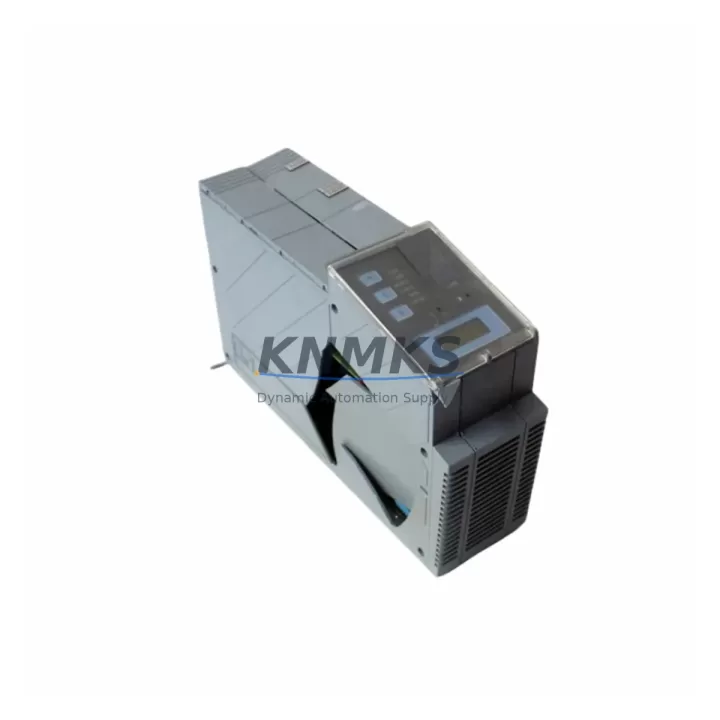
B&R 5PC810.SX01-00 Migration-Ready Panel PC for Legacy Control Systems
The B&R 5PC810.SX01-00 is a migration-ready industrial Panel PC engineered for direct replacement and retrofit integration within B&R APC 810 control architectures. As legacy APC 810 platforms approach end-of-life and spare part availability narrows, the 5PC810.SX01-00 provides a validated drop-in upgrade path that preserves existing wiring topology, backplane addressing, and POWERLINK communication links — minimizing engineering rework and unplanned downtime during system modernization.
Designed for demanding industrial environments, this unit supports B&R Automation Studio project migration without requiring full PLC logic rewrites. Engineers replacing discontinued APC 810 variants can retain existing terminal assignments, I/O module addressing, and HMI screen layouts, provided firmware compatibility is confirmed prior to commissioning. Each unit undergoes pre-shipment functional testing and ships with a support terms confirmed by quotation, backed by verified in-stock inventory for emergency and planned replacement programs.
Migration Compatibility Table
| Parameter | Legacy APC 810 (Discontinued) | 5PC810.SX01-00 (Replacement) | Migration Notes |
|---|---|---|---|
| Form Factor | APC 810 Panel PC chassis | Compatible Panel PC chassis | Confirm panel cutout dimensions before installation |
| Communication Protocol | POWERLINK / Ethernet | POWERLINK / Ethernet | No protocol migration required; verify node addressing |
| Backplane Interface | B&R X2X Link / internal bus | B&R X2X Link compatible | Retain existing X2X module layout; re-confirm slot addressing |
| Terminal Wiring | Existing field wiring | Drop-in compatible | Verify terminal block pinout against updated wiring diagram |
| HMI / Visualization | Automation Studio / mapp View | Automation Studio / mapp View | Re-validate HMI screen bindings after firmware update |
| Firmware Version | Legacy AR firmware | Current AR firmware | Backup original project; test in offline simulation before go-live |
| Installation Space | Standard APC 810 panel bay | Equivalent footprint | Confirm depth clearance for rear connectors and cable routing |
| Pre-Shipment Testing | — | Full functional test included | Test report available on request |
| Support terms | — | support terms confirmed by quotation | Covers hardware defects under normal operating conditions |
Retrofit Planning for Existing Automation Systems
A successful retrofit of the B&R 5PC810.SX01-00 into an existing APC 810 control cabinet requires systematic pre-migration planning across power, communication, and I/O subsystems. Begin by auditing the 24 VDC power supply capacity — the B&R PS3100 or equivalent power supply module must deliver sufficient current headroom for the replacement Panel PC plus all connected X2X Link I/O modules. Undersized power rails are a common cause of intermittent faults during post-retrofit commissioning.
Next, document all existing X2X Link module addresses and their physical slot positions on the backplane. When the 5PC810.SX01-00 is installed, the Automation Runtime (AR) firmware will re-enumerate connected modules; any addressing conflicts with digital input/output modules such as the B&R X20DI9371 or X20DO9322 must be resolved in the Automation Studio hardware configuration before the first power-on. Failure to pre-validate module addressing is the leading cause of extended commissioning time in APC 810 retrofit projects.
For systems using POWERLINK as the primary fieldbus, verify that the POWERLINK Managing Node (MN) configuration in Automation Studio reflects the updated hardware topology. If the legacy system included a B&R IF1043 POWERLINK interface card or equivalent communication module, confirm that the replacement Panel PC’s integrated POWERLINK port is mapped to the same logical network node. This eliminates the need to reconfigure Controlled Node (CN) devices on the production floor.
HMI visualization layers built in mapp View or VC4 should be exported and archived before the retrofit begins. After installing the 5PC810.SX01-00, re-import the visualization project and validate all data bindings against the updated PLC variable table. Pay particular attention to alarm management screens and trend displays, which often reference hardware-specific OPC UA node paths that may shift after a Panel PC replacement. If the control cabinet also houses a B&R ACOPOS servo drive or ACOPOSmulti axis module, confirm that the drive communication parameters and axis configuration tables are preserved in the Automation Studio project backup.
Finally, assess installation space carefully. The 5PC810.SX01-00 requires adequate rear clearance for USB, DisplayPort, and Ethernet connector access. In compact control cabinets originally designed for earlier APC 810 variants, cable management adapters or extended connector brackets may be required to maintain safe bend radii on existing field cables.
Downtime Control During System Migration
Minimizing production downtime during a B&R APC 810 to 5PC810.SX01-00 migration depends on preparation quality, not installation speed. The most effective strategy is to complete all Automation Studio project backups, hardware configuration exports, and firmware version documentation during a scheduled maintenance window — before the physical swap begins. This allows the replacement Panel PC to be pre-configured and bench-tested offline, so that on-site installation is reduced to a mechanical swap, wiring verification, and controlled power-on sequence.
Preserve the original PLC program logic by archiving the full Automation Studio project, including all task classes, cyclic programs, and library references. Do not rely solely on the Panel PC’s internal storage for backup — export to an external USB drive or network share before decommissioning the legacy unit. If the system uses structured text or ladder logic programs that reference hardware-specific function blocks, verify that those function blocks are available and compatible in the firmware version running on the 5PC810.SX01-00.
During the physical installation, maintain field control continuity where possible by keeping downstream I/O modules, safety relays, and field instruments powered and in a safe hold state. This prevents process upsets caused by unexpected de-energization of output channels during the Panel PC swap. After the 5PC810.SX01-00 is installed and powered, perform a structured commissioning sequence: verify POWERLINK network status, confirm X2X Link module enumeration, validate I/O channel states against the process P&ID, and execute a controlled program start before releasing the system to production.
Retrofit Support FAQ
Q: Is the B&R 5PC810.SX01-00 a direct replacement for all APC 810 variants?
A: The 5PC810.SX01-00 is compatible with the APC 810 platform family, but specific variants differ in CPU performance, memory configuration, and expansion slot count. Confirm your existing APC 810 order code against the 5PC810.SX01-00 datasheet before ordering. Our technical team can assist with compatibility verification based on your existing hardware configuration.
Q: Will my existing Automation Studio project run on the 5PC810.SX01-00 without modification?
A: In most cases, existing AR-based projects are portable to the 5PC810.SX01-00 with minimal changes. The primary variables are firmware version compatibility and hardware configuration mapping. Projects developed on significantly older AR versions may require library updates. A pre-migration firmware compatibility check is strongly recommended.
Q: What wiring changes are required during installation?
A: The 5PC810.SX01-00 is designed for drop-in wiring compatibility with APC 810 installations. However, always verify terminal block pinout assignments against the updated wiring diagram supplied with the replacement unit. Pay particular attention to power input terminals, USB port assignments, and any custom I/O wiring that may have been field-modified on the legacy unit.
Q: What does the support terms confirmed by quotation cover, and is pre-shipment testing included?
A: Every 5PC810.SX01-00 unit undergoes full functional pre-shipment testing prior to dispatch. The support terms confirmed by quotation cover hardware defects arising under normal operating conditions and excludes damage caused by incorrect installation, overvoltage, or environmental factors outside the specified operating range. Test reports are available on request. In-stock units are available for immediate dispatch to support emergency replacement requirements.
© 2026 KNMKS. All rights reserved.
Original Source: https://knmks.com
Contact: admin@knmks.com | +86 18359268345
Product Identification
- Brand / Ecosystem
-
Other Brands
Assorted Brands - Model / Series
-
5PC810.SX01-00
Assorted Series - Product Family
- HMI & Displays
- Availability Status
- Available on request after model and quantity confirmation
- Inquiry Type
- B2B RFQ, replacement inquiry and project spare-part request
- Pre-Quote Check
- Exact SKU, brand, series, quantity, nameplate photos and destination country are checked before quotation
System Path
Where this product fits in the KNMKS automation structure.
Specification & Inquiry Focus
- Display range
- Operator panels and touch screens
- Common needs
- Screen size, interface and version matching
- Project support
- Retrofit, spare unit and panel replacement
Buyer Confirmation
Information KNMKS checks before replying.
- Exact model
- 5PC810.SX01-00
- Brand / ecosystem
- Other Brands
- Product family
- HMI & Displays
- Application note
- Replacement, maintenance, project build or spare-part list
- Useful photos
- Nameplate, installed unit, cabinet layout or connector side
- Delivery details
- Quantity, destination country and target schedule
Document Support
Files and notes can be confirmed during quotation.
- Product photos or nameplate confirmation when available
- Packing and delivery notes before quotation confirmation
- Support scope and delivery terms confirmed per inquiry
- Export document coordination for qualified B2B requests
Inquiry Support
- Panel size and interface confirmation
- Replacement unit inquiry for discontinued HMIs
- Protective packaging for display shipment
What to Send Us
- Brand and exact model number: Other Brands 5PC810.SX01-00
- Quantity and required delivery time
- Application, replacement requirement or nameplate photo
- Destination country and shipping preference
RFQ Preparation
This is a product inquiry page built for RFQ communication.
Fast Model Check
Send this model to KNMKS for confirmation.
Include quantity, destination country and photos if this is a maintenance replacement. The inquiry will be saved with a reference number after submission.
Brand & Compatibility Note
KNMKS displays automation product information for well-known industrial brand ecosystems and compatible replacement references. Brand names are used for product identification and compatibility reference only; final availability and commercial terms are confirmed per quotation.
 Manufacturing
 Machine Tools
 Packaging
 Energy & Power
 PLCs & Controllers
 Servo Systems
 Variable Frequency Drives
 Sensors