
Overview
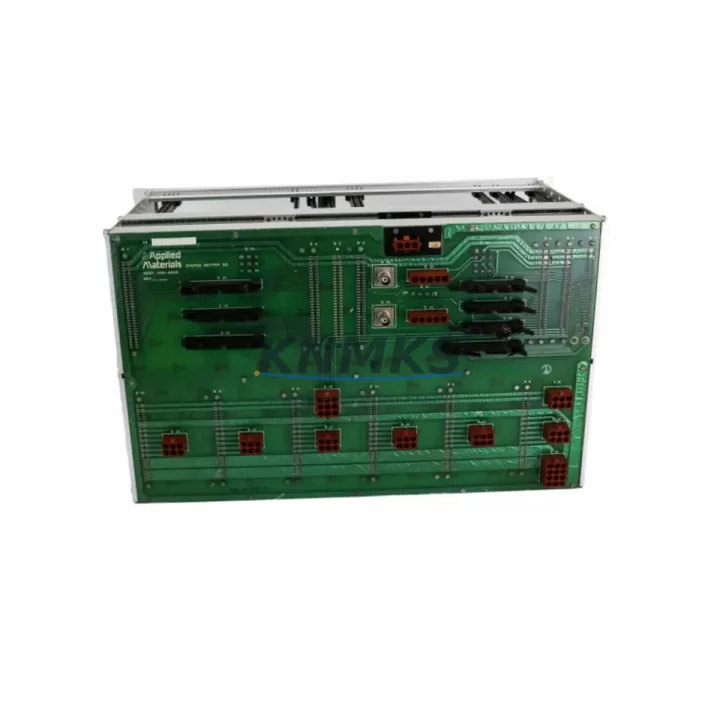
Applied Materials 0100-AE108 Migration-Ready Cardcage for Legacy Control Systems
The Applied Materials 0100-AE108 is a migration-ready cardcage assembly engineered for SAM Series legacy control platforms. As semiconductor fabrication facilities face increasing pressure to extend the operational life of installed equipment or transition to modern control architectures, the 0100-AE108 serves as a critical structural and electrical backbone for both in-place maintenance and full system retrofit programs. Whether your facility is replacing a failed cardcage in an aging SAM controller, consolidating spare parts inventory ahead of a planned shutdown, or executing a phased migration to a next-generation process control platform, the 0100-AE108 provides the dimensional compatibility, backplane interface alignment, and slot configuration required for a controlled, low-risk changeover.
Before committing to a cardcage replacement, retrofit engineers must verify several interdependent parameters. Power supply capacity is the first checkpoint: the replacement cardcage must be matched to the existing Applied Materials power supply module to ensure rail voltages and current ratings are within specification. Backplane connector pinout and slot addressing must be confirmed against the original SAM Series rack documentation, as mismatched slot assignments can cause module address conflicts that prevent the controller from initializing correctly. Terminal wiring routed to I/O modules seated in the cardcage — including analog input cards, digital output cards, and communication interface boards — must be documented and tagged prior to removal to ensure accurate reconnection during commissioning.
Program compatibility is another key consideration. The PLC or process controller logic stored in the CPU module seated in the 0100-AE108 cardcage must be backed up and verified before the cardcage is swapped. In many SAM Series installations, the CPU module retains ladder logic or function block programs that govern process interlocks, recipe management, and equipment sequencing. If the replacement cardcage introduces any change in slot count or backplane bus architecture, the program may require re-addressing of I/O references before it can be reloaded and validated. HMI screen configurations linked to specific I/O tags should also be audited to confirm that display elements remain correctly mapped after the retrofit.
Communication link integrity is equally important. SAM Series systems commonly use RS-232, RS-485, or proprietary serial protocols to connect the cardcage-hosted controller to upstream process management systems, recipe servers, or equipment front-end modules (EFEMs). During a cardcage replacement, the communication cable routing, termination resistors, and baud rate settings must be preserved. If the retrofit also involves upgrading the communication module — for example, replacing a legacy serial interface card with an Ethernet-based module — the network configuration, IP addressing, and protocol mapping must be completed and tested before the system is returned to production.
Installation space confirmation is a practical prerequisite that is often underestimated. The 0100-AE108 cardcage must fit within the existing control cabinet envelope, including clearance for airflow, cable management, and front-panel access. Mounting rail compatibility, DIN rail spacing, and chassis depth should be measured against the replacement unit before the old cardcage is removed. Firmware version alignment between the new cardcage backplane and the CPU module, I/O cards, and any embedded communication processors must also be verified to prevent initialization failures or feature incompatibilities during startup.
Migration Compatibility Table
| Parameter | Specification / Requirement |
|---|---|
| SKU | 0100-AE108 |
| Brand | Applied Materials |
| Series | SAM Series |
| Product Type | Cardcage Assembly |
| Backplane Interface | SAM Series proprietary backplane bus; verify slot count and connector pinout before installation |
| Power Supply Compatibility | Must match existing Applied Materials SAM Series power supply module; confirm rail voltages and current ratings |
| Slot Configuration | Confirm slot count and module address assignments against original rack documentation |
| Communication Compatibility | RS-232 / RS-485 / proprietary serial; verify baud rate, termination, and cable routing |
| Installation Dimensions | Confirm cabinet clearance, DIN rail spacing, and chassis depth before removal of legacy unit |
| Firmware Alignment | Verify firmware version compatibility between cardcage backplane, CPU module, and I/O cards |
| Replacement Recommendation | Direct retrofit replacement for SAM Series legacy cardcage; confirm backplane revision before ordering |
| Commissioning Focus | I/O re-addressing, HMI tag mapping, communication link validation, program reload and verification |
| Support terms | support terms confirmed by quotation included |
Retrofit Planning for Existing Automation Systems
A successful 0100-AE108 cardcage retrofit begins with a comprehensive audit of the existing SAM Series control cabinet. The cardcage serves as the physical and electrical host for all modules in the rack, meaning that its replacement affects every component seated within it. Retrofit planners should document the position and wiring of each installed module before disassembly begins.
In a typical SAM Series control cabinet, the cardcage hosts a combination of the SAM CPU module, one or more analog I/O cards for process variable monitoring, digital I/O modules for equipment interlock and status signaling, and a communication interface card connecting the controller to the facility network or equipment front-end. The Applied Materials power supply module mounted adjacent to or within the cardcage must be evaluated for capacity: if the retrofit introduces additional I/O modules or a higher-power CPU, the power supply may need to be upgraded in parallel with the cardcage replacement.
Terminal block wiring connected to the I/O modules must be carefully labeled and photographed before removal. In many legacy SAM installations, wiring documentation is incomplete or reflects earlier revisions of the system, making field verification essential. Signal isolators installed between field instruments and the I/O cards should be checked for compatibility with the replacement module’s input impedance and signal range specifications.
If the retrofit includes a communication protocol migration — for example, transitioning from a legacy serial link to an Ethernet-based fieldbus — the communication module seated in the 0100-AE108 cardcage will need to be replaced alongside the cardcage itself. In this scenario, the PLC program must be updated to reflect the new communication driver, and the HMI screens must be re-linked to the updated tag database. A programming cable compatible with the SAM Series CPU module is required for program backup, reload, and online verification during commissioning.
Backplane compatibility between the 0100-AE108 and the installed module set should be confirmed with the Applied Materials technical documentation or through direct comparison of the backplane revision markings on the legacy and replacement units. Mismatched backplane revisions can result in module recognition failures or intermittent communication errors that are difficult to diagnose without the correct reference documentation.
Downtime Control During System Migration
Minimizing unplanned downtime during a cardcage replacement requires a structured pre-migration checklist and a clearly defined rollback plan. Before the legacy 0100-AE108 cardcage is removed, the following steps should be completed: full program backup from the CPU module using a compatible programming cable, photographic documentation of all module positions and wiring connections, verification of spare module availability for any components that may be damaged during removal, and confirmation that the replacement cardcage has been bench-tested and inspected prior to installation.
To protect original program logic, the CPU module should be removed from the legacy cardcage and retained separately if it is not being replaced. This approach allows the existing program to be reloaded into the replacement cardcage without requiring a full reprogram from source files, reducing commissioning time and the risk of introducing errors during program transfer. If the CPU module is also being replaced, the program must be transferred from the backup file and all I/O addresses must be verified against the new module configuration before the system is powered on.
Field control continuity during the migration window can be maintained by coordinating the cardcage replacement with a scheduled maintenance period or planned production downtime. For facilities where continuous operation is required, a parallel control strategy — using a temporary bypass panel or a portable controller to maintain critical interlocks during the changeover — may be appropriate. The duration of the migration window should account for cardcage installation, module reseating, wiring reconnection, program reload, communication link verification, and a full functional test of all I/O points before the system is returned to automatic control.
Post-installation commissioning should follow a structured sequence: power-on verification, CPU initialization check, I/O module recognition confirmation, communication link establishment, HMI connectivity test, and a step-by-step functional test of all process interlocks and control loops. Any deviations from expected behavior should be documented and resolved before the system is released for production operation.
Retrofit Support FAQ
Q: Is the Applied Materials 0100-AE108 a direct drop-in replacement for the original SAM Series cardcage?
A: The 0100-AE108 is designed as a retrofit-compatible replacement for SAM Series legacy cardcage assemblies. However, backplane revision compatibility should be confirmed before installation, as different production revisions may have minor differences in connector layout or slot addressing. Contact our technical team with your existing cardcage revision marking for confirmation prior to ordering.
Q: What pre-shipment testing is performed on the 0100-AE108?
A: Each unit undergoes functional inspection and electrical verification prior to shipment. Units are tested for backplane bus continuity, power rail integrity, and mechanical fit. A support terms confirmed by quotation is included with every shipment, covering defects in materials and workmanship under normal operating conditions.
Q: How do I verify wiring compatibility before replacing the cardcage?
A: Document all terminal block connections, cable routing, and module positions in the existing cardcage before removal. Compare the terminal layout of the 0100-AE108 against the legacy unit using the Applied Materials SAM Series wiring diagram. If field wiring documentation is unavailable, our technical support team can assist with reference documentation retrieval.
Q: What is the typical lead time and stock availability for the 0100-AE108?
A: The 0100-AE108 is maintained availability confirmed by RFQ to support urgent replacement and planned retrofit programs. Standard lead time for in-stock units is 3–5 business days for international shipment. For large-quantity orders or scheduled maintenance programs requiring guaranteed availability, contact our sales team to arrange a reserved stock allocation.
© 2026 KNMKS. All rights reserved.
Original Source: https://knmks.com
Contact: admin@knmks.com | +86 18359268345
Product Identification
- Brand / Ecosystem
-
Applied Materials
Assorted Brands - Model / Series
-
0100-AE108
Legacy Control Series - Product Family
- Other Components
- Availability Status
- Available on request after model and quantity confirmation
- Inquiry Type
- B2B RFQ, replacement inquiry and project spare-part request
- Pre-Quote Check
- Exact SKU, brand, series, quantity, nameplate photos and destination country are checked before quotation
System Path
Where this product fits in the KNMKS automation structure.
Specification & Inquiry Focus
- Component range
- Breakers, terminals and cabinet accessories
- Common needs
- Model, photo and installation requirement
- Project support
- Maintenance and mixed spare-part inquiry
Buyer Confirmation
Information KNMKS checks before replying.
- Exact model
- 0100-AE108
- Brand / ecosystem
- Applied Materials
- Product family
- Other Components
- Application note
- Replacement, maintenance, project build or spare-part list
- Useful photos
- Nameplate, installed unit, cabinet layout or connector side
- Delivery details
- Quantity, destination country and target schedule
Document Support
Files and notes can be confirmed during quotation.
- Product photos or nameplate confirmation when available
- Packing and delivery notes before quotation confirmation
- Support scope and delivery terms confirmed per inquiry
- Export document coordination for qualified B2B requests
Inquiry Support
- Mixed automation spare parts inquiry
- Cabinet component and accessory support
- Model identification from photos or labels
What to Send Us
- Brand and exact model number: Applied Materials 0100-AE108
- Quantity and required delivery time
- Application, replacement requirement or nameplate photo
- Destination country and shipping preference
RFQ Preparation
This is a product inquiry page built for RFQ communication.
Fast Model Check
Send this model to KNMKS for confirmation.
Include quantity, destination country and photos if this is a maintenance replacement. The inquiry will be saved with a reference number after submission.
Brand & Compatibility Note
KNMKS displays automation product information for well-known industrial brand ecosystems and compatible replacement references. Brand names are used for product identification and compatibility reference only; final availability and commercial terms are confirmed per quotation.
 Manufacturing
 Machine Tools
 Packaging
 Energy & Power
 PLCs & Controllers
 HMI & Displays
 Servo Systems
 Variable Frequency Drives