
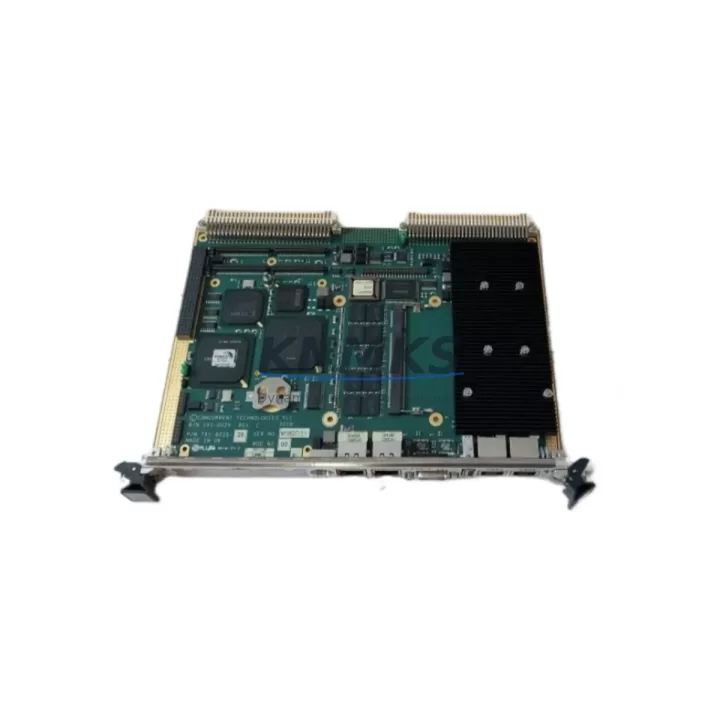
Overview
ALSTOM VP32502X Migration-Ready I/O Module for VP3 Series: Legacy System Retrofit & Compatibility Upgrade
The ALSTOM VP32502X is a migration-ready discrete I/O module engineered for the VP3 Series programmable control platform. As legacy automation infrastructure reaches end-of-life, the VP32502X serves as a critical bridge component — enabling engineers to extend operational continuity, replace discontinued modules, and execute controlled system upgrades without full platform replacement. Whether you are managing a power generation facility, a rail traction control cabinet, or an industrial process line built on ALSTOM VP3 architecture, the VP32502X delivers the I/O channel density, backplane compatibility, and signal integrity required for reliable retrofit execution.
This module is stocked and available for immediate dispatch. Each unit undergoes pre-shipment functional verification and is covered by a support terms confirmed by quotation from the date of delivery. Global shipping is supported with documentation packages available for customs clearance and site acceptance testing.
Migration Compatibility Table
| Parameter | Details |
|---|---|
| SKU / Part Number | VP32502X |
| Brand / Manufacturer | ALSTOM |
| Compatible Platform | VP3 Series Programmable Control System |
| Module Type | Discrete I/O Module |
| Backplane Interface | VP3 Series rack backplane — direct slot insertion, no adapter required |
| Terminal Wiring | Compatible with existing VP3 field wiring harnesses; verify terminal pitch and conductor gauge before installation |
| Communication Protocol | Internal VP3 backplane bus; no external fieldbus configuration required for standard I/O operation |
| Power Supply Requirement | Sourced from VP3 rack power supply (e.g., VP32001X or equivalent); verify total rack load budget before adding modules |
| Module Address Configuration | Address set via DIP switch or rack slot position per VP3 system configuration; confirm against existing I/O map in control program |
| Firmware Compatibility | Compatible with VP3 Series firmware revisions; confirm firmware version on host controller before replacement |
| Installation Footprint | Standard VP3 single-slot form factor; verify available rack slot count in existing control cabinet |
| Replacement Recommendation | Direct replacement for discontinued VP3 I/O modules; no program logic rewrite required for equivalent channel mapping |
| Commissioning Notes | Force I/O channels to safe state before hot-swap; verify signal assignments in HMI tag database post-installation |
| Support terms | 12 months from delivery date — covers manufacturing defects and functional failure under normal operating conditions |
Retrofit Planning for Existing Automation Systems
Successful integration of the VP32502X into a legacy VP3 control system requires a structured pre-retrofit assessment. Engineers should begin by auditing the existing rack configuration — identifying occupied and available slots, confirming the rack model (such as the VP32000X chassis), and reviewing the total power budget supplied by the installed VP32001X power supply module. Overloading the rack power rail is a common cause of intermittent faults during post-retrofit commissioning, and adding I/O modules without recalculating the load budget can introduce instability across the entire control node.
Terminal wiring compatibility must be verified against the existing field cable schedule. The VP32502X uses the standard VP3 terminal block pitch; however, conductor gauge, shielding requirements, and signal type (dry contact, sourcing, or sinking) must be confirmed against the original I/O module specification. In applications where signal isolation is required — particularly in mixed-voltage environments or where long cable runs introduce noise — the addition of a signal isolator module between the field device and the VP32502X input channel is recommended practice.
For systems that include a VP3 Series communication module (such as a PROFIBUS DP or Modbus RTU interface card), the I/O address map must be reviewed to ensure the VP32502X slot assignment does not conflict with existing network node addresses. This is especially critical in distributed control architectures where the VP3 rack communicates upstream to a supervisory controller or DCS via a fieldbus link. Any address conflict will cause the communication module to report a configuration fault, which may trigger a system-wide alarm or controlled shutdown.
HMI screen tag databases should be reviewed in parallel with the I/O replacement. If the original VP3 I/O module used a specific tag naming convention tied to slot address or channel number, replacing the module with the VP32502X and reassigning the slot may require tag remapping in the HMI engineering station. Operators should be informed of any temporary tag unavailability during the cutover window. In facilities using a VP3-compatible programming cable (such as the VP3 USB or RS-232 programming interface), the engineering workstation should be connected and the control program backed up before any hardware change is made.
Where the retrofit involves migrating from an older VP3 I/O variant to the VP32502X across multiple racks, a phased approach is recommended — replacing one rack at a time, verifying I/O health on the VP3 Series controller diagnostic display, and confirming field device response before proceeding to the next rack. This approach limits the blast radius of any configuration error and preserves production continuity in facilities that cannot tolerate extended downtime.
Downtime Control During System Migration
Minimizing unplanned downtime during a VP3 I/O module replacement requires preparation at three levels: hardware staging, program protection, and field verification. Before the maintenance window opens, the VP32502X should be bench-tested using a spare VP3 rack or a portable test fixture to confirm that the module powers up correctly, responds to the rack controller, and reports healthy status on the diagnostic bus. This pre-staging step eliminates the risk of installing a transit-damaged or misconfigured module into a live control cabinet.
Program logic protection begins with a full backup of the VP3 controller program, including all I/O force tables, retentive data registers, and communication configuration files. The backup should be stored on both the engineering workstation and an offline medium. If the VP3 controller supports online program editing, the I/O channel assignments can be pre-configured in the program before the physical module swap, reducing the time the control system spends in a partially configured state.
During the physical swap, all field outputs connected to the VP32502X channels should be driven to a safe state — either through the controller’s I/O force function or by isolating the field power supply feeding the output loads. This prevents unintended actuator movement during the module removal and insertion sequence. After the VP32502X is seated in the rack and the terminal block is reconnected, the controller should be allowed to complete its I/O initialization cycle before any output forces are released.
Post-installation verification should include a channel-by-channel I/O check against the field device list, confirmation that all HMI status indicators reflect the correct field state, and a review of the controller diagnostic log for any new fault codes. In facilities with a formal management of change (MOC) process, the completed I/O verification checklist should be signed off before the system is returned to automatic control. With proper preparation, a single VP32502X module replacement can typically be completed within a planned maintenance window of two to four hours, including pre-staging, swap, and verification.
Retrofit Support FAQ
Q1: Is the VP32502X a direct drop-in replacement for the original VP3 Series I/O module in the same slot?
Yes. The VP32502X is designed as a form-fit-function replacement for the equivalent VP3 Series I/O module. It uses the same backplane connector, the same terminal block pitch, and the same slot addressing scheme. In most cases, no changes to the control program are required, provided the channel count and signal type (discrete input or output) match the original module specification. Confirm the exact channel configuration against your system’s I/O schedule before ordering.
Q2: What commissioning steps are required after installing the VP32502X?
After physical installation, power up the rack and confirm the VP32502X appears in the controller’s I/O configuration table without fault codes. Perform a forced I/O test on each channel to verify field device response. Check the HMI tag database to confirm all associated tags are reading correctly. If the system uses a communication module for upstream reporting, verify that the I/O data is being transmitted correctly to the supervisory system. Document all test results as part of the site acceptance record.
Q3: Can the VP32502X be used in a mixed-revision VP3 rack alongside older I/O modules?
Yes, in most configurations. The VP3 backplane is designed to support mixed module revisions within the same rack, provided the rack firmware and controller firmware are at compatible revision levels. Review the VP3 Series compatibility matrix for your specific controller firmware version. If you are unsure of your current firmware revision, connect the programming cable to the controller and read the firmware version from the diagnostic menu before placing your order.
Q4: What does the support terms confirmed by quotation cover, and what is the process for a support terms claim?
The support terms confirmed by quotation cover manufacturing defects and functional failures under normal operating conditions, including backplane communication faults, I/O channel failures, and power regulation issues attributable to the module itself. It does not cover damage caused by incorrect installation, overvoltage, reverse polarity, or physical impact. To initiate a support terms claim, contact our sales team at admin@knmks.com with the order reference number, a description of the fault, and the site installation date. Replacement units are dispatched after fault confirmation, with return shipping instructions provided.
© 2026 KNMKS. All rights reserved.
Original Source: https://knmks.com
Contact: admin@knmks.com | +86 18359268345
Product Identification
- Brand / Ecosystem
-
ALSTOM
Assorted Brands - Model / Series
-
VP32502X
Assorted Series - Product Family
- PLCs & Controllers
- Availability Status
- Available on request after model and quantity confirmation
- Inquiry Type
- B2B RFQ, replacement inquiry and project spare-part request
- Pre-Quote Check
- Exact SKU, brand, series, quantity, nameplate photos and destination country are checked before quotation
System Path
Where this product fits in the KNMKS automation structure.
Specification & Inquiry Focus
- Control platform
- PLC, PAC and modular controllers
- Common needs
- CPU, rack, power and I/O expansion
- Project support
- Replacement, cabinet build and maintenance
Buyer Confirmation
Information KNMKS checks before replying.
- Exact model
- VP32502X
- Brand / ecosystem
- ALSTOM
- Product family
- PLCs & Controllers
- Application note
- Replacement, maintenance, project build or spare-part list
- Useful photos
- Nameplate, installed unit, cabinet layout or connector side
- Delivery details
- Quantity, destination country and target schedule
Document Support
Files and notes can be confirmed during quotation.
- Product photos or nameplate confirmation when available
- Packing and delivery notes before quotation confirmation
- Support scope and delivery terms confirmed per inquiry
- Export document coordination for qualified B2B requests
Inquiry Support
- Model cross-checking before quotation
- CPU, power, rack and expansion module matching
- Support for replacement and project inquiry
What to Send Us
- Brand and exact model number: ALSTOM VP32502X
- Quantity and required delivery time
- Application, replacement requirement or nameplate photo
- Destination country and shipping preference
RFQ Preparation
This is a product inquiry page built for RFQ communication.
Fast Model Check
Send this model to KNMKS for confirmation.
Include quantity, destination country and photos if this is a maintenance replacement. The inquiry will be saved with a reference number after submission.
Brand & Compatibility Note
KNMKS displays automation product information for well-known industrial brand ecosystems and compatible replacement references. Brand names are used for product identification and compatibility reference only; final availability and commercial terms are confirmed per quotation.
 Manufacturing
 Machine Tools
 Packaging
 Energy & Power



 HMI & Displays
 Servo Systems
 Variable Frequency Drives
 Sensors