
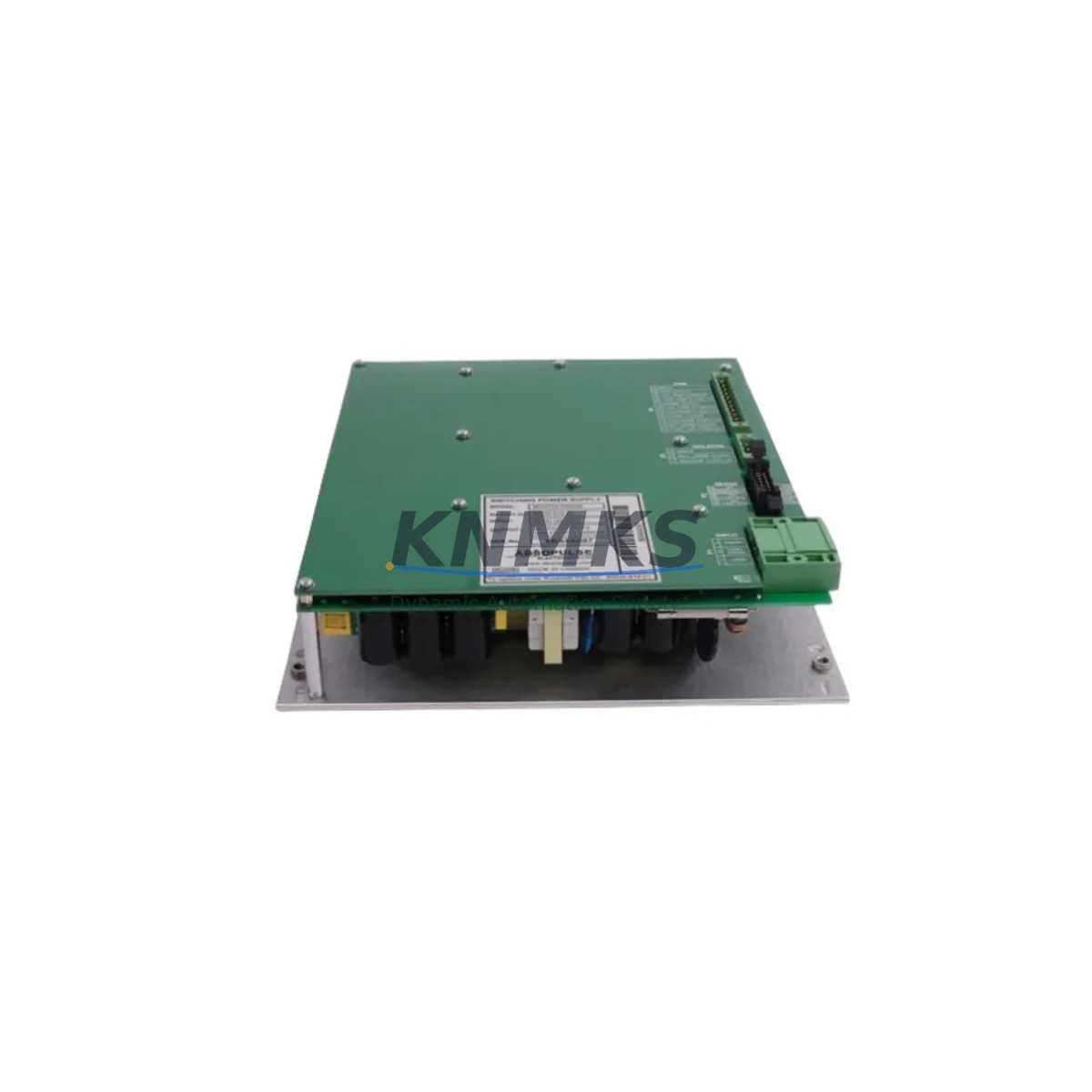
Overview
Allen-Bradley MOX720-P4668E Spare Part for Factory Uptime
The Allen-Bradley MOX720-P4668E (alternate P/N: 80026-518-01) is a field-proven DC power supply module from the MOX720 series, engineered for continuous-duty industrial automation environments. Maintenance engineers and procurement teams managing legacy Allen-Bradley control architectures rely on this module to sustain uninterrupted production across process lines, discrete manufacturing cells, and utility control panels. Every unit shipped by KNMKS undergoes pre-shipment electrical verification and is backed by a support terms confirmed by quotation, giving your maintenance team the confidence to stock this part as a ready-to-deploy replacement.
Whether you are executing a planned annual shutdown, responding to an unscheduled power fault, or building a strategic spare parts buffer for a multi-site facility, the MOX720-P4668E delivers the electrical stability and form-factor compatibility required to restore system operation with minimal downtime. Its role within the MOX720 power architecture makes it a critical line item on any Allen-Bradley control cabinet maintenance checklist.
Spare Maintenance Table
| Parameter | Specification / Detail |
|---|---|
| Part Number | MOX720-P4668E |
| Alternate P/N | 80026-518-01 |
| Brand | Allen-Bradley |
| Series | MOX720 |
| Product Type | DC Power Supply Module |
| Application | Industrial PLC / DCS Control Cabinet Power Rail |
| Origin | USA (Allen-Bradley / Rockwell Automation) |
| Compatibility | MOX720 series backplane; verify rack slot and bus voltage before installation |
| Installation | Rack-mount; follow MOX720 series installation manual for slot assignment and torque specs |
| Operating Environment | Industrial control cabinet; observe ambient temperature, humidity, and vibration ratings per OEM spec |
| Weight | 2,100 g (approx.) |
| Pre-Shipment Test | Yes — electrical function verified before dispatch |
| Support terms | 12 Months |
| Lead Time | Contact admin@knmks.com for current stock availability |
| Maintenance Recommendation | Inspect every 12 months; replace proactively if output ripple or thermal performance degrades |
Maintenance Planning for Continuous Operation
A power supply failure in a MOX720-based control cabinet rarely occurs in isolation. When replacing the MOX720-P4668E, a disciplined maintenance engineer will simultaneously audit the surrounding electrical ecosystem to prevent cascading faults and repeat downtime events.
Begin with the input power feed: inspect the upstream transformer secondary, incoming fuse block, and any surge protection devices feeding the cabinet. A degraded power supply is frequently the downstream symptom of chronic input voltage fluctuation or a failing fuse holder — components such as the Allen-Bradley 1492-SP series fuse blocks and associated DIN-rail terminal strips should be checked for discoloration, loose terminations, or elevated contact resistance.
Next, evaluate the backplane and I/O modules seated in the MOX720 rack. A power rail event can stress adjacent modules; inspect the MOX720 series I/O modules for fault LEDs, verify that all field wiring terminals are torqued to spec, and confirm that any signal isolation modules in the analog I/O loops are reading within calibrated range. Analog signal isolators — particularly those handling 4–20 mA process loops — are sensitive to power quality transients and may require recalibration after a supply replacement.
Communications infrastructure deserves equal attention. If the control cabinet hosts a 1756-EN2T or similar EtherNet/IP communication module, verify network link status and confirm that the module re-establishes its I/O connections cleanly after power restoration. Similarly, any DeviceNet or ControlNet scanner cards in the rack should be checked for node address conflicts that can emerge after an unplanned power cycle.
For cabinets that include an HMI panel — such as a PanelView Plus terminal — confirm that the HMI power supply rail is independent of the PLC backplane supply, and that the HMI application reloads its runtime project correctly after the maintenance window. Finally, review the 24 VDC auxiliary power supply feeding field devices, relay coils, and solenoid outputs; a separate 24 V rail failure can mask itself as a PLC output fault and is frequently overlooked during a power module replacement.
Stocking the MOX720-P4668E alongside these complementary components — fuse blocks, I/O modules, communication cards, and auxiliary power supplies — transforms a reactive repair into a proactive maintenance posture, reducing mean time to repair (MTTR) and protecting production throughput.
Site Replacement Workflow
Step 1 — Pre-work verification: Obtain the MOX720 rack wiring diagram and confirm the slot assignment for the power supply. Cross-reference the P/N MOX720-P4668E (80026-518-01) against the installed unit’s nameplate before breaking any connections. If the installed unit carries a different revision suffix, contact KNMKS to confirm cross-compatibility.
Step 2 — Safe isolation: Follow your site’s lockout/tagout (LOTO) procedure. De-energize the cabinet at the upstream disconnect, verify absence of voltage on the power supply input terminals, and discharge any bulk capacitance per the OEM service manual.
Step 3 — Module removal and inspection: Remove the faulty MOX720-P4668E. Inspect the rack slot connector for bent pins, carbon tracking, or heat damage. Clean the slot with dry compressed air before seating the replacement unit.
Step 4 — Installation and torque: Seat the replacement MOX720-P4668E firmly into the rack slot. Reconnect all field wiring terminals and torque to the values specified in the MOX720 installation manual. Do not over-torque DIN-rail terminal screws.
Step 5 — Power-up and functional test: Re-energize the cabinet in a controlled sequence. Observe the power supply status LED, confirm that all I/O modules return to RUN state, and verify that the PLC program resumes execution without fault codes. Document the replacement in your CMMS with the new unit’s serial number and installation date to anchor the support terms confirmed by quotation period.
Step 6 — Replenish spare stock: After consuming a spare, initiate a replenishment order immediately. Contact KNMKS at admin@knmks.com or +86 18359268345 to confirm current stock and lead time for the next MOX720-P4668E unit.
Spare Parts Support FAQ
Q1: Is the MOX720-P4668E still available as a new original spare, or only as a refurbished unit?
KNMKS sources and supplies original Allen-Bradley MOX720-P4668E units. Each unit is individually tested before shipment. Condition and availability are confirmed at the time of order — contact admin@knmks.com for the current stock status and to request a certificate of conformance if required by your quality system.
Q2: How many units should a multi-site facility stock for long-term supply security?
For facilities operating three or more MOX720-based control cabinets, a minimum of one spare per cabinet cluster is recommended, with a strategic buffer of two to three units for sites where production continuity is critical. KNMKS supports long-term supply agreements (12–36 months) to lock in pricing and guarantee availability — reach out to discuss a framework agreement tailored to your annual consumption.
Q3: What compatibility checks are required before installing the MOX720-P4668E as a direct replacement?
Verify that the rack slot, backplane bus voltage, and firmware revision of the MOX720 chassis are compatible with the P4668E variant. Cross-reference the installed unit’s full nameplate data (including the 80026-518-01 alternate P/N) against the replacement unit. If your system was originally configured with a different power supply revision, consult the MOX720 series compatibility matrix or contact KNMKS technical support before installation.
Q4: What does the support terms confirmed by quotation cover, and what is the claims process?
The support terms confirmed by quotation cover manufacturing defects and functional failures under normal operating conditions from the date of shipment. It does not cover damage resulting from incorrect installation, overvoltage events, or environmental conditions outside the OEM specification. To initiate a support terms claim, contact admin@knmks.com with your order reference, installation date, and a description of the fault. KNMKS will coordinate return logistics and replacement dispatch to minimize your downtime.
© 2026 KNMKS. All rights reserved.
Original Source: https://knmks.com
Contact: admin@knmks.com | +86 18359268345
Product Identification
- Brand / Ecosystem
-
Allen-Bradley
Allen-Bradley - Model / Series
- MOX720-P4668E 80026-518-01
- Product Family
- PLCs & Controllers
- Availability Status
- Available on request after model and quantity confirmation
- Inquiry Type
- B2B RFQ, replacement inquiry and project spare-part request
- Pre-Quote Check
- Exact SKU, brand, series, quantity, nameplate photos and destination country are checked before quotation
System Path
Where this product fits in the KNMKS automation structure.
Specification & Inquiry Focus
- Control platform
- PLC, PAC and modular controllers
- Common needs
- CPU, rack, power and I/O expansion
- Project support
- Replacement, cabinet build and maintenance
Buyer Confirmation
Information KNMKS checks before replying.
- Exact model
- MOX720-P4668E 80026-518-01
- Brand / ecosystem
- Allen-Bradley
- Product family
- PLCs & Controllers
- Application note
- Replacement, maintenance, project build or spare-part list
- Useful photos
- Nameplate, installed unit, cabinet layout or connector side
- Delivery details
- Quantity, destination country and target schedule
Document Support
Files and notes can be confirmed during quotation.
- Product photos or nameplate confirmation when available
- Packing and delivery notes before quotation confirmation
- Support scope and delivery terms confirmed per inquiry
- Export document coordination for qualified B2B requests
Inquiry Support
- Model cross-checking before quotation
- CPU, power, rack and expansion module matching
- Support for replacement and project inquiry
What to Send Us
- Brand and exact model number: Allen-Bradley MOX720-P4668E 80026-518-01
- Quantity and required delivery time
- Application, replacement requirement or nameplate photo
- Destination country and shipping preference
RFQ Preparation
This is a product inquiry page built for RFQ communication.
Fast Model Check
Send this model to KNMKS for confirmation.
Include quantity, destination country and photos if this is a maintenance replacement. The inquiry will be saved with a reference number after submission.
Brand & Compatibility Note
KNMKS displays automation product information for well-known industrial brand ecosystems and compatible replacement references. Brand names are used for product identification and compatibility reference only; final availability and commercial terms are confirmed per quotation.
 Manufacturing
 Machine Tools
 Packaging
 Energy & Power



 HMI & Displays
 Servo Systems
 Variable Frequency Drives
 Sensors