
Overview
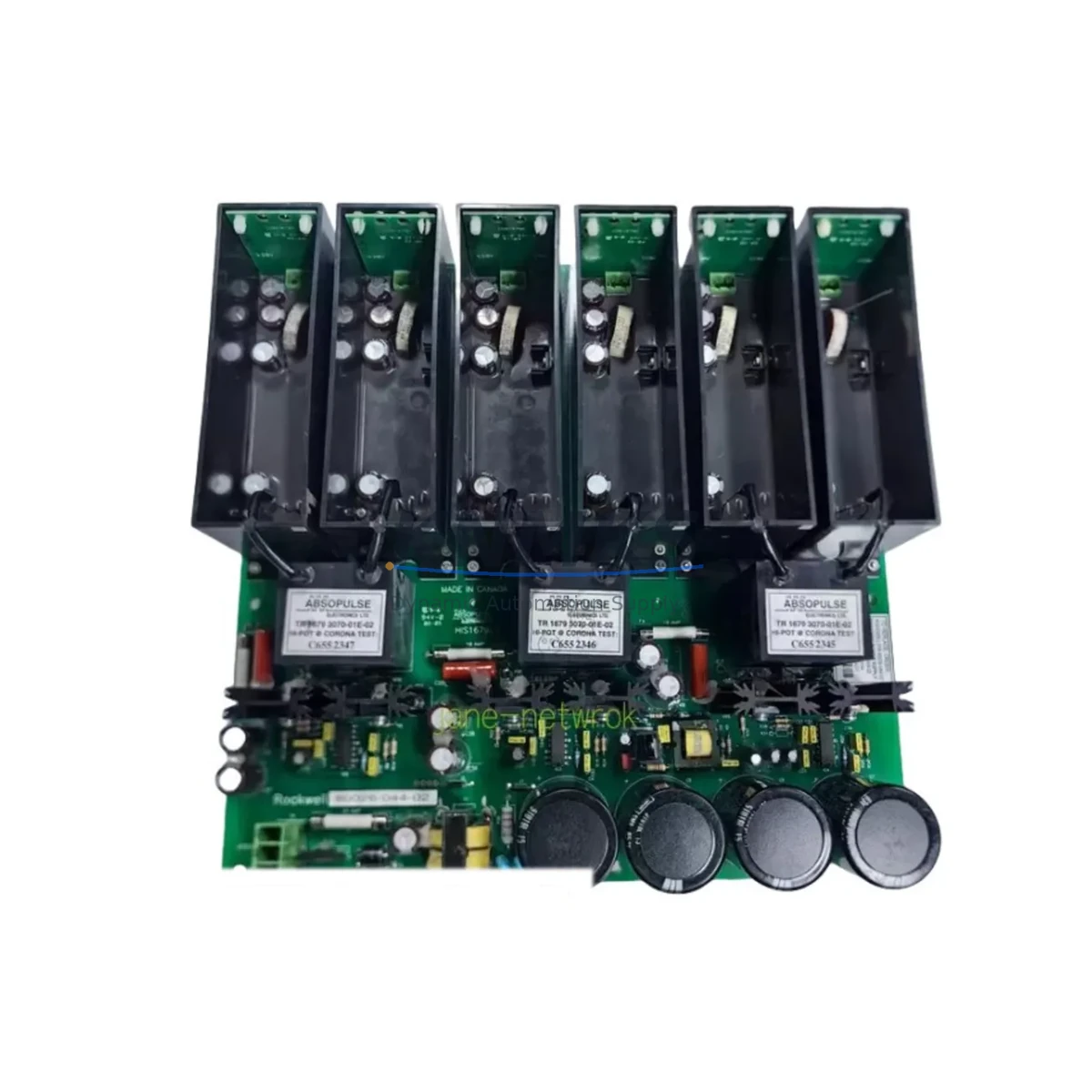
Allen-Bradley 80026-044-02 Maintenance Spare SMC Flex: Proven Reliability for Factory Uptime
The Allen-Bradley 80026-044-02 is a critical spare part within the SMC Flex soft starter platform — one of Rockwell Automation’s most widely deployed motor control solutions across process industries, water treatment, mining, and discrete manufacturing. Maintaining a stocked unit of the 80026-044-02 in your spare parts inventory is a proven strategy for reducing unplanned downtime and protecting motor-driven production lines from extended outages caused by component failure or end-of-life degradation.
This component is sourced as an original Allen-Bradley spare, fully tested prior to shipment, and backed by a support terms confirmed by quotation. Whether you are managing a planned annual shutdown, responding to an emergency motor trip, or building a preventive maintenance kit for your control cabinet, the 80026-044-02 delivers the compatibility and reliability that maintenance engineers and procurement teams require for mission-critical applications.
Our global distribution network ensures fast lead times for facilities in Asia-Pacific, Europe, the Middle East, and the Americas — with regional stock positions designed to support urgent replacement cycles and blanket purchase orders for long-term maintenance programs.
Spare Maintenance Table
| Part Number | 80026-044-02 |
| Brand | Allen-Bradley (Rockwell Automation) |
| Series | SMC Flex Soft Starter |
| Product Type | Soft Starter / Motor Controller Spare Part |
| Compatibility | SMC Flex series soft starters; cross-compatible with SMC-3 and SMC Dialog Plus platforms in equivalent control circuit applications |
| Application Environment | Industrial motor control centers (MCC), standalone soft starter panels, pump stations, conveyor drives, compressor control cabinets |
| Origin | United States (Allen-Bradley / Rockwell Automation) |
| Installation Parameters | Follow OEM wiring diagram; verify control voltage, I/O wiring, and bypass contactor configuration before installation |
| Maintenance Recommendation | Inspect during annual shutdown; replace proactively if SMC Flex unit shows fault codes F1–F8 or thermal overload trips |
| Pre-Shipment Testing | Functional and electrical test performed before dispatch |
| Support terms | 12 Months from date of shipment |
| Lead Time | In-stock units ship within 2–5 business days; expedited options available |
Maintenance Planning for Continuous Operation
When replacing or inspecting the Allen-Bradley 80026-044-02 in an SMC Flex soft starter installation, a thorough maintenance workflow should extend beyond the component itself. Experienced maintenance engineers treat a soft starter replacement as an opportunity to audit the entire motor control circuit for wear, drift, or latent faults that could trigger the next unplanned outage.
Begin by verifying the control power supply feeding the SMC Flex unit — typically 120VAC or 24VDC depending on the panel configuration. A degraded or undersized power supply is a common root cause of intermittent soft starter faults that are misdiagnosed as component failure. Alongside the power supply, inspect the input and output power wiring terminals for signs of thermal discoloration, loose connections, or insulation breakdown, particularly on high-cycle applications such as pump or compressor starts.
The bypass contactor associated with the SMC Flex installation should be tested for contact wear and coil integrity. In many installations, the bypass contactor operates every motor start cycle and accumulates wear faster than the soft starter electronics. Pairing a 80026-044-02 replacement with a contactor inspection — or a proactive contactor replacement using an Allen-Bradley 100-C or 700-CF series device — is a recognized best practice in motor control center maintenance.
Check the overload relay or electronic overload module installed in series with the soft starter. If the SMC Flex has been tripping on thermal overload faults, the overload settings may need recalibration to match the actual motor FLA after the spare part replacement. For facilities running DeviceNet or EtherNet/IP communication, verify that the SMC Flex communication module (such as the 150-SM series) is seated correctly and that network parameters are restored after the swap.
In control cabinets with multiple drives and starters, also inspect the 24VDC I/O power rail, terminal blocks, and any signal isolators used to interface the SMC Flex run/fault signals with the plant PLC — commonly an Allen-Bradley ControlLogix or CompactLogix system. Fuse holders and branch circuit protection fuses on the control circuit should be checked for continuity and rated capacity. A blown or degraded fuse on the control circuit can cause the replacement spare to appear faulty during commissioning.
For facilities with older SMC Flex installations approaching 10–15 years of service, consider scheduling a parallel review of the HMI operator panel (such as a PanelView 800 or PanelView Plus) used to monitor motor status, as display and communication faults often surface during the same maintenance window as soft starter component replacements.
Site Replacement Workflow
Step 1 — Isolation and Lockout/Tagout: De-energize the motor control circuit and apply LOTO procedures per site safety standards. Confirm zero energy state on both the power and control circuits before opening the enclosure.
Step 2 — Document Existing Configuration: Photograph or record all parameter settings on the existing SMC Flex unit using the integral keypad or connected HMI. Note fault history, motor FLA setting, ramp time, and current limit parameters. These values must be re-entered on the replacement unit.
Step 3 — Remove and Inspect: Disconnect all power, control, and communication wiring. Label each wire before removal. Inspect the mounting rail, enclosure backplate, and adjacent components for heat damage or contamination.
Step 4 — Install 80026-044-02: Mount the replacement spare per OEM mechanical specifications. Reconnect all wiring in reverse order of removal. Verify torque on power terminals per the SMC Flex installation manual.
Step 5 — Parameter Restore and Commissioning: Power up the control circuit only and restore all saved parameters. Verify communication link status if DeviceNet or EtherNet/IP is used. Perform a no-load test start before reconnecting the motor load.
Step 6 — Full Load Test and Documentation: Run the motor under normal load conditions and monitor starting current, ramp profile, and bypass transition. Record the commissioning date and spare part serial number in the site maintenance log for support terms tracking.
This workflow minimizes re-work risk, ensures system compatibility is maintained, and supports the support terms confirmed by quotation validation process.
Spare Parts Support FAQ
Q1: Is the 80026-044-02 a direct drop-in replacement for all SMC Flex configurations?
The 80026-044-02 is designed for the SMC Flex platform. Compatibility depends on the specific SMC Flex catalog number and control voltage configuration installed at your site. We recommend confirming your full SMC Flex catalog number before ordering. Our technical team can assist with compatibility verification at no charge.
Q2: How is the spare part tested before shipment?
Every 80026-044-02 unit undergoes functional and electrical testing prior to dispatch. Test records are available upon request. Units that do not pass our pre-shipment inspection are not shipped. This process supports our support terms confirmed by quotation commitment from the date of shipment.
Q3: Can you support long-term or blanket purchase orders for this part?
Yes. We support blanket orders, scheduled releases, and consignment stock arrangements for maintenance programs requiring guaranteed supply of the 80026-044-02 over 12–36 month horizons. Contact our procurement team to discuss volume pricing and delivery scheduling.
Q4: What is the support terms coverage and how do I initiate a claim?
The 80026-044-02 carries a support terms confirmed by quotation from the date of shipment, covering manufacturing defects and functional failure under normal operating conditions. To initiate a support terms claim, contact admin@knmks.com with your order reference, installation date, and a description of the fault. Our team will respond within one business day.
© 2026 KNMKS. All rights reserved.
Original Source: https://knmks.com
Contact: admin@knmks.com | +86 18359268345
Product Identification
- Brand / Ecosystem
-
Allen-Bradley
Allen-Bradley - Model / Series
- 80026-044-02
- Product Family
- PLCs & Controllers
- Availability Status
- Available on request after model and quantity confirmation
- Inquiry Type
- B2B RFQ, replacement inquiry and project spare-part request
- Pre-Quote Check
- Exact SKU, brand, series, quantity, nameplate photos and destination country are checked before quotation
System Path
Where this product fits in the KNMKS automation structure.
Specification & Inquiry Focus
- Control platform
- PLC, PAC and modular controllers
- Common needs
- CPU, rack, power and I/O expansion
- Project support
- Replacement, cabinet build and maintenance
Buyer Confirmation
Information KNMKS checks before replying.
- Exact model
- 80026-044-02
- Brand / ecosystem
- Allen-Bradley
- Product family
- PLCs & Controllers
- Application note
- Replacement, maintenance, project build or spare-part list
- Useful photos
- Nameplate, installed unit, cabinet layout or connector side
- Delivery details
- Quantity, destination country and target schedule
Document Support
Files and notes can be confirmed during quotation.
- Product photos or nameplate confirmation when available
- Packing and delivery notes before quotation confirmation
- Support scope and delivery terms confirmed per inquiry
- Export document coordination for qualified B2B requests
Inquiry Support
- Model cross-checking before quotation
- CPU, power, rack and expansion module matching
- Support for replacement and project inquiry
What to Send Us
- Brand and exact model number: Allen-Bradley 80026-044-02
- Quantity and required delivery time
- Application, replacement requirement or nameplate photo
- Destination country and shipping preference
RFQ Preparation
This is a product inquiry page built for RFQ communication.
Fast Model Check
Send this model to KNMKS for confirmation.
Include quantity, destination country and photos if this is a maintenance replacement. The inquiry will be saved with a reference number after submission.
Brand & Compatibility Note
KNMKS displays automation product information for well-known industrial brand ecosystems and compatible replacement references. Brand names are used for product identification and compatibility reference only; final availability and commercial terms are confirmed per quotation.
 Manufacturing
 Machine Tools
 Packaging
 Energy & Power



 HMI & Displays
 Servo Systems
 Variable Frequency Drives
 Sensors