
Overview
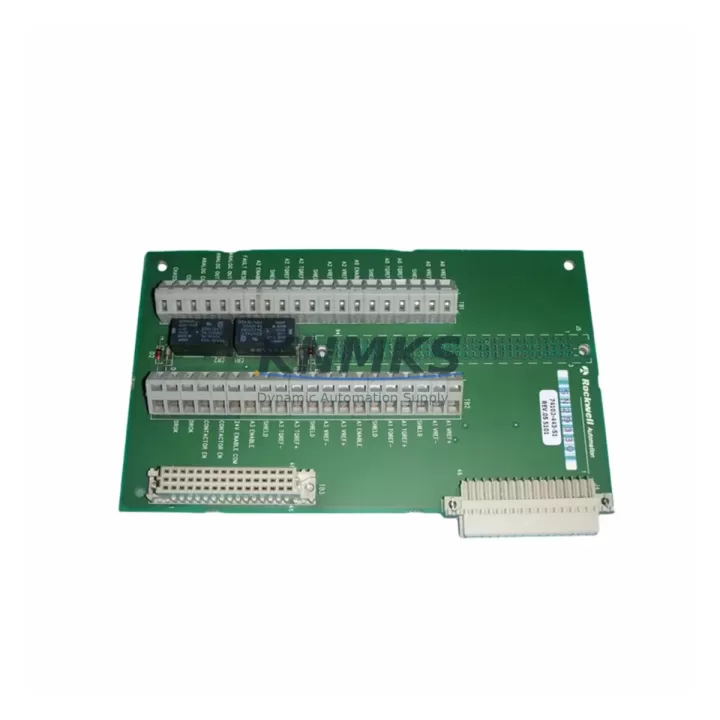
Allen-Bradley 74102-443-51 Spare Part for Factory Uptime
The Allen-Bradley 74102-443-51 is a proven PLC interface module designed for continuous-duty industrial environments operating under Rockwell Automation control architectures. Sourced as an original spare, this module supports maintenance engineers and procurement teams managing legacy PLC/DCS control cabinets where unplanned downtime carries significant production cost. Each unit is pre-shipment tested, covered by a support terms confirmed by quotation, and dispatched from multi-region stock to minimize lead time during emergency replacement scenarios.
Whether you are executing a scheduled annual overhaul, responding to a fault alarm, or building a strategic spare parts buffer for a critical production line, the 74102-443-51 delivers the electrical compatibility and mechanical fit required for a direct, low-risk swap. Its role within the Rockwell Automation PLC ecosystem makes it a recurring line item in maintenance BOMs for facilities running legacy Allen-Bradley control systems that are not yet scheduled for full migration.
Spare Maintenance Table
| Parameter | Specification / Detail |
|---|---|
| SKU / Part Number | 74102-443-51 |
| Brand | Allen-Bradley (Rockwell Automation) |
| Product Type | PLC Interface Module |
| Series | Allen-Bradley Legacy PLC Series |
| Compatibility | Rockwell Automation legacy PLC control cabinets; cross-reference with OEM documentation for exact rack/slot fit |
| Origin | United States |
| Installation | Direct module replacement; verify backplane connector alignment and slot addressing before power-up |
| Application Environment | Industrial automation, process control, discrete manufacturing, utilities |
| Pre-Shipment Testing | Yes — functional and electrical verification performed before dispatch |
| Support terms | 12 Months |
| Stock Availability | Multi-region inventory; emergency dispatch supported |
| Condition | Original spare / refurbished-to-spec (confirm at order) |
Maintenance Planning for Continuous Operation
When replacing the 74102-443-51 in a live control cabinet, a disciplined maintenance engineer will not stop at the module itself. The interface module sits at the intersection of the PLC backplane, field I/O wiring, and communication bus — meaning adjacent components should be inspected and, where appropriate, replaced or stocked as concurrent spares.
Begin with the power supply module feeding the rack: voltage sag or ripple at the backplane rail is a leading cause of interface module failure and will damage a new replacement if left unaddressed. Verify output voltage under load and check capacitor condition. Next, inspect the I/O terminal blocks and field wiring connected to the module’s signal channels — corroded terminals, loose ferrules, or undersized conductors introduce noise and intermittent faults that are frequently misdiagnosed as module failure.
The backplane or rack chassis itself should be examined for bent connector pins, cracked card guides, and contamination. A damaged backplane connector will cause repeated module failures regardless of spare quality. If the system uses a communication module (such as a DH+ or ControlNet adapter) sharing the same rack, confirm its firmware revision is compatible with the replacement module’s addressing scheme.
For systems with relay output modules in adjacent slots, check contact wear and coil resistance — relay modules in high-cycle applications often degrade in parallel with interface modules. Similarly, inspect any signal isolators or analog input modules on the same I/O loop: a failed isolator can inject ground loops that stress the interface module’s input circuitry.
Finally, review the fuse and circuit protection on the field side of the module. Blown or degraded fuses are a symptom, not a root cause — replacing the 74102-443-51 without restoring proper overcurrent protection risks repeat failure within weeks. Stocking a set of matched fuses alongside the module spare is standard practice for facilities with 24/7 uptime requirements.
Site Replacement Workflow
Step 1 — Fault Isolation: Confirm the 74102-443-51 is the failed component using the PLC programmer or HMI fault log. Document the fault code, slot address, and last-known configuration before de-energizing the rack.
Step 2 — Safe De-energization: Follow site LOTO (Lockout/Tagout) procedures. Discharge any capacitive field devices connected to the module’s I/O channels before handling.
Step 3 — Module Extraction: Release the module locking tab, extract firmly and evenly to avoid bending backplane pins. Inspect the ejected module and backplane connector for visible damage.
Step 4 — Replacement Installation: Seat the 74102-443-51 replacement into the correct slot, confirm the locking tab engages, and verify slot addressing matches the original configuration (check DIP switches or rotary selectors if applicable).
Step 5 — Power-Up and Verification: Re-energize the rack and observe the module status LED. Download or verify the existing PLC program configuration. Confirm all I/O channels report correctly in the programmer and on the HMI before returning the line to production.
Step 6 — Documentation: Log the replacement in the site CMMS, update the spare parts inventory, and flag the next reorder point to maintain buffer stock for this SKU.
Spare Parts Support FAQ
Q1: Is the 74102-443-51 a direct drop-in replacement for the original Allen-Bradley module?
Yes. The 74102-443-51 is sourced as an original Allen-Bradley spare and is designed for direct slot replacement within compatible Rockwell Automation PLC racks. Always verify the slot address, backplane connector type, and any firmware or configuration requirements against your system’s OEM documentation before installation.
Q2: What does the support terms confirmed by quotation cover?
The support terms confirmed by quotation cover functional failure under normal operating conditions from the date of shipment. Each unit undergoes pre-shipment electrical and functional testing. Support requests are supported with replacement dispatch or credit, subject to fault verification.
Q3: How quickly can the 74102-443-51 be dispatched for an emergency breakdown?
Multi-region stock is maintained specifically to support emergency replacement scenarios. Express dispatch options are available — contact the sales team with your urgency level and destination to confirm the fastest available routing.
Q4: How should I manage long-term supply for this legacy SKU?
For legacy Allen-Bradley modules with uncertain OEM availability, the recommended strategy is to hold a minimum of one-to-two units on-site as buffer stock and establish a standing reorder agreement with a verified spare parts supplier. Annual consumption data from your CMMS should drive reorder quantity decisions. Confirm supplier stock levels and lead times at least once per quarter to avoid supply gaps during peak maintenance seasons.
© 2026 KNMKS. All rights reserved.
Original Source: https://knmks.com
Contact: admin@knmks.com | +86 18359268345
Product Identification
- Brand / Ecosystem
-
Allen-Bradley
Assorted Brands - Model / Series
-
74102-443-51
Assorted Series - Product Family
- PLCs & Controllers
- Availability Status
- Available on request after model and quantity confirmation
- Inquiry Type
- B2B RFQ, replacement inquiry and project spare-part request
- Pre-Quote Check
- Exact SKU, brand, series, quantity, nameplate photos and destination country are checked before quotation
System Path
Where this product fits in the KNMKS automation structure.
Specification & Inquiry Focus
- Control platform
- PLC, PAC and modular controllers
- Common needs
- CPU, rack, power and I/O expansion
- Project support
- Replacement, cabinet build and maintenance
Buyer Confirmation
Information KNMKS checks before replying.
- Exact model
- 74102-443-51
- Brand / ecosystem
- Allen-Bradley
- Product family
- PLCs & Controllers
- Application note
- Replacement, maintenance, project build or spare-part list
- Useful photos
- Nameplate, installed unit, cabinet layout or connector side
- Delivery details
- Quantity, destination country and target schedule
Document Support
Files and notes can be confirmed during quotation.
- Product photos or nameplate confirmation when available
- Packing and delivery notes before quotation confirmation
- Support scope and delivery terms confirmed per inquiry
- Export document coordination for qualified B2B requests
Inquiry Support
- Model cross-checking before quotation
- CPU, power, rack and expansion module matching
- Support for replacement and project inquiry
What to Send Us
- Brand and exact model number: Allen-Bradley 74102-443-51
- Quantity and required delivery time
- Application, replacement requirement or nameplate photo
- Destination country and shipping preference
RFQ Preparation
This is a product inquiry page built for RFQ communication.
Fast Model Check
Send this model to KNMKS for confirmation.
Include quantity, destination country and photos if this is a maintenance replacement. The inquiry will be saved with a reference number after submission.
Brand & Compatibility Note
KNMKS displays automation product information for well-known industrial brand ecosystems and compatible replacement references. Brand names are used for product identification and compatibility reference only; final availability and commercial terms are confirmed per quotation.
 Manufacturing
 Machine Tools
 Packaging
 Energy & Power



 HMI & Displays
 Servo Systems
 Variable Frequency Drives
 Sensors