
Overview
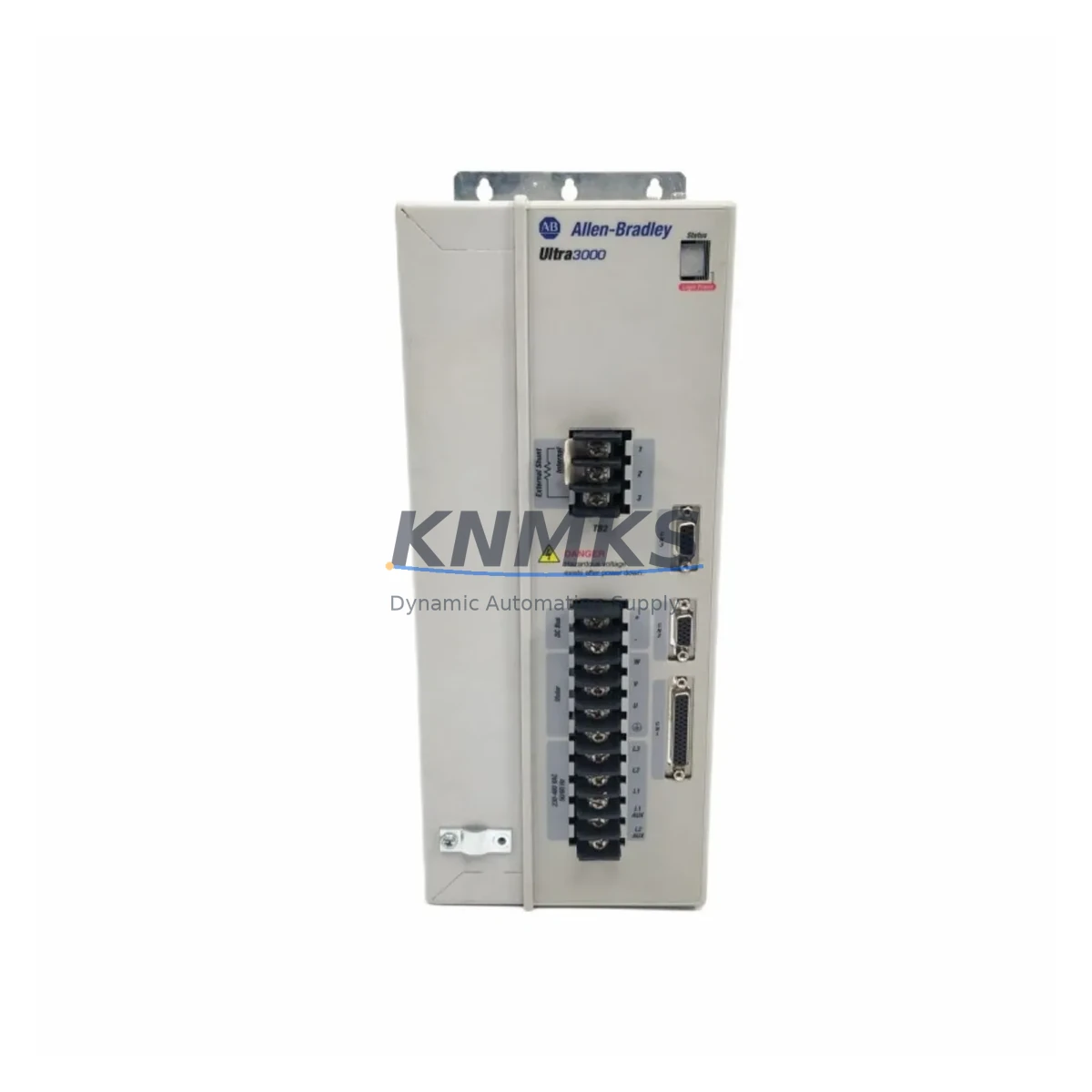
Allen-Bradley 2098-DSD-HV030-SE Spare Part for Factory Uptime
The Allen-Bradley 2098-DSD-HV030-SE is a high-voltage, 30-ampere SERCOS-interface servo drive from the Ultra 3000 series, engineered for precision motion control in demanding industrial environments. As a maintenance-proven spare part, it is a critical component for facilities running Rockwell Automation motion systems where unplanned downtime carries significant operational and financial consequences. Stocking a verified original 2098-DSD-HV030-SE ensures your maintenance team can execute rapid drive replacement without waiting on lead times that can stretch weeks for motion-control hardware.
The Ultra 3000 SERCOS platform is widely deployed across automotive assembly, packaging machinery, semiconductor handling, and precision manufacturing lines. When a drive fault occurs — whether triggered by overcurrent, encoder feedback loss, bus overvoltage, or thermal shutdown — the ability to swap in a pre-tested spare within the same maintenance window is the difference between a two-hour recovery and a two-day production halt. The 2098-DSD-HV030-SE is designed for direct drop-in replacement within existing Ultra 3000 SERCOS ring topologies, preserving axis configuration and minimizing recommissioning effort.
From a procurement engineering perspective, sourcing original Allen-Bradley servo drive spares from a verified supplier with documented testing and a support terms confirmed by quotation eliminates the risk of counterfeit components entering the maintenance supply chain — a growing concern in the industrial automation aftermarket. Every unit shipped from KNMKS undergoes functional verification prior to dispatch, with inspection records available upon request.
Spare Maintenance Table
| Parameter | Specification |
|---|---|
| SKU / Part Number | 2098-DSD-HV030-SE |
| Brand | Allen-Bradley (Rockwell Automation) |
| Series | Ultra 3000 SERCOS |
| Drive Type | AC Servo Drive, Digital SERCOS Interface |
| Continuous Output Current | 30A (High Voltage) |
| Input Voltage | 230–480V AC, 3-Phase |
| Communication Interface | SERCOS (fiber optic ring) |
| Compatible Motor Series | MP-Series, TL-Series, HPK-Series servo motors |
| Compatible Cables | 2090-XXNPMF / 2090-CPWM7DF series power & feedback cables |
| Mounting | Panel mount, DIN rail compatible enclosure |
| Operating Temperature | 0°C to 50°C (32°F to 122°F) |
| Protection Rating | IP20 (control cabinet installation) |
| Weight | Approx. 8.6 kg |
| Country of Origin | United States |
| Condition | Original spare, tested before shipment |
| Support terms | 12 Months from date of shipment |
| Application Environment | Industrial control cabinets, motion control panels, servo axis enclosures |
| Maintenance Recommendation | Inspect cooling fan, DC bus capacitors, and SERCOS fiber connectors at each annual overhaul |
Maintenance Planning for Continuous Operation
Replacing the 2098-DSD-HV030-SE in a live production environment requires a structured approach to avoid secondary faults and ensure the restored axis performs within specification. Maintenance engineers should treat a servo drive replacement as a system-level event, not an isolated component swap.
Before removing the faulted drive, verify the incoming AC supply voltage at the drive’s L1/L2/L3 terminals using a calibrated meter. Voltage imbalance exceeding 2% between phases is a known cause of premature drive failure and should be corrected at the upstream transformer or distribution panel before the new unit is energized. Check the associated line filter — typically a 2090-XXLF series EMC filter — for signs of overheating or insulation breakdown, as a degraded filter can inject noise that triggers nuisance faults on the replacement drive.
Inspect the 2090-CPWM7DF motor power cable and the 2090-XXNPMF feedback cable for chafing, connector pin corrosion, and shield continuity. Damaged cables are a leading cause of encoder feedback errors (fault code F004/F007 on Ultra 3000 drives) and will cause the replacement drive to fault immediately upon enable. If the cables show wear, replace them concurrently with the drive to avoid a repeat callout.
Within the control cabinet, examine the 24VDC control power supply feeding the drive’s logic bus. An aging or undersized 24V supply — such as a 1606-XLP or equivalent — can cause erratic drive behavior during motor acceleration. Verify output voltage under load is within ±1% of nominal. Similarly, check the associated I/O terminal blocks and any 1492-series wiring duct for loose terminations that could cause intermittent enable or fault-reset signals.
For systems using a ControlLogix or CompactLogix controller with a SERCOS motion module (such as the 1756-M08SE or 1756-M16SE), confirm the SERCOS ring integrity after drive replacement. A single faulty fiber connection or a cracked fiber jumper can prevent the axis from being recognized by the controller. Inspect all fiber connectors with a fiber inspection scope before closing the cabinet.
Annual maintenance schedules for Ultra 3000 SERCOS systems should include: drive cooling fan RPM verification, DC bus capacitor ESR measurement, SERCOS fiber power level logging, and a full axis tuning verification against the baseline autotune record. Proactive replacement of drives showing elevated thermal readings or intermittent fault histories — before catastrophic failure — is the most cost-effective strategy for high-utilization production lines.
Site Replacement Workflow
Step 1 — Isolation & Lockout: De-energize the drive following site LOTO procedures. Wait a minimum of 5 minutes after AC power removal before touching DC bus terminals to allow bus capacitors to discharge below 50V DC.
Step 2 — Configuration Backup: If the faulted drive is still partially functional, use RSLogix 5000 / Studio 5000 to export the axis configuration (drive parameters, tuning gains, position limits) before removal. If the drive is non-responsive, retrieve the last known configuration from your PLC project backup.
Step 3 — Physical Replacement: Disconnect AC input, motor power, feedback, SERCOS fiber, and 24VDC control wiring in sequence. Mount the 2098-DSD-HV030-SE replacement unit and reconnect all wiring, verifying torque on power terminals per the Ultra 3000 installation manual (typically 1.7–2.0 N·m for power terminals).
Step 4 — Parameter Restore: Download the saved axis configuration to the replacement drive via the SERCOS interface. Verify drive firmware version compatibility with the motion module firmware. Update drive firmware if required before downloading parameters.
Step 5 — Commissioning Verification: Perform a low-speed jog test in manual mode before enabling automatic operation. Verify encoder feedback counts, motor direction, and torque limits. Log the first 10 minutes of operation data for baseline comparison.
This workflow is compatible with direct replacement of earlier Ultra 3000 variants including the 2098-DSD-HV030X and 2098-DSD-HV030, subject to firmware and catalog number cross-reference verification. Consult the Rockwell Automation Product Compatibility and Download Center (PCDC) for confirmed interchangeability before installation.
Spare Parts Support FAQ
Q1: Is the 2098-DSD-HV030-SE tested before shipment?
Yes. Every unit undergoes functional verification prior to dispatch. Inspection records are available upon request. We ship only original Allen-Bradley components — no rebranded or counterfeit substitutes.
Q2: What is the support terms coverage and how is it handled?
All units carry a support terms confirmed by quotation from the date of shipment. In the event of a support terms claim, contact admin@knmks.com with the order reference and fault description. We will arrange replacement or repair with priority handling to minimize your downtime.
Q3: Can you supply multiple units for long-term spare stock?
Yes. KNMKS supports bulk and scheduled procurement for maintenance departments building strategic spare inventories. Long-term supply agreements with fixed pricing are available for facilities managing large Ultra 3000 SERCOS installations. Contact us to discuss volume requirements.
Q4: How do I confirm compatibility with my existing system before ordering?
Provide your existing drive catalog number, the associated motion module part number (e.g., 1756-M08SE), and your controller firmware version. Our technical team will confirm compatibility and flag any firmware alignment requirements before the order is placed. Email admin@knmks.com or call +86 18359268345 for pre-order compatibility verification.
© 2026 KNMKS. All rights reserved.
Original Source: https://knmks.com
Contact: admin@knmks.com | +86 18359268345
Product Identification
- Brand / Ecosystem
-
Allen-Bradley
Allen-Bradley - Model / Series
- 2098-DSD-HV030-SE
- Product Family
- PLCs & Controllers
- Availability Status
- Available on request after model and quantity confirmation
- Inquiry Type
- B2B RFQ, replacement inquiry and project spare-part request
- Pre-Quote Check
- Exact SKU, brand, series, quantity, nameplate photos and destination country are checked before quotation
System Path
Where this product fits in the KNMKS automation structure.
Specification & Inquiry Focus
- Control platform
- PLC, PAC and modular controllers
- Common needs
- CPU, rack, power and I/O expansion
- Project support
- Replacement, cabinet build and maintenance
Buyer Confirmation
Information KNMKS checks before replying.
- Exact model
- 2098-DSD-HV030-SE
- Brand / ecosystem
- Allen-Bradley
- Product family
- PLCs & Controllers
- Application note
- Replacement, maintenance, project build or spare-part list
- Useful photos
- Nameplate, installed unit, cabinet layout or connector side
- Delivery details
- Quantity, destination country and target schedule
Document Support
Files and notes can be confirmed during quotation.
- Product photos or nameplate confirmation when available
- Packing and delivery notes before quotation confirmation
- Support scope and delivery terms confirmed per inquiry
- Export document coordination for qualified B2B requests
Inquiry Support
- Model cross-checking before quotation
- CPU, power, rack and expansion module matching
- Support for replacement and project inquiry
What to Send Us
- Brand and exact model number: Allen-Bradley 2098-DSD-HV030-SE
- Quantity and required delivery time
- Application, replacement requirement or nameplate photo
- Destination country and shipping preference
RFQ Preparation
This is a product inquiry page built for RFQ communication.
Fast Model Check
Send this model to KNMKS for confirmation.
Include quantity, destination country and photos if this is a maintenance replacement. The inquiry will be saved with a reference number after submission.
Brand & Compatibility Note
KNMKS displays automation product information for well-known industrial brand ecosystems and compatible replacement references. Brand names are used for product identification and compatibility reference only; final availability and commercial terms are confirmed per quotation.
 Manufacturing
 Machine Tools
 Packaging
 Energy & Power



 HMI & Displays
 Servo Systems
 Variable Frequency Drives
 Sensors