
Overview
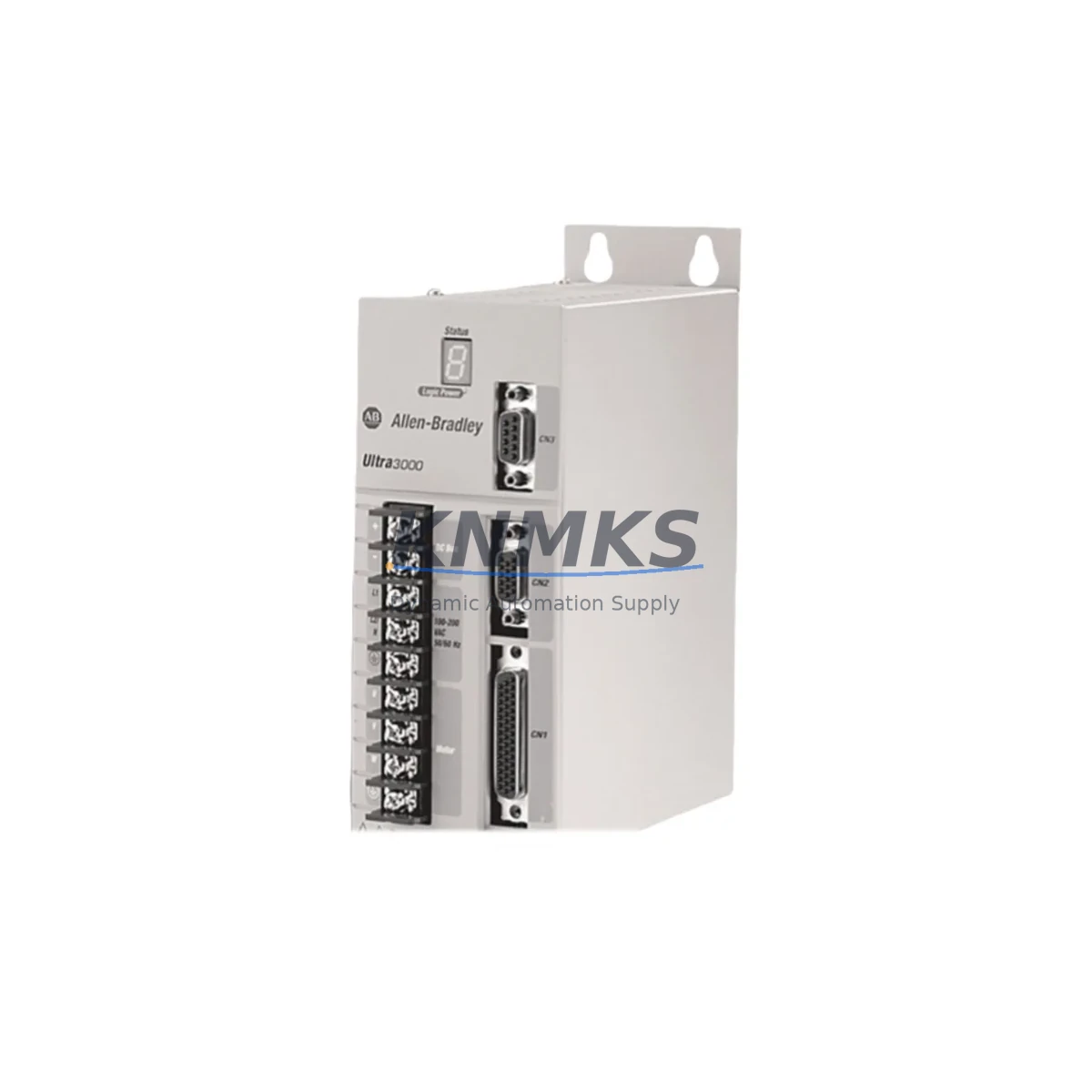
Allen-Bradley 2098-DSD-020-SE Spare Part for Factory Uptime
The Allen-Bradley 2098-DSD-020-SE is a 20A Digital Servo Drive from the Ultra3000 series, engineered by Rockwell Automation for high-performance motion control in demanding industrial environments. As a maintenance-proven spare part, this drive supports Safe Torque Off (STO) functionality and is designed for seamless integration into existing Allen-Bradley servo systems — making it a critical component for any maintenance engineer managing continuous production lines, automated assembly cells, or precision motion applications.
Whether you are responding to an unplanned servo fault, executing a scheduled annual overhaul, or building a strategic spare parts inventory to reduce mean time to repair (MTTR), the 2098-DSD-020-SE delivers the original performance specifications your system demands. Each unit is sourced, inspected, and dispatched with a support terms confirmed by quotation, giving procurement engineers the confidence to stock this drive as a long-term supply asset.
Spare Maintenance Table
| Parameter | Specification |
|---|---|
| Part Number | 2098-DSD-020-SE |
| Brand | Allen-Bradley / Rockwell Automation |
| Series | Ultra3000 Digital Servo Drive |
| Continuous Output Current | 20A RMS |
| Safety Function | Safe Torque Off (STO) — IEC 61800-5-2 |
| Input Voltage | 195–264 VAC, 3-Phase, 50/60 Hz |
| Communication Interface | Serial (RS-232/RS-485), compatible with 1394 GMC and Kinetix systems |
| Feedback Support | Encoder, Resolver, Hall-effect sensors |
| Mounting | Panel mount, DIN rail compatible |
| Operating Temperature | 0°C to 50°C (32°F to 122°F) |
| Protection Rating | IP20 |
| Compatibility | MPL, MPM, MPS, TL-Series servo motors; 1394 GMC; Kinetix 6000/6200 |
| Certifications | UL, CE, cUL |
| Support terms | 12 Months — Tested before dispatch |
| Origin | USA |
| Condition | Original spare, fully tested |
Maintenance Planning for Continuous Operation
When a 2098-DSD-020-SE servo drive fails or is flagged during a routine control cabinet inspection, the fault rarely exists in isolation. Maintenance engineers should treat the drive replacement as an opportunity to audit the entire servo loop and associated power distribution components to prevent repeat failures and unplanned downtime.
Begin by verifying the AC input power quality upstream of the drive — voltage sags, phase imbalances, or harmonic distortion from variable frequency drives on the same bus are common root causes of premature servo drive failure. Check the line reactor or EMC filter (such as the 1321-3R series line reactors commonly paired with Ultra3000 drives) for signs of overheating or degraded filtering performance.
Inspect the 24VDC control power supply feeding the STO circuit and the drive’s logic board. A marginal power supply — even one that appears functional under light load — can cause intermittent STO faults or drive lockouts during peak servo demand cycles. Replacing the control power supply alongside the drive is a low-cost insurance measure that experienced maintenance teams routinely include in their servo drive swap-out kits.
At the motor end, verify the servo motor feedback cable and encoder connector integrity. Damaged or moisture-ingressed feedback cables are a leading cause of encoder fault codes on Ultra3000 drives. If the motor is an MPL or MPM series unit, confirm that the resolver or encoder signal levels are within specification using a handheld oscilloscope before commissioning the replacement drive.
For systems using 1394 GMC (General Motion Controller) or integrated Kinetix 6000/6200 multi-axis systems, also inspect the sercos fiber optic ring or SERCOS interface module for continuity and signal integrity. A degraded fiber link can cause axis faults that are incorrectly attributed to the drive itself. Similarly, check the ControlLogix or CompactLogix PLC backplane and the motion module (such as the 1756-M02AE or 1756-M08SE) for firmware compatibility with the replacement drive.
Do not overlook the drive enable relay and safety relay circuit — particularly the wiring to the STO input terminals. Verify that the safety relay (e.g., Allen-Bradley MSR series or Pilz PNOZ) is functioning correctly and that the STO wiring meets IEC 62061 or ISO 13849 requirements for your machine safety category. A faulty safety relay can prevent the replacement drive from enabling even after a successful hardware swap.
Finally, review the terminal block wiring and I/O signal assignments in the drive’s parameter configuration. Ultra3000 drives store axis parameters in non-volatile memory; if the replacement unit is a factory-fresh spare, you will need to download the axis configuration from your ControlLogix project or from a backup created with RSLogix 5000 / Studio 5000 Logix Designer before the original drive failed.
Site Replacement Workflow
Step 1 — Isolate and de-energize: Follow your site LOTO (Lockout/Tagout) procedure. Isolate the 3-phase AC input, the 24VDC control power, and the STO circuit before opening the control cabinet.
Step 2 — Document existing wiring: Photograph or sketch the terminal block assignments, feedback cable routing, and any jumper or DIP switch settings on the existing drive before removal. Ultra3000 drives have hardware configuration switches that must be replicated on the replacement unit.
Step 3 — Remove the failed drive: Disconnect the motor power cable (U/V/W), feedback cable, control I/O wiring, and STO terminals. Remove the drive from its mounting position.
Step 4 — Install the 2098-DSD-020-SE spare: Mount the replacement drive, reconnect all cables in the documented order, and verify torque on all terminal screws. Confirm that the STO wiring is correctly reinstated before applying control power.
Step 5 — Download axis parameters: Using Studio 5000 Logix Designer or RSLogix 5000, download the saved axis configuration to the replacement drive via the serial or USB-to-serial interface. Verify all motion parameters — acceleration, deceleration, velocity limits, and torque limits — match the original configuration.
Step 6 — Commission and test: Apply power in stages — control power first, then AC bus power. Perform a jog test at reduced speed before returning the axis to automatic mode. Monitor drive status LEDs and fault codes during initial operation.
Step 7 — Update maintenance records: Log the replacement date, drive serial number, and any parameter changes in your CMMS (Computerized Maintenance Management System). Schedule a follow-up inspection at 500 operating hours to verify thermal performance and connector integrity.
Spare Parts Support FAQ
Q1: Is the 2098-DSD-020-SE compatible with my existing Ultra3000 system without firmware changes?
In most cases, yes. The 2098-DSD-020-SE is a direct form-fit-function replacement within the Ultra3000 series. However, if your system uses a specific firmware revision for STO compliance or for compatibility with a particular ControlLogix motion module, confirm the firmware version on the replacement unit before installation. We can provide firmware version details upon request prior to shipment.
Q2: What testing is performed before the unit is shipped?
Every 2098-DSD-020-SE spare undergoes a functional power-on test, STO circuit verification, and output current calibration check before dispatch. Units that do not meet original Allen-Bradley performance specifications are not shipped. A test report is available upon request for critical applications.
Q3: How should I manage long-term spare parts inventory for Ultra3000 servo drives?
Given that the Ultra3000 series is a mature product line, procurement engineers should consider stocking at least one 2098-DSD-020-SE per production line that relies on this drive. Store units in original anti-static packaging in a climate-controlled environment (15°C–25°C, <70% RH). Rotate stock on a first-in, first-out basis and inspect stored units annually. We offer blanket order programs for customers requiring guaranteed long-term supply across multiple sites.
Q4: What is covered under the support terms confirmed by quotation?
The support terms confirmed by quotation cover manufacturing defects and functional failures under normal operating conditions. It does not cover damage caused by incorrect installation, overvoltage events, or failure to follow Allen-Bradley wiring and grounding guidelines. Support requests are processed with a replacement-first policy to minimize your downtime — contact admin@knmks.com with your order reference and fault description to initiate a claim.
© 2026 KNMKS. All rights reserved.
Original Source: https://knmks.com
Contact: admin@knmks.com | +86 18359268345
Product Identification
- Brand / Ecosystem
-
Allen-Bradley
Allen-Bradley - Model / Series
- 2098-DSD-020-SE
- Product Family
- PLCs & Controllers
- Availability Status
- Available on request after model and quantity confirmation
- Inquiry Type
- B2B RFQ, replacement inquiry and project spare-part request
- Pre-Quote Check
- Exact SKU, brand, series, quantity, nameplate photos and destination country are checked before quotation
System Path
Where this product fits in the KNMKS automation structure.
Specification & Inquiry Focus
- Control platform
- PLC, PAC and modular controllers
- Common needs
- CPU, rack, power and I/O expansion
- Project support
- Replacement, cabinet build and maintenance
Buyer Confirmation
Information KNMKS checks before replying.
- Exact model
- 2098-DSD-020-SE
- Brand / ecosystem
- Allen-Bradley
- Product family
- PLCs & Controllers
- Application note
- Replacement, maintenance, project build or spare-part list
- Useful photos
- Nameplate, installed unit, cabinet layout or connector side
- Delivery details
- Quantity, destination country and target schedule
Document Support
Files and notes can be confirmed during quotation.
- Product photos or nameplate confirmation when available
- Packing and delivery notes before quotation confirmation
- Support scope and delivery terms confirmed per inquiry
- Export document coordination for qualified B2B requests
Inquiry Support
- Model cross-checking before quotation
- CPU, power, rack and expansion module matching
- Support for replacement and project inquiry
What to Send Us
- Brand and exact model number: Allen-Bradley 2098-DSD-020-SE
- Quantity and required delivery time
- Application, replacement requirement or nameplate photo
- Destination country and shipping preference
RFQ Preparation
This is a product inquiry page built for RFQ communication.
Fast Model Check
Send this model to KNMKS for confirmation.
Include quantity, destination country and photos if this is a maintenance replacement. The inquiry will be saved with a reference number after submission.
Brand & Compatibility Note
KNMKS displays automation product information for well-known industrial brand ecosystems and compatible replacement references. Brand names are used for product identification and compatibility reference only; final availability and commercial terms are confirmed per quotation.
 Manufacturing
 Machine Tools
 Packaging
 Energy & Power



 HMI & Displays
 Servo Systems
 Variable Frequency Drives
 Sensors