
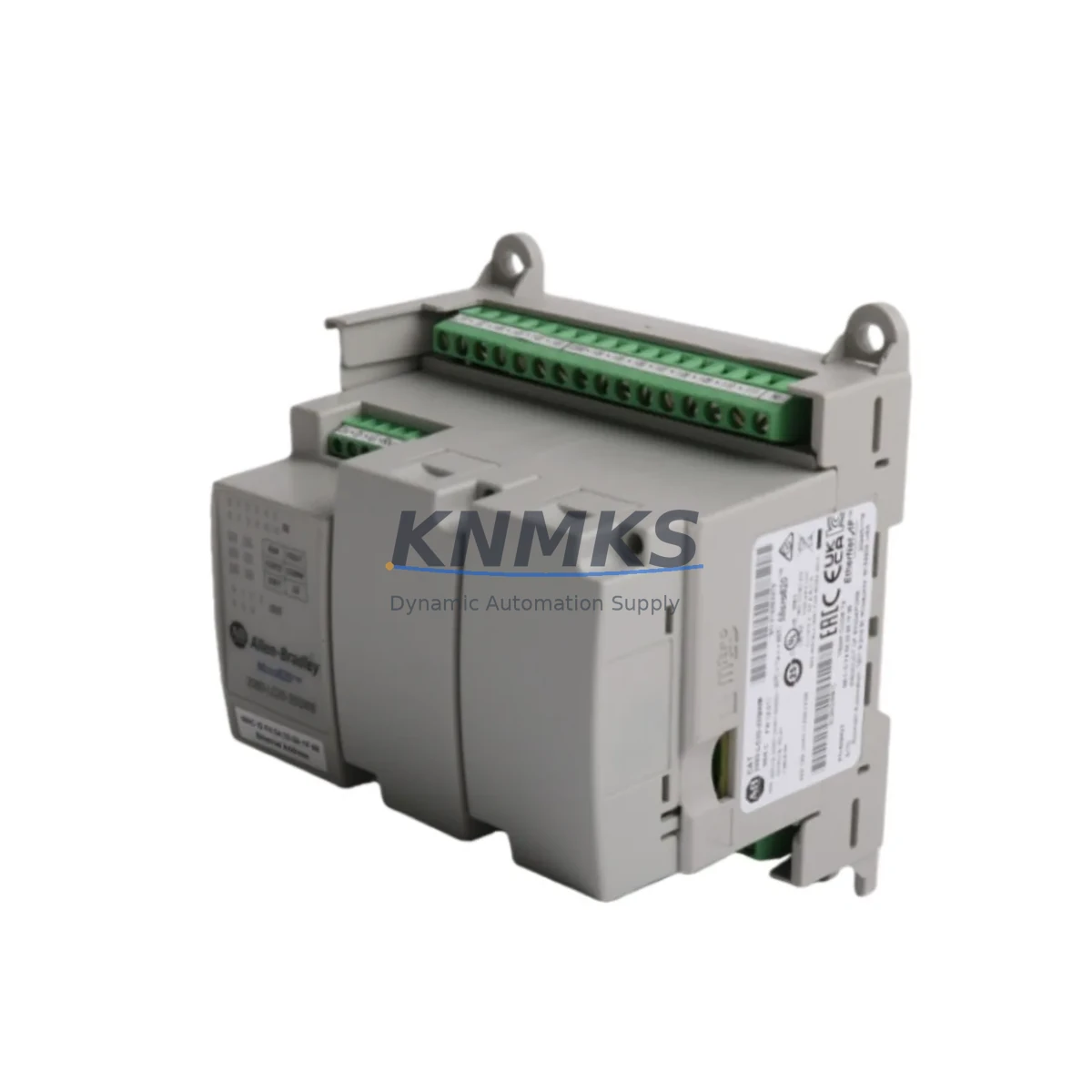
Overview
Allen-Bradley 2080-LC20-20QWB Migration-Ready PLC: Legacy System Retrofit and Compatibility Upgrade
The Allen-Bradley 2080-LC20-20QWB is a Micro820 series programmable logic controller engineered for direct integration into existing Micro800 control architectures. As legacy SLC 500, MicroLogix 1100, and MicroLogix 1400 platforms approach end-of-life, the 2080-LC20-20QWB provides a validated migration path that preserves existing panel layouts, minimizes rewiring effort, and reduces total system downtime during cutover. With 12 DC inputs, 8 relay outputs, and a compact DIN-rail footprint, this controller fits directly into most existing control cabinets without structural modification.
For facilities managing aging automation infrastructure — including energy substations, water treatment panels, conveyor control systems, and petrochemical skid controllers — the 2080-LC20-20QWB offers a cost-effective upgrade that does not require full PLC platform migration. Engineers replacing MicroLogix 1000 or MicroLogix 1200 units will find that the 2080-LC20-20QWB supports equivalent I/O addressing structures, simplifying program conversion through Connected Components Workbench (CCW) software. Logic blocks, timer presets, and counter configurations can be ported with minimal rework, significantly reducing engineering hours during the retrofit phase.
Before initiating replacement, field engineers should verify the existing 24VDC power supply capacity against the 2080-LC20-20QWB’s rated consumption. The 2080-PS120-240VAC power supply module is commonly paired with this controller in new panel builds, and its output ratings should be cross-checked against the total I/O load of the replacement system. Terminal block wiring should be mapped against the original I/O schedule, paying particular attention to relay output common groupings and input signal voltage levels. Where the legacy system used analog expansion modules such as the 2080-OF2 analog output module or the 2080-IF2 analog input module, these plug-in modules remain compatible with the 2080-LC20-20QWB’s embedded expansion port, preserving analog signal chains without additional signal conditioning hardware.
Communication protocol continuity is a critical consideration in any legacy migration. The 2080-LC20-20QWB supports EtherNet/IP as its primary network interface, enabling direct integration with existing Rockwell Automation FactoryTalk View SE SCADA systems and PanelView Plus HMI terminals. Where the legacy system communicated via DF1 serial or DH-485, a protocol gateway or the 2080-SERIALISOL isolated serial plug-in module may be required to maintain upstream communication links during the transition period. HMI screen tag databases referencing legacy controller addresses will require remapping to the new Micro820 data table structure — this step should be completed and validated in a staging environment before live cutover.
Backplane and rack compatibility should be confirmed early in the planning process. Unlike rack-based ControlLogix or CompactLogix platforms, the Micro820 is a standalone controller with no chassis dependency, which simplifies installation in space-constrained panels. However, engineers migrating from SLC 500 rack systems must account for the elimination of the backplane I/O bus and plan for distributed I/O expansion using plug-in modules or Point I/O over EtherNet/IP. Module addressing in the new program must reflect the plug-in slot assignments rather than rack slot numbers.
Firmware version compatibility should be verified prior to deployment. The 2080-LC20-20QWB ships with a factory-loaded firmware baseline; however, project files created in newer versions of Connected Components Workbench may require a firmware update before the program can be downloaded. Firmware updates are performed via USB programming cable using the 2080-USBADAPTER or equivalent, and should be completed before the controller is installed in the live panel. All firmware update procedures should be documented as part of the site modification record.
Pre-shipment functional testing is performed on every 2080-LC20-20QWB unit prior to dispatch. Each controller is powered, I/O continuity is verified, and communication ports are confirmed operational. Units are supplied with original manufacturer packaging and are accompanied by a test record. Stock is maintained for immediate dispatch, supporting urgent replacement requirements where production continuity depends on rapid spare part availability.
Migration Compatibility Table
| Parameter | Legacy Reference | 2080-LC20-20QWB Specification | Migration Note |
|---|---|---|---|
| Digital Inputs | MicroLogix 1100: 10 DI | 12 x 24VDC Sink/Source | Additional I/O capacity; verify wiring schedule |
| Digital Outputs | MicroLogix 1100: 6 Relay | 8 x Relay (2A per point) | Expanded output count; confirm common groupings |
| Analog Expansion | 2080-IF2 / 2080-OF2 | Compatible via plug-in port | Plug-in modules carry over; no rewiring required |
| Communication | DF1 / DH-485 / EtherNet/IP | EtherNet/IP (embedded) | Serial gateway required for DF1/DH-485 links |
| Programming Software | RSLogix 500 / RSLogix Micro | Connected Components Workbench | Program conversion required; logic structure compatible |
| Power Supply | 24VDC external | 24VDC (external supply required) | Verify existing PSU capacity against new load |
| Mounting | DIN rail / panel mount | DIN rail (35mm) | Direct fit in most existing panels |
| HMI Compatibility | PanelView Component | PanelView Component / PanelView Plus via EIP | Tag remapping required in HMI project |
| Support terms | — | 12 Months | Covers hardware defects from date of shipment |
Retrofit Planning for Existing Automation Systems
A successful retrofit begins with a complete audit of the existing control panel. Engineers should document all terminal block assignments, cable schedules, and I/O module configurations before any hardware is removed. When replacing a MicroLogix 1400 or SLC 5/03 with the 2080-LC20-20QWB, the panel layout typically allows the new controller to occupy the same DIN rail position, provided the existing cable lengths are sufficient to reach the new terminal arrangement.
Analog signal chains using the 2080-IF2 two-channel analog input module or the 2080-OF2 two-channel analog output module can be retained without modification, as these plug-in modules are directly compatible with the Micro820 expansion port. For systems requiring additional discrete I/O beyond the onboard 20 points, the 2080-IQ4OB4 4-input/4-output plug-in module provides a compact expansion option within the same controller housing. Where the legacy system included a 2080-SERIALISOL isolated serial module for upstream SCADA communication, this module can be reused in the replacement controller, preserving the existing serial communication link during the transition period.
HMI integration should be planned in parallel with the controller replacement. PanelView Component terminals communicating with the legacy MicroLogix platform via EtherNet/IP will require a tag database update to reflect the new Micro820 data table addresses. This remapping should be completed and tested offline before the live cutover window. Where the existing HMI project references legacy ladder rung addresses, a systematic address translation table should be prepared as part of the retrofit documentation package.
Downtime Control During System Migration
Minimizing production downtime during a PLC replacement requires a structured cutover plan. The recommended approach is to complete all program conversion, HMI tag remapping, and bench testing of the 2080-LC20-20QWB before the scheduled maintenance window. The replacement controller should be pre-configured with the converted program, correct IP address, and verified I/O assignments so that the live cutover is limited to physical installation and final I/O verification.
During the cutover window, the original controller should be powered down only after all field devices have been confirmed in a safe state. Terminal block wiring should be transferred systematically, following the documented cable schedule, with each circuit verified for continuity before the new controller is energized. Where the process cannot tolerate a complete shutdown, a phased migration approach — migrating I/O groups sequentially while maintaining partial legacy control — may be appropriate depending on the process safety requirements.
After energizing the 2080-LC20-20QWB, a structured commissioning sequence should be followed: confirm power supply voltage at the controller terminals, verify all input status indicators against known field device states, exercise each output point individually before enabling automatic control, and confirm communication link status with upstream SCADA or HMI systems. Any deviations from expected behavior should be investigated and resolved before returning the system to automatic operation. A rollback plan — including retention of the original controller and its program backup — should remain available until the replacement system has completed a full operational cycle.
Retrofit Support FAQ
Q: Is the 2080-LC20-20QWB a direct drop-in replacement for the MicroLogix 1100?
A: The 2080-LC20-20QWB is a functional replacement with expanded I/O capacity and EtherNet/IP communication. It is not a pin-for-pin hardware substitute — terminal wiring must be remapped and the control program must be converted from RSLogix Micro to Connected Components Workbench format. However, the logic structure and instruction set are sufficiently compatible to allow efficient program conversion with minimal rework.
Q: What commissioning steps are required after installation?
A: After physical installation, engineers should verify 24VDC supply voltage at the controller input terminals, download the converted program via USB or EtherNet/IP, confirm all I/O point states against the field device schedule, and verify communication link status with any connected HMI or SCADA system. A full I/O functional test should be completed before enabling automatic control mode.
Q: Are plug-in expansion modules from the legacy system compatible with this controller?
A: Yes. Micro800-series plug-in modules including the 2080-IF2, 2080-OF2, 2080-IQ4OB4, and 2080-SERIALISOL are compatible with the 2080-LC20-20QWB expansion port. Module slot assignments must be reflected in the replacement program’s I/O configuration.
Q: What support terms and stock availability does KNMKS provide for this unit?
A: Every 2080-LC20-20QWB supplied by KNMKS carries a support terms confirmed by quotation covering hardware defects from the date of shipment. Units are pre-tested prior to dispatch and are available from stock for immediate shipment to support urgent replacement requirements. Contact admin@knmks.com or +86 18359268345 for current availability and lead time confirmation.
© 2026 KNMKS. All rights reserved. Original Source: https://knmks.com | Contact: admin@knmks.com | +86 18359268345
Product Identification
- Brand / Ecosystem
-
Allen-Bradley
Allen-Bradley - Model / Series
- 2080-LC20-20QWB
- Product Family
- PLCs & Controllers
- Availability Status
- Available on request after model and quantity confirmation
- Inquiry Type
- B2B RFQ, replacement inquiry and project spare-part request
- Pre-Quote Check
- Exact SKU, brand, series, quantity, nameplate photos and destination country are checked before quotation
System Path
Where this product fits in the KNMKS automation structure.
Specification & Inquiry Focus
- Control platform
- PLC, PAC and modular controllers
- Common needs
- CPU, rack, power and I/O expansion
- Project support
- Replacement, cabinet build and maintenance
Buyer Confirmation
Information KNMKS checks before replying.
- Exact model
- 2080-LC20-20QWB
- Brand / ecosystem
- Allen-Bradley
- Product family
- PLCs & Controllers
- Application note
- Replacement, maintenance, project build or spare-part list
- Useful photos
- Nameplate, installed unit, cabinet layout or connector side
- Delivery details
- Quantity, destination country and target schedule
Document Support
Files and notes can be confirmed during quotation.
- Product photos or nameplate confirmation when available
- Packing and delivery notes before quotation confirmation
- Support scope and delivery terms confirmed per inquiry
- Export document coordination for qualified B2B requests
Inquiry Support
- Model cross-checking before quotation
- CPU, power, rack and expansion module matching
- Support for replacement and project inquiry
What to Send Us
- Brand and exact model number: Allen-Bradley 2080-LC20-20QWB
- Quantity and required delivery time
- Application, replacement requirement or nameplate photo
- Destination country and shipping preference
RFQ Preparation
This is a product inquiry page built for RFQ communication.
Fast Model Check
Send this model to KNMKS for confirmation.
Include quantity, destination country and photos if this is a maintenance replacement. The inquiry will be saved with a reference number after submission.
Brand & Compatibility Note
KNMKS displays automation product information for well-known industrial brand ecosystems and compatible replacement references. Brand names are used for product identification and compatibility reference only; final availability and commercial terms are confirmed per quotation.
 Manufacturing
 Machine Tools
 Packaging
 Energy & Power



 HMI & Displays
 Servo Systems
 Variable Frequency Drives
 Sensors