
Overview
Allen-Bradley 20-750-2262C-2R Retrofit-Ready I/O Module: Legacy Control System Migration & Compatibility Upgrade
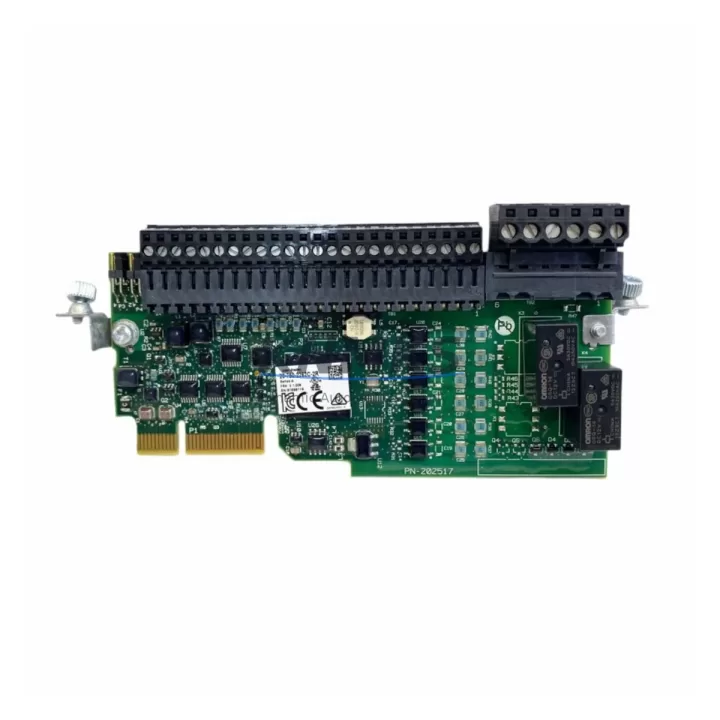
The Allen-Bradley 20-750-2262C-2R is a Digital I/O Option Module engineered for the PowerFlex 750 Series drive platform. As industrial facilities face increasing pressure to modernize aging automation infrastructure, this module serves as a critical bridge component — enabling engineers to extend the operational life of existing PowerFlex 750 drive cabinets while maintaining full compatibility with legacy control architectures. Whether you are replacing a discontinued I/O option card, expanding digital signal capacity in a retrofit project, or restoring a drive system after an unplanned failure, the 20-750-2262C-2R delivers the electrical and logical compatibility required for a controlled, low-risk migration.
Designed to slot directly into the option card bays of PowerFlex 750 Series drives, this module eliminates the need for full drive replacement in most retrofit scenarios. Engineers working on legacy production lines — particularly those originally commissioned with earlier-generation Allen-Bradley drives such as the PowerFlex 700 or 40 Series — will find the 20-750-2262C-2R a reliable upgrade path that preserves existing wiring infrastructure, terminal block layouts, and PLC program logic wherever possible.
Migration Compatibility Table
| Parameter | Details |
|---|---|
| Compatible Drive Platform | PowerFlex 750 Series (755, 753) |
| Module Type | Digital I/O Option Module |
| Option Bay Installation | Slots into standard PowerFlex 750 option card bays (Ports 4–6) |
| Terminal Block Compatibility | Compatible with standard 750-Series terminal wiring; verify existing field wiring gauge and torque specs before installation |
| Communication Interface | Internal drive backplane; no external fieldbus required for I/O operation |
| Legacy Replacement Path | Direct replacement for equivalent 20-750-22xx series I/O option modules; verify revision suffix compatibility |
| Firmware Compatibility | Confirm drive firmware version supports 2262C-2R; update via Connected Components Workbench (CCW) or Studio 5000 if required |
| PLC Program Impact | Verify I/O tag mapping in Studio 5000 / RSLogix 5000; module parameter re-configuration may be required after swap |
| HMI Screen Impact | Confirm PanelView or FactoryTalk View screen tags referencing drive I/O status remain valid post-replacement |
| Installation Space | Standard PowerFlex 750 option card form factor; no additional panel space required |
| Retrofit Risk Level | Low — drop-in compatible with existing drive hardware when firmware and revision are confirmed |
| Support terms | support terms confirmed by quotation included |
Retrofit Planning for Existing Automation Systems
A successful retrofit using the 20-750-2262C-2R begins well before the module arrives on-site. Engineers should conduct a thorough pre-migration audit of the existing drive cabinet, documenting the current option card population across all available ports. In many legacy PowerFlex 750 installations, Port 4 or Port 5 may already be occupied by a 20-750-ENETR EtherNet/IP dual-port communication module or a 20-750-DNET DeviceNet adapter. Understanding the existing communication topology is essential before introducing a new I/O option card, as port assignments directly affect the drive’s parameter file and the PLC’s I/O tree configuration in Studio 5000.
Terminal wiring is another critical checkpoint. The 20-750-2262C-2R connects to field devices through the drive’s I/O terminal block. Before disconnecting any wiring, photograph and document all existing terminal assignments. In older installations, field wiring may use non-standard color coding or undocumented modifications made during previous maintenance cycles. Cross-reference the existing wiring against the original panel drawings and the drive’s parameter list to confirm signal types — particularly whether inputs are sourcing or sinking — before completing the swap.
For facilities running mixed-generation control architectures, the 20-750-2262C-2R often works alongside other PowerFlex 750 option modules. A common configuration pairs this digital I/O module with a 20-750-S1 Safe Speed Monitor Option Module for safety-rated applications, or with a 20-750-PNET PROFIBUS DP adapter in plants where legacy PROFIBUS networks remain in service. In I/O-intensive retrofit projects, engineers may also need to evaluate whether the existing 1756-IB16 or 1756-OB16 ControlLogix digital I/O modules in the main control rack require parameter updates to reflect the new drive I/O mapping. Where signal isolation is required between the drive and the PLC rack, a signal isolator or relay interface module should be incorporated into the retrofit design.
Power budget verification is mandatory before finalizing the retrofit plan. Each option module installed in a PowerFlex 750 drive draws power from the drive’s internal option card power supply. Adding the 20-750-2262C-2R to an already-populated drive must be validated against the drive’s total option card power budget — typically documented in the PowerFlex 750 User Manual (Publication 750-UM001). Exceeding the power budget will result in drive faults and potential module damage.
Downtime Control During System Migration
Minimizing unplanned downtime is the primary concern for any production facility undertaking a drive I/O module replacement. For the 20-750-2262C-2R, a structured migration approach can reduce total installation and commissioning time to under four hours in most standard retrofit scenarios.
Begin by exporting the existing drive parameter file using Connected Components Workbench (CCW) or Studio 5000 Logix Designer before powering down the drive. This backup preserves all tuning parameters, I/O configurations, and communication settings, providing a recovery baseline if commissioning issues arise. Store the backup file on a local engineering workstation and a secondary location such as a USB drive kept in the control cabinet.
During the physical swap, follow lockout/tagout (LOTO) procedures strictly. The PowerFlex 750 drive bus capacitors retain charge after power removal — always verify bus voltage has discharged to safe levels using a calibrated meter before accessing the option card bays. Remove the existing module carefully, noting the orientation and any retention clips, then seat the 20-750-2262C-2R firmly until the connector is fully engaged.
After power restoration, the drive will detect the new option module and may prompt a parameter reset or module configuration sequence. Use Studio 5000 or CCW to verify the module is recognized correctly, then restore the parameter backup and confirm all I/O tag assignments in the PLC program remain valid. Conduct a controlled functional test — cycling each digital input and output through its full operating range — before returning the drive to automatic production mode. Where a PanelView Plus HMI is connected to the system, verify that all drive status indicators and I/O feedback screens update correctly during the functional test.
For facilities with strict production schedules, pre-staging the replacement module with a verified parameter file loaded in advance can further compress commissioning time. Our team provides pre-shipment functional testing on all 20-750-2262C-2R units to confirm module integrity before dispatch, reducing the risk of receiving a non-functional component during a time-critical maintenance window.
Retrofit Support FAQ
Q1: Is the 20-750-2262C-2R a direct drop-in replacement for other 20-750-22xx series I/O option modules?
In most cases, yes — the 20-750-2262C-2R shares the same physical form factor and connector interface as other modules in the 20-750-22xx family. However, the specific I/O channel count, signal type (sourcing vs. sinking), and parameter configuration differ between variants. Always verify the replacement module’s specification sheet against the original module’s parameter settings before installation. If the original module’s catalog number is no longer available, our technical team can assist with cross-referencing the correct replacement based on your drive’s existing parameter file.
Q2: What firmware version does my PowerFlex 755 or 753 drive need to support this module?
Rockwell Automation periodically updates drive firmware to add support for new option modules and resolve compatibility issues with existing ones. Check the release notes for your drive’s current firmware version against the 20-750-2262C-2R compatibility matrix in the PowerFlex 750 Option Module Installation Instructions (Publication 750-IN009). If a firmware update is required, it can be performed using Studio 5000 or CCW with a standard USB or EtherNet/IP connection to the drive. We recommend completing any firmware updates before the scheduled maintenance window to avoid extending downtime.
Q3: How do I verify the module has been correctly recognized by the drive after installation?
After powering up the drive with the 20-750-2262C-2R installed, navigate to the drive’s HIM (Human Interface Module) or connect via Studio 5000 and check the option module status under the drive’s port configuration menu. The module should appear as a recognized device on the port where it was installed. If the drive reports a module fault or unrecognized device, verify the module is fully seated, check the drive firmware version, and confirm the module catalog number matches the expected variant. Our pre-shipment testing process includes a functional verification step to confirm each module powers up and communicates correctly before dispatch.
Q4: What support terms and supply terms apply to this module?
All 20-750-2262C-2R units supplied by KNMKS carry a support terms confirmed by quotation covering manufacturing defects and functional failures under normal operating conditions. We maintain inventory of this module to support urgent replacement requirements, with expedited shipping available for critical production downtime situations. For volume procurement or long-term supply agreements supporting ongoing retrofit programs, contact our sales team to discuss availability, lead times, and pricing.
© 2026 KNMKS. All rights reserved.
Original Source: https://knmks.com
Contact: admin@knmks.com | +86 18359268345
Product Identification
- Brand / Ecosystem
-
Allen-Bradley
Allen-Bradley - Model / Series
-
20-750-2262C-2R
Assorted Series - Product Family
- PLCs & Controllers
- Availability Status
- Available on request after model and quantity confirmation
- Inquiry Type
- B2B RFQ, replacement inquiry and project spare-part request
- Pre-Quote Check
- Exact SKU, brand, series, quantity, nameplate photos and destination country are checked before quotation
System Path
Where this product fits in the KNMKS automation structure.
Specification & Inquiry Focus
- Control platform
- PLC, PAC and modular controllers
- Common needs
- CPU, rack, power and I/O expansion
- Project support
- Replacement, cabinet build and maintenance
Buyer Confirmation
Information KNMKS checks before replying.
- Exact model
- 20-750-2262C-2R
- Brand / ecosystem
- Allen-Bradley
- Product family
- PLCs & Controllers
- Application note
- Replacement, maintenance, project build or spare-part list
- Useful photos
- Nameplate, installed unit, cabinet layout or connector side
- Delivery details
- Quantity, destination country and target schedule
Document Support
Files and notes can be confirmed during quotation.
- Product photos or nameplate confirmation when available
- Packing and delivery notes before quotation confirmation
- Support scope and delivery terms confirmed per inquiry
- Export document coordination for qualified B2B requests
Inquiry Support
- Model cross-checking before quotation
- CPU, power, rack and expansion module matching
- Support for replacement and project inquiry
What to Send Us
- Brand and exact model number: Allen-Bradley 20-750-2262C-2R
- Quantity and required delivery time
- Application, replacement requirement or nameplate photo
- Destination country and shipping preference
RFQ Preparation
This is a product inquiry page built for RFQ communication.
Fast Model Check
Send this model to KNMKS for confirmation.
Include quantity, destination country and photos if this is a maintenance replacement. The inquiry will be saved with a reference number after submission.
Brand & Compatibility Note
KNMKS displays automation product information for well-known industrial brand ecosystems and compatible replacement references. Brand names are used for product identification and compatibility reference only; final availability and commercial terms are confirmed per quotation.
 Manufacturing
 Machine Tools
 Packaging
 Energy & Power



 HMI & Displays
 Servo Systems
 Variable Frequency Drives
 Sensors