
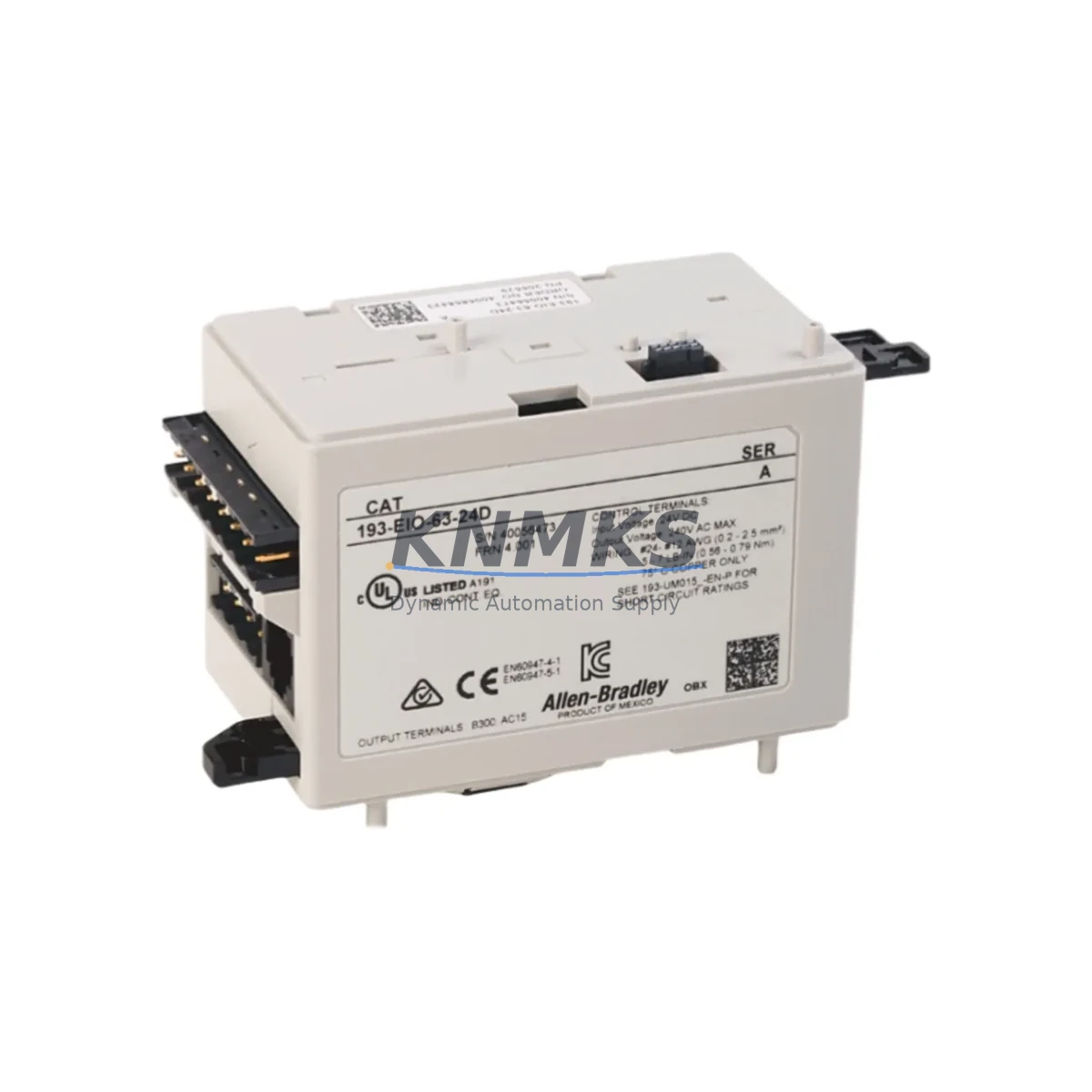
Overview
Allen-Bradley 193-EIO-63-24D Spare Part for Factory Uptime
The Allen-Bradley 193-EIO-63-24D is an Expansion I/O Module designed for the E3 Plus Electronic Overload Relay series. Purpose-built for industrial motor protection and control systems, this module extends the I/O capacity of the E3 Plus relay over a DeviceNet network, enabling remote monitoring, diagnostics, and control integration within Allen-Bradley MCC (Motor Control Center) and PLC-based automation architectures. Sourced as an original spare, the 193-EIO-63-24D is a critical component for maintenance engineers managing aging motor protection systems, ensuring continuous factory uptime without costly panel redesigns or system migrations.
At KNMKS, every 193-EIO-63-24D unit is sourced from verified supply channels, functionally inspected prior to dispatch, and backed by a support terms confirmed by quotation. We support global procurement teams and on-site maintenance engineers with delivery details confirmed by RFQ, long-term stock availability, and responsive technical pre-sales support.
Spare Maintenance Table
| Part Number / SKU | 193-EIO-63-24D |
| Brand | Allen-Bradley (Rockwell Automation) |
| Series | E3 Plus Electronic Overload Relay |
| Product Type | Expansion I/O Module |
| Supply Voltage | 24V DC |
| Communication Protocol | DeviceNet |
| I/O Configuration | 6 Inputs / 3 Outputs (6-3 I/O) |
| Compatible Base Units | 193-EC1, 193-EC2, 193-EC3 E3 Plus Overload Relays |
| Mounting | Direct side-mount to E3 Plus relay body |
| Operating Temperature | -20°C to +60°C |
| Protection Rating | IP20 |
| Application Environment | Industrial MCC panels, motor control cabinets, DeviceNet-based PLC systems |
| Maintenance Recommendation | Inspect terminal connections and DeviceNet wiring annually; replace if I/O response latency or communication faults are detected |
| Origin | USA |
| Support terms | 12 Months from date of shipment |
| Condition | Original Spare — Tested & Verified |
Maintenance Planning for Continuous Operation
When the 193-EIO-63-24D is identified as a fault source or scheduled for preventive replacement, a disciplined maintenance engineer will not stop at swapping the module alone. The E3 Plus system operates within a tightly integrated motor protection and DeviceNet communication loop, and adjacent components must be evaluated simultaneously to prevent repeat failures and unplanned downtime.
Begin with the 193-EC1 or 193-EC2 E3 Plus base relay unit — the host device to which the 193-EIO-63-24D attaches. If the expansion module has failed due to voltage transients or communication errors, the base relay’s internal diagnostics and trip history should be reviewed before reinstalling a new I/O module. A faulty base relay will damage a replacement expansion module within weeks.
Next, inspect the DeviceNet drop cable and trunk line serving the motor control cabinet. Loose or corroded DeviceNet connectors are a leading cause of intermittent I/O faults on the 193-EIO-63-24D. Verify termination resistors (121Ω) are correctly installed at both ends of the DeviceNet segment, and check the 1769-SDN or 1756-DNB DeviceNet Scanner module in the ControlLogix or CompactLogix rack for node address conflicts or scan list errors.
The 24VDC auxiliary power supply feeding the expansion module must also be verified. Voltage sags below 21.6V DC or ripple exceeding 5% can cause the 193-EIO-63-24D to drop off the DeviceNet network intermittently. A dedicated 1606-XLP or equivalent 24VDC DIN-rail power supply with adequate current margin (minimum 2A reserved for the I/O module and connected sensors) is recommended for stable operation.
For sites running motor starters or soft starters alongside the E3 Plus relay, inspect the 100-C or 100-D series Allen-Bradley contactors wired to the relay output terminals. Worn contactor coils or welded contacts can generate back-EMF spikes that stress the I/O module’s output drivers. Surge suppressors across contactor coils are a low-cost preventive measure that extends the service life of the 193-EIO-63-24D significantly.
Finally, review the terminal block wiring and ferrule crimps on the I/O module’s input and output terminals. Loose field wiring — particularly on sensor inputs from proximity switches or limit switches — is a common source of nuisance trips and false diagnostics. Annual re-torquing of terminal screws and replacement of any discolored or brittle wire insulation is standard practice in high-vibration motor control environments.
Site Replacement Workflow
Step 1 — Isolation and Lockout/Tagout (LOTO): De-energize the motor control cabinet and apply LOTO procedures per site safety policy. Confirm 24VDC auxiliary power is removed from the DeviceNet segment before disconnecting the 193-EIO-63-24D.
Step 2 — Document Current Configuration: Before removal, record the node address set on the 193-EIO-63-24D rotary switches and photograph the terminal wiring. The replacement module must be configured to the identical node address to avoid DeviceNet scan list mismatches in the PLC program.
Step 3 — Module Removal: Disconnect the DeviceNet drop cable and all field wiring from the I/O terminals. Release the side-mount locking tab and slide the 193-EIO-63-24D away from the E3 Plus base relay body.
Step 4 — Replacement Module Preparation: Set the rotary node address switches on the new 193-EIO-63-24D to match the documented address. Verify the module firmware revision is compatible with the installed E3 Plus base relay — consult Rockwell Automation Publication 193-UM002 for revision compatibility matrices.
Step 5 — Installation and Wiring: Slide the replacement module onto the E3 Plus relay body until the locking tab engages. Reconnect field wiring per the documented terminal layout. Reconnect the DeviceNet drop cable and verify connector seating.
Step 6 — Power-Up and Commissioning: Restore 24VDC auxiliary power and monitor the DeviceNet scanner for node recognition. Use RSNetWorx for DeviceNet or Studio 5000 Logix Designer to verify the 193-EIO-63-24D appears on the network with correct I/O mapping. Perform a functional test of all 6 inputs and 3 outputs before returning the motor to service.
This structured replacement workflow minimizes mean time to repair (MTTR) and ensures the replacement 193-EIO-63-24D is fully validated before the production line resumes — a critical discipline for facilities operating continuous-process or high-throughput manufacturing environments.
Spare Parts Support FAQ
Q1: Is the 193-EIO-63-24D still available as a new original spare?
Yes. KNMKS maintains stock of the 193-EIO-63-24D sourced from verified Allen-Bradley distribution channels. Each unit is inspected and tested prior to shipment. Given that the E3 Plus series is a mature product line, we recommend procurement teams secure buffer stock of 1–2 units per active DeviceNet motor protection loop to avoid extended lead times during peak demand periods.
Q2: How do I confirm compatibility between the 193-EIO-63-24D and my installed E3 Plus base relay?
The 193-EIO-63-24D is compatible with 193-EC1, 193-EC2, and 193-EC3 E3 Plus base relay units. Compatibility is also dependent on firmware revision — units manufactured after 2010 are generally cross-compatible. Provide your base relay catalog number and series letter when contacting KNMKS, and our technical team will confirm compatibility before shipment.
Q3: What testing is performed before the 193-EIO-63-24D is shipped?
Every unit undergoes a pre-shipment functional check covering DeviceNet communication initialization, I/O channel continuity, and supply voltage acceptance range. Units that fail any check are quarantined and not offered for sale. A test report summary is available upon request for critical infrastructure procurement.
Q4: What does the support terms confirmed by quotation cover, and how is a support terms claim processed?
The support terms confirmed by quotation cover manufacturing defects and functional failures under normal operating conditions. It does not cover damage resulting from incorrect installation, overvoltage events, or physical mishandling. To initiate a support terms claim, contact admin@knmks.com with the order reference, failure description, and site installation photos. KNMKS will arrange a replacement dispatch or credit within 5 business days of claim verification.
© 2026 KNMKS. All rights reserved.
Original Source: https://knmks.com
Contact: admin@knmks.com | +86 18359268345
Product Identification
- Brand / Ecosystem
-
Allen-Bradley
Allen-Bradley - Model / Series
- 193-EIO-63-24D
- Product Family
- PLCs & Controllers
- Availability Status
- Available on request after model and quantity confirmation
- Inquiry Type
- B2B RFQ, replacement inquiry and project spare-part request
- Pre-Quote Check
- Exact SKU, brand, series, quantity, nameplate photos and destination country are checked before quotation
System Path
Where this product fits in the KNMKS automation structure.
Specification & Inquiry Focus
- Control platform
- PLC, PAC and modular controllers
- Common needs
- CPU, rack, power and I/O expansion
- Project support
- Replacement, cabinet build and maintenance
Buyer Confirmation
Information KNMKS checks before replying.
- Exact model
- 193-EIO-63-24D
- Brand / ecosystem
- Allen-Bradley
- Product family
- PLCs & Controllers
- Application note
- Replacement, maintenance, project build or spare-part list
- Useful photos
- Nameplate, installed unit, cabinet layout or connector side
- Delivery details
- Quantity, destination country and target schedule
Document Support
Files and notes can be confirmed during quotation.
- Product photos or nameplate confirmation when available
- Packing and delivery notes before quotation confirmation
- Support scope and delivery terms confirmed per inquiry
- Export document coordination for qualified B2B requests
Inquiry Support
- Model cross-checking before quotation
- CPU, power, rack and expansion module matching
- Support for replacement and project inquiry
What to Send Us
- Brand and exact model number: Allen-Bradley 193-EIO-63-24D
- Quantity and required delivery time
- Application, replacement requirement or nameplate photo
- Destination country and shipping preference
RFQ Preparation
This is a product inquiry page built for RFQ communication.
Fast Model Check
Send this model to KNMKS for confirmation.
Include quantity, destination country and photos if this is a maintenance replacement. The inquiry will be saved with a reference number after submission.
Brand & Compatibility Note
KNMKS displays automation product information for well-known industrial brand ecosystems and compatible replacement references. Brand names are used for product identification and compatibility reference only; final availability and commercial terms are confirmed per quotation.
 Manufacturing
 Machine Tools
 Packaging
 Energy & Power



 HMI & Displays
 Servo Systems
 Variable Frequency Drives
 Sensors