
Overview
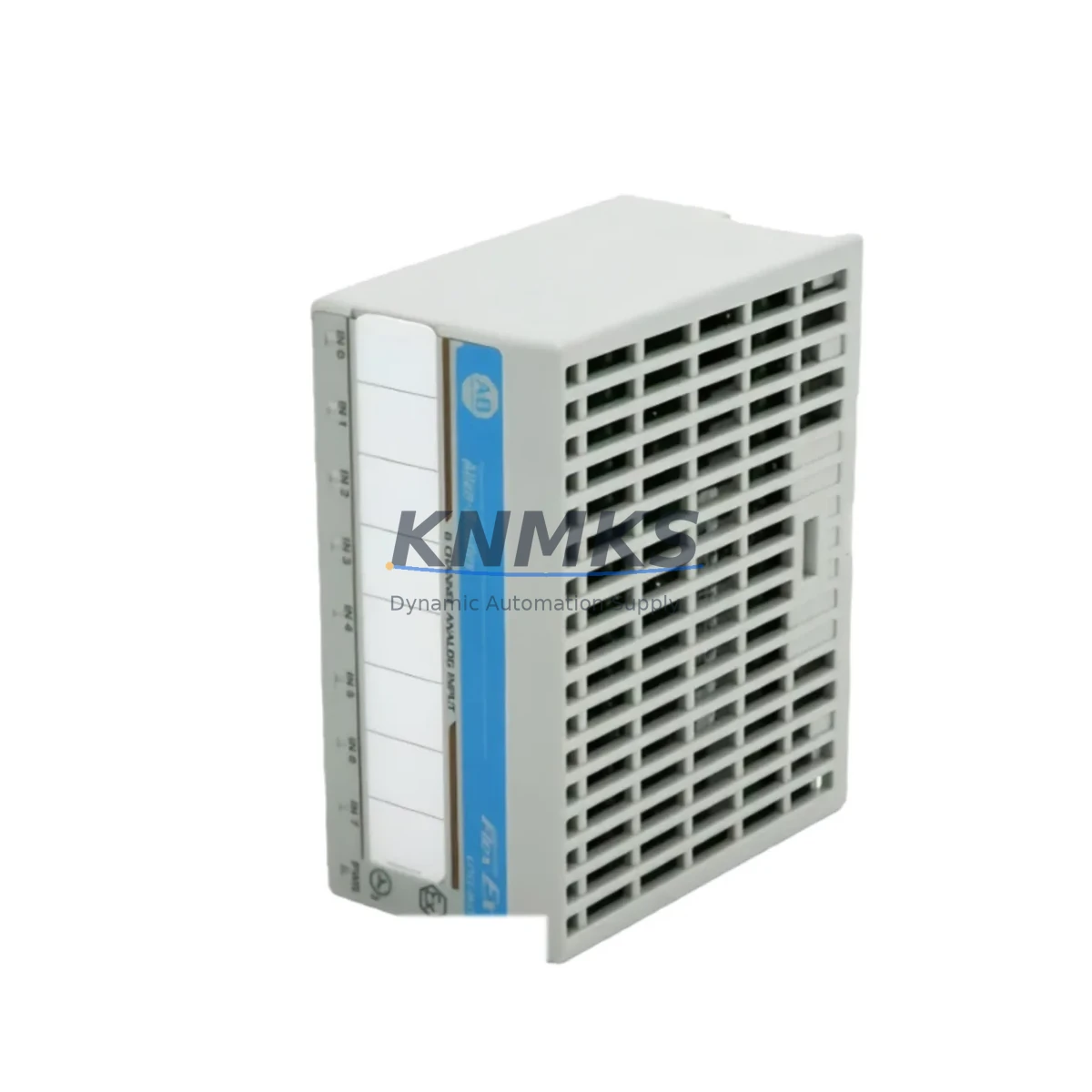
Allen-Bradley 1797-IE8 Maintenance-Proven Spare Part for Factory Uptime
The Allen-Bradley 1797-IE8 is an 8-channel analog input module designed for the FLEX I/O platform — one of the most widely deployed distributed I/O architectures in process automation, discrete manufacturing, and hybrid control environments. As a maintenance-proven spare part, the 1797-IE8 supports continuous factory operation by enabling rapid module-level replacement without requiring full rack shutdowns or PLC reprogramming. Whether you are managing a scheduled annual overhaul, responding to an unplanned process fault, or building a strategic MRO inventory for aging FLEX I/O systems, the 1797-IE8 is a critical line item in any Allen-Bradley spare parts plan.
Each unit supplied by KNMKS is sourced from verified industrial channels, functionally tested prior to shipment, and backed by a support terms confirmed by quotation. We support long-term supply commitments for maintenance teams managing multi-site FLEX I/O deployments across energy, petrochemical, water treatment, and discrete manufacturing sectors.
Spare Maintenance Table
| Parameter | Specification |
|---|---|
| Part Number / SKU | 1797-IE8 |
| Brand / Manufacturer | Allen-Bradley (Rockwell Automation) |
| Series | FLEX I/O (1797 Series) |
| Module Type | Analog Input Module |
| Number of Channels | 8 Channels (Single-ended) |
| Input Signal Range | 4–20 mA / 0–20 mA / 0–10 V / ±10 V (software configurable) |
| Resolution | 12-bit |
| Backplane Compatibility | 1794 FLEX I/O Adapter (e.g., 1794-ADN, 1794-AENT, 1794-ACN15) |
| Communication Interface | Via FLEX I/O adapter (DeviceNet, EtherNet/IP, ControlNet) |
| Operating Temperature | 0°C to 55°C (32°F to 131°F) |
| Storage Temperature | -40°C to 85°C |
| Power Consumption | Supplied via 1794 backplane |
| Mounting | DIN rail via 1794 terminal base (e.g., 1794-TB3, 1794-TB3S) |
| Certifications | UL, CE, C-Tick |
| Country of Origin | United States |
| Condition | Original, Tested Before Shipment |
| Support terms | 12 Months |
| Typical Application | Process analog signal acquisition, PID loop input, sensor monitoring |
| Replacement Compatibility | Direct replacement for existing 1797-IE8 in 1794 FLEX I/O racks |
Maintenance Planning for Continuous Operation
When a 1797-IE8 analog input module fails or is flagged during a routine control cabinet inspection, the fault rarely exists in isolation. Maintenance engineers and procurement teams should treat the 1797-IE8 replacement as a trigger for a broader system health check across the associated FLEX I/O rack and control loop.
Start with the 1794 terminal base — the 1797-IE8 mounts onto a dedicated terminal base such as the 1794-TB3 or 1794-TB3S. Inspect the terminal base for corrosion, loose field wiring, or damaged screw terminals before installing the replacement module. A degraded terminal base will cause recurring faults even with a new 1797-IE8 in place.
Next, verify the FLEX I/O adapter module — typically a 1794-AENT (EtherNet/IP), 1794-ADN (DeviceNet), or 1794-ACN15 (ControlNet) — is operating normally. The adapter is the communication gateway for all modules in the rack; a degraded adapter can cause intermittent analog data loss that mimics an input module fault. Check adapter firmware version and confirm it is compatible with the current ControlLogix or CompactLogix PLC firmware.
For sites running ControlLogix or CompactLogix PLCs, confirm that the I/O configuration in RSLogix 5000 / Studio 5000 correctly maps the 1797-IE8 channel assignments. After module swap, force a re-initialization of the I/O tree and verify all 8 analog channels are reading within expected engineering unit ranges. If the system uses a 1756-EN2T or similar EtherNet/IP bridge module, check for connection timeout errors in the controller diagnostics.
Inspect the 24 VDC field power supply feeding the FLEX I/O rack — a sagging or noisy power rail is a common root cause of analog input drift and module faults. If the site uses a 1794-PS13 or third-party DIN rail power supply, verify output voltage under load and check for ripple. Consider stocking a spare power supply alongside the 1797-IE8 for critical process lines.
For signal integrity, check the field wiring shielding and grounding at the terminal base. Analog input modules are sensitive to EMI from adjacent VFDs, contactors, and high-current cables. If signal noise is suspected, a signal isolator or signal conditioner in the field wiring loop can protect the 1797-IE8 from recurring damage. Also inspect any fuse holders or miniature circuit breakers protecting the analog field circuits — open or degraded fuses cause channel-level faults that are often misdiagnosed as module failures.
Finally, if the site uses an HMI panel (such as a PanelView Plus or third-party SCADA terminal) to display analog process values, verify that the tag bindings and scaling parameters are correctly restored after the module replacement. Incorrect engineering unit scaling after a swap is a common commissioning error that delays production restart.
Site Replacement Workflow
Step 1 — Isolate and document: Before removing the 1797-IE8, record all channel configurations, tag names, and engineering unit scaling from the PLC program (RSLogix 5000 / Studio 5000). Take a photo of the field wiring at the terminal base for reference during reinstallation.
Step 2 — Power down the terminal base: De-energize the field power supply feeding the affected FLEX I/O rack segment. Do not remove the module under live backplane power unless the system design explicitly supports hot-swap for this module type. Confirm with the OEM documentation before attempting hot-swap.
Step 3 — Remove and inspect: Slide the 1797-IE8 out of the terminal base. Inspect the backplane connector pins for damage or contamination. If the terminal base shows signs of wear, replace it simultaneously with the module to avoid a repeat fault.
Step 4 — Install the replacement 1797-IE8: Seat the new module firmly into the terminal base until the locking tab engages. Reconnect field wiring according to the documented wiring diagram. Restore field power and confirm the module status LED indicates normal operation.
Step 5 — Verify in PLC and HMI: Go online with the PLC in RSLogix 5000 / Studio 5000 and confirm the module is recognized in the I/O tree. Verify all 8 analog channels are reading correctly. Check the HMI for correct process value display and alarm status. Log the replacement in the site maintenance record.
Step 6 — Replenish spare stock: After consuming a spare 1797-IE8 from inventory, initiate a replenishment order immediately. For critical process lines, maintain a minimum of 1–2 units on-site. KNMKS supports long-term supply agreements and can provide scheduled delivery to support annual maintenance budgets.
Spare Parts Support FAQ
Q1: Is the 1797-IE8 supplied by KNMKS an original Allen-Bradley part?
Yes. All 1797-IE8 units are sourced from verified industrial supply channels and are original Allen-Bradley (Rockwell Automation) components. Each unit undergoes functional testing before shipment. A support terms confirmed by quotation is included with every order.
Q2: What is the lead time and can KNMKS support urgent replacement orders?
For in-stock units, we support same-day or next-business-day shipment for urgent maintenance requirements. For planned procurement, we recommend placing orders 2–4 weeks ahead of scheduled maintenance windows. Contact admin@knmks.com or +86 18359268345 for real-time stock confirmation and expedited shipping options.
Q3: How do I confirm compatibility between the 1797-IE8 and my existing FLEX I/O rack?
The 1797-IE8 is compatible with all standard 1794 FLEX I/O terminal bases (1794-TB3, 1794-TB3S, 1794-TB3G) and communicates via any 1794-series adapter module (AENT, ADN, ACN15). Confirm your adapter firmware version supports the module revision. If you are unsure, share your system configuration with our technical team and we will verify compatibility before shipment.
Q4: Does KNMKS support long-term supply for multi-site FLEX I/O maintenance programs?
Yes. KNMKS offers long-term supply agreements for maintenance teams managing multiple sites or aging FLEX I/O systems approaching end-of-life. We can provide scheduled delivery, reserved stock allocation, and consolidated invoicing to support annual MRO budgets. Contact us to discuss a supply plan tailored to your maintenance schedule.
© 2026 KNMKS. All rights reserved.
Original Source: https://knmks.com
Contact: admin@knmks.com | +86 18359268345
Product Identification
- Brand / Ecosystem
-
Allen-Bradley
Allen-Bradley - Model / Series
- 1797-IE8
- Product Family
- PLCs & Controllers
- Availability Status
- Available on request after model and quantity confirmation
- Inquiry Type
- B2B RFQ, replacement inquiry and project spare-part request
- Pre-Quote Check
- Exact SKU, brand, series, quantity, nameplate photos and destination country are checked before quotation
System Path
Where this product fits in the KNMKS automation structure.
Specification & Inquiry Focus
- Control platform
- PLC, PAC and modular controllers
- Common needs
- CPU, rack, power and I/O expansion
- Project support
- Replacement, cabinet build and maintenance
Buyer Confirmation
Information KNMKS checks before replying.
- Exact model
- 1797-IE8
- Brand / ecosystem
- Allen-Bradley
- Product family
- PLCs & Controllers
- Application note
- Replacement, maintenance, project build or spare-part list
- Useful photos
- Nameplate, installed unit, cabinet layout or connector side
- Delivery details
- Quantity, destination country and target schedule
Document Support
Files and notes can be confirmed during quotation.
- Product photos or nameplate confirmation when available
- Packing and delivery notes before quotation confirmation
- Support scope and delivery terms confirmed per inquiry
- Export document coordination for qualified B2B requests
Inquiry Support
- Model cross-checking before quotation
- CPU, power, rack and expansion module matching
- Support for replacement and project inquiry
What to Send Us
- Brand and exact model number: Allen-Bradley 1797-IE8
- Quantity and required delivery time
- Application, replacement requirement or nameplate photo
- Destination country and shipping preference
RFQ Preparation
This is a product inquiry page built for RFQ communication.
Fast Model Check
Send this model to KNMKS for confirmation.
Include quantity, destination country and photos if this is a maintenance replacement. The inquiry will be saved with a reference number after submission.
Brand & Compatibility Note
KNMKS displays automation product information for well-known industrial brand ecosystems and compatible replacement references. Brand names are used for product identification and compatibility reference only; final availability and commercial terms are confirmed per quotation.
 Manufacturing
 Machine Tools
 Packaging
 Energy & Power



 HMI & Displays
 Servo Systems
 Variable Frequency Drives
 Sensors